chou109/dsh-strength-meter ↗★ 0
dsh-strength-meter
⚡ DshStrengthMeter — a reasoning-strength quick controller (simple slider + advanced model/effort/speed panel) and per-model token usage stats for the DeepSeek Harness Web UI 核心用途是控制模型推理强度并统计 Token 消耗。适合需要精细调节模型 Effort、查看各模型消耗占比、每日使用趋势及活动热力图的 DSH 用户。
Install
This plugin has no verified bundle, or compatibility checks failed. Read the repository notes first. Read the full README ↗
README
Read the full README ↗⚡ dsh-strength-meter — Model Usage Stats for DSH Web
dsh-strength-meter: a model token-usage statistics plugin for the DeepSeek Harness Web UI — a full "Usage stats" page in Settings (metric cards, per-model donut, activity heatmap, daily trend). All data comes from your local session logs; nothing is uploaded.
| Language | Link |
|---|---|
| English | This document |
| 中文 | README.zh.md |
Table of Contents
If you are a human, read this
What this plugin does
The plugin adds a full "Usage stats" page under Settings → Usage stats, presented in the following blocks:
Block 1 — six metric cards (overview at the top)
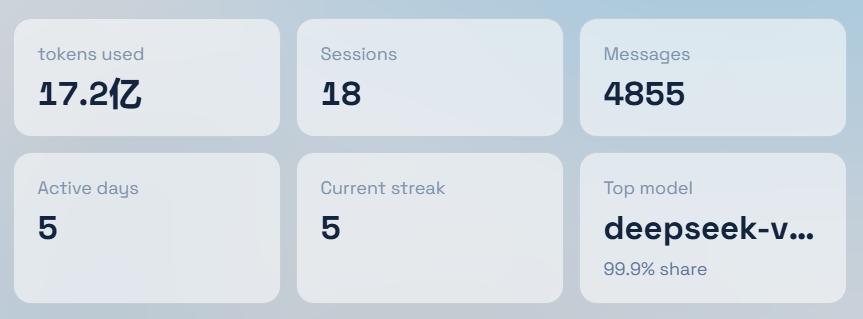
- Tokens used: total token consumption in the selected range;
- Sessions: sessions active in the range;
- Messages: total messages in the range;
- Active days: days with any activity in the range;
- Current streak: consecutive active days up to today (GitHub-style);
- Top model: the model that consumed the most tokens in the range, with its share (%).
The header offers a time-range switch (Last 7 days / Last 30 days) and a Refresh button (forces a fresh recomputation, bypassing the cache).
Block 2 — Model usage (per-model totals)
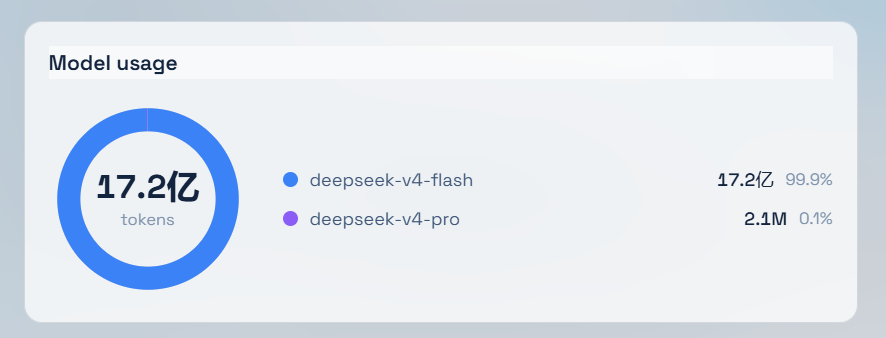
- A donut of the total token consumption in the range;
- A legend on the right: model name, tokens and share (%). Same-named models across providers are merged into one row.
Block 3 — Activity heatmap
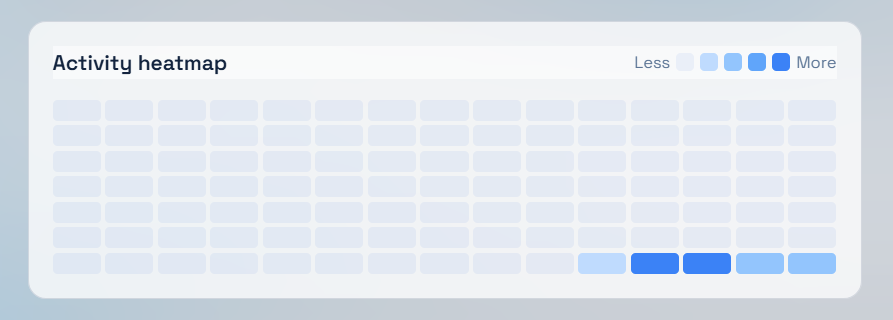
- A 15-week × 7-day matrix in GitHub-contribution style;
- Cell shade scales against the highest-token day in history: ≥75% darkest, ≥50% next, ≥25% mid, >0 light blue, no activity blank (legend "Less → More").
Block 4 — Daily token trend
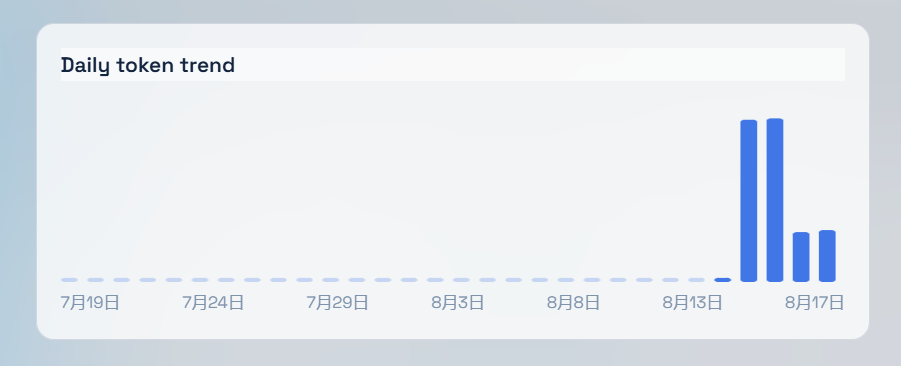
- A bar chart of tokens per day within the selected range (hover for the exact value), with auto-labeled date ticks.
Statistics are computed from your local persisted session logs (~/.dsh/sessions) — nothing is uploaded.
Manual install
Prerequisites (all must hold):
- A working DSH Web (
dsh web) reachable athttp://127.0.0.1:3080; - You can locate the DSH data dir:
%USERPROFILE%\.dshon Windows,~/.dshelsewhere (written as~/.dshbelow); - Network access to this repository (or a local copy).
Option A — one-command install (recommended, no npm, no build)
In mainland China, use the Gitee mirror instead:
https://gitee.com/chill109/dsh-strength-meter(swap the repo URL in the commands below).
Windows (PowerShell):
powershell -ExecutionPolicy Bypass -Command "Invoke-WebRequest 'https://github.com/chou109/dsh-strength-meter/raw/main/install.ps1' -OutFile install.ps1; .\install.ps1"
macOS / Linux / WSL (bash):
bash <(curl -fsSL https://raw.githubusercontent.com/chou109/dsh-strength-meter/main/install.sh)
The installer does three things (idempotent — safe to re-run):
- puts the source into
~/.dsh/plugins/dsh-strength-meter(zip download or git clone); - creates a junction (Windows) / symlink (macOS·Linux) in
~/.dsh/profiles/node_modules; - registers the
dsh-strength-meterentry in~/.dsh/profiles/web/cordis.patch.yml.
Option B — manual, three steps (offline environments / to understand the wiring)
- Get the source:
git clone https://github.com/chou109/dsh-strength-meter.git(or download the zip) anywhere, e.g.~/.dsh/plugins/dsh-strength-meter; - Link it (the loader resolves plugins from
~/.dsh/profiles):# Windows (junction, no admin rights) New-Item -ItemType Junction -Path "$env:USERPROFILE\.dsh\profiles\node_modules\dsh-strength-meter" -Target "$env:USERPROFILE\.dsh\plugins\dsh-strength-meter"# macOS / Linux (symlink) ln -s ~/.dsh/plugins/dsh-strength-meter ~/.dsh/profiles/node_modules/dsh-strength-meter - Register: append to
~/.dsh/profiles/web/cordis.patch.yml:- insert: - id: dsh-strength-meter name: 'dsh-strength-meter'
Last step: restart the dsh web process — a page refresh is not enough for a newly added plugin (the plugin set is snapshotted at boot; an already-open tab keeps its old boot manifest):