darkzhexue/dsh-plan-progress-pill ↗★ 0
dsh-plan-progress-pill
DSH Web UI overlay plugin: a collapsible plan & progress capsule showing the session todo list, completed count and current task. 适合需要实时直观查看和追踪当前会话Todo任务进度的用户。
Install
npx -p @deepseek-ai/dsh dsh plugin --profile web add github:darkzhexue/dsh-plan-progress-pillREADME
Read the full README ↗dsh-plan-progress-pill
DeepSeek Harness Web UI 右上角的会话计划与进度胶囊浮窗:从官方 todo 任务清单实时读取当前会话的计划,可收纳成小胶囊、展开成完整任务卡。
A collapsible plan / progress capsule pinned to the top-right overlay of the DSH Web UI. It reads the session's official todos projection and shows it as a compact pill or an expanded task card.

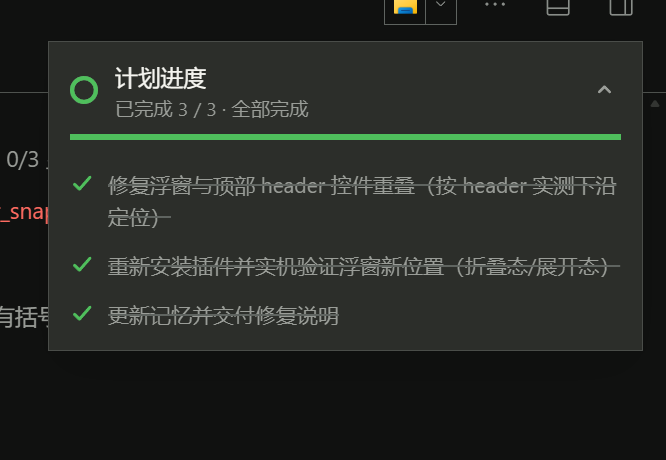
功能
- 实时计划:数据源是官方
todo_write写入的todos会话投影(turn/start时清空、turn/end保留完成清单),agent 每更新一次任务清单,浮窗立即刷新。 - 胶囊 / 卡片两态:默认收起为胶囊(进度环 + 当前进行中任务摘要 +
已完成 n/m),点击胶囊或箭头展开完整任务列表;再点收起。收起状态按标签页记忆(sessionStorage)。 - 完整任务视图:每项带状态图标(✓ 已完成 / 旋转环 进行中 / 虚线圆 待处理)、进度条、完成百分比与「全部完成」状态。
- 不遮控件:位置在运行时实测会话头部(标签行)下沿后贴齐,不覆盖右上角工具按钮;窗口宽度 ≤720px 时自动落到底部。
- 跟随会话:随当前会话切换;当前会话没有任务清单时自动隐藏,不占屏幕。
- 主题自适应:全部颜色使用宿主主题 token(
--dsw-alias-*),亮/暗主题与桌面端/Web 端一致。
安装
推荐从源码安装(npm 包 dsh-plan-progress-pill 尚在发布流程中):
-
克隆仓库:
git clone https://github.com/darkzhexue/dsh-plan-progress-pill -
安装本地目录:桌面版打开「插件」页面 → 安装 bundle → 选择克隆下来的目录;或用 dsh CLI 安装该本地目录。
-
刷新会话页,右上角出现胶囊;让 agent 用
todo_write更新任务清单即可看到进度。
也可以从 Release 下载预构建包 dsh-plan-progress-pill.tgz,解压后同样用插件管理器安装该目录(无需构建工具)。
兼容性
- DSH(DeepSeek Harness)Web 端与桌面版,已验证
0.2.1-rc.2。 - 依赖宿主提供的
slots/locale/uiSession客户端服务与官方todo_write工具的todos投影。
开发
index.js          host 入口(no-op,UI 全部在 client 侧)
client.js         客户端组件:读取 todos 投影、浮窗渲染、定位测量、样式
cordis.patch.yml  bundle 补丁:插入 dsh-plan-progress-pill 行
locale/           中英文案
icon.svg          插件图标
assets/           README 截图
screenshots.json  市场截图声明
本地开发与验证:
npm install                 # 无第三方依赖,仅用于 npm pack 打包检查
npm pack --dry-run
插件机制:package.json 声明 dsh.bundle.patch,cordis.patch.yml 向 profile 插入本插件行;客户端 bundle 由 dsh 侧的 dsh.client 声明加载。修改后需要重装(remove_bundle + install_bundle)并刷新页面。
License
MIT © darkzhexue