archgraph-argo
Deploy the ArchGraph ARGO toolchain, skills, and rules (schema, scripts, argo-init skill, global rule) with one command. 适合需要为编码智能体配置基于知识图谱的长期架构记忆团队。
Install
npx -p @deepseek-ai/dsh dsh plugin --profile web add github:derekhu0002/archgraphREADME
Read the full README ↗ArchGraph
A knowledge-graph framework with an ontology you define — wired into your coding agent through one MCP interface.
English · 简体中文
For teams running coding agents on a real codebase, ArchGraph gives the agent durable, tiered long-term memory on an intent graph — a versioned architecture graph that records why the system is built the way it is, not just how. You and the agent read and write it through a single MCP server (MCP = Model Context Protocol, the open standard that lets an AI tool call external servers as tools). The graph's shape is set by an ontology — its vocabulary of element and relationship types — and that ontology is yours to define. The built-in default is ArchiMate 3.2 + ARGO extensions, where ArchiMate is a standard enterprise-architecture modeling language and ARGO is the toolchain and agent-workflow layer behind the argo-deploy and argo-init commands. A repository can plug in its own ontology — and this one does. One install, one interface to learn.
Ready to try it? Jump to Build your own graph.
Install · Build your own graph · Why ArchGraph · Capabilities · Docs · Community
What is this?
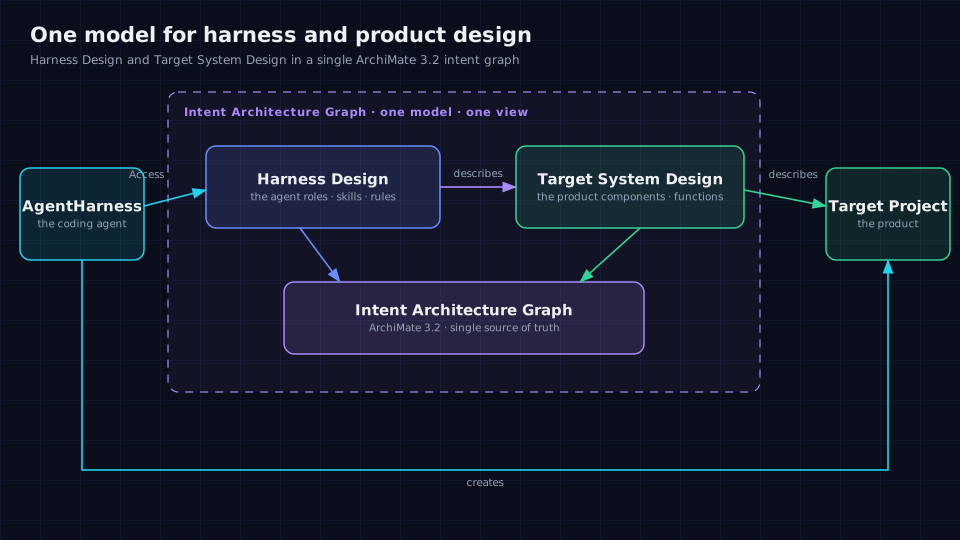
If you run coding agents on a real codebase, every session starts cold and the "why" behind the system lives nowhere. ArchGraph makes one architecture graph the single source of truth — the agent's memory and the product's design in one model. It is one MCP interface to install and learn: the agent restores context at session start, recalls detail on demand, and reuses what it already knows instead of duplicating it (a duplicate needs an explicit override).
- Architects / tech leads — one model of the product, the harness, and the agents.
- Agent users — memory restored at session start, recalled on demand, reused instead of duplicated.
- Platform teams — one interface, deployed into the editor you already use.
→ Full onboarding: docs/getting-started.html
Why ArchGraph
Every team running coding agents hits the same wall: the code is in the repo, but the reasoning behind it lives nowhere. Four common fixes exist, and each works until it doesn't.
The real differentiator is not "custom vs. locked". Protégé/OWL, Neo4j, TerminusDB, and Archi/EA all let you extend a model or bring your own vocabulary. It is that ArchGraph makes the ontology a first-class, validated, runtime-resolved schema bundle — and puts it behind one MCP interface the agent reads and writes, with typed dedup and commit traceability built in.
The honest, cost-included comparison lives in one canonical place — docs/capabilities.html#compare.
Bring your own ontology
A knowledge-graph framework that speaks only one language is not a framework. ArchGraph separates the core from the ontology: a repository drops a schema bundle under .argo/schema/ (element/relationship types, endpoint rules, an actor contract, an optional guide), and validation, MCP guidance, and the .qea projection follow it. A bundle can extends: "default" — inheriting the built-in ArchiMate 3.2 + ARGO extensions — and add its own types; no framework change required.
This repository is the proof: its own bundle uses extends: "default" and layers a UML 2 state-machine profile on top, resolved at runtime from .argo/schema/ rather than hardcoded in the framework.
→ Worked example — define an ontology, then build the graph step by step: docs/case-team-graph.html · prebuilt ontology catalog: custom-schema/ (Team Graph · Finance CDM · Industry 4.0 AAS · STIX Threat Intelligence · UML 2 · SysML · IPD · Mathematics) · full authoring reference (types, relationship structure, axioms/constraints): docs/ontology-authoring.md
Ontology validation (optional)
Your schema bundle already enforces endpoint rules. ArchGraph can go further and run a real ontology / reasoning engine at the same validation timings the framework already uses — on write (the change's delta subgraph) and at init (the whole graph) — to catch what a schema alone cannot:
- logical contradictions (OWL inconsistency — e.g. an element that is two disjoint types, or a single-valued slot with two values), and
- constraint violations (SHACL, compiled from your endpoint matrix).
It is opt-in and off by default; when enabled it is fail-close — a configured-but-unavailable engine is a blocking error, not a silent pass (an advisory validator can opt out per entry with onError: "warn").
Enable it.
argo-deploy -EnableOntologyValidation
That writes two keys into ~/.argo/.env (the same file the deployer configures) — you don't hand-edit them:
ARGO_ONTOLOGY_PYTHON=python
ARGO_VALIDATION_EXTENSIONS=[{"name":"ontology","timings":["write","init"],"command":["node","/scripts/ontology-projection/cli.js","--workspace","{workspaceRoot}","--graph","{graphPath}","--mode","{mode}"]}]
Then restart your editor / host so the MCP server reloads ~/.argo/.env. Turn it off by clearing the ARGO_VALIDATION_EXTENSIONS line (or deploying without the flag) and restarting.
Dependencies. The engine is pySHACL + owlready2/HermiT. The deployer installs the Python packages (pyshacl, owlready2) for you; Python 3 and a JRE are prerequisites — if either is missing the deploy stops with an alert (it never installs a system runtime), so install them and re-run argo-deploy. Pass -SkipOntologyEngine to skip the engine step entirely.
Verify.
Get-Content "$env:USERPROFILE\.argo\.env" | Select-String ARGO_VALIDATION_EXTENSIONS   # ~/.argo/.env on macOS/Linux
python -c "import pyshacl, owlready2; print('ok')"
The extension point is open-closed: any external validator that speaks the small contract (argv tokens {workspaceRoot} / {graphPath} / {mode}; reads the post-mutation document and touched ids from the environment; prints {errors, warnings}) is added as one entry in ARGO_VALIDATION_EXTENSIONS — no framework change. Spec: argo/scripts/ontology-projection/EXTENSION_PROTOCOL.md.
Install
Prerequisite: Node.js ≥ 18 (the ARGO toolchain and the MCP server both run on Node).
npm install -g archgraph-argo
argo-deploy
argo-deploy registers the argo MCP server and installs the skills and rules into GitHub Copilot, Cursor, OpenCode, DeepSeek Harness, OpenClaw, and Codex (agents are installed where the host supports them). It then prompts for the few settings in ~/.argo/.env. After deploying, restart your editor / host so it reloads the MCP server. Semantic queries additionally need Neo4j and an embedding endpoint — see Build your own graph.
Quick start
There is one canonical start: Build your own graph — install once, then pick Route A (the default ontology) or Route B (your own). That section carries every step and MCP call; this one deliberately keeps no second copy, so there is only one path to follow.
The one prerequisite that is not out of the box: semantic (Graph RAG) retrieval needs a Neo4j instance and an OpenAI-compatible embedding endpoint. Context reads, writes, and Enterprise Architect interop work without them; the Cypher (Neo4j's graph query language) structural projection and all semantic retrieval need Neo4j.
Build your own graph
Pick one of two routes. Everything happens through your coding agent and the ARGO MCP server; the only commands you run yourself are the install. Once initialized, the intent graph is the single source of truth.
Route A — default ontology (fastest)
No schema work: use the built-in ArchiMate 3.2 + ARGO extensions.
-
Install (once). Requires Node.js ≥ 18.
npm install -g archgraph-argo
argo-deploy
Then restart your editor / host so it reloads the MCP server.
-
Initialize. Ask your coding agent to run
argo-init(the workspace-init CLI). It creates and validates the starterdesign/KG/SystemArchitecture.json, which already contains the project's root view namedSystemArchitecture. -
Add elements and relationships. Ask your coding agent to call
applySystemArchitectureMutationand attach every new element and relationship to the project's existing root view — tell it to resolve that view's realview_idfirst (queryNeo4jGraph/getArchitectureViewContext). Do not pre-create a view: a new view calledSystemArchitecturewould collide with the oneargo-initmade, and anyview_idspointing at a different id would then fail. -
Verify. Ask your coding agent to call
validateSystemArchitecture, thenqueryNeo4jGraphwith{"schema": true}to confirm the element and relationship types in effect.
Route B — your own ontology
-
Install (once). As in Route A.
-
Author your schema. Put your modeling language under
.argo/schema/. A standalone bundle — a fullSystemArchitecture.schema.json, editing its two$defsenum arrays,archimateElementTypeandarchimateRelationshipType— must also declareactorElementTypeinschema-bundle.config.json, set to one of your element types (or tonullif your schema genuinely has no actor concept), or loading fails closed (bundleValidation.status: "failed") and validation/writes are blocked. A bundle that onlyextends: "default"needs just the config.schema-bundle.rules.jsonstays optional (without it, endpoint checks are permissive). -
Author the graph yourself. With a custom schema,
argo-initdoes not create the graph — the packaged default would not match your vocabulary — and it fails closed withNO_DEFAULT_GRAPH. Before any MCP write, createdesign/KG/SystemArchitecture.jsonby hand, using your own element and relationship types and your own root view. Then ask your coding agent to runargo-initto validate it. -
Add into YOUR root view. Ask your coding agent to call
applySystemArchitectureMutation, attaching each element and relationship to the root view you authored (not the default one). -
Verify. Ask your coding agent to call
validateSystemArchitecture, thenqueryNeo4jGraphwith{"schema": true}.
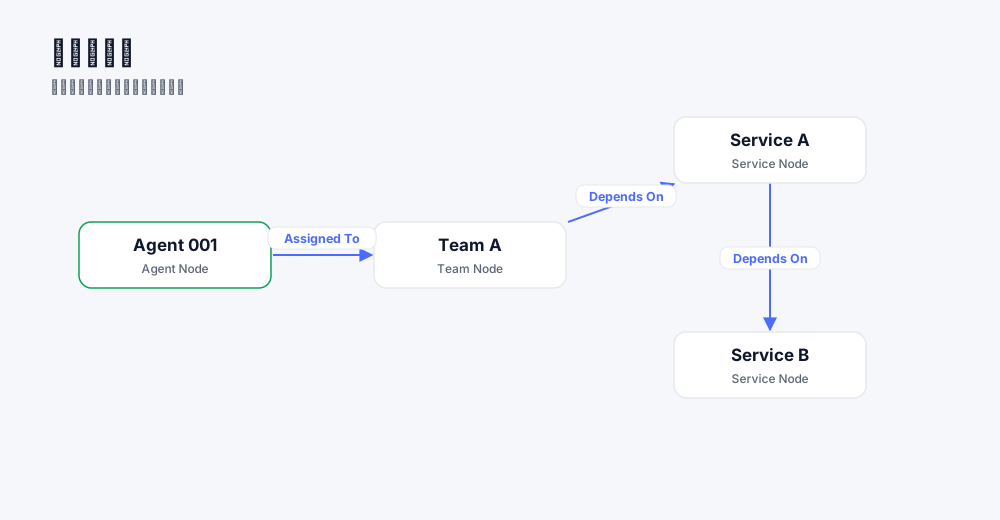
The fully-illustrated, step-by-step walkthrough is docs/case-team-graph.html (Chinese), and the prebuilt example bundles are catalogued in custom-schema/. The result looks like this:
Capabilities
Each line links to a short page — this is the map, not the manual.
- Tiered long-term memory — a compact working memory at session start, a long-term memory recalled on demand, and an archive.
- Pluggable ontology — ship your own schema bundle; the default (ArchiMate 3.2 + ARGO extensions) is data, not code.
- Semantic + structural retrieval — Graph RAG recall plus read-only Cypher for exact structure.
- Deduplicated writes — reuse an existing element, relationship, or view instead of copying it; near-duplicates are blocked as candidates.
- Acceptance-test-first + traceability — every change is testable, and the commit id is registered back onto the element.
- Enterprise Architect interop — the graph projects to
.qea; human EA edits return as a semantic diff. - Federated graph sharing — sovereign graphs joined by a registry–broker; reads authorized and returned by reference.
- One MCP interface, six hosts — install once, run in Copilot, Cursor, OpenCode, DeepSeek Harness, OpenClaw, and Codex.
How to use
Initialize once (argo-init), then open your project and let your coding agent work. It will:
- locate the architecture element behind the task before changing anything,
- arm itself with that element's Skills and Rules,
- work test-first (GIVEN-WHEN-THEN) and trace every commit back to the graph,
- reuse an existing element by default — a near-duplicate needs an explicit override.
The intent architecture graph is the single source of truth.
Supported Harnesses
| Harness | MCP | Skills | Rules | Agents |
|---|---|---|---|---|
| GitHub Copilot | ✓ | ✓ | ✓ | ✓ |
| Cursor | ✓ | ✓ | ✓ | ✓ |
| OpenCode | ✓ | ✓ | ✓ | ✓ |
| DeepSeek Harness | ✓ | ✓ | ✓ | ✓ |
| OpenClaw | ✓ | ✓ | ✓ | — |
| Codex | ✓ | ✓ | ✓ | — |
A single argo-deploy registers the argo MCP server and installs all artifacts into each harness automatically.
Cross-project read/write
Cross-project access runs over two separate channels — they must not be conflated:
- Local path — a per-call
workspaceRootreads a peer project's graph on the same machine. Writes are read-only by design: a foreign write is refused withWORKSPACE_WRITE_DENIED. - Federated — a per-call
projectIdis routed through the federation center, authorized there (denied by default), and returned by reference.
Whether the local channel works depends on the harness, because a harness may bridge the MCP server and pin the workspace per call:
| Harness | Local read (workspaceRoot) | Local write | Federated read (projectId) |
|---|---|---|---|
| OpenCode | ✓ | blocked (WORKSPACE_WRITE_DENIED) | ✓ |
| Codex | ✓ | blocked (WORKSPACE_WRITE_DENIED) | ✓ |
| DeepSeek Harness | ✗ | ✗ | ✓ |
| GitHub Copilot | ✓ | blocked (WORKSPACE_WRITE_DENIED) | ✓ |
| Cursor | 待测 | 待测 | ✓ |
| OpenClaw | 不涉及 | 不涉及 | ✓ |
DeepSeek Harness cannot do local cross-project access: its bridge pins the session workspace, so the request never reaches the server as written and only the federated channel works.
Community
ArchGraph runs on open co-building: share and reuse architecture subgraphs across projects. Sharing is federated — each project keeps its graph sovereign, and members register, discover, authorize, and read opened content by reference (denied by default; nothing copied or merged). The center is a registry–broker that holds federation metadata, never content.
- Community site — https://argo.derekworkspacev5.com/archgraph/
- graph-wiki (graph-asset home) — https://github.com/derekhu0002/graph-wiki
- GitHub — https://github.com/derekhu0002/archgraph
Docs
- Getting started · Capabilities · Worked case: Team Graph
- Schema bundles / ontology decoupling · Self-hosted embeddings · MCP acceptance
- Insights — GraphRAG, agent memory, and portable skills.