dsh-plugins/dsh-auxiliary ↗★ 3
@dsh-plugin/dsh-auxiliary
DeepSeek Harness plugin that uses configured model providers for image analysis and context compaction.
AI Analysis
将图片分析和上下文压缩任务分流给指定的辅助模型,避免主模型不支持多模态。适合使用纯文本主模型但仍需处理图片或需要优化上下文长度的用户。
Install
npx -p @deepseek-ai/dsh dsh plugin --profile web add github:dsh-plugins/dsh-auxiliaryREADME
Read the full README ↗Configuration
All fields are optional; defaults are shown.
- name: '@dsh-plugin/dsh-auxiliary'
  config:
    vision:
      maxTokens: 2048                      # inspect_image output cap (provider/model written by the settings page)
      handoff: true                        # text-only main models may reference chat images via describe_image
    tool:
      enabled: true                        # register the inspect_image tool
      maxImageBytes: 10485760              # per-file size cap
      timeoutMs: 120000                    # cooperative tool-call budget
    compact:
      enabled: false                       # reroute compaction summaries to an auxiliary model
      provider: ""                         # e.g. deepseek-official (a registered provider route id)
      model: ""                            # e.g. deepseek-chat (a model id on that provider)
    approve:
      enabled: false                       # give dsh-command-approve-for-me's reviews a dedicated model
      provider: ""                         # e.g. deepseek-official (a registered provider route id)
      model: ""                            # e.g. deepseek-chat (a model id on that provider)
    subagent:
      enabled: false                       # route delegated subagents to a dedicated model
      provider: ""                         # e.g. deepseek-official
      model: ""                            # e.g. deepseek-chat
    title:
      enabled: false                       # route session-title calls to a dedicated model
      provider: ""                         # e.g. deepseek-official
      model: ""                            # e.g. deepseek-chat
    imagegen:
      enabled: false                       # register generate_image with a dedicated image model
      provider: ""                         # e.g. lanqin-gpt (an OpenAI-compatible provider route)
      model: ""                            # e.g. gpt-image-2 (marked Allow image generation)
    engine:
      enabled: false                       # optional compression engine (mutually exclusive with dsh-compaction-basic)
      thresholdRatio: 0.8
      retainRatio: 0.16
      maxTokens: 8192
      compactionRetries: 1
      maxOverflowRetries: 1
      auto: true
      compressPrompt: "..."                # custom compression instruction
Settings page: Auxiliary Models
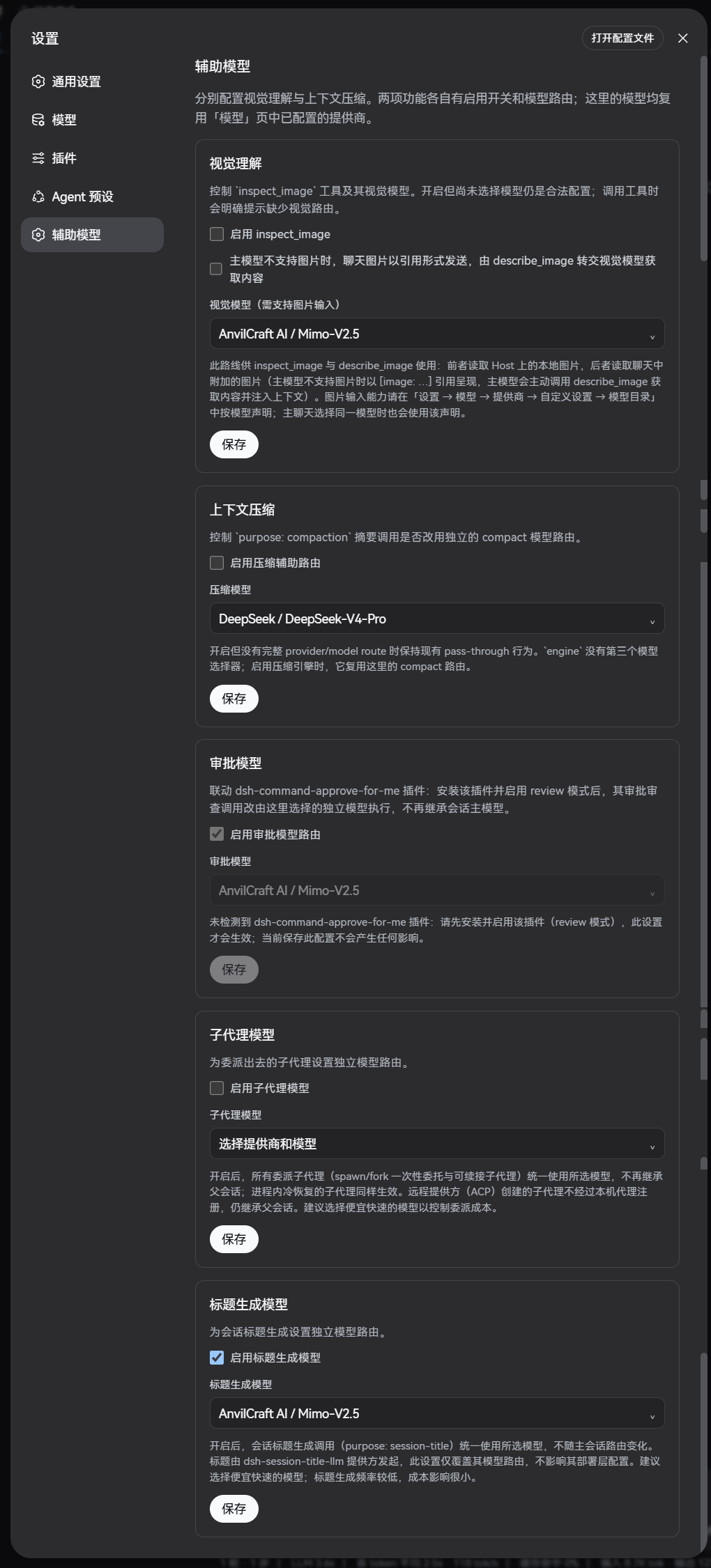
The plugin ships a web settings section (Settings → Auxiliary Models). Configure providers and models in the Models page first, then use the feature cards here: each card has its own enable switch and provider/model picker. The picker presents all currently available models together, grouped by provider (the image-generation card lists only models marked Allow image generation). A saved route that is temporarily absent from the catalog is kept and is never replaced automatically.
Marking models in the catalog
For a user-configured llm-pi-ai model, open its model settings under
Settings → Models → Provider → Customized settings → Models → Model
settings:
- Allow image input writes the canonical
inputdeclaration ([text, image]when checked,[text]when cleared) — consumed byinspect_imageand the main chat composer. Enable only when the upstream endpoint actually accepts images. - Allow image generation writes
imageGeneration: true— the mark that makes the model selectable in the Image-generation model card. Enable only when the upstream endpoint actually generates images.
The checkboxes are injected into every user-owned llm-pi-ai model row and
are always visible — no need to expand the row's capacity disclosure. A model
you are adding gets working checkboxes immediately: the marks are recorded
in the browser and written into the model's settings at the same time the page
saves the new model (Apply), so you can set image capabilities while adding,
not only after saving. Rows that cannot carry the marks explain why instead of
staying silent: DeepSeek-official (or any non-pi-ai adapter) rows show a notice
that the marks are llm-pi-ai-only, and pi-ai catalog rows not yet saved into
the user section say to save the model first.