dsh-workbench
DSH Workbench: a three-column kanban over your sessions — running tasks with live background-job progress, tasks awaiting confirmation, and recent activity — with time-range filters and a last-reply excerpt on each card.
Other repositories with this package name
Install
This plugin has no verified bundle, or compatibility checks failed. Read the repository notes first. Read the full README ↗
README
Read the full README ↗dsh-workbench — a Workbench plugin for DSH
English | 中文
A Web client plugin for DSH (DeepSeek Harness) that adds a Workbench page: a three-column kanban over your sessions — In progress, Needs confirmation, and Recent activity — where each card shows status, workspace, live background-job progress, and the last assistant reply excerpt. Click a card to open that conversation.
- A read-only projection of Host state; it changes no session, message, or model-visible input.
- No user configuration; it works once installed and reads the same data source as the sidebar.
Features
- Three-column board
- In progress: sessions whose turn is running, have running subagents, or
still have live background jobs (a job that outlives its turn), showing the
job's live progress line (e.g.
3/10, current command/phase). - Needs confirmation (human-in-the-loop): sessions blocked on you —
approval (
approval), an answer (question), or a plan review (plan-review). - Recent activity: recently updated idle sessions (paginated, see below).
- In progress: sessions whose turn is running, have running subagents, or
still have live background jobs (a job that outlives its turn), showing the
job's live progress line (e.g.
- Top stats: In progress / Awaiting / Recent / Total sessions.
- Time-range filter: Today / This week / This month / All / Custom (popover with presets — today, yesterday, last 3/7/30 days — or an explicit start/end date, precise to the day). Defaults to Today. The range scopes the Recent column and the totals.
- Per-card excerpt: the session's last assistant reply as plain text (Markdown stripped), clamped to two lines and expanded on hover/focus. Excerpts are read only for the newest 20 sessions to bound cost.
- Automation hidden by default: sessions bound to an active scheduled task (reminder) are hidden; a header toggle reveals them and shows how many are hidden.
- Search: filter by title or workspace instantly.
- Infinite scroll / load more: the Recent column starts at 12 and loads +12 as you scroll to the bottom (or via a Load more button). Every column is capped so a huge session count never renders all at once.
- Bilingual (English/Chinese) and light/dark aware.
Screenshots
Three-column kanban (stats bar, in-progress / needs-confirmation / recent, per-card reply excerpt, time-range filter):
| Light | Dark |
|---|---|
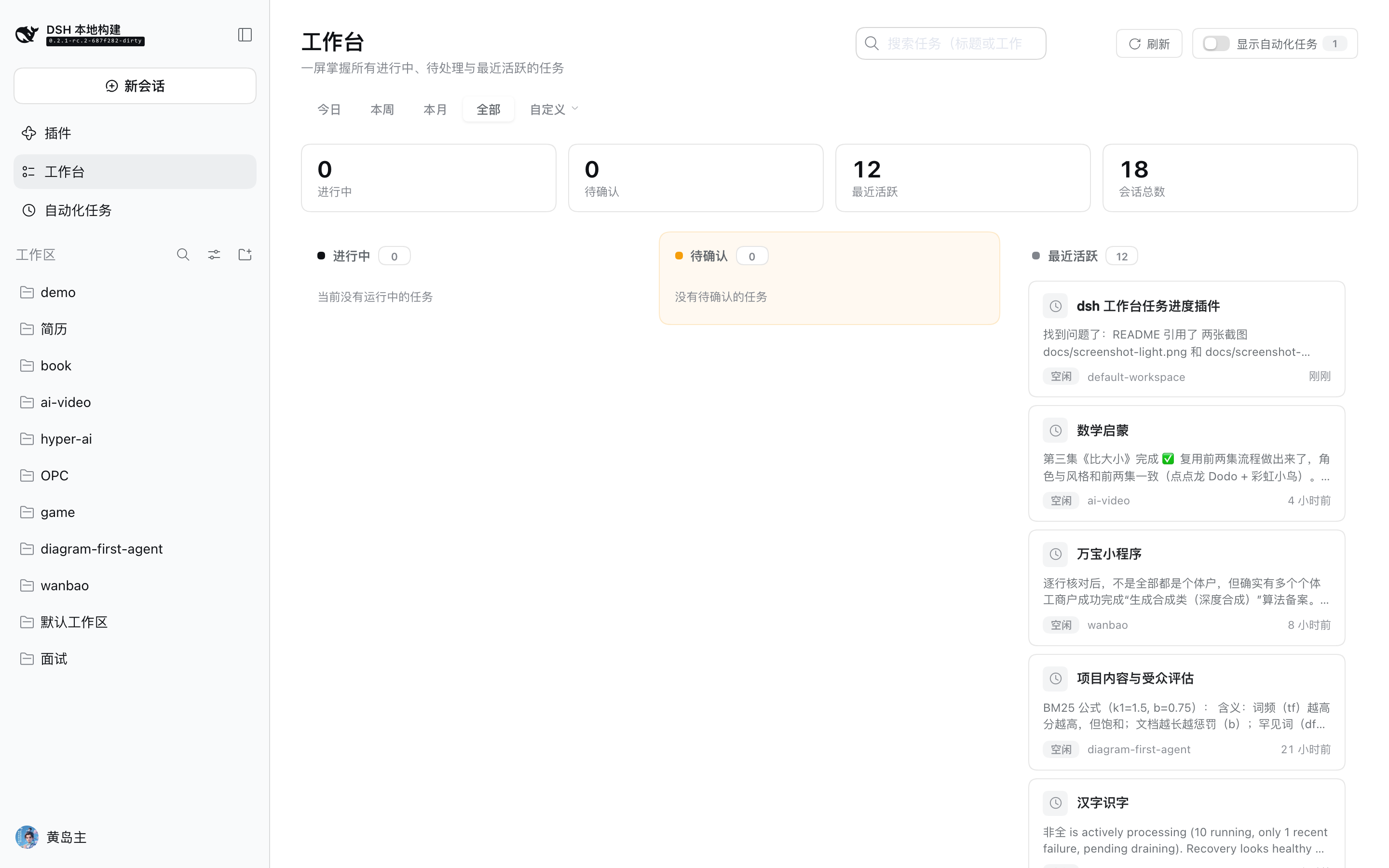 | 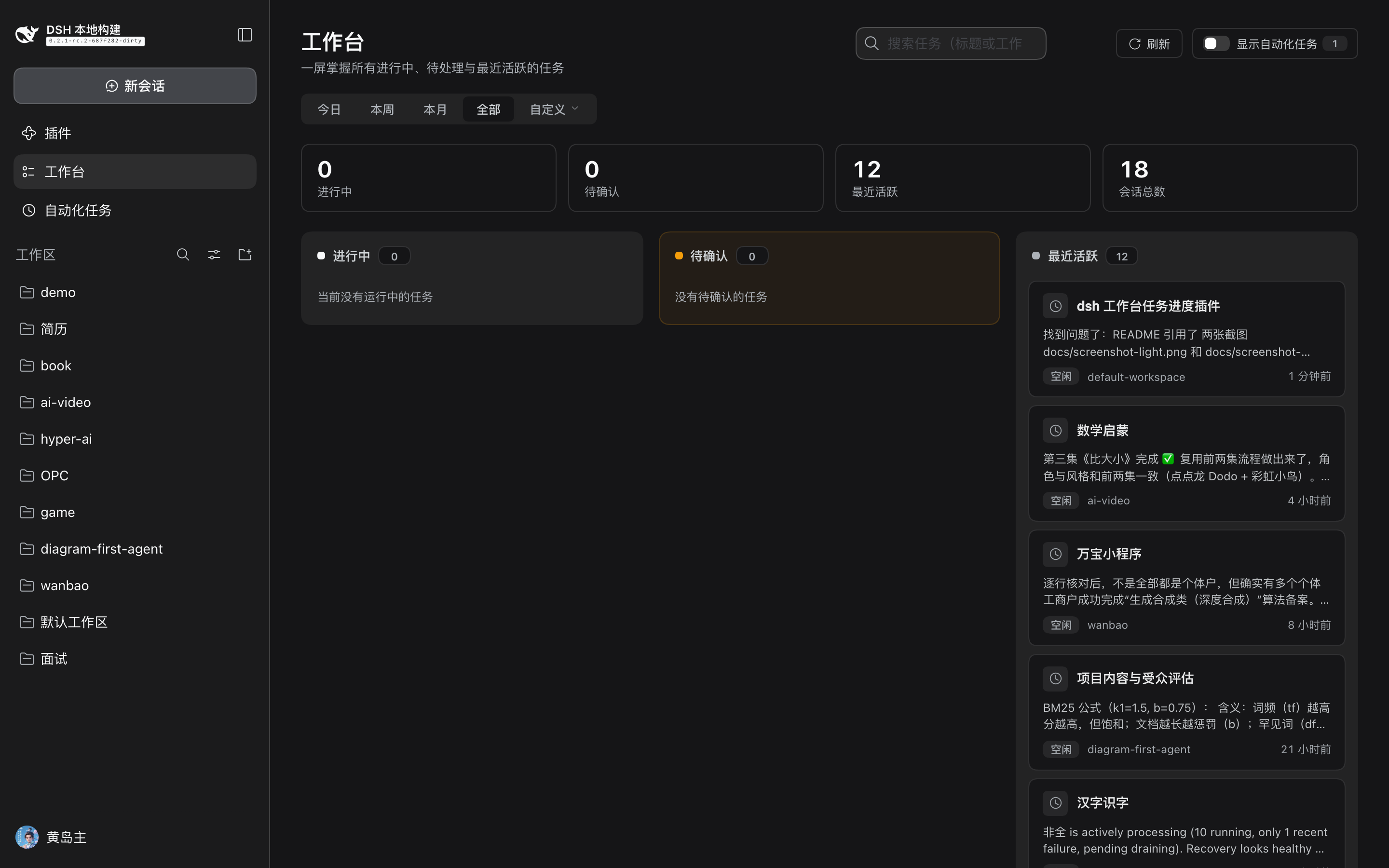 |
Install
Recommended: install from npm (the package ships a prebuilt lib/).
# into the default profile, or name one
dsh plugin add dsh-workbench
dsh plugin --profile web add dsh-workbench
Then restart dsh web (or close and reopen the GUI) and refresh the page. A
Workbench entry appears in the sidebar between Plugins and Automation tasks.
Or install from the in-app plugin market if you configure a market index that lists this plugin (see "Ecosystem" below).
From a Git source install (advanced)
A Git install fetches sources, not built artifacts, so it needs a local DSH
source checkout to build (the client bundle preset, CSS handling, and
@deepseek-ai/* type declarations live in the monorepo):
DSH_CHECKOUT=/path/to/deepseek-harness dsh plugin add 'github:/dsh-workbench#'
pnpm will refuse the package's prepare build script on the first attempt; add
the exact package key it prints to the profile's pnpm-workspace.yaml:
allowBuilds:
  dsh-workbench: true
and retry. To avoid asking users to build, publish to npm (prebuilt) instead.
How it loads
DSH's Web plugin mechanism: any Host Loader package that declares dsh.client in
its package.json and exports ./client (built to lib/client.js, wrapped as
window.__ModuleLoader__.load({ id, factory })) is scanned by
@deepseek-ai/dsh-client-modules, which injects the browser bundle into the
window.__DSH_BOOT__ module graph.
The page registers a root-level main keyed slot (key: 'workbench') plus a
sidebar.panellist entry that selects it via ctx.layout.selectPanel('workbench'),
becoming a global page beside Plugins and Automation tasks.
All data is ambient; the plugin holds no transport state:
| Source | Purpose |
|---|---|
useSessions (ui-session root source, injected as a global prop) | session ids / byId (displayTitle, cwd, running, updatedAt) |
useSessionStatus (same) | per-session running / pendingInteraction |
hooks.jobs = ctx.jobs.state | background-job roster and progress (with ctx.jobs.watchRows) |
hooks.schedule (ctx.remote.schedule.catalog) | sessions bound to an active reminder (for default-hiding) |
hooks.workspaces = ctx.workspaces.list | archived session ids (archived sessions are hidden) |
ctx.uiWorkspace.openSession | open a conversation |
ctx.remote.session.follow (newest 20 sessions only) | last assistant reply excerpt |
Develop / build
# 1) link the DSH source checkout's packages into this project's node_modules (once)
npm run link-deps
# 2) build: tsc emits lib/types → tsdown emits lib/index.js + lib/client.js
npm run build
The default checkout path is ../../../source/deepseek-harness (relative to this
project); override with DSH_CHECKOUT=/path/to/deepseek-harness. It uses the
checkout's tsc and tsdown; if the checkout was never built, run pnpm run build
there first (or at least ensure each packages/*/*/lib/types exists).
Publishing to npm ships the prebuilt lib/ (see the files list), so consumers
never build.
Ecosystem
This is a community DSH plugin. To help others find it:
- Add the
dsh-plugintopic to the GitHub repo. - (Optional) Host a format-1 plugin market index JSON (validated by
@deepseek-ai/dsh-plugin-market-index:parseMarketIndex/marketInstallTarget). Users add it as an index URL and can then find and one-click install the plugin from the GUI's Discover page. The repo'sapps/plugin-market-generatorcan generate/validate an index.
The official DSH repository currently does not accept external pull requests (see its
CONTRIBUTING.md); community plugins are the encouraged path.
Known limitations
- "In progress" progress comes from background jobs (
JobView.progress/label); plain conversation turns have no unified milestone/percentage field, so those show only a "Running" state. pendingInteraction.kindis mapped by string; a new upstream kind falls back to the generic "Needs confirmation" wording.- The time range scopes the Recent column and totals; In-progress / Needs-confirmation are always shown (active work should always be visible).
- Excerpts read a handful of recent records; very long replies are clipped to ~4000 chars (two-line clamp on the card, full text on hover).
Contact
- Technical questions / bug reports: please open an Issue so the answer stays searchable for others.
- Chat / collaboration / licensing: add me on WeChat (scan the QR code, note "GitHub").