@jkin8010/dsh-code-review
代码评审中心:基于 alibaba/open-code-review 的 DeepSeek Harness 插件,支持当前改动/提交/分支、项目架构、代码模块与信息流业务工作流评审,提供实时进度与动态、GitHub 风格提交热力图与评审统计。
Install
npx -p @deepseek-ai/dsh dsh plugin --profile web add github:jkin8010/dsh-code-reviewREADME
Read the full README ↗Configuration (cordis.patch.yml, all optional)
- insert:
    - id: qise-code-review
      name: '@jkin8010/dsh-code-review'
      config:
        projectRoots: [/Users/you/workspace]     # repositories to auto-discover (2 levels deep by default)
        projectDepth: 2                          # directory scan depth, 1-3
        maxProjects: 40                          # maximum number of projects to include
        extraProjects: [/Users/you/current/repo] # extra projects to include (may be non-Git)
        defaultProjectPath: ''                   # empty = the most recently committed discovered project
        excludeProjects: []
        stateDir: ~/.dsh/code-review             # review history / artifacts
        engine: auto                             # auto | ocr | structural
        pollSeconds: 2
        heatmapDays: 365
        maxJobs: 200
        ocr:
          command: ''            # empty = auto-detect
          provider: ''           # passed through as --provider
          model: ''              # passed through as --model
          llmUrl: ''             # injects OCR_LLM_URL
          llmToken: ''           # injects OCR_LLM_TOKEN (llmTokenFile works too)
          llmTokenFile: ''       # read the token from a file instead of writing it into the config
          effort: medium         # low | medium | high
          concurrency: 8
          timeoutMin: 15
          maxTokens: 0
          maxTokensBudget: 0
          extraArgs: []
The block above is the full option reference (values are examples). The cordis.patch.yml shipped in this repository only sets the project-discovery and OCR basics — every option is optional, and anything you omit falls back to the built-in default. Override what you need in your profile config.
Usage
Review directly from a project conversation (recommended)
The plugin registers the model tool code_review (active after install/restart). In any project session you can simply say:
- "Review the architecture of the current project with the code review center"
- "Review the current changes, only high and above"
- "Review the
hostmodule" - "Review this project's message pipeline from a data-flow perspective"
- "Show me the details of the most recent review"
Copy the line below to kick off a full review in one go:
Review the current project with the code review center: start with the project architecture, then review the host module, and finally review the message pipeline from a data-flow perspective; anything below high can be skipped.
The Agent calls code_review → start (waiting for the review to finish by default) → and returns the issue summary and findings in the conversation; the full grouping, code suggestions and coverage remain available in the "Code Review Center" in the sidebar.
action=status/detail/list queries progress and history, and wait:false runs in the background so you can fetch the result afterwards.
Tool arguments (the Agent fills them in automatically, but you can also ask for them directly):
| Argument | Description |
|---|---|
action | start / status / detail / list |
project_path | Omitted = the current session working directory (the current project) |
type | workspace / commit / range / architecture / module / flow; when omitted, supplying paths means a module review, otherwise a project architecture review |
scope | paths (module) / commit / from+to |
options | effort, background, exclude, max_tokens_budget |
wait | Defaults to true and waits for completion; false returns a job id immediately |
job_id / severity / limit | Used when querying details |
If you would rather not wait, say "run it in the background and tell me when it's done"; the Agent will use
wait:falseand fetch the result later withstatus/detail.
Slash command /code-review
Besides having the Agent call the tool, you can also use slash commands right in the input box (mirroring the ocr CLI review types):
/code-review workflow @test/                    # add test/ as a project and run the data-flow review
/code-review workflow --fix @test/              # same as above, then open a fix session automatically
/code-review architecture @/Users/me/proj       # project architecture
/code-review module src/server,src/db --fix     # code module + fix session
/code-review module --paths src/server,src/db --fix   # equivalent form
/code-review module @host                       # the host directory inside the current project
/code-review changes --effort high              # current changes
/code-review commit abc123
/code-review range main feature/login
/code-review fix [jobId]                        # open a fix session for the most recent review
/code-review list / status [jobId]
@pathor--project path: works even when the project is not in the list yet — the command adds it as a project first, then runs the review; relative paths resolve against the current session directory--fix: opens a fix session in the project directory and sends it the findings once the review finishes--async: returns immediately after starting;--effort/--background/--exclude/--budgetmap to the review options- With no subcommand, or with
help, it prints the full usage
Using it in the page
- Open "Code Review Center" in the left sidebar and pick a project at the top (
projectRootsauto-discovery +extraProjects). - Click "New Review" and choose a type:
- Current changes / single commit / branch comparison: fill in the commit or from/to
- Project architecture / code module / data flow: for a module review fill in the directory path; the data-flow review can be left empty for auto-discovery
- After submitting, watch the stage progress and activity in the overview's "Live review queue", then click through to the details for the findings.
- The overview heatmap and "recent projects / hotspot modules" track the review rhythm; the project page lets you switch the current project.
- The project list automatically includes: Git repositories under
projectRoots(default/Users/jkin/workspace, 2 levels deep), DSH workspaces, and projects that have already been reviewed (even if they are not underprojectRoots).
Any project
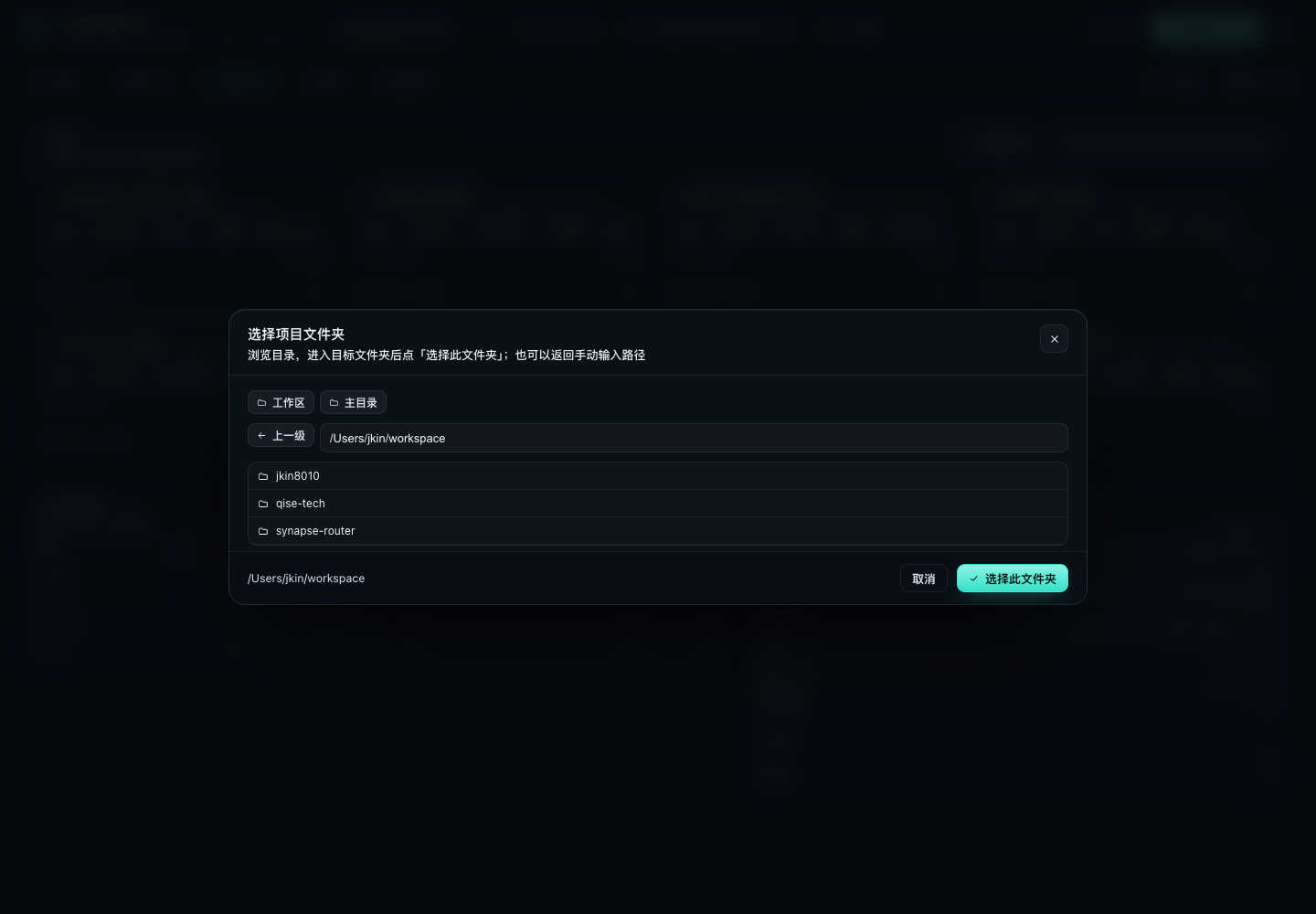
- The project dropdown, "Add project" on the project page, and the project dropdown in New Review all offer "+ Add project path…"
- Either the built-in folder browser (list directory / go up one level / select the current folder) or a manually typed absolute path; both Git repositories and plain directories work
- Project sources are also merged automatically: repositories found 2 levels below
projectRoots, DSH workspaces, and already reviewed projects; additions are persisted in/projects.json
Fixed markers
- Every finding on the review details page has "Mark as fixed / Unmark fixed", and the filter on the right switches between All / Unfixed / Fixed
- The header and the list show
Fixed X / Unfixed Y, finding cards carry a green "Fixed" badge, and the Markdown export includes the fix status - Markers are persisted in the job file (
resolutions) and survive refreshes and restarts - When a new review with the same project, review type and scope no longer reports an old finding, the old report is marked as fixed automatically
- After a fix session was started from a report, reopening it automatically re-runs the same scope to verify fixes (or use the "Verify fixes" button); findings that no longer appear are marked fixed
One-click fix session
The review details page offers "New fix session": it creates a session in the project Workspace and fills the findings
(critical/high first, including files and line numbers, with the suggested code) into the composer as a fix prompt draft;
press Enter to send (edit first if needed). /code-review --fix and the fix-session RPC use the Host auto-send path.
This requires DSH to provide
sessionController; when the Host is older (not restarted yet) the client falls back to DSH Client Remote'ssession.create/session.promptto create the session, and prompts you to restart DSH to enable the full mode. The settings drawer also shows any client/Host version mismatch — fully quit and reopen DSH to load the new Host.