njjpro/dsh-remote-workspace ↗★ 1
@njjpro/dsh-remote-workspace
Device-workspace federation for the dsh web GUI: pair into another DSH instance and browse its projects and sessions from the local sidebar, with each peer session opening in the local center column through a loopback embed proxy 适合拥有多台设备,希望在单个本地窗口中管理和运行远程 DSH 会话的用户。
Install
npx -p @deepseek-ai/dsh dsh plugin --profile web add github:njjpro/dsh-remote-workspaceREADME
Read the full README ↗DSH Remote Workspace
English | 中文
One window, two machines: bring another DSH instance's workspaces into the local sidebar, and open its sessions so the peer's real GUI renders in the local center column — no second browser window, no re-shelling, no peer-side mock.
This package is the device-workspace federation for the dsh web GUI. After pairing one remote DSH instance:
- The remote workspaces behave like local ones. The peer's projects and sessions appear in the local sidebar, directly beneath this machine's own workspaces, browsed the same way (running dot, relative time, collapsible groups).
- A peer session opens in place, in the local center column. Clicking one switches the local center column to that session while the local sidebar stays. What renders is the peer's real GUI: chat, streaming output, and session switching all run on the peer's backend — not a mock, and not the peer's interface rebuilt here.
- It still costs one window. No second browser window, no second credential, no second bookmark. That is the substantive difference from opening a tunnel address in another tab.
- New conversations can start on the peer. Every remote workspace row offers a new-conversation control; the peer creates the session and the local half opens what it returns, so a remote workspace is not limited to sessions that already exist.
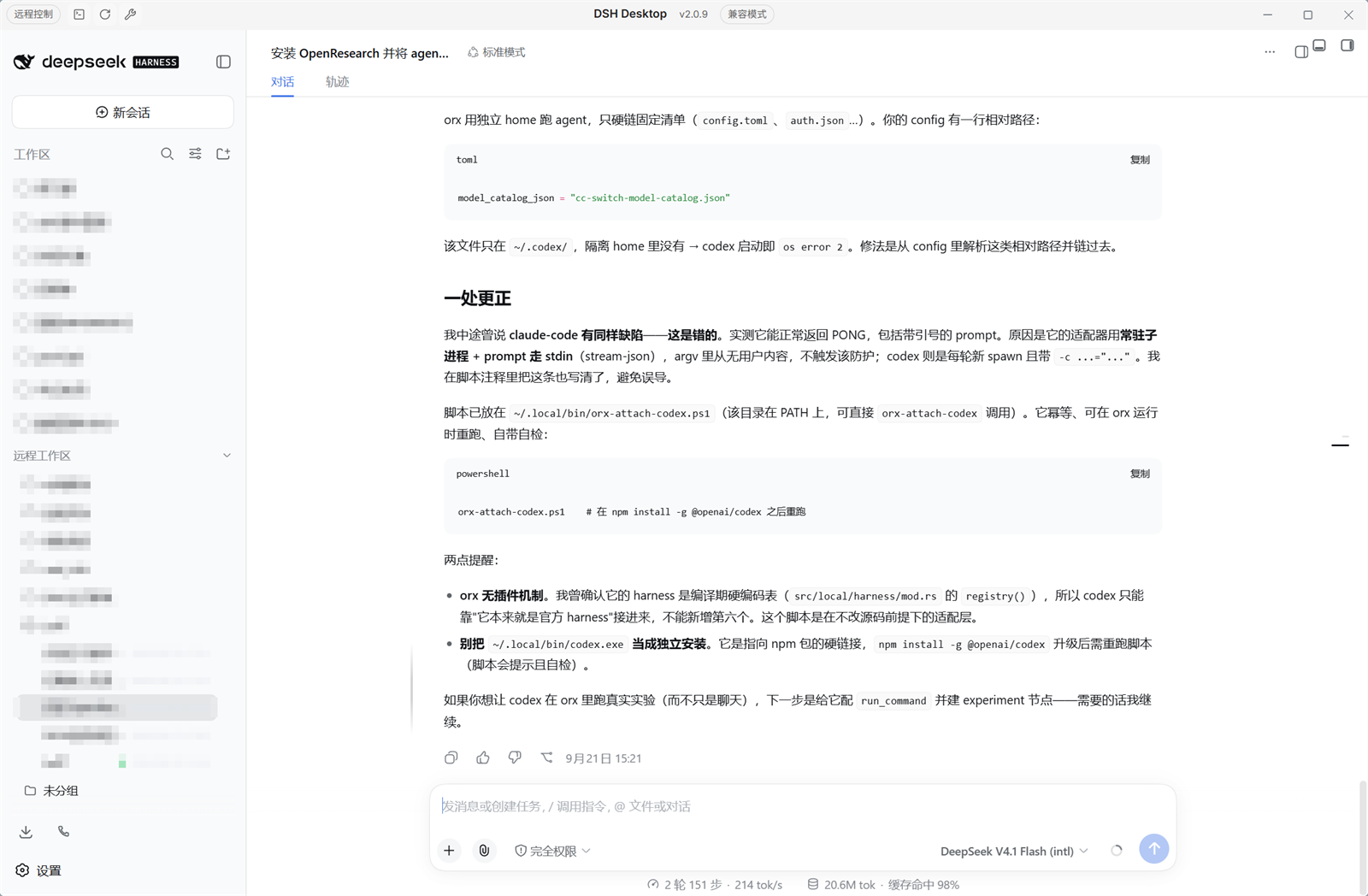
The screenshot is the local GUI: the sidebar lists this machine's own workspaces and, below them, the paired instance's under 远程工作区 / Remote workspaces; the center column is showing a session running on that other machine. Project names in the capture are pixelated.
How it works
This is a single dual-face package:
- Host half (runs in the DSH host process): serves the peer inventory routes a paired remote instance reads, the loopback embed proxy that republishes the peer GUI, and the control routes the local browser half calls.
- Browser half (runs inside the Web GUI): renders the collapsible remote-workspace group in the sidebar and hosts each peer session in an iframe.
A peer pane loads through the loopback embed proxy: the proxy reaches the peer with the device credential and republishes its GUI on a local 127.0.0.1 port, so the browser holds no peer cookie and the pane stays separable from the local UI.
The package is independent of @linxin666/dsh-remote-web-ui at build time (no import, no package dependency), and reads that plugin's pairing identity through the remoteWebUiPairing cordis service at runtime — pairing itself (minting tokens, revoking, the device cookie) belongs to that plugin, and this one only redeems a token once. The two route tables do not overlap, so both install side by side.
What it does
The four points above are the core. The supporting details:
- Sidebar integration: the group sits beneath the official workspace list and its fold state persists across reloads, so the section stays as the user left it.
- Bounded mounting: at most three peer panes stay mounted at once, so the per-origin connection budget is not exhausted by long-lived streams.
- Session state survives switching: opening a local session folds the peer view without destroying its frame, so the peer session is still loaded on the next click.
- Skin anchorable: each peer surface carries
data-dsh-plugin="remote-workspace"and a baredata-dsh-partvalue. - Archived sessions excluded: the peer leaves archived sessions out of both the session list and workspace membership, so the group only offers sessions that open.
Install
Requires the official @linxin666/dsh-remote-web-ui plugin on both machines: it owns pairing, and this package only redeems a token that plugin issued.
From npm
dsh plugin --profile web add @njjpro/dsh-remote-workspace
From this repository (development loop)
git clone
cd dsh-remote-workspace
pnpm install
pnpm build
dsh plugin --profile web add file:$(pwd)
Development
pnpm install
pnpm typecheck   # tsc -b --pretty false
pnpm test        # vitest run
pnpm build       # tsc -b && tsdown
build/tsdown.client.ts is this repository's client-bundle preset, lifted from the dsh-web monorepo's shared/tsdown.client.ts together with the platform seed table it reads, so the package builds without that repository present. pnpm-workspace.yaml and the root-level packages/ layout are not used here: this repository is the package.
Config
| Key | Type | Default | Meaning |
|---|---|---|---|
enabled | boolean | true | Master switch; disabling removes both surfaces. |
peerBaseUrl | string | '' | Base URL of the paired peer instance; empty means no peer is configured. |
peerPairToken | secret string | '' | One-time pairing token minted on the peer's panel; exchanged once and persisted. |
peerEmbedPort | number | 43121 | Loopback port the embed proxy binds, on 127.0.0.1 only. |
Security model
- The peer inventory routes (
/pair-remote/*) require a live paired-device credential and do not treat loopback as a bypass. The predicate is the host's own pairing check, so a request that could not pair with this instance cannot read its inventory. - The control routes (
/api/pair/peer/*) are loopback-only: both the socket address and theHostheader must be loopback, so a LAN origin cannot reach the ticket-minting or session-creating endpoints even with a forgedHost. - Pairing itself is never performed here. Minting, revoking, and the device cookie all belong to
@linxin666/dsh-remote-web-ui; this package redeemsPOST /api/pair/acceptand stores the resulting credential per peer base URL. - The embed proxy binds
127.0.0.1and republishes the peer GUI with that credential attached. Embed tickets are one-shot and TTL-bounded, and are minted only for sessions the inventory actually lists. - Without the official plugin installed, the pairing service is absent and every peer route fails closed with
401.
Known limitations
- A peer session's document is served by the peer, so its shell, service worker, and injected scripts are the peer's copies. Fixes to those belong on the peer's install, not here.
- The sidebar mount and embed layout overrides anchor on official CSS-module class suffixes, so an official GUI redesign needs a visual QA pass before release.
- Loopback embed proxies are HTTP only; a peer reached over a tunnel still terminates at the peer's own origin.
- The runtime pairing dependency means this package is not usable on its own: the official plugin must be installed for the fences to admit anyone.
License
Apache-2.0.