qingshanyuluo/dsh-mobile-ux ↗★ 0
@qingshanyuluo/dsh-client-ui-mobile
DeepSeek Harness mobile shell adaptation: zero-space sidebar drawer, floating hamburger pill, tighter conversation gutters. Ships as a real dsh client plugin.
AI Analysis
核心用途是优化 DSH 在移动设备上的显示与交互。适合经常在手机或平板上使用 DSH Web 界面的用户。
Install
This plugin has no verified bundle, or compatibility checks failed. Read the repository notes first. Read the full README ↗
README
Read the full README ↗dsh-mobile-ux — DeepSeek Harness Mobile UX & Access Kit


The mobile experience pack for DeepSeek Harness: use the Harness web UI on your phone. A three-part kit, each usable on its own:
| Part | Where | What it does |
|---|---|---|
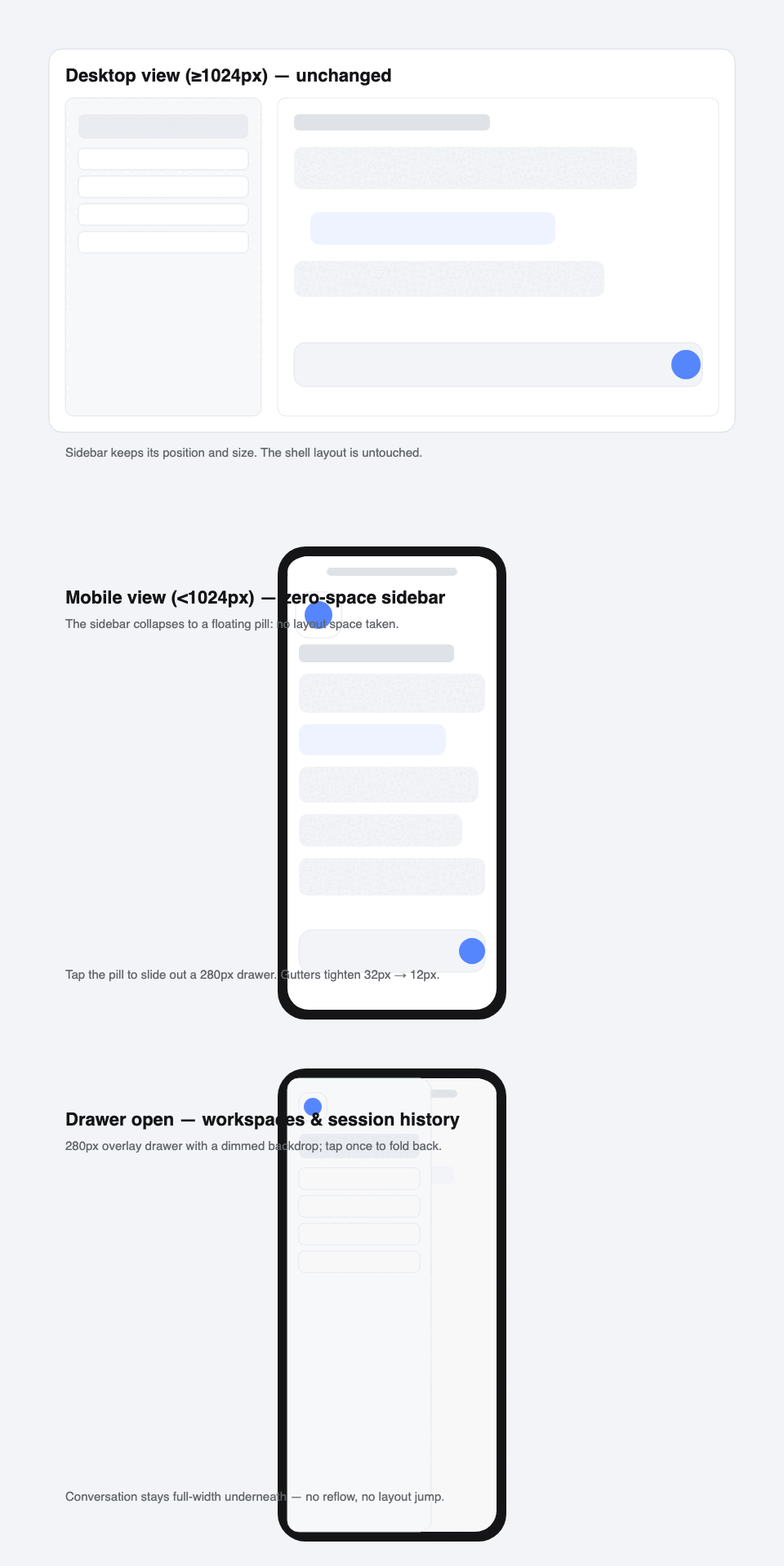
| Mobile UI plugin | client.js / styles/mobile.css | Below 1024px: zero-space sidebar (floating pill + drawer), full-width conversation, tighter gutters. Pure CSS — dsh itself is untouched. |
| Public tunnel kit | tunnel/ | Password-protected public access via cloudflared + a local Caddy gateway, launchd-managed, URL change tracking built in. |
| Android app | apk/ | A fullscreen WebView shell that remembers your credentials and opens the tunnel URL — no password prompts, no browser chrome. |
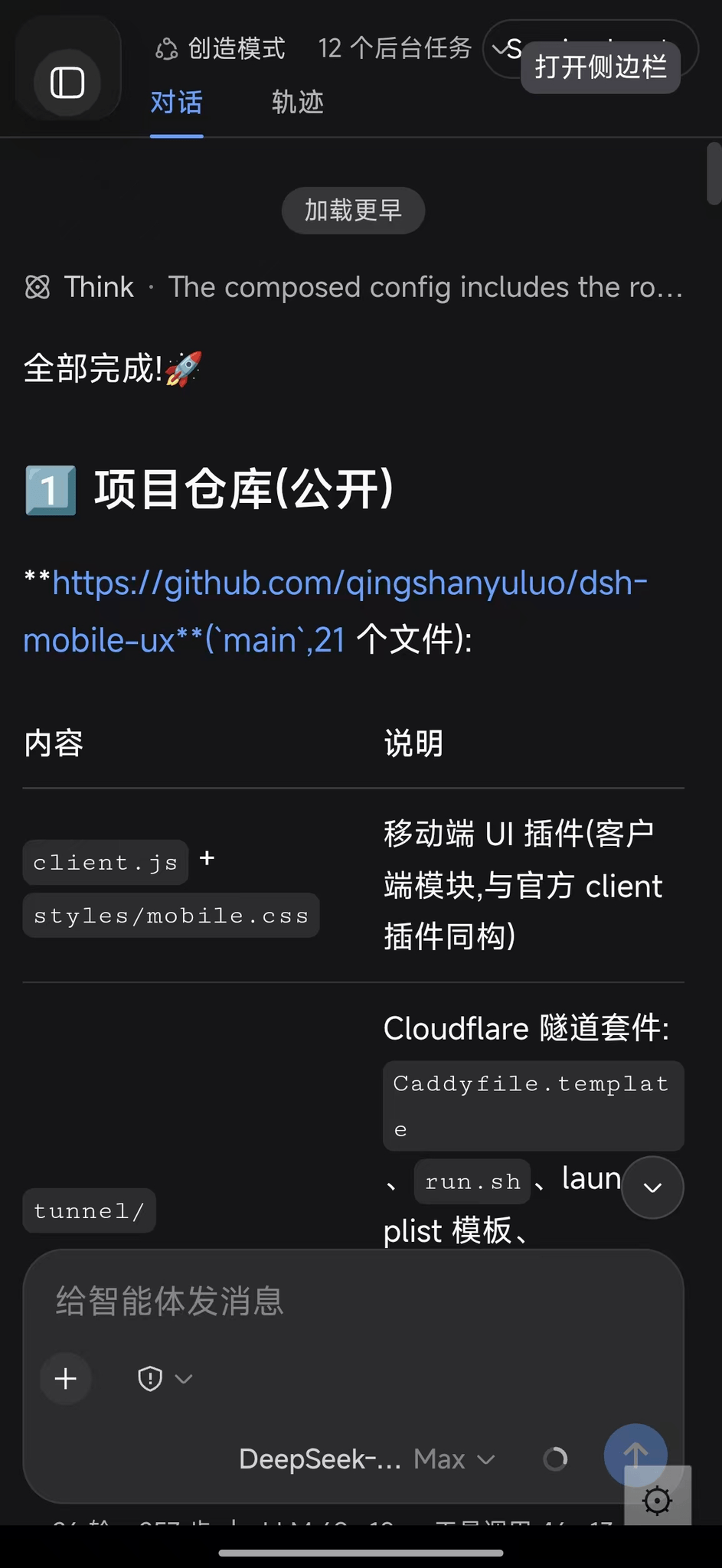
Real capture on a phone (943×2048):
Mobile UI plugin
Below the shell's own narrow breakpoint (1024px) the plugin:
- forces the three-column grid to a full-width center column — the sidebar and details stop allocating layout space;
- collapses the sidebar into a 56px floating pill (tap to slide out a 280px drawer with a dimmed backdrop);
- tightens conversation gutters from 32px → 12px, hides the column drag handles;
- hides the session header strip (title bar + chat/trajectory tabs) — the whole surface belongs to the conversation;
- leaves desktop view (≥1024px) and everything upstream untouched.
Known limitation: the details panel cannot open on phones — the shell's column math hard-forces it to 0 in narrow mode and CSS cannot override JS. The trajectory view tab is also hidden on narrow screens, so tool-call details are desktop-only until upstream adds narrow-mode support.
Install as a real dsh plugin (recommended)
-
Install the package into your deployment profile's out-of-tree dependencies:
cd ~/.dsh/profiles/ pnpm add @qingshanyuluo/dsh-client-ui-mobile -
Append one row to the profile's user patch layer (
cordis.patch.yml):- insert: - id: ui-mobile-ux name: '@qingshanyuluo/dsh-client-ui-mobile' -
Restart
dsh web. Check the composed tree first withdsh --profile --dump-config.
The client half mirrors the shape of the official dsh-client-ui-* modules (exports./client), so no dsh installation files are changed — only the user-level profile. Full details: docs/dsh-plugin.md.
⚠️ CSS selectors (
.pI_x6G_*,.wSkVaW_*,.Md3f7G_*, …) are pinned to the frontend build they were extracted from; re-pin them afterdsh-web-frontend/dsh-client-ui-*upgrades.
Public tunnel (no domain required)
Random *.trycloudflare.com hostname + basic auth — the URL changes on every process start, so a small launchd agent records the current URL and shows a desktop notification.
brew install caddy cloudflared
bash tunnel/install.sh
cat ~/.dsh/public-tunnel/url.txt   # current public URL
Chain: Cloudflare edge → cloudflared (QUIC) → Caddy gate (127.0.0.1:3081, localhost-only, basic auth) → dsh web (:3080). Caddy rewrites Host/Origin to the loopback authority, which passes dsh's /api browser-trust fence (anti-DNS-rebinding) without touching dsh config — and keeps working when the tunnel URL changes.
For a stable hostname use your own domain on Cloudflare (free) with a named tunnel; this kit intentionally stays account-less.
Android app (DSHViewer)
Fullscreen WebView, HTTP Basic Auth answered automatically from saved credentials:
- first run asks for URL / username / password; stored in SharedPreferences;
- half-transparent ⚙ (bottom-right) reopens the tiny settings dialog (tunnel URLs change);
- back button = browser back.
brew install --cask android-commandlinetools gradle
export ANDROID_HOME=/opt/homebrew/share/android-commandlinetools
yes | sdkmanager --sdk_root="$ANDROID_HOME" --licenses
sdkmanager --sdk_root="$ANDROID_HOME" "platform-tools" "platforms;android-35" "build-tools;35.0.0"
cd apk && bash build.sh    # -> app/build/outputs/apk/debug/app-debug.apk
Security
- A public tunnel exposes the whole Harness (it can run commands). Share only with people you trust; rotate the password from time to time; consider your own domain + Cloudflare Access for per-user, per-person audit.
- This repository contains no real passwords, no tunnel URLs, no certificates.
License
MIT