stefanydevitoqz-creatorPPP/dsh-edit-resend ↗★ 0
dsh-edit-resend
DSH plugin: edit an already-sent user prompt and resend it. Forks a child session whose inherited prefix stops just before that message, then submits the edited text as its new prompt. 适合需要修改历史对话并创建新分支会话,而不破坏原会话记录的用户。
Other repositories with this package name
Install
This plugin has no verified bundle, or compatibility checks failed. Read the repository notes first. Read the full README ↗
README
Read the full README ↗dsh-edit-resend
改掉已经发出去的那句话,然后重新问一遍。
DeepSeek Harness(DSH)Web GUI 的客户端插件: 给消息操作条加一个 ✏️ 按钮,把某条已发送的用户提示词改掉、分叉重发。
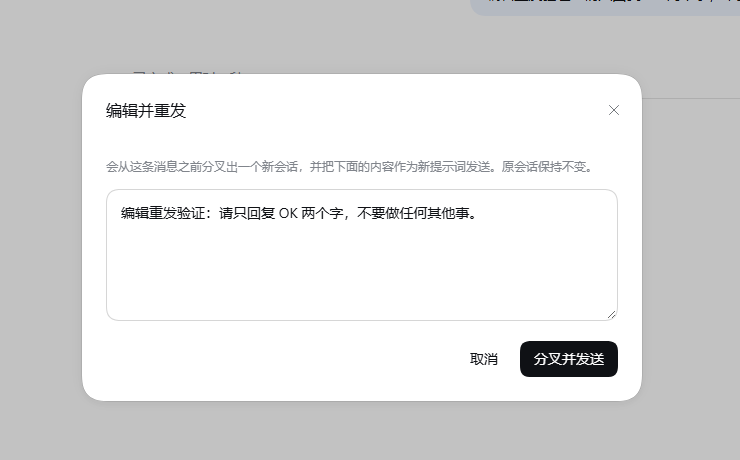
为什么需要它
DSH 没有「编辑已发送的用户消息并重新生成」这个功能,这是架构决定的,不是漏做:
会话是一份 append-only 的事件日志(session.v4.jsonl + 崩溃检查点),任何已经落盘的
user/message 都不能被原地改写。目前消息上能做的操作只有 复制 和 在新对话中分支。
本插件补上语义上最接近的等价物:
- 读出某个已完成轮次开头那条用户提示词(文本 + 事件 seq);
sessions.fork({ atSeq: seq - 1 })—— 分叉出一个子会话,其继承前缀正好停在这条提示词之前;- 打开子会话,把编辑后的文本作为新提示词发给它。
原会话完全不动:不改历史、不改标题、不留痕迹。
用法
在任意已完成轮次的底部操作条里点铅笔图标,位置是 复制 → 👍 → 👎 → ✏️ → 分支:
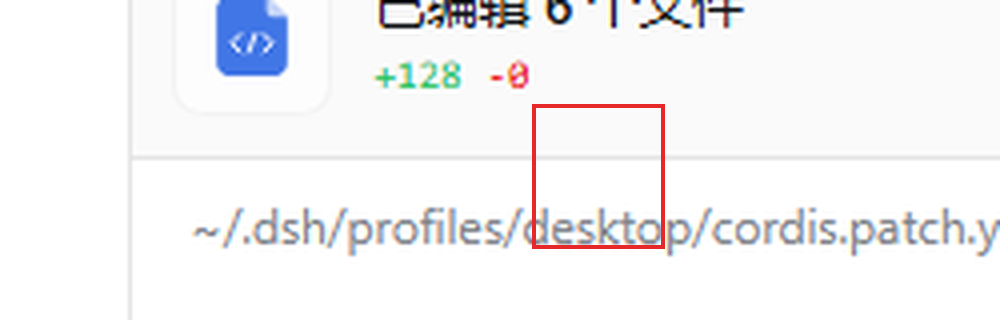
- 弹出的对话框预填该轮次的原始提示词,直接改;
- 点「分叉并发送」,界面自动跳到新会话,新提示词已经在跑。
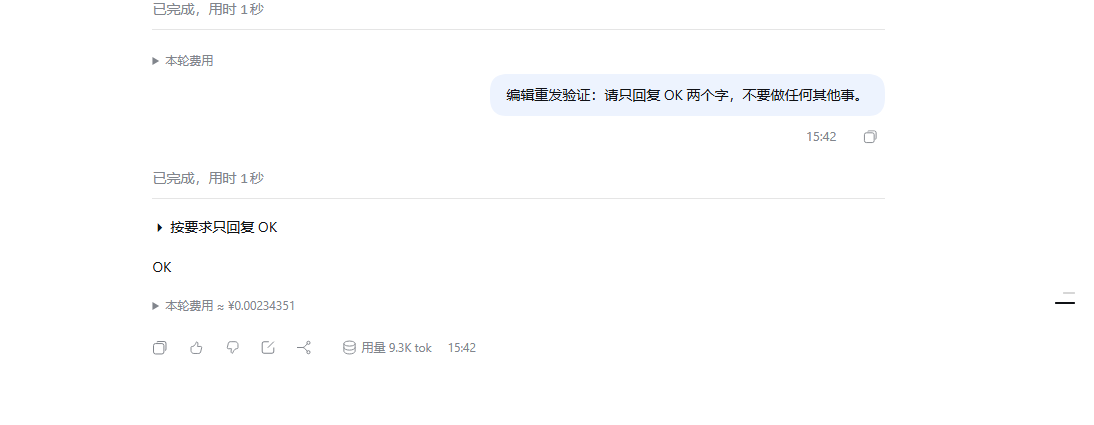
下图的子会话就是分叉出来的:上面那个空的「已完成」是切点留下的合成收尾(见 已知取舍),然后是改写后的提示词和模型的新回复。
按钮只在轮次开头确实是用户提示词、且该提示词之前还有事件(seq > 0)时可用;
通知唤醒、命令触发的轮次上按钮是灰的,悬停会说明原因。
安装
DSH 插件按 profile 安装。以桌面版默认 profile 为例:
$profile = "$env:USERPROFILE\.dsh\profiles\desktop"
git clone https://github.com/stefanydevitoqz-creatorPPP/dsh-edit-resend.git "$profile\plugins\dsh-edit-resend"
在 $profile\package.json 的 dependencies 里加一行:
"dsh-edit-resend": "file:plugins/dsh-edit-resend"
在 profile 目录里安装:
pnpm install
桌面版自带 pnpm,可以这样调:
& "\resources\runtime\pnpm\bin\pnpm.mjs" install(用resources\runtime\primary-runtime\...\node.exe跑,或任何 ≥ 8 的 pnpm)
最后让它挂载:重启 DSH,或者在侧栏的插件页面里把 dsh-edit-resend 打开
(市场对纯客户端插件是热挂载的,不用重启;浏览器刷新一次即可看到按钮)。
⚠️ 不要在
cordis.patch.yml里用裸包名手动加这一行。loader 解析插件入口时是从宿主 闭包出发往上找node_modules,走不到 profile 目录,裸包名会解析失败。市场写入的是绝对file://URL —— 那才是对的做法。
卸载
- 从
$profile\package.json的dependencies删掉"dsh-edit-resend"那一行; - 在
$profile里跑一次pnpm install; - 删掉
$profile\plugins\dsh-edit-resend与$profile\node_modules\dsh-edit-resend。
工作原理
| 环节 | 做法 |
|---|---|
| 挂载点 | ui-chat 声明的 conversation.chat.assistant-actions(list / session 作用域)。每条已定稿的助手消息都会渲染该条目,owner prop 是 { messageId },组件另外拿到 useChat / sessionId / t 等框架 share |
| 定位提示词 | 用 messageId 在 useChat 快照的 timeline.turns 里反查轮次号,再 locations.getTurn(turn) + nodes.get(key) 找该轮第一个 kind === 'user' 节点,取 data.seq 与 data.content |
| 分叉 | ctx.get('sessions').fork({ sessionId, atSeq: seq - 1, increaseTitle: true })。atSeq 是闭区间切点,所以 seq - 1 恰好排除掉这条提示词 |
| 发送 | sessions.using(childId, { source }, ref => …) 拿到子会话 binding,经 binding.ctx.get('conversation').sendSession(binding.session, text, [], 'queue') 提交 —— 和输入框走完全相同的宿主准入路径(含本地提交回显) |
| 依赖 | 只 require('react') 和 @deepseek-ai/dsh-client-ui-primitives(两者都在平台 module seed 里),样式用 DSW CSS 变量自绘,零非基线外部依赖 |
文件很小:lib/index.js 是宿主半边的空 apply()(只为让包出现在 loader 里),
lib/client.js 是全部逻辑。
已知取舍
- 不是原地编辑:产物是新会话。这是 append-only 日志下能做到的上限。
- 子会话会多一个空的「已完成」尾巴:切点落在该轮
turn/start与user/message之间, 属于宿主明确支持的「在未结束轮次内截取」,它会补上合成的结束事件。这是切点的忠实 表现,不影响上下文正确性。 - 刻意不切更早:切到
turn/start之前,会把携带原提示词的agent/inbox/spliced插入 事件一起继承过来,而它的移除事件不会跟着继承 —— 子会话的输入队列里就会残留一条待处理 消息。切在seq - 1保证队列是干净的。 - 附件不搬运:原消息若含图片/文件,对话框会提示;v1 只搬文本。
开发
宿主加载的是 node_modules/ 里的副本,不是 plugins/ 里的源码。改完源码后:
Copy-Item "$profile\plugins\dsh-edit-resend\lib\client.js" `
          "$profile\node_modules\dsh-edit-resend\lib\client.js" -Force
再让市场重新挂载(插件页关掉再打开),浏览器刷新一次。
许可
MIT © 2026 stefanydevitoqz-creatorPPP
English summary
A client-side plugin for the DeepSeek Harness (DSH) Web GUI that gives you the closest honest equivalent of "edit a sent message and regenerate".
DSH cannot rewrite history: a session is an append-only event log, so a durable user/message is
immutable. This plugin instead reads the opening user prompt of a completed turn, forks a child
session whose inherited prefix stops immediately before that prompt
(sessions.fork({ atSeq: seq - 1 })), opens it, and submits your edited text as its new prompt
through the very same host admission path the composer uses. The original session is never touched.
A pencil button appears in the turn action strip (copy → 👍 → 👎 → ✏️ → branch) and the dialog is
prefilled with the original prompt.
Most notable limitation: the result is a new session, never an in-place edit, and the child
inherits a small synthetic "completed" turn tail from the cut point (the plugin deliberately cuts at
seq - 1 rather than before turn/start, so the child's input queue stays clean).
MIT licensed.