tan90tan90/dsh-custom-menu ↗★ 0
dsh-custom-menu
Sidebar organizer for DeepSeek Harness: hide or group built-in menu entries, and add your own web links or local folders to the sidebar.
Install
npx -p @deepseek-ai/dsh dsh plugin --profile web add github:tan90tan90/dsh-custom-menuREADME
Read the full README ↗dsh-custom-menu
Sidebar organizer for DeepSeek Harness: hide or group the built-in sidebar entries, and add your own entries — web pages or local folders.
侧栏整理插件:隐藏或分组 DSH 自带菜单项,并添加自己的入口(网页链接 / 本地文件夹)。
Screenshots / 截图
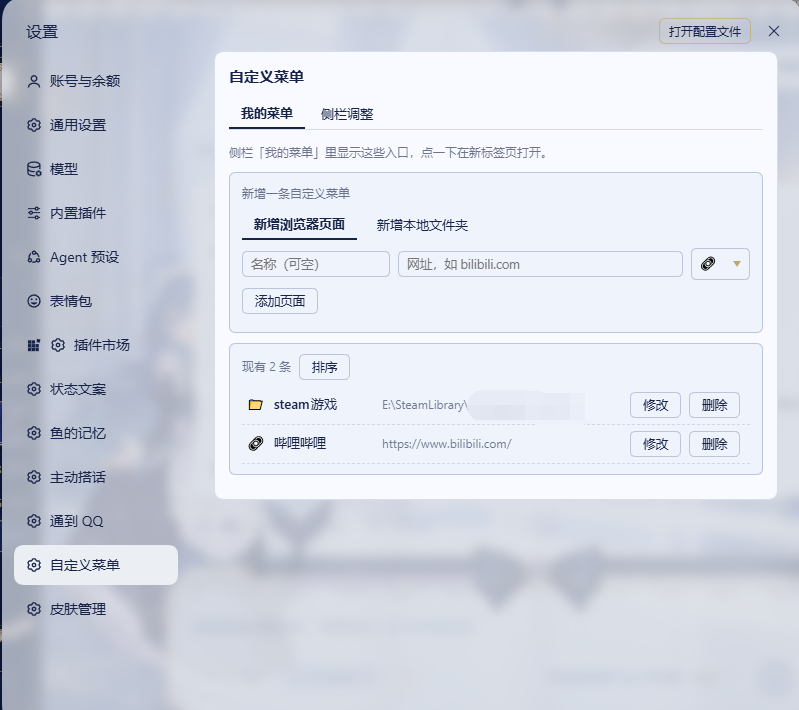
Custom entries / 自定义菜单
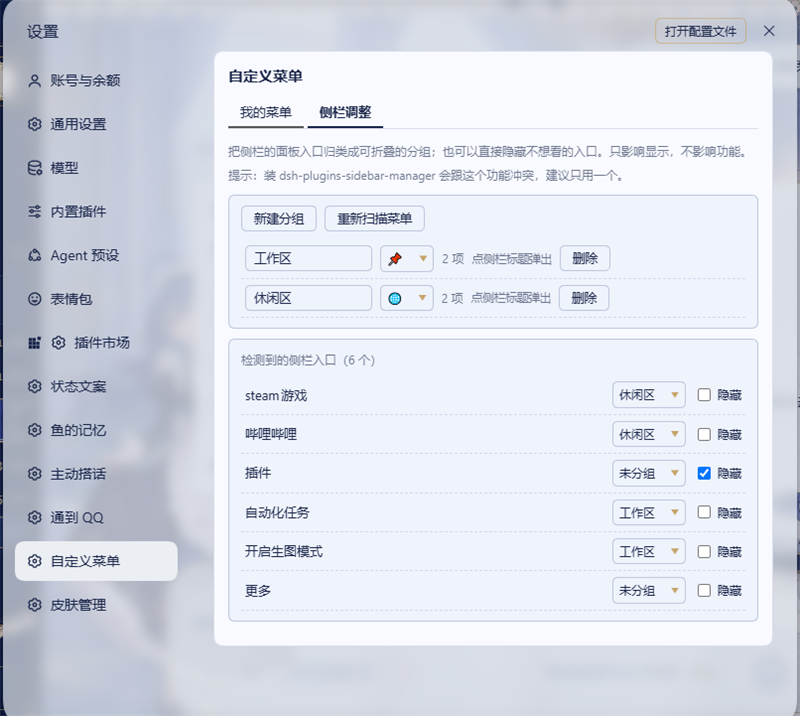
Sidebar adjustment / 侧栏调整
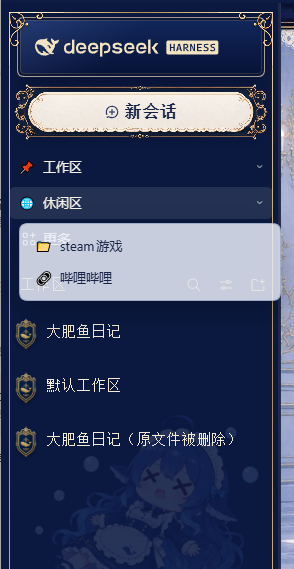
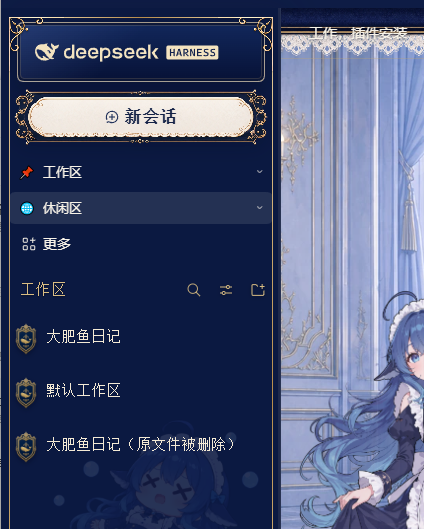
Group popover and the organized sidebar / 分组浮层与整理后的侧栏
Features / 功能
1. Custom entries / 自定义菜单
Add entries to the sidebar. Clicking one either opens a web page in a new tab, or opens a local folder in your file manager.
在侧栏添加自己的入口,点一下:网页在新标签页打开,本地文件夹用资源管理器打开。
- Name, address, and icon are editable after creation
- Reorder by drag after turning on「排序」
- Supports
D:\Folder,\\server\share, andhttps://…
2. Sidebar adjustment / 侧栏调整
- Group built-in entries into collapsible groups with a custom name and icon
- Clicking a group opens a small popover listing its entries (like the built-in “More” menu)
- Hide individual entries you never use
- The built-in “More” row is pinned to the bottom
把自带菜单项归进可折叠的分组(可自定义名称与图标);点分组弹出浮层列出组内条目;也可以单独隐藏不用的入口;「更多」固定在最后。
Install / 安装
dsh plugin --profile desktop add dsh-custom-menu
From source:
dsh plugin --profile desktop add github:tan90tan90/dsh-custom-menu
After installing, restart DSH, then open Settings → 自定义菜单.
安装后重启 DSH,打开 设置 → 自定义菜单。
How it works / 实现说明
- The settings page is registered through the host's
settings.sectionslot. - Sidebar rows are decorated from the client. React keeps ownership of its own nodes, so the plugin never moves them: it appends its own rows as direct children of the panel column, orders entries where a flex container allows it, and hides entries with
display: none. AMutationObserverre-applies after re-renders, guarded so that its own writes do not re-trigger it. - Opening a local folder goes through a host route (
POST /dsh-custom-menu/open). Only absolute paths are accepted, the path must exist, and arguments are passed as an array — no shell interpolation. On Windows it launchesexplorer.exe; elsewhereopen/xdg-open. - All configuration lives in the browser's
localStorage; nothing is written into DSH profile files.
Requirements
- DSH desktop with a web-based client
- Windows / macOS / Linux (folder opening uses
explorer.exeon Windows,openon macOS,xdg-openon Linux)
Known limitations
- Sidebar rows are located by their labels; a major DSH sidebar redesign may need
KNOWN_LABELSadjustment inlib/client.js. - Only
http(s)links and absolute local paths are supported (no custom URI schemes). - Hiding is visual only — hidden entries stay functional and reachable through their own menus.
Credits / 致谢
The sidebar grouping approach borrows its idea from HighToward/dsh-plugins-sidebar-manager: rather than moving nodes that React owns, decorate the rendered column (CSS order, display: none, and self-inserted group titles). No code was copied; the implementation here is written independently.
侧栏分组的实现思路借鉴了 HighToward/dsh-plugins-sidebar-manager:不移动 React 拥有的节点,改用 DOM 装饰(CSS order、display:none 与自插标题行)实现分组与隐藏。未复制其代码,本插件为独立实现。
The settings-page registration follows the settings.section slot usage documented by Yuuyuko-uu/dsh-speak-up and DSH's own window.__ModuleLoader__.load client-side convention.
设置页的注册方式参考了 Yuuyuko-uu/dsh-speak-up 的 settings.section 用法,以及 DSH 官方的 window.__ModuleLoader__.load 客户端加载约定。
License
MIT