xxxyz/DeepSeekHarness-MCP-Manager ↗★ 0
dsh-mcp-manager
DSH-standard MCP manager plugin: Settings UI + HTTP API + model-facing mcp_manager_* tools. Composed as a loader entry, survives restarts.
AI Analysis
核心用途是提供持久化的 MCP 服务端管理能力。适合需要动态添加、删除、启停 MCP 工具,且希望配置在 DSH 重启或升级后依然保留的高级用户。
Install
This plugin has no verified bundle, or compatibility checks failed. Read the repository notes first. Read the full README ↗
README
Read the full README ↗dsh-mcp-manager
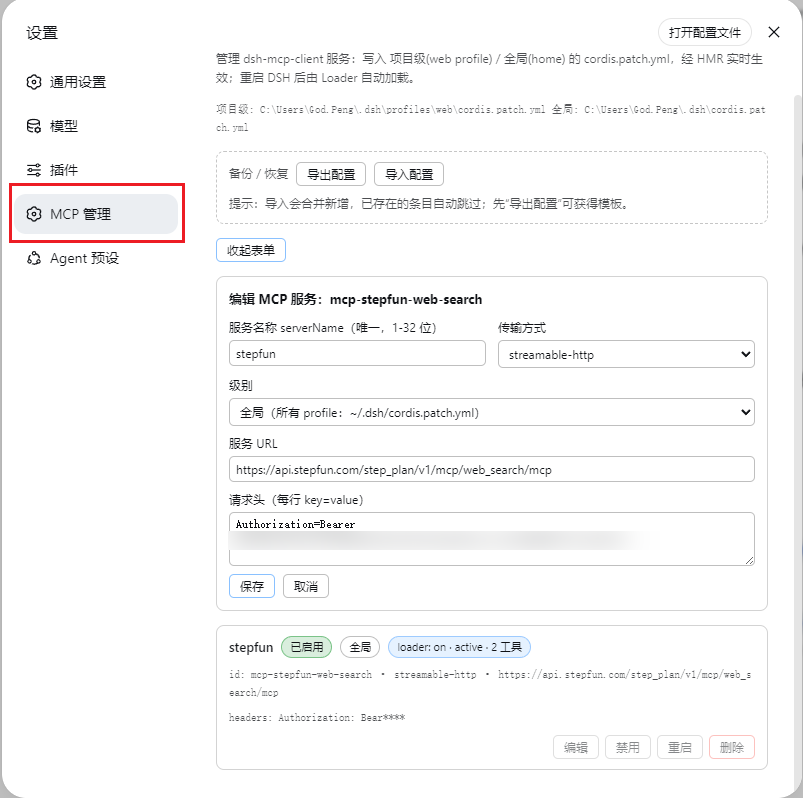
Durable MCP server manager for DeepSeek Harness (DSH) — a composed loader plugin (not a dynamic session plugin), so it survives DSH restarts and upgrades.
Built to the DSH plugin development standard (see the official docs: 第一个插件, 开发一个工具):
- object-form Cordis plugin (
export default { name, inject, apply }) - required services declared in
inject— the framework guarantees they are ready beforeapplyruns, and reloads the plugin if one disappears (this is what keeps the plugin alive across DSH upgrades) - agent-facing capabilities exposed as registered model tools via
ctx.tools.register(defineTool(...)):mcp_manager_list,mcp_manager_set_enabled,mcp_manager_restart,mcp_manager_add - UI-facing capability via a
webServerexact route (POST /dsh-mcp-manager/api), consumed by the client half
Features:
- Settings → MCP 管理 page (added by the client half)
- Host half manages
@deepseek-ai/dsh-mcp-clientrows in the real patch files:- 项目级 →
~/.dsh/profiles/ /cordis.patch.yml - 全局 →
~/.dsh/cordis.patch.yml - add / edit / enable / disable / restart / delete, live tool-count health, JSON export/import, per-file write lock
- 项目级 →
How it works
| Piece | File | Role |
|---|---|---|
| Host plugin source | src/index.ts | TypeScript source (the documented plugin shape); build with npm run build (tsc) |
| Host plugin (compiled) | lib/index.js (main) | Cordis object-form plugin: patch-file CRUD + 4 model tools + webServer exact route /dsh-mcp-manager/api (JSON {op, args} → {ok, ...}) |
| Client bundle | lib/client.js (exports["./client"] + dsh.client) | Browser module: registers the settings page; calls the host via fetch('/dsh-mcp-manager/api') |
| Loader row | added to the profile's cordis.patch.yml | composes the host entry; the client-modules service scans enabled entries and serves the client bundle |
The loader entry is the single composition point for both halves — no changes to any shipped DSH package. The package itself is platform-neutral (pure JS; path separators detected at runtime), so it works on Windows, macOS and Linux. Building (npm run build) requires the devDependencies (typescript, @deepseek-ai/cordis, @deepseek-ai/dsh-tools, @types/node); the shipped/installed package needs none of them.
Install (any platform)
All installers share one cross-platform logic file (install.mjs). Install steps:
- copy the package to
/local-packages/dsh-mcp-manager(a true source kept outsidenode_modules, so DSH upgrades never touch it) - copy it into
/profiles/node_modules/dsh-mcp-manager(a plain copy on purpose — a symlink would make Node ESM resolve the plugin's realpath where@deepseek-ai/dsh-toolscannot be found) - append the loader row to
profiles/ /cordis.patch.yml(idempotent; keeps the patch a valid top-level array)
Windows (PowerShell):
.\dsh-mcp-manager\install.ps1                     # default: ~/.dsh, web profile
# or: .\install.ps1 -DshHome D:\path\.dsh -Profile web
macOS / Linux:
./dsh-mcp-manager/install.sh                      # default: ~/.dsh, web profile
# or: ./install.sh --dsh-home /path/.dsh --profile web
Any platform (direct):
node dsh-mcp-manager/install.mjs [--dsh-home
] [--profile ] [--port ] [--repair] [--skip-patch]
Then restart DSH and open Settings → MCP 管理. The four mcp_manager_* tools become callable by the model after that restart.
Uninstall (same three ways):
.\dsh-mcp-manager\uninstall.ps1      # or: ./uninstall.sh   or: node uninstall.mjs [--dsh-home
] [--profile ]
then restart DSH. Uninstall removes the deployed copy, the local-packages true source, and the loader row.
After a DSH upgrade: --repair
A DSH upgrade (or a broken HMR state) can leave the plugin's host half unloaded while the files are still in place. One command fixes it — re-copies the package from the source of record, bumps the loader row's config.version to force an HMR re-apply, then polls the API until it answers:
node dsh-mcp-manager/install.mjs --repair            # default ~/.dsh, web, port 3080
node dsh-mcp-manager/install.mjs --repair --port 3080
# PowerShell: .\install.ps1 -Repair -Port 3080     bash: ./install.sh --repair --port 3080
--repair returns success only when POST /dsh-mcp-manager/api answers {ok:true} again. If the API still does not answer after 30s, restart DSH once (the loader always re-imports fresh at boot).
API reference
All ops are POST /dsh-mcp-manager/api with {"op": "", "args": {...}}, same-origin.
| op | args | result |
|---|---|---|
mcpm-list | {} | {ok, rows[], paths, errors[]} |
mcpm-add | `{serverName, transport, url | command, args?, headers?, env?, level, enabled?}` |
mcpm-edit | {id, level, ...fields} | {ok} |
mcpm-set-enabled | {id, level, enabled} | {ok} |
mcpm-restart | {id, level} | {ok} |
mcpm-remove | {id, level} | {ok} |
mcpm-export | {} | {ok, json, savedTo} |
mcpm-import | {json} | {ok, added[], skipped[]} |
Model tools
Registered on the host with ctx.tools.register(defineTool(...)) (standard @deepseek-ai/dsh-tools):
| tool | description |
|---|---|
mcp_manager_list | list all configured MCP servers (level, enabled state, live loader status, tool count) |
mcp_manager_set_enabled | enable / disable one server (id, level, enabled) |
mcp_manager_restart | restart one server (id, level) |
mcp_manager_add | add a server (serverName, transport, url |
Notes / limitations
- The HTTP route is unauthenticated on the local web server — fine for a local single-user machine; do not expose the DSH web port publicly.
- Managed rows carry
# dsh-mcp-manager:server:markers; the loader row is aninsertblock addingid: mcp-manager, name: dsh-mcp-manager— DSH's patch dialect treats a plain- id:row as an override of an existing entry (silently skipped when absent), so adding a plugin requires theinsertform. - If the running web page predates the install, a page refresh or DSH restart is needed for the client module (the boot graph is built at page load).