xzyonline/dsh-file-attachments ↗★ 2
@dsh-external/dsh-file-attachments
DSH plugin: session-bound file attachments with safe detection and bounded readers for office/text/archive formats (AI-assisted development) 核心用途是为 Web 界面提供直观的文件附件管理。适合需要通过拖放、粘贴或按钮向输入框添加文件卡片,并让 Agent 能够安全读取表格、PDF、代码等不同类型附件的用户。
Other repositories with this package name
Install
This plugin has no verified bundle, or compatibility checks failed. Read the repository notes first. Read the full README ↗
README
Read the full README ↗dsh-file-attachments · DeepSeek Harness 通用文件附件插件
给 DeepSeek Harness Web 会话加上「真正的文件」:拖放 / 粘贴 / 按钮三种入口,内容寻址存储,会话隔离鉴权,按类型区分展示,以及跟随真实事件升级的发送回执。支持 macOS / Windows / Linux,一键部署。


实现效果(附截图)
| 场景 | 效果 |
|---|---|
| 拖放 / 粘贴 / 按钮添加文件 | 输入框出现按类型区分的附件卡片(📊 表格 / 📕 PDF / 🗜️ 归档 / ⚙️ 配置 / 💻 代码…) |
| 发送带附件的消息 | 你的消息气泡正下方出现沉静回执,并随真实事件升级 |
| 模型真正读取文件 | 回执升级为「Agent 已读取」 |
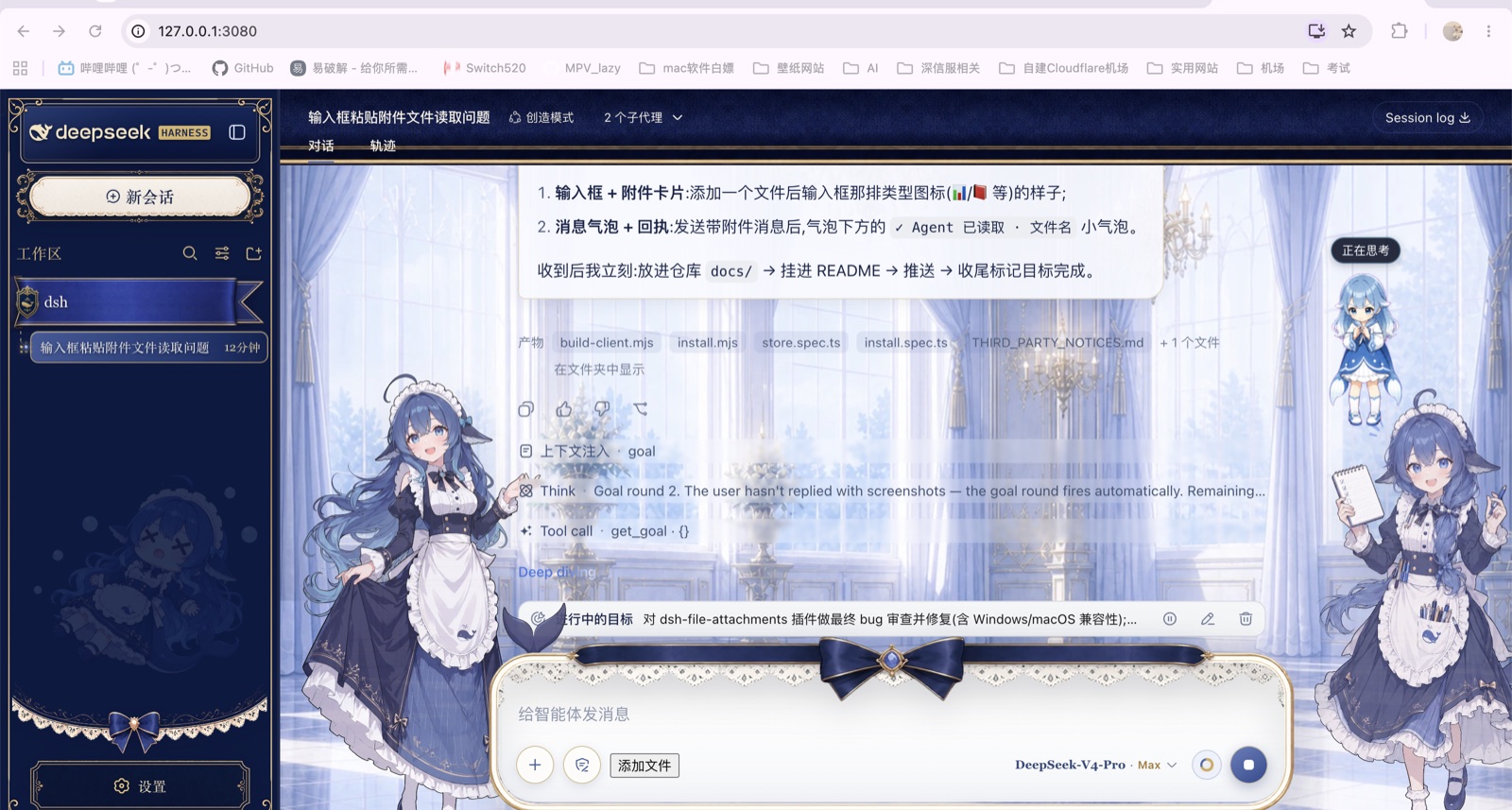
本地运行演示:输入框「添加文件」、按类型区分的附件卡片、消息气泡下方的三态回执。 截图中界面皮肤为第三方作品「深海女仆工坊 maid-atelier」(Small-tailqwq/dsh-deep-whale,CC BY-NC-SA 4.0;角色原作:上善,二创:ZipZipPipe,三创:Small-tailqwq)——仅为演示皮肤,不随本插件分发。 预期:回执三阶段为
✓ Agent 已收到 · 文件名(发送瞬间)→✓ Agent 正在读取…(模型调用读取工具时)→✓ Agent 已读取 · 文件名(读取完成,文字变主题成功色)。 检测按「回合号 + 附件 id」精确匹配,模型没读就一直停留在「已收到」——诚实,不造假。
三态回执样式
回执为透明小气泡(底色 4.5% 透明度 + 极细边框,颜色全部走主题 token,自动适配深色/浅色/第三方主题),读取完成后文字升级为主题成功色,附小圆勾徽章。
功能清单
- 三种入口:按钮(添加文件)、拖放(document 级捕获)、粘贴(捕获阶段拦截,图片放行原生链路);
- 读取能力:text/配置/源码、PDF、DOCX、XLSX(sharedStrings + A1 范围)、PPTX、旧版 .doc/.xls、RTF、ODF、EPUB,以及 ZIP/7z/RAR/EPUB 归档列表与安全单条目读取;
- 安全护栏(对照 OWASP/CWE 设计):
- 路径穿越/选项注入:提取只用
tar -xOf -- name(仅 stdout,零落盘),路径白名单归一化; - 解压炸弹:按声明尺寸分配内存 + 256MB 解压预检 + tar 输出 25MB 封顶;
- 解析隔离:read/list/detect 全部跑在 worker_threads(512MB 堆上限),15s 超时 + terminate 可打断同步解析;
- 鉴权:会话归属绑定 + 会话真实性校验(失败关闭);GET/DELETE 带 Origin 校验;
- 脱敏:统一出口对 password/token/api_key/私钥块等行级脱敏;
- 限额:普通文件 25MB、归档 100MB、每消息 10 个/50MB、每次读取 256KB/2000 行、归档 1 万条目。
- 路径穿越/选项注入:提取只用
- 模型工具:
attachment_info/read_attachment/list_archive(带 offset/page/range/cursor 分页读取)。
一键部署
零命令「双击即装」:Windows 双击 install.bat;macOS 双击 install.command(自动装依赖 → 构建 → 链接 → 写补丁;卸载对应 uninstall.bat / uninstall.command)。
命令行方式(前置:Node.js ≥ 20,已安装并运行 DeepSeek Harness Web):
git clone https://github.com/xzyonline/dsh-file-attachments.git
cd dsh-file-attachments
npm install
node scripts/install.mjs          # 自动构建 → 链接 → 写补丁(幂等,可重复执行)
| 平台 | 说明 |
|---|---|
| macOS / Linux | 使用符号链接,系统自带 bsdtar |
| Windows | 优先符号链接,无权限自动回退目录联接(junction);归档读取用 Windows 10+ 自带的 tar.exe(bsdtar),无需额外安装 |
安装完成后:重启 dsh web(守护会自动拉起;macOS 可双击 ~/Applications/DSH.app),浏览器硬刷新(macOS Cmd+Shift+R / Windows Ctrl+Shift+R),输入框出现「添加文件」即成功。
📖 分平台逐步详解(含 PowerShell 联接回退、常见问题、升级与卸载)见 docs/DEPLOY.md。
卸载:
node scripts/install.mjs --uninstall
卸载只移除插件行与链接,不删除
~/.dsh/file-attachments里的历史文件(删除会永久断开历史会话的读取)。
兼容性
| 平台 | Node 20/22/24 | 归档读取 | 说明 |
|---|---|---|---|
| macOS | ✅ | 系统 bsdtar | 主力开发环境 |
| Windows | ✅ | 系统内置 tar.exe | CI 覆盖;符号链接自动回退联接 |
| Linux | ✅ | 系统 tar(bsdtar/GNU) | CI 覆盖 |
测试
npm test          # 147 项单元/集成测试(vitest)
npm run typecheck
node ./scripts/smoke.mjs http://127.0.0.1:3080   # 线上冒烟:上传/检测/跨会话拒绝/删除
CI 矩阵:ubuntu/macos/windows × node 22/24,每次 push 与 PR 自动跑 build + typecheck + test。
开源声明(Open Source Disclosure)
- DSH 标签:DeepSeek Harness(
dsh)生态插件;dsh.plugin.json声明贡献attachment_info/read_attachment/list_archive三个工具。 - AI 辅助开发:代码由人类与 AI 编程助手(DeepSeek Harness / OpenAI Codex)协作完成;安全关键路径(文件解析限额、会话鉴权、行级脱敏、解压炸弹防护)为人工设计并复核。
- 第三方归因:见 THIRD_PARTY_NOTICES.md(pdfjs-dist、@keep-lts/xlsx(SheetJS 安全补丁 fork)、word-extractor、fflate、file-type 等,MIT / Apache-2.0 / BSD-3-Clause)。
- 许可证:MIT,见 LICENSE。
- 构建:本仓库
.gitignore排除lib/,克隆后npm install && npm run build生成产物(一键部署脚本会自动构建)。 - 安全报告:见 SECURITY.md。