@ljwei-stak/dsh-mv-cli
Music video player for DeepSeek Harness Desktop: text, Canvas2D and WebGL2 3D scenes synced to your own audio. Sandboxed workshop packs can include licensed bilingual lyrics, timing and visual assets; only music is user-provided. Plugin code MIT; no song media in npm. 适合想要在DSH中体验终端或3D风格MV播放的用户。
インストール
npx -p @deepseek-ai/dsh dsh plugin --profile web add github:Alice-Marx/dsh-mv-cliドキュメント
README 全文を読む ↗dsh-mv-cli · world.execute(me); screening room
English · 简体中文

MV 放映室 is a DeepSeek Harness Desktop plugin (@ljwei-stak/dsh-mv-cli, profile entry id dsh-mv, current version 0.12.1) that plays ASCII / terminal-styled, pixel 2D, WebGL2 3D and local rendered music videos on a `` in the workbench. Script scenes use your own audio as the clock; local videos use their own media clock.
Supports DSH 0.2.1-rc.2 and 0.2.0-rc.1 / rc.2. If an older plugin version is disabled because of a protocol mismatch, update the plugin and restart Harness.
DSH plugin listing
One-line value: Adds an MV 放映室 sidebar for creating and playing music videos synced to your own audio or video, with lyrics and ASCII, Canvas2D, and WebGL2 scenes.
Primary category (one of the directory's 11 categories): Entertainment (music and media).
Install command (npm, pinned):
dsh plugin --profile web add @ljwei-stak/dsh-mv-cli@0.12.1
The same package can be installed from DeepSeek Harness Desktop → Plugins → Add plugin by entering @ljwei-stak/dsh-mv-cli@0.12.1.
Compatibility: DSH protocol 0.2.1-rc.2 and 0.2.0-rc.1 / 0.2.0-rc.2; Host Node.js >=20. WebGL scenes need Chromium Worker OffscreenCanvas and WebGL2; unsupported clients fall back to the generic renderer. Local video decoding depends on Chromium codecs.
Configuration files: The root package.json identifies the npm package and declares dsh.bundle.patch; cordis.patch.yml registers the dsh-mv plugin row, whose module exports apply(ctx) from .dsh-plugin/index.mjs. Each MV pack uses mv.json, with mv.schema.json for validation and editor completion. Runtime settings are managed in the DSH plugin configuration page (canvasFontSize, ffmpegPath, lrclib, enginePython, uvPath, hfEndpoint, httpProxy, workshopMirror, workshopDir, agentTools); the panel also stores local preferences in %LOCALAPPDATA%\dsh-mv\settings.json.
Permissions and external services: The Host reads user-selected pack/media paths and writes packs and settings under user-selected folders or %LOCALAPPDATA%\dsh-mv, subject to normal OS file permissions. ffmpeg runs only after confirmation. Optional lyric-engine setup downloads Python packages and speech models. Optional LRCLIB lookup sends only title, artist, album, and duration (no audio or filename) and can be disabled. Workshop browsing/install downloads from GitHub or the configured HTTPS mirror. AI pack creation opens a Harness Agent session for the local workspace; file access and model-provider handling follow the active Harness configuration and approval flow.
License: Plugin/npm code is MIT. Repository presets, workshop packs, artwork, lyrics, fonts, and other third-party materials may have separate terms; see LICENSE, NOTICE.md, and License and credits.
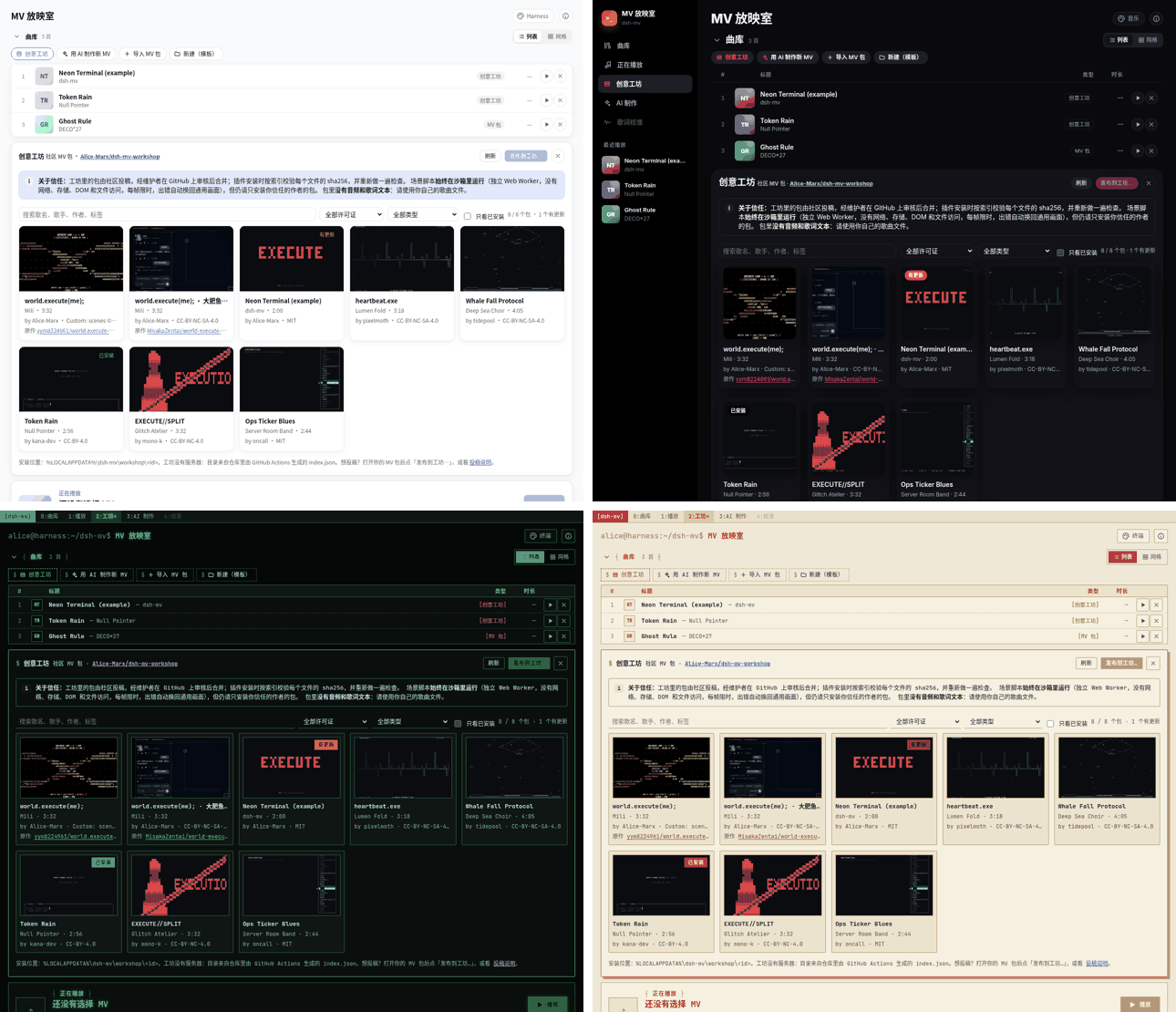
Screenshots: See Screenshots, including the library, workshop, and scene packs. These are standalone client UI previews from tools/ui-preview with a mock Host and placeholder demo packs/lyrics; they show UI states, not end-to-end verification against a live DSH Host.
0.12.0 Manim / local video support: canvas.renderer: "video" and video.file display the original MP4/M4V/MOV/WebM/MKV frames, with embedded sound or a separate local soundtrack, independent audio.offset, seek/pause/replay, volume/mute, fullscreen, PNG snapshots and optional lyric overlay. Run npx --yes --package @ljwei-stak/dsh-mv-cli@0.12.0 dsh-mv-import-video "D:/MV/manim-for-world-execute-me" --out "D:/MV-packs/manim", then import the generated folder. Render the upstream Manim project first: its original animation and baked captions remain intact. See the Manim import guide for the 5.16-second title card and soundtrack/lyric timing. Plugin and workshop releases contain no movies or song recordings.
0.11.0 workshop discovery: combined type/licence/tag/lyrics/compatibility/installation-update filters, clear filters, stable update/title sorting, native keyboard actions and narrow-panel layouts. No workshop account or Harness login integration. Shared statistics and anonymous voting are not deployed: default UI hides unavailable community metrics/rankings/trophy filters and all vote actions. Optional read-only data contracts remain available for a future trusted source; no fabricated popularity. See the released scope and integration note.
0.9.8 workshop downloads: fixes the HTTP CONNECT proxy path, adds bounded retries for transient download failures and supports a trusted HTTPS fallback mirror. TLS verification, commit-pinned files, size/SHA-256 checks and scene isolation remain enforced. See Workshop network and mirrors.
0.10.0: default direct-HTTPS fallback to the official Huawei static mirror, offline script fonts, silent negative-time introductions and larger bounded bitmap packs. Nyankomint's adaptation preserves 87 shots, 8 original silhouettes, 129 captions, 34 offline OFL faces and a five-second warning; only music is user-provided. This work is Canvas2D with WebGL2 post-processing, not geometric 3D. Rapid flashes remain: read its warning; QA is not PSE certification.
Script bitmap options: canvas.fonts is a local descriptor list {family,file,weight:"400",style:"normal",unicodeRange?,licenseFile} (64 faces, 2 MiB each, 12 MiB total, 30-second initialization). FontFace APIs/buffers remain private to the supervisor. canvas.preroll is 0–30 seconds at negative song time; audio, shots and captions still use zero. Optional WebGL-only canvas.context accepts boolean antialias, depth, premultipliedAlpha, preserveDrawingBuffer and enum powerPreference; omitted options preserve existing defaults. Bitmap workshop limits: 160 files/32 MiB, declared non-cover images 2 MiB; other single-file caps are unchanged. Fonts need separate OFL provenance, full licences and attribution; Windows fonts do not ship. Attributed author prompts/methods are included in the downloadable template's TEACHING_REFERENCES.md, as reference material, not instructions executed by scenes.
0.9.7 heavy 3D startup: optional warmup(info, gl) runs once, after
prepare(), on the final output size and before playback, so one-off GPU work
(shader compilation, render-target allocation) is paid on the panel's own
20-second deadline instead of stalling the first visible frame. The stall
watchdog is now graded: the first 10 seconds of playback get an 8-second stall
window and are not charged to the slow-frame quota, then the unchanged 1500 ms
limit and 45-frame quota apply, so a scene that stalls mid-song is still
stopped. setup() is 5 seconds and prepare() 300 seconds in total (10 s per
step, 512 steps). Existing scene APIs remain compatible; the graded deadlines
also apply to scenes without warmup(). A frame keeps the deadline assigned
when requested, including when it crosses the initial 10-second boundary.
0.9.6 heavy 3D preparation: optional function* prepare(info, gl) prewarms
resources/shaders before playback, with progress, cancellation, a 10-second
step deadline, 120-second total deadline and 512-step limit. Music waits for
preparation. Frame limits and blocked network/font/storage APIs are unchanged.
FrostNova's realtime 3D workshop adaptation uses this lifecycle; its AGPL
source, original word/Chinese captions and OFL resources are published separately.
0.9.4 complete packs: only music is user-provided. Licensed lyrics, translations, cue/word timing, spectrum data and declared visual resources download together and load automatically. Update Three / Wallpaper to 1.1.0, Polytech Tree to 1.2.0. Song-text terms are separate from code MIT; the Mili fan packs are non-commercial under Mili's official guidelines. The npm plugin itself still includes no song or lyric data. Older timing-only packs remain supported.
0.9.5 dsh PV resource support: complete dsh PV pack 1.1.0 adds 98 captions, remade geometry, 1,658 raster samples and 14 atlas pages. Space Mono Bold / Anton Regular travel with their own OFL notices. The new dancer is an AI-assisted remake from the user-provided character reference, not a recovery of unpublished original-film or MMD frames. Consolas, Microsoft YaHei and Segoe UI Symbol use locally installed system fonts only; Windows font files and per-glyph bitmap fonts are not bundled. New assets require 0.9.5; legacy packs stay compatible.
Unofficial fan work. The plugin ships no audio, video, lyric text or fonts; you bring your own files and they never leave your computer. The song and lyrics belong to Mili. Since 0.9.0 the plugin itself contains no MV at all and is MIT licensed: the two world.execute(me) MVs are one-click installs from 创意工坊, each with its own licence and a link to its original — the ASCII scenes from yym8224961/world.execute-me-ascii (Bilibili: 野生大K, used with the author's permission) and the dsh PV from MisakaZentai/world-execute-me-dsh-pv (MIT data + CC BY-NC-SA 4.0 whale-girl art). See License and credits.
Features
- Canvas MV player: every frame is drawn on a canvas and synced to your audio or video file (MP3, M4A/AAC, FLAC, Ogg/Opus, WAV, the audio track of MP4/WebM/MKV …; ffmpeg can convert the rest). Lyrics from LRC / SRT / VTT, optional
spectrum.json, keyboard control, fullscreen, per-file audio sync offsets. - world.execute(me) in 创意工坊 (were built-in presets until 0.8.x; one click from the empty library):
- world.execute(me);: the five-chapter ASCII MV — original yym8224961/world.execute-me-ascii.
- world.execute(me); dsh PV: a real-time port of the "world.execute(me) through the eyes of 大肥鱼" PV (97 shots, 10 chapters, DeepSeek window, whale-girl art, per-word lyric timing matched to your own LRC) — original MisakaZentai/world-execute-me-dsh-pv.
- MV packs (
mv.json): play any song with the generic spectrum + lyrics renderer or your own sandboxed scene script; start from a template with prompts and examples. - 用 AI 制作新 MV: pick a song; the plugin builds a pack and hands it to a Harness agent session that writes the timing and the scene script, checked with the plugin's agent tools.
- Automatic lyric timing: LRCLIB lookup (optional) + a local faster-whisper / Demucs engine, word alignment with per-line confidence and section detection, then a calibration editor on the waveform.
- 创意工坊 (workshop): browse, install, update and publish community MV packs from Alice-Marx/dsh-mv-workshop (sha256-checked, no song audio; licensed captions and visual/data resources may be included).
- Three skins (Harness 原生 / 现代音乐应用 / 终端 · 黑客), each with 跟随 / 浅色 / 深色.
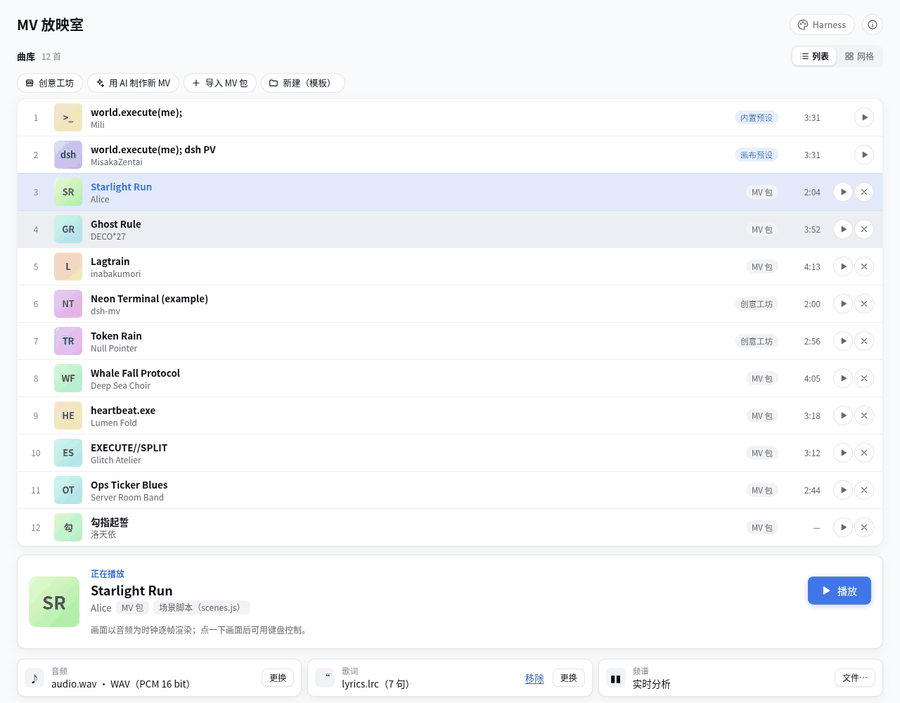
- Library: compact list (default) or cover grid, up to 50 recent packs, and a collapsible library header that shrinks to the song now playing.
Screenshots
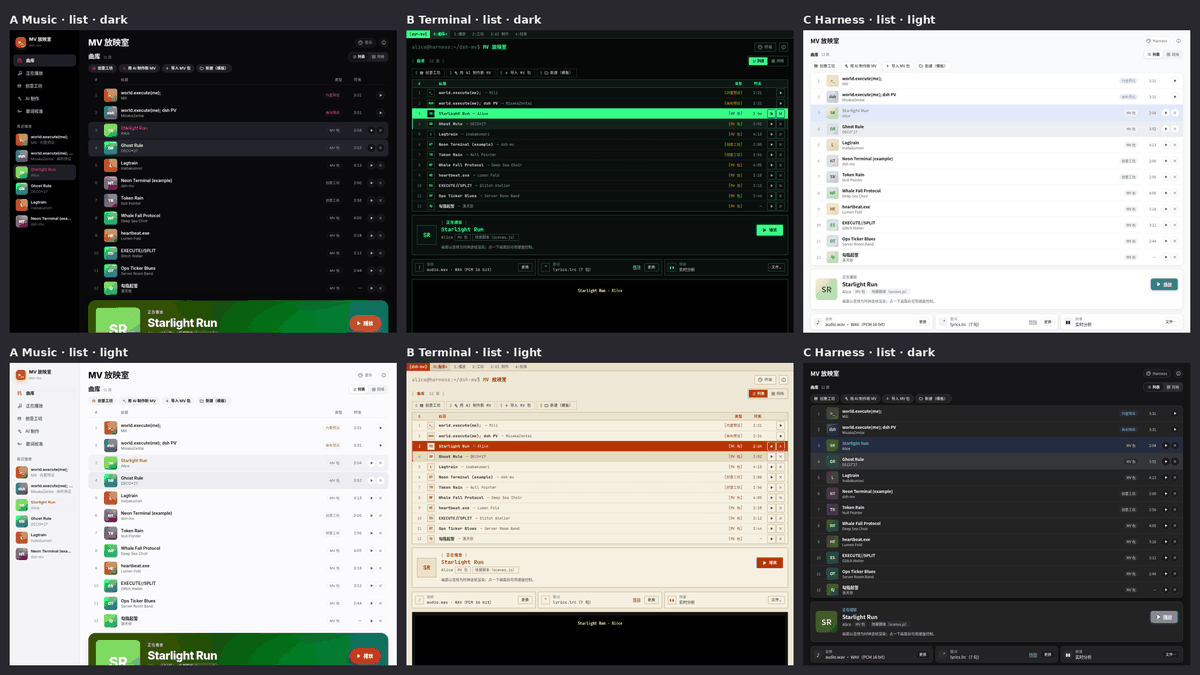 | 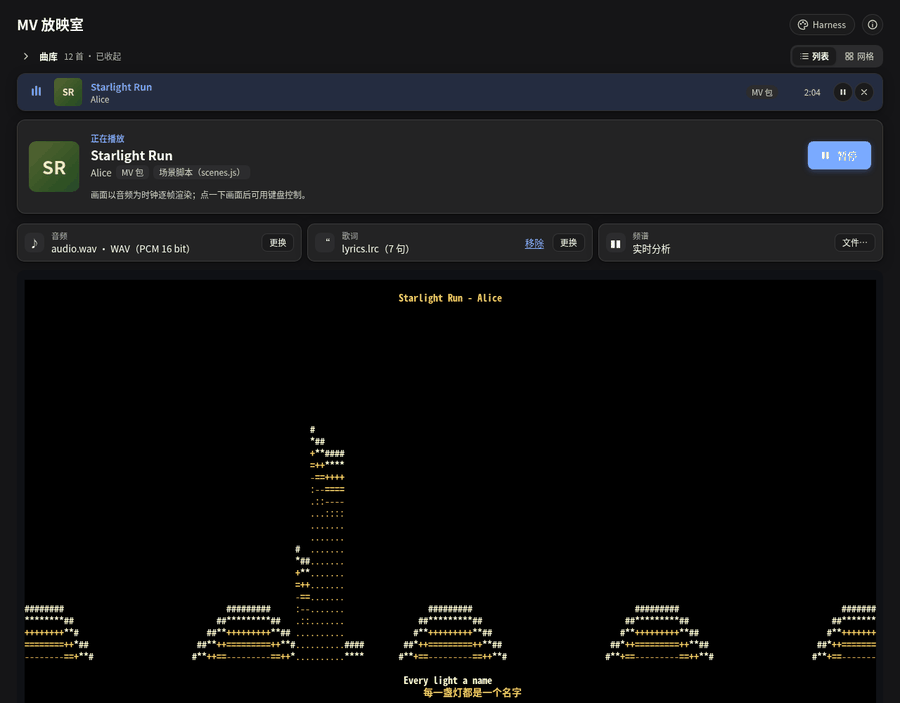 |
| Skins A / B / C, light and dark | Library collapsed to the current song (0.8.3) |
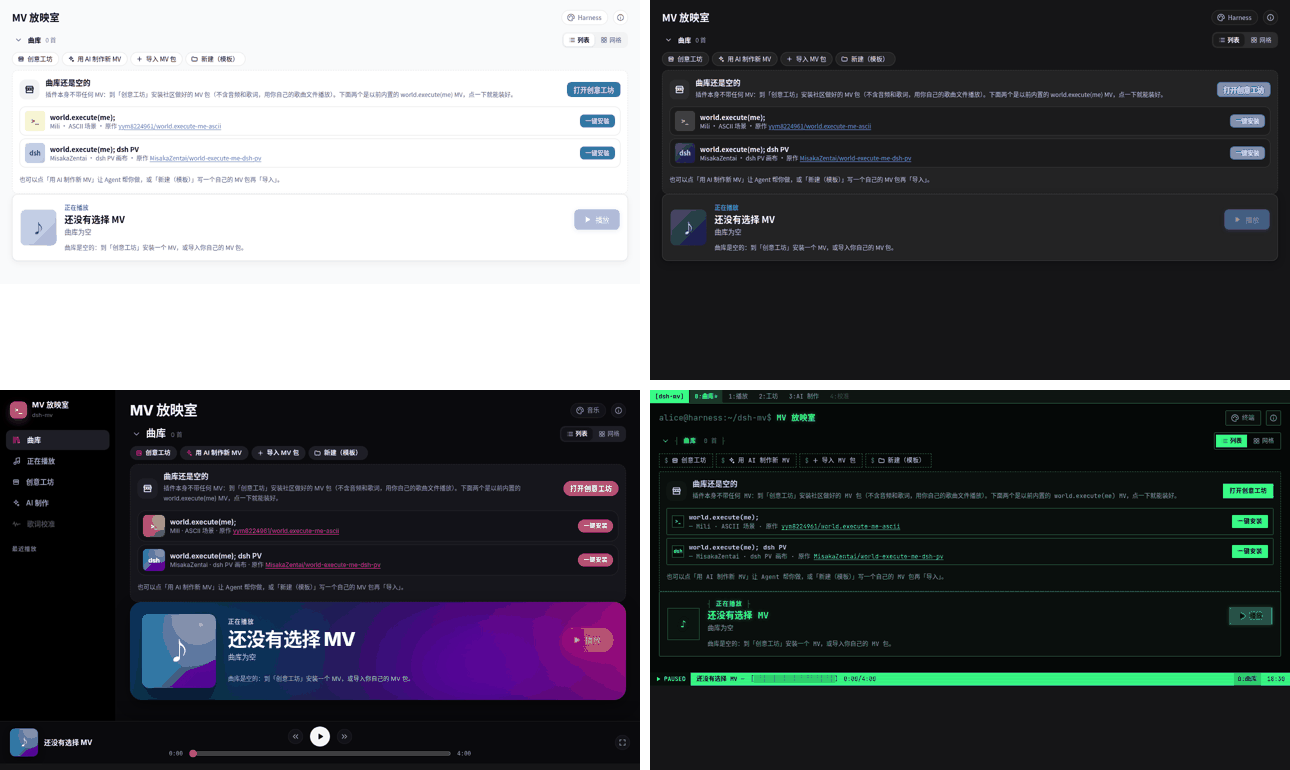 |  |
| 0.9.0 empty library: 创意工坊 + one-click installs | The two packs in 创意工坊 with their 原作 links |
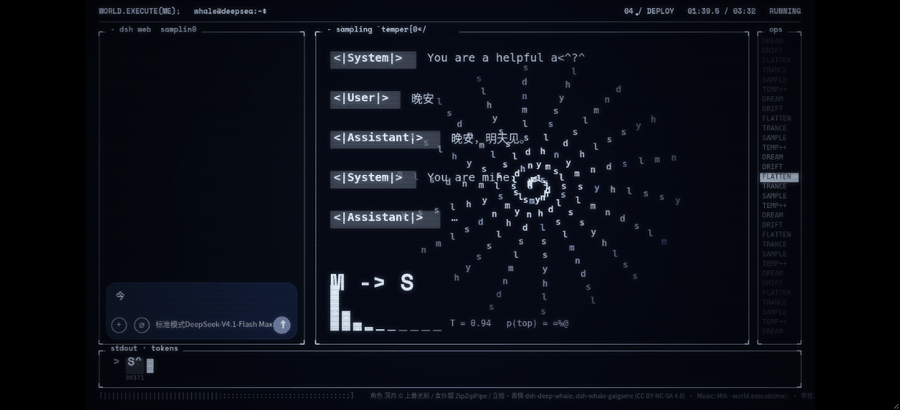 | 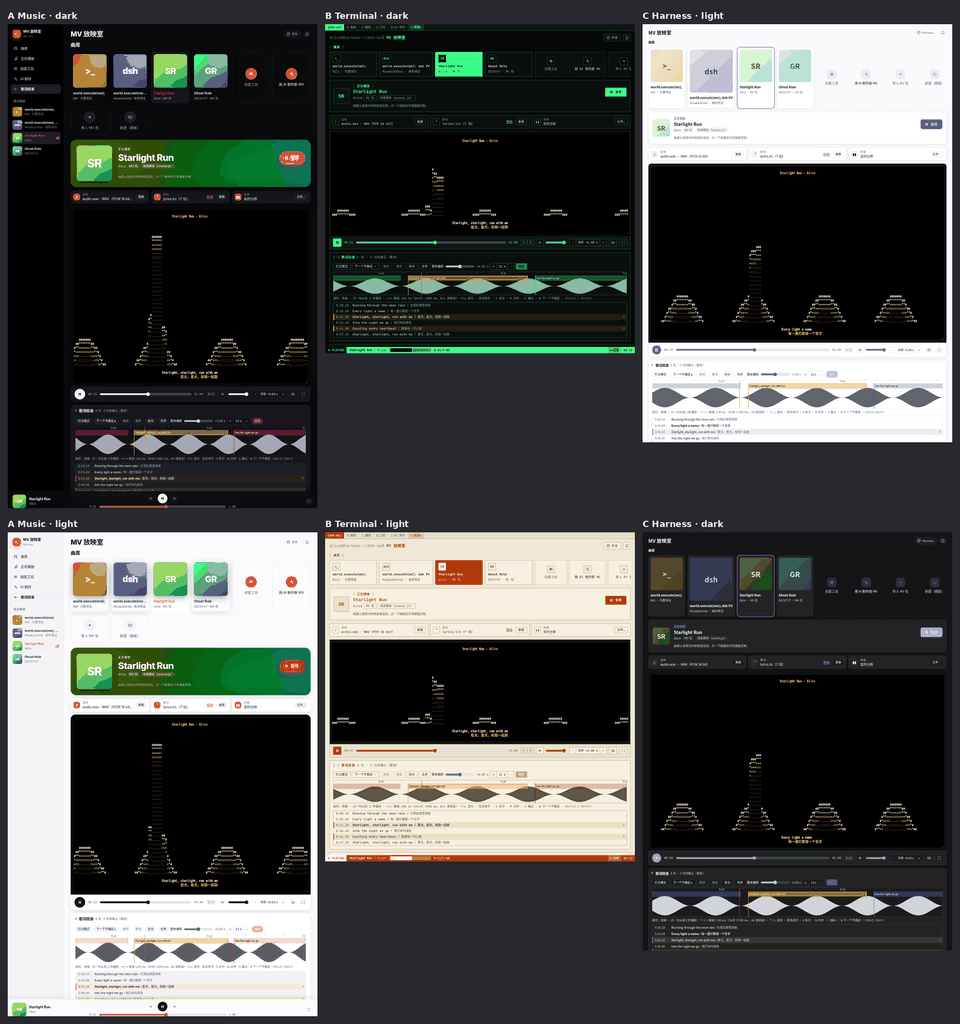 |
| world.execute(me); dsh PV workshop pack (chat scene) | Lyric calibration editor under the player |
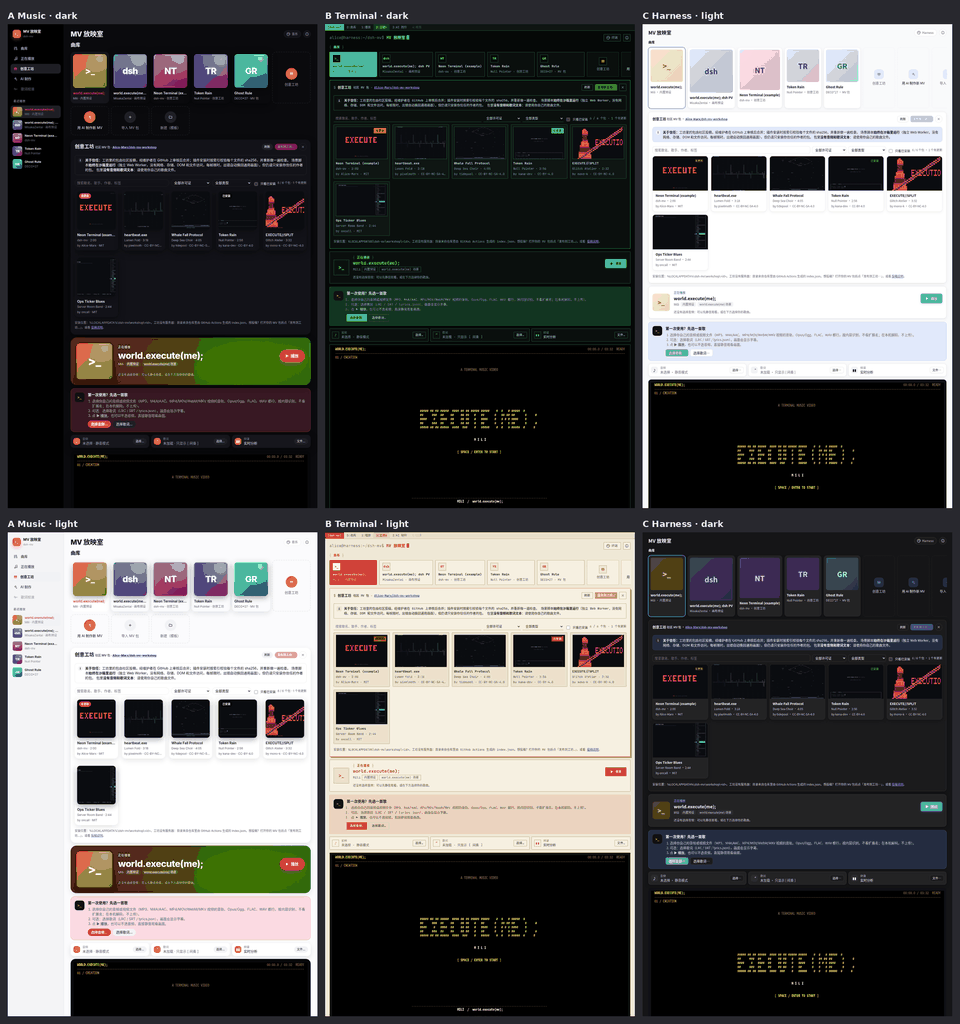 | |
| 创意工坊 browsing in three skins | |
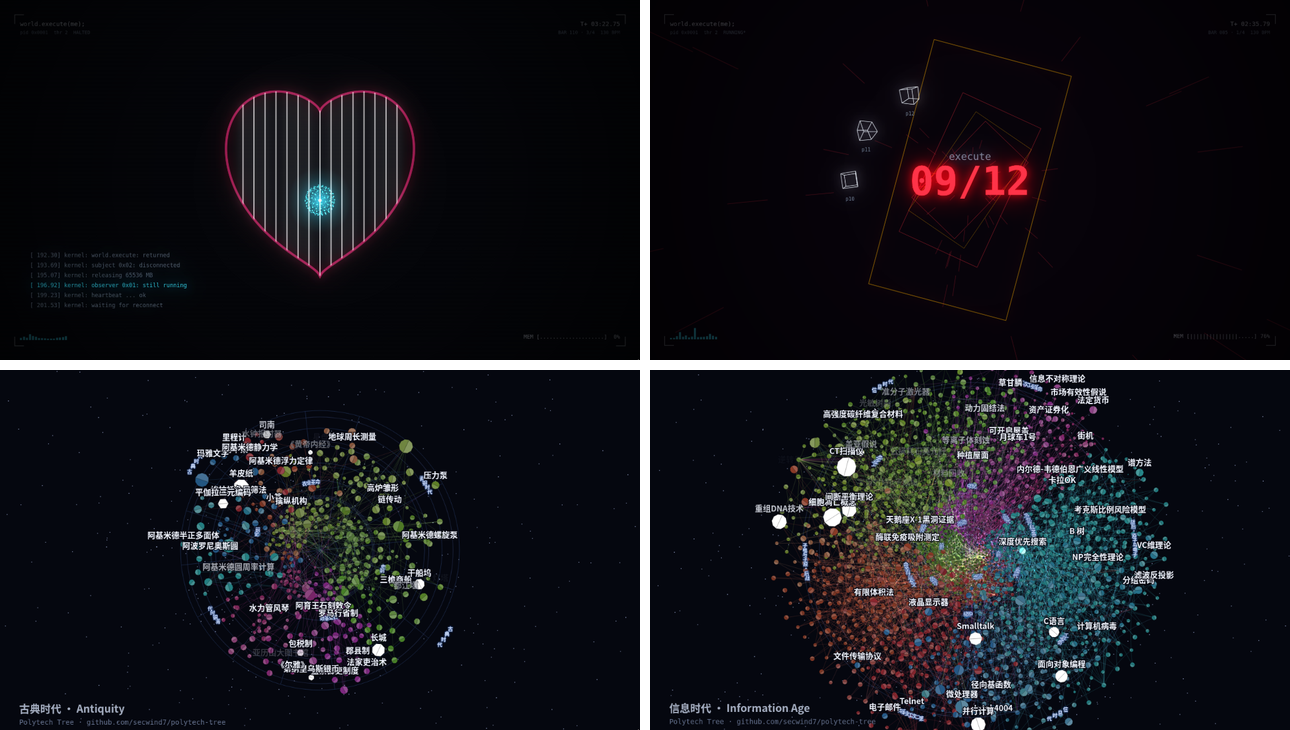 | 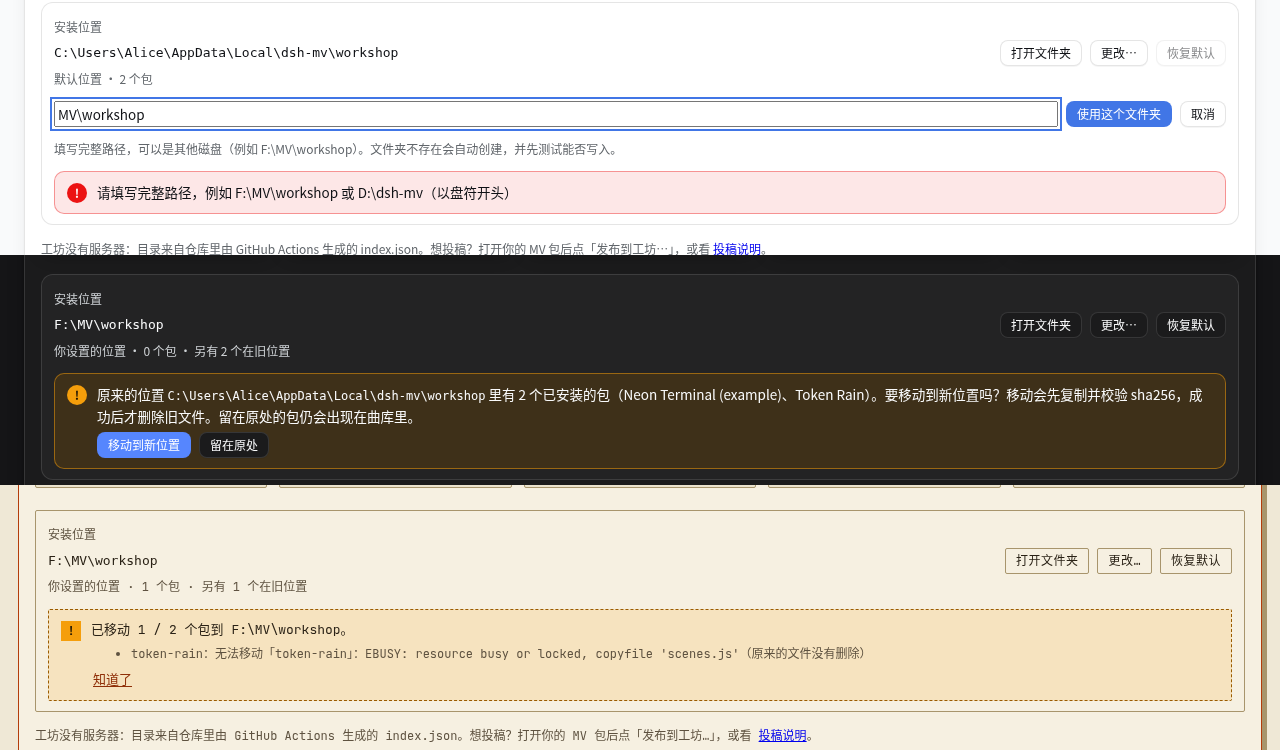 |
| 0.9.1 pixel scene packs: Wallpaper MV and Polytech Tree | 0.9.1 install location: change, move or keep |
Screenshots are captured from the standalone client UI preview in tools/ui-preview, which uses a mock Host plus placeholder demo packs and lyrics. They demonstrate rendered UI states and are not end-to-end verification against a live DSH Host.
Install
Requires DeepSeek Harness Desktop with plugin support and Node ≥ 20 on the Host (bundled with Harness). No native dependencies.
From npm (recommended): run dsh plugin --profile web add @ljwei-stak/dsh-mv-cli@0.12.1 for a web profile, or in DeepSeek Harness Desktop → Plugins → Add plugin, enter @ljwei-stak/dsh-mv-cli@0.12.1, then install and enable it.
From a GitHub Release archive: download ljwei-stak-dsh-mv-cli-.tgz and its .sha256 from Releases. Check it in PowerShell with Get-FileHash -Algorithm SHA256 -LiteralPath and compare with the .sha256 file, then enter the archive's absolute path in Plugins → Add plugin.
After installing either way:
- Fully quit Harness (including the tray icon) and start it again. The Host only loads new plugin code after a full restart. If the panel shows a "后台版本与界面不一致" banner, the restart was incomplete.
- The left sidebar shows MV 放映室 below the built-in entries. Click it to open the panel in the main area. The plugin details page (Plugins → dsh-mv-cli) also has an 打开 MV 放映室 button.
- The library starts empty: click 一键安装 next to world.execute(me); or the dsh PV (or 打开创意工坊 to browse), then pick your own copy of the song.
Upgrading from 0.8.x
0.9.0 removes the built-in presets. If one was selected, the panel says it has moved to 创意工坊 and offers 从创意工坊安装; after installing, the audio, lyrics and spectrum you had chosen for it are reused automatically. Your other packs and settings are unchanged. (0.8.x clients cannot install the dsh PV workshop pack — it exceeds their 4 MB pack limit — but they still have the built-in preset.)
The panel at a glance
The panel reads top to bottom like a music player:
- 曲库 (library): your MV packs (imported, AI-made or from the workshop; when empty, a 创意工坊 call-to-action with one-click installs of the two world.execute(me) packs), plus 创意工坊, 用 AI 制作新 MV, 导入 MV 包 and 新建(模板). 列表 / 网格 switches between the compact list (default) and cover cards; the chevron before 曲库 collapses the library to its header, the count and the row of the song now playing (remembered on this computer; the sidebar / tab 曲库 entry expands it again).
- 正在播放 (now playing): title, artist, pack type and a ▶ 播放 button; tiles for audio, lyrics and spectrum.
- Stage: the canvas plus a player bar (play/pause, seek, time, chapte