BeforeLanding/dsh-done-check ↗★ 0
dsh-done-check
Executable acceptance checklists for DeepSeek Harness coding tasks: every "done" has a recorded check result, and results go stale when the code changes.
インストール
npx -p @deepseek-ai/dsh dsh plugin --profile web add github:BeforeLanding/dsh-done-checkドキュメント
README 全文を読む ↗dsh-done-check
English | 中文

Executable acceptance checklists for DeepSeek Harness coding tasks: every "done" is backed by a check that actually ran, and old results are flagged for re-check when the code changes.
What it can and cannot tell you
- A summary such as "3 checks: 2 passed, 1 awaiting manual confirmation" covers only the agreed checks. It does not mean the requirement is fully implemented. The plugin never shows a percentage or a "completion" score.
- It guards against an agent casually rewriting the verdict: claiming tests passed, quietly changing a check command, deleting a failing check, or forging a confirmation. It does not stop a malicious agent with an unrestricted shell, which can edit the tests themselves or the files under DSH home.
- Confirming a checklist does not authorize running its commands. Checks run on the shell executor of the current DSH composition;
bash-local/pwsh-localprovide no isolation, so compose the matching sandbox executor if you need it.watchis a scope you declare, not a dependency graph inferred for you.
Demo
The demo below was recorded on 0.1.1, before the v0.2 output redesign; the old command spellings it shows (run, show) still work. It will be re-recorded. A real DSH Web workflow: passed → code changed → stale → re-run fails → inspect evidence. Captured on DSH 0.1.5-rc.1 with a small CSV export repository; the full DSH interface is shown, with each complete command held for 3 seconds before its result. Waiting time is shortened; status text is Chinese.
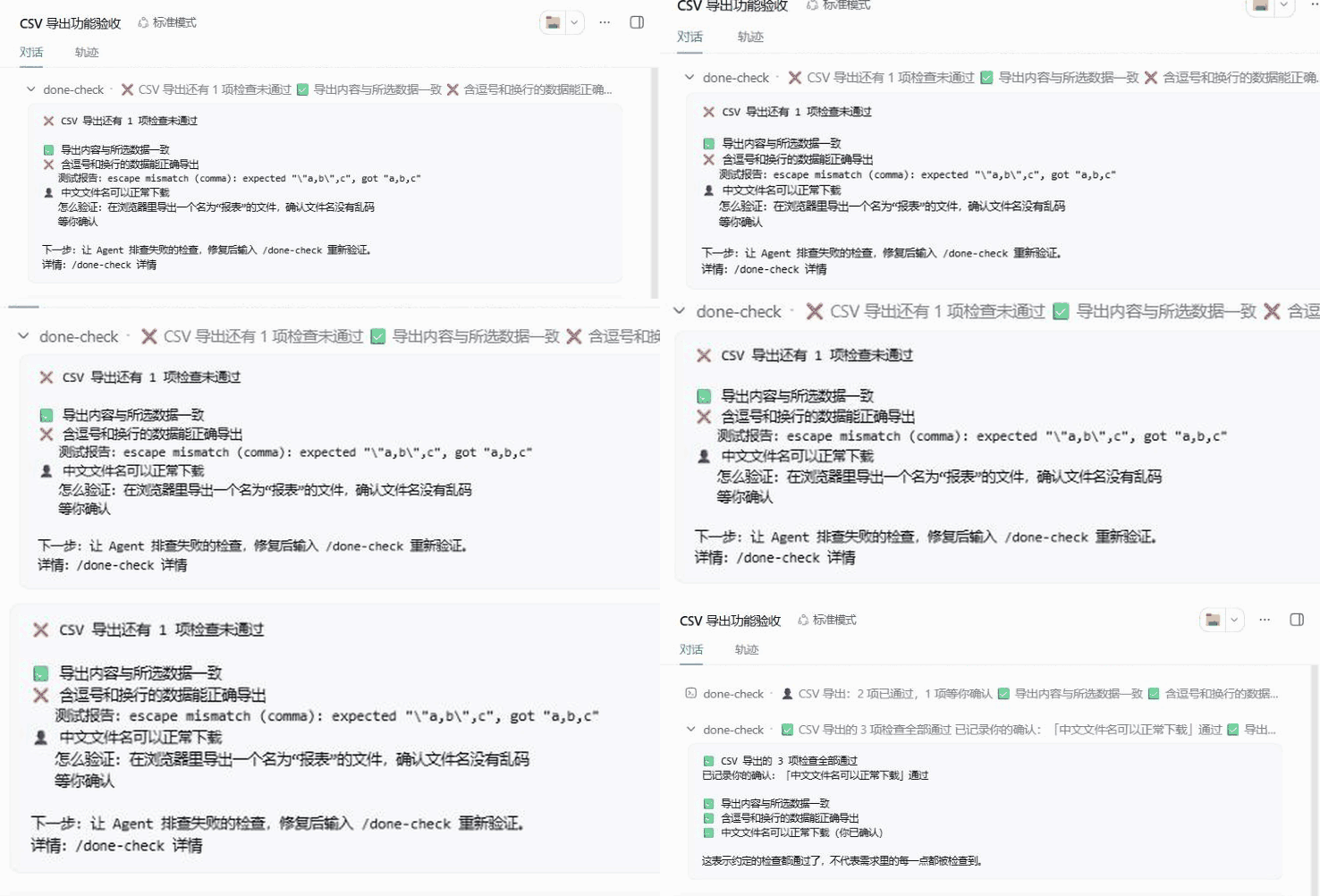
Changing the CSV separator from , to ; invalidates the old results. /done-check run then catches the regression, while /done-check show export-tests reveals the command, exit code, executor, fingerprint and log. The manual verdict was recorded before this clip and stays stale after re-running automatic checks.
Status
v0.2.0, an early release. v0.2 redesigns only what you read and type; the verification rules are unchanged, and the new output is covered by snapshot tests but has not yet been re-checked on a real DSH host. The 0.1 flow was run on real DSH web hosts (0.1.5-rc.1 and 0.2.1-rc.5), with checks executed by the real pwsh tool inside its sandbox. Supported DSH: `>=0.1.5-rc.1 add dsh-done-check
From a checkout: `pnpm install && pnpm build`, then `dsh plugin --profile  add /path/to/dsh-done-check`.

## Commands and tools

One command covers the main path: **`/done-check` does the next thing that is due** — preview the checklist, run the checks, or show the verdict. Status messages are currently in Chinese only.

| | Who | What |
|---|---|---|
| `/done-check` | you | Not confirmed yet → shows the checklist **and the commands it will run**, runs nothing. Confirmed → runs the checks that were never run or whose code changed, then shows the summary. |
| `/done-check 确认` (`confirm`) | **you only** | Confirm the checklist you were just shown. Only works on the exact list from the last preview; otherwise it shows the preview again. |
| `/done-check ok [n]` / `no [n] [note]` | **you only** | Record the result of a manual check. With one manual check waiting, no number is needed. |
| `/done-check 详情 [n]` (`details`) | you | Command, exit code, time, output tail, changed files |
| `/done-check 全部` (`all`) | you | Every check, passing ones included |
| `/done-check 技术详情 [n]` (`tech`) | you | Executor and sandbox, full fingerprint, definition hash, log path |
| `/done-check 重新检查` (`run`) | you | Force-run every automatic check |
| `done_check_draft` | Agent | Validate a drafted checklist (the Agent saves it with its own file tool) |
| `done_check_run` | Agent | Run the confirmed automatic checks |
| `done_check_status` | Agent | Read the status (returns `verdict` and `nextStep`) |

`n` is the check's position in the summary; the internal id still works. `show`, `pass` and `fail` remain as aliases for one more version.

Output answers three questions: what was checked, what is still wrong, what to do now. The first line is always a complete conclusion, for example `❌ CSV 导出还有 1 项检查未通过`. A failed check quotes up to three lines of the test's own output as "测试报告" — the plugin draws no conclusion from them. A check that could not run (permission denied, timeout, executor error) is reported as `⚠️ 没能运行`, never as a failure and never as a pass.

**Confirming is not authorizing.** Typing `/done-check` after confirming executes the confirmed commands, through your session's normal permission rules. Every command goes to the shell tool registered in your DSH composition (`pwsh`/`bash`), so your approval prompts apply; a refused command leaves no evidence.

## How it works

1. Write `done-check.yaml` in the project root (or let the Agent draft it). Name each check by something you can judge, and give manual checks a `how`:

   ```yaml
   version: 1
   task: CSV 导出
   checks:
     - id: export-tests
       name: 导出内容与所选数据一致
       run: node test/export.test.mjs
       watch: ["src/**", "test/**"]
     - id: escape-tests
       name: 含逗号和换行的数据能正确导出
       run: node test/escape.test.mjs
       watch: ["src/**", "test/**"]
     - id: zh-filename
       name: 中文文件名可以正常下载
       manual: true
       how: 在浏览器里导出一个名为“报表”的文件,确认文件名没有乱码
/done-checkpreviews it; you confirm with/done-check 确认. Confirmation and manual verdicts can only come from you, never from the Agent.- Checks run through DSH's shell tool; exit code, output, duration and a fingerprint of the workspace at that moment are recorded.
- Any change to the workspace (uncommitted edits included) turns results bound to the old content into
🔄 代码已更新,需要重新检查, and lists the changed files in the details. Editing a check makes it✏️and asks you to re-confirm; adding or removing checks or rewording the task asks you to re-confirm the whole list. - A result whose run saw the workspace or definition change is
🔄 检查时代码正在变化,结果不可信; restoring the files does not revive it.
Development
pnpm install
pnpm test
Requires Node.js ≥ 22.19 and git.
License
MIT