dsh-free-search
Free web search for DeepSeek Harness: 13 engines (Bing/DuckDuckGo/AnySearch/SearXNG/Exa/Tavily/Keenable/Firecrawl/Parallel keyless; Perplexity/SerpBase/DeepSeek with key) + time filtering + platform search + web_fetch, with web settings UI. 适合需要为DSH配置免费或自定义API Key的联网搜索能力的用户。
同名パッケージの別リポジトリ
インストール
npx -p @deepseek-ai/dsh dsh plugin --profile web add github:DDDMUC/dsh-free-searchドキュメント
README 全文を読む ↗使用
网页设置(推荐)
安装后按 DSH 版本打开配置页:
- DSH 0.1.6-alpha.2 及以上:左侧 插件 页 → 已安装 分组 →
free-search→ 点击组件行web-search-free(行内"配置"入口) - DSH 0.1.5 及更早:设置 → 插件 → 可配置 标签页 → Free Search 卡片
配置页提供:
-
Search engine:下拉框切换引擎,保存即生效
-
API keys:为 Exa / Tavily / Keenable / Firecrawl / Parallel / Perplexity / DeepSeek 填写 key(密码框,保存后只显示"已配置";Exa / Tavily / Keenable / Firecrawl / Parallel 不填也可免 key 使用)
- 推荐:付费引擎 key 建议写入 harness 凭据中心
~/.dsh/.credentials.yaml(如DEEPSEEK_API_KEY: sk-...,与官方 LLM provider 一致,一处管理所有 key)。插件读取优先级:凭据中心 > 设置页 > 环境变量,设置页填的 key 仅作为遗留兼容。
- 推荐:付费引擎 key 建议写入 harness 凭据中心
-
Test engine:直测当前引擎可用性(不走回退链,付费引擎无 key 会明确报错)
-
Use Bing default:把当前搜索引擎切回稳定的免费 Bing;
Discard只撤销尚未保存的编辑 -
Platform search:勾选启用 GitHub / V2EX / Bilibili 平台搜索(
platform_search工具按此过滤) -
EN / 中文:切换界面语言(默认中文)
[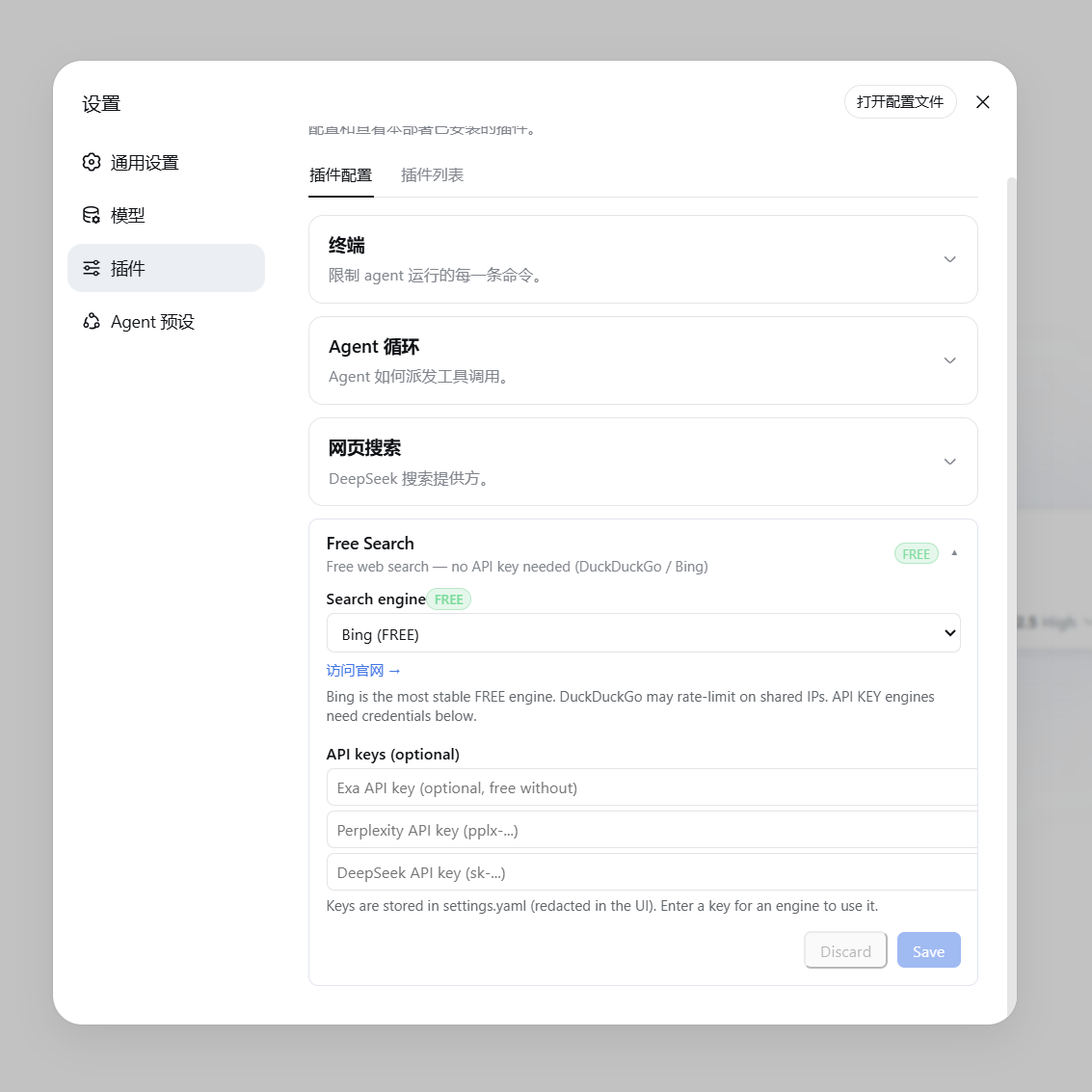](https://raw.githubusercontent.com/DDDMUC/dsh-free-search/master/assets/settings-free.png) ▲ 免费引擎(显示绿色 FREE 徽章与官网链接) [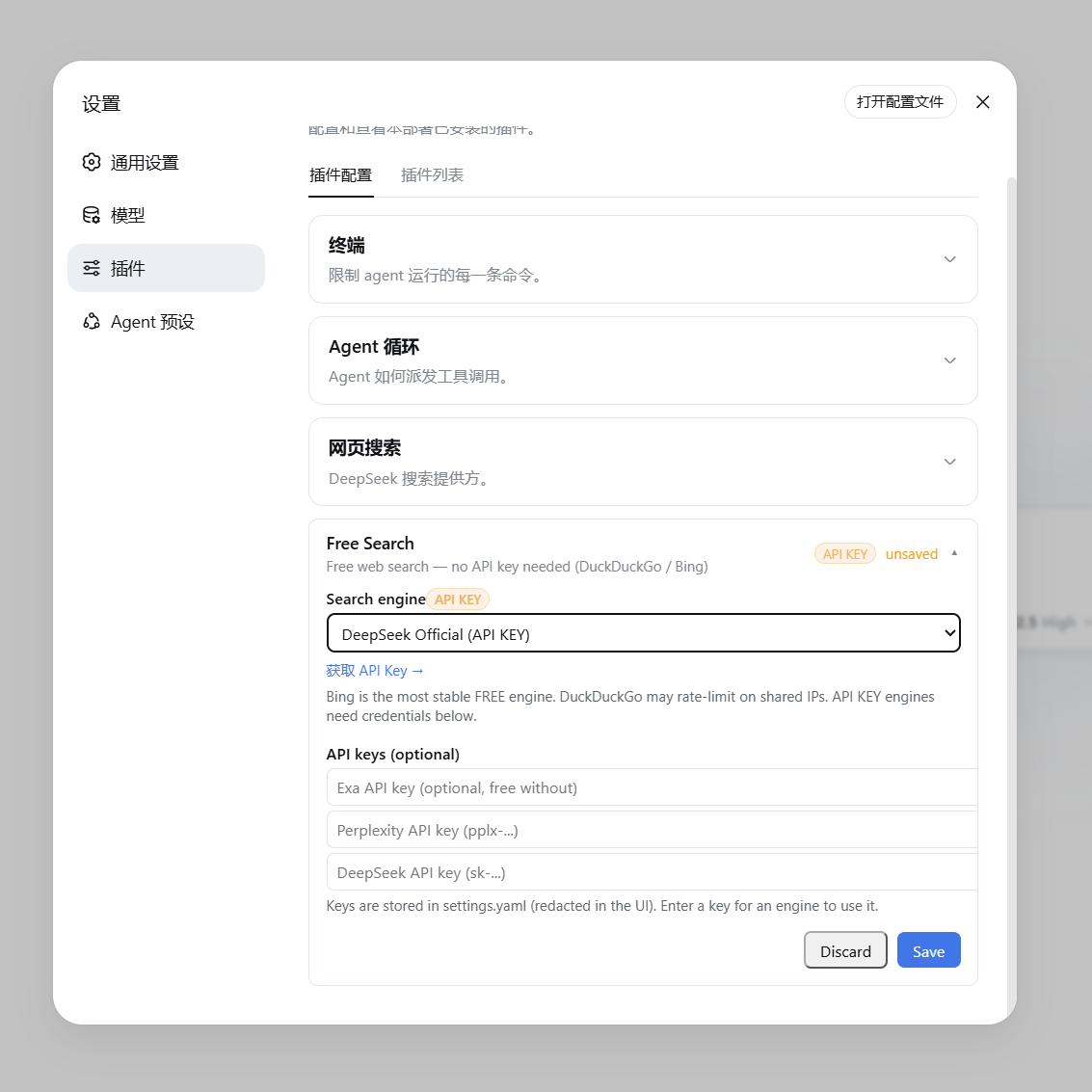](https://raw.githubusercontent.com/DDDMUC/dsh-free-search/master/assets/settings-apikey.png) ▲ 付费/API Key 引擎(显示橙色 API KEY 徽章与获取链接)
聊天框切换引擎(/free-search-engine)
不用进设置页也能切换引擎:在聊天框输入 /free-search-engine,弹出引擎选择窗口(和 /model 选模型一样的交互),点选即切换,当前引擎会标记出来。等效于设置页切换 + 保存,且界面语言跟随设置页(中文/英文)。
命令只改首选引擎配置,搜索仍走 web_search + 统一回退链:即使首选引擎挂了也会自动换其他引擎,永不直接失败。系统提示词同步刷新。
配置文件
配置存在 ~/.dsh/settings.yaml:
free-search:
  provider: bing              # ddg / ddg-lite / bing / searxng / anysearch / exa / tavily / keenable / firecrawl / parallel / perplexity / serpbase / deepseek-official
  lang: zh                    # 设置页界面语言(zh / en)
  bingMarket: zh-CN           # Bing 市场
  region: cn-zh               # DuckDuckGo 区域(可选)
  searxngInstances:           # 自定义 SearXNG 实例(可选)
    - https://your-instance.example
  exaApiKey: ...              # 或通过设置页填写
  tavilyApiKey: ...           # 或通过设置页填写
  keenableApiKey: ...         # 或通过设置页填写
  firecrawlApiKey: ...        # 或通过设置页填写
  parallelApiKey: ...         # 或通过设置页填写
  perplexityApiKey: ...
  serpbaseApiKey: ...         # 或通过设置页填写
  deepseekApiKey: ...
让 agent 测试所有引擎
对 agent 说"测试一下所有搜索引擎",它会调用 free_search_test 工具,逐个测试并报告:
Search engine test:
- ddg: FAIL - DuckDuckGo is rate-limited right now (anti-bot challenge, usually temporary) - Bing works
- bing: OK (2 results, e.g. "DeepSeek Harness developer preview...")
- exa: FAIL - EXA_API_KEY not configured
时间过滤(advanced_search)
让 agent 搜"最近一周的新闻"、"这个月的发布"、"最近 3 天的消息"、"7 月以来的更新",它会调用 advanced_search 工具,带 timeRange 参数。该工具同样走统一回退链,且可显式指定 engine,返回结构同 web_search。
timeRange 支持三种形式:
| 形式 | 示例 | 含义 |
|---|---|---|
| 固定档 | day / week / month / year | 分别 = 1 / 7 / 30 / 365 天 |
| 自定义相对值 | 12h、3d、2mo、1y | 最近 12 小时 / 3 天 / 2 个月 / 1 年 |
| 绝对日期 | 2026-07-01 | 该日期(含)之后发布的结果 |
各引擎对 timeRange 的处理逻辑:
| 引擎 | 参数 | 是否精确 | 说明 |
|---|---|---|---|
| Exa | startPublishedDate | ✅ 精确 | 自定义天数转成 ISO 日期(N 天前),绝对日期原样传入 |
| Keenable | published_after | ✅ 精确 | 相对值原样传(12h/3d/2mo/1y),绝对日期原样传 |
| Tavily | time_range | ⚠️ 近似 | 只认固定档,自定义天数自动映射到最近似档位 |
| Firecrawl | tbs | ⚠️ 近似 | 固定档映射到 qdr:d/w/m/y;绝对日期用 cdr:1,cd_min:M/D/YYYY(精确) |
| Parallel | source_policy.after_date(有 key 时精确);无 key 走 MCP,无日期参数,改为把窗口写进 objective 作为新鲜度提示(软过滤) | ✅ 精确 / ⚠️ 软过滤 | 自定义天数转成 ISO 日期(N 天前),绝对日期原样传入 |
| SearXNG | time_range | ⚠️ 近似 | 同上 |
| DuckDuckGo / Lite | df | ⚠️ 近似 | 同上 |
| Bing / AnySearch | — | ❌ 忽略 | 无对应参数 |
"最近似档位"映射规则:≤2 天 → day,≤14 天 → week,≤90 天 → month,否则 year。例如 3d 在 Tavily 上按 day 处理,2mo 按 month 处理。
引擎链优先级:当带 timeRange 搜索时,支持时间过滤的引擎(tavily / exa / keenable / firecrawl / parallel / searxng / ddg / ddg-lite)会排到引擎链前面,确保过滤真正生效——即使首选引擎是 bing(不支持过滤),也会先尝试支持过滤的引擎。
示例对话:"帮我搜最近 3 天关于 DSH 的新闻" → agent 调用 advanced_search,timeRange: "3d"。
抓取网页内容(web_fetch)
搜索到 URL 后,可以让 agent 读取网页全文(如"打开第一个链接看看内容")。web_fetch 工具已启用(官方 dsh-web-fetch-http provider):
- 自动跟随重定向、解码正文(HTML 转文本)
- 支持超时和大小限制
- ⚠️ 注意:
web_fetch无 SSRF 防护,agent 理论上可访问内网地址——按需使用
平台搜索(platform_search)
让 agent 搜特定平台,如"在 GitHub 上搜 deepseek harness"、"看看 B站有什么相关视频"、"V2EX 上关于 dsh 的讨论"。platform_search 工具支持:
| 平台 | 用途 |
|---|---|
github | GitHub 仓库搜索(API,免费无 key) |
v2ex | V2EX 热门/相关主题 |
bilibili | B站视频/内容搜索(公开接口) |
reddit | Reddit 帖子/讨论搜索(公开 JSON API;部分网络环境可能被 Reddit 反爬拦截) |
hn | Hacker News 技术社区讨论(Algolia 官方 API) |
stackoverflow | Stack Overflow 技术问答(Stack Exchange 官方公开 API) |
wikipedia | 维基百科词条(中文环境用 zh.wikipedia.org,lang: en 时切换 en.wikipedia.org) |
npm | npm 包搜索(registry 官方 API) |
全部走公开 API,零外部依赖、无需任何 key,开箱即用。
Usage
Web Settings (Recommended)
After installation, open the config page according to your DSH version:
- DSH 0.1.6-alpha.2 and later: sidebar Plugins page → Installed group →
free-search→ click theweb-search-freecomponent row (the row's "configure" entry) - DSH 0.1.5 and earlier: Settings → Plugins → Configurable tab → Free Search card
The config page provides:
-
Search engine: Select an engine from the dropdown; changes take effect immediately upon saving.
-
API keys: Enter keys for Exa / Tavily / Keenable / Firecrawl / Parallel / Perplexity / DeepSeek (password fields; displayed as "configured" once saved; Exa / Tavily / Keenable / Firecrawl / Parallel work without a key too).
- Recommended: store paid-engine keys in the harness credential center
~/.dsh/.credentials.yaml(e.g.DEEPSEEK_API_KEY: sk-..., same as the official LLM providers — one place for all keys). Resolution order: credentials center > settings page > environment variable; the settings-page fields remain for backward compatibility.
- Recommended: store paid-engine keys in the harness credential center
-
Test engine: Tests the selected engine directly (no fallback chain; paid engines without a key report an explicit error).
-
Use Bing default: stage a switch back to the stable free Bing engine;
Discardonly cancels unsaved edits -
Platform search: check platforms (GitHub / V2EX / Bilibili / Reddit / HN / Stack Overflow / Wikipedia / npm) to enable them for the
platform_searchtool (disabled platforms are skipped). -
EN / 中文: toggle the interface language (default Chinese).
[](https://raw.githubusercontent.com/DDDMUC/dsh-free-search/master/assets/settings-free.png) ▲ Free Engine (shows green FREE badge and official website link) [](https://raw.githubusercontent.com/DDDMUC/dsh-free-search/master/assets/settings-apikey.png) ▲ Paid / API Key Engine (shows orange API KEY badge and link to get an API key)
Switching Engines from the Chat (/free-search-engine)
You can also switch the engine right from the chat — no need to open the settings page. Type /free-search-engine: a picker opens with all engines (the same interaction as /model for selecting a model). Click one to switch; the current engine is marked. Equivalent to switching and saving in the settings page, and the language follows the settings page (Chinese/English).
The command only changes the preferred engine; search still goes through web_search + the unified fallback chain — even if the preferred engine fails, it automatically switches to others, never failing outright. The system prompt refreshes accordingly.
Configuration File
Configuration is stored in ~/.dsh/settings.yaml:
free-search:
  provider: bing              # ddg / ddg-lite / bing / searxng / anysearch / exa / tavily / keenable / firecrawl / parallel / perplexity / serpbase / deepseek-official
  lang: zh                    # settings UI language (zh / en)
  bingMarket: zh-CN           # Bing market
  region: cn-zh               # DuckDuckGo region (optional)
  searxngInstances:           # Custom SearXNG instances (optional)
    - https://your-instance.example
  exaApiKey: ...              # Or configure via the web settings UI
  tavilyApiKey: ...           # Or configure via the web settings UI
  keenableApiKey: ...         # Or configure via the web settings UI
  firecrawlApiKey: ...        # Or configure via the web settings UI
  parallelApiKey: ...         # Or configure via the web settings UI
  perplexityApiKey: ...
  serpbaseApiKey: ...         # Or configure via the web settings UI
  deepseekApiKey: ...
Asking the Agent to Test All Engines
Tell the agent "Test all search engines", and it will call the free_search_test tool to check each engine sequentially and report back:
Search engine test:
- ddg: FAIL - DuckDuckGo is rate-limited right now (anti-bot challenge, usually temporary) - Bing works
- bing: OK (2 results, e.g. "DeepSeek Harness developer preview...")
- exa: FAIL - EXA_API_KEY not configured
Time Filtering (advanced_search)
Ask the agent for "news from the last week", "releases this month", "updates from the last 3 days", or "posts since July", and it will call the advanced_search tool with a timeRange parameter. It uses the same unified fallback chain, can force a specific engine, and returns the same shape as web_search.
The timeRange parameter accepts three forms:
| Form | Example | Meaning |
|---|---|---|
| Fixed tier | day / week / month / year | = 1 / 7 / 30 / 365 days |
| Custom relative | 12h, 3d, 2mo, 1y | last 12 hours / 3 days / 2 months / 1 year |
| Absolute date | 2026-07-01 | results published on or after that date |
How each engine handles timeRange:
| Engine | Parameter | Precise? | Notes |
|---|---|---|---|
| Exa | startPublishedDate | ✅ precise | custom days become an ISO date (N days ago); absolute dates pass through |
| Keenable | published_after | ✅ precise | relative values (12h/3d/2mo/1y) and absolute dates pass through |
| Tavily | time_range | ⚠️ approximate | only fixed tiers; custom days map to the nearest tier |
| Firecrawl | tbs | ⚠️ approximate | fixed tiers map to qdr:d/w/m/y; absolute dates use cdr:1,cd_min:M/D/YYYY (precise) |
| Parallel | source_policy.after_date with a key (precise); without a key the MCP path has no date parameter, so the window is written into the objective as a freshness hint (soft filter) | ✅ precise / ⚠️ soft | custom days become an ISO date (N days ago); absolute dates pass through |
| SearXNG | time_range | ⚠️ approximate | same as above |
| DuckDuckGo / Lite | df | ⚠️ approximate | same as above |
| Bing / AnySearch | — | ❌ ignored | no corresponding parameter |
Nearest-tier mapping rule: ≤2 days → day, ≤14 days → week, ≤90 days → month, otherwise year. For example, 3d becomes day on Tavily, and 2mo becomes month.
Engine-chain priority: when a timeRange is present, engines that support time filtering (tavily / exa / keenable / firecrawl / parallel / searxng / ddg / ddg-lite) are moved to the front of the fallback chain, so the filter actually takes effect — even if the preferred engine is bing (which does not support filtering), a filtering-capable engine is tried first.
Example: "Find DSH news from the last 3 days" → agent calls advanced_search with timeRange: "3d".
Fetch Webpage Content (web_fetch)
After searching, the agent can read full webpage content (e.g., "Open the first link and summarize it"). The web_fetch tool is enabled by default (official dsh-web-fetch-http provider):
- Automatically follows redirects and decodes HTML to plain text.
- Supports timeout and response size limits.
- ⚠️ Note:
web_fetchdoes not have SSRF protection; the agent could theoretically access internal network addresses. Use as needed.
Platform Search (platform_search)
Ask the agent to search specific platforms (e.g., "Search GitHub for deepseek harness", "Find related videos on Bilibili", or "Discussions about dsh on V2EX"). The platform_search tool supports:
| Platform | Purpose |
|---|---|
github | GitHub repository search (public API, free, no key required) |
v2ex | V2EX hot / relevant topics |
bilibili | Bilibili video / content search (public API) |
reddit | Reddit posts / discussions (public JSON API; may be blocked by Reddit anti-bot in some network environments) |
hn | Hacker News tech community discussions (official Algolia API) |
stackoverflow | Stack Overflow Q&A (official public Stack Exchange API) |
wikipedia | Wikipedia articles (zh.wikipedia.org for Chinese; switches to en.wikipedia.org when lang: en) |
npm | npm package search (registry official API) |
All platform searches rely on public endpoints with zero external dependencies and no API keys — they work out of the box.