Jovan1666/dsh-commandcode-quota ↗★ 4
dsh-commandcode-quota
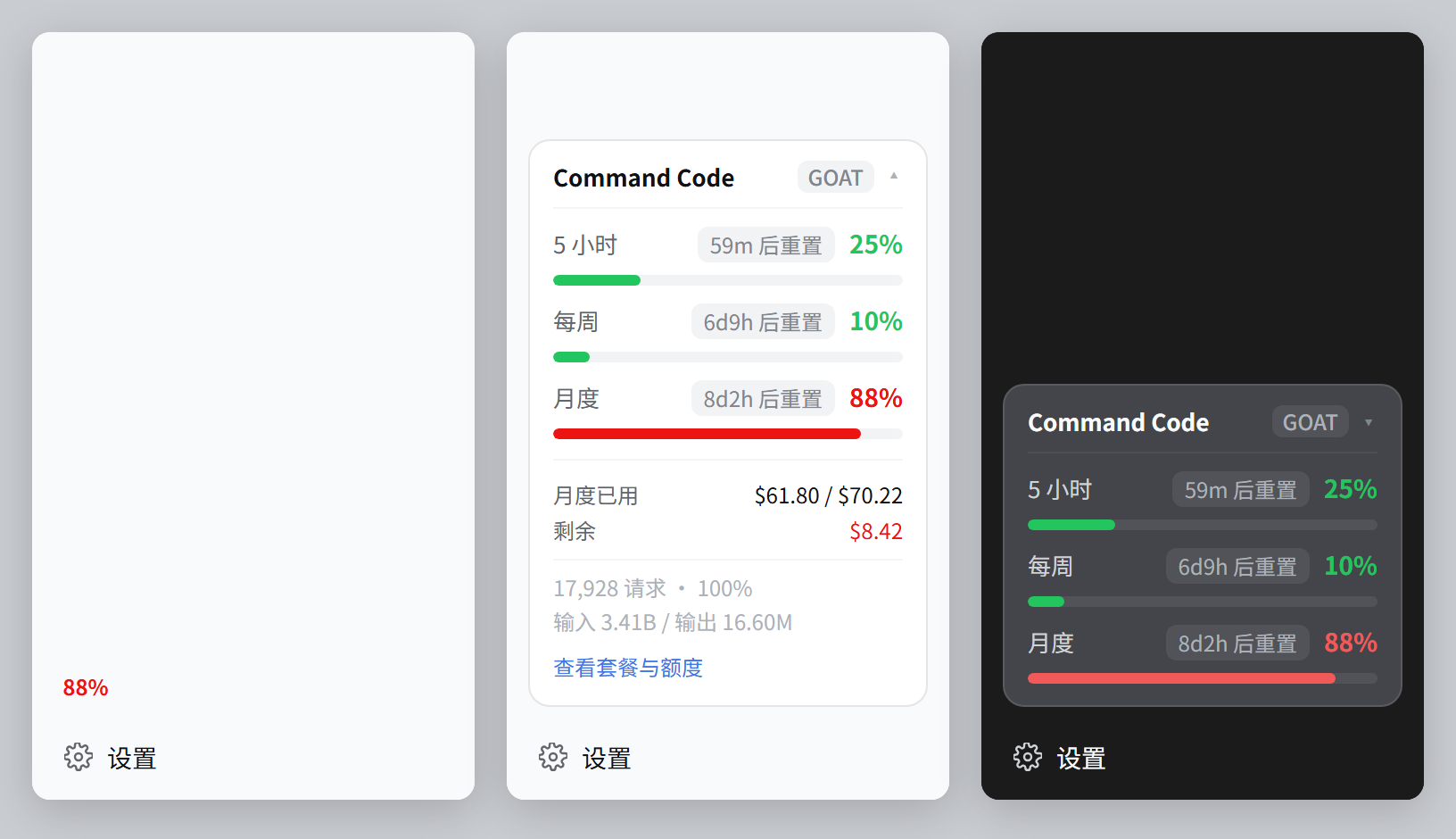
Command Code plan quota panel for DeepSeek Harness: monthly / 5-hour / weekly credit windows with reset countdowns, above the sidebar Settings seat. 适合Command Code用户,需要实时查看多窗口信用额度及重置倒计时。
同名パッケージの別リポジトリ
インストール
npx -p @deepseek-ai/dsh dsh plugin --profile web add github:Jovan1666/dsh-commandcode-quotaドキュメント
README 全文を読む ↗Command Code quota for DeepSeek Harness
Your 5-hour, weekly and monthly credit windows, in the sidebar — right above Settings.
No browser tab, no login, no guessing how much of the plan is left.





What you get
| Three windows, one glance | 5-hour, weekly and monthly, shortest first — so the tightest limit is where your eye lands |
| Percentage first | The headline rounds to a whole percent, exactly like the Command Code dashboard, so the card and the website never disagree |
| Money where it matters | Used and remaining for the monthly allowance; exact figures for every row on hover |
| Instant, then live | The card is on screen about 2 ms after a restart, and live about a second later |
| Quiet when it should be | No Command Code account? The card does not render at all |
| Bilingual | The card follows your DSH interface language (中文 / English) |
Everything is read from your own account's data — window count, caps and percentages come from the API, never assumed. GOAT, Pro, Provider, Max and Teams work; a plan that reports no rolling windows simply renders no rows. (The $1 Go tier is the exception — it has no API access, so the card has nothing to render there.)
Check your dsh version first
This plugin needs dsh ^0.1.5-rc.1. On anything older it crashes at startup:
Error: failed to apply loader entry commandcode-quota:
Cannot read properties of undefined (reading 'register')
The ctx.connection.fetch seam it relies on does not exist in older releases. Check before you install:
dsh --version          # needs 0.1.5-rc.1 or newer
npm i -g @deepseek-ai/dsh@latest
Note that the plugin's 146 offline checks also pass on an older dsh — they never start dsh. So "the checks are green" does not mean it will work once installed.
Install
dsh plugin --profile web add github:Jovan1666/dsh-commandcode-quota
Then restart dsh web and reload the browser page. That is the whole setup — no configuration file, no API key to paste: if Command Code is already a provider in your DSH settings, the plugin finds it.
The package declares a bundle patch (dsh.bundle.patch → its cordis.patch.yml), so dsh plugin add registers the plugin row for you. Do not also append that row to your profile's cordis.patch.yml. Two layers inserting the same loader id make dsh refuse to start: duplicate loader entry id: commandcode-quota. The row belongs to the manual install below, where no bundle layer exists.
Other ways to install, and how to remove it
From a local clone
git clone https://github.com/Jovan1666/dsh-commandcode-quota
dsh plugin --profile web add ./dsh-commandcode-quota
Manually, without pnpm — link the folder into the profile's node_modules, then register the row yourself, since nothing else will:
# $DSH_HOME/profiles/web/cordis.patch.yml
- insert:
    - id: commandcode-quota
      name: "dsh-commandcode-quota"
A freshly created profile ends that file with []. Replace the [] — appending a sequence under it is not valid YAML, and the profile will not load.
# macOS / Linux  ($DSH_HOME defaults to $HOME/.dsh)
ln -s "$PWD/dsh-commandcode-quota" "${DSH_HOME:-$HOME/.dsh}/profiles/web/node_modules/dsh-commandcode-quota"
# Windows  ($env:DSH_HOME defaults to $env:USERPROFILE\.dsh)
$dsh = if ($env:DSH_HOME) { $env:DSH_HOME } else { "$env:USERPROFILE\.dsh" }
New-Item -ItemType Junction -Path "$dsh\profiles\web\node_modules\dsh-commandcode-quota" -Target "$PWD\dsh-commandcode-quota"
To remove it: dsh plugin --profile web remove dsh-commandcode-quota drops the package and the bundle layer that registers it; a manual install instead deletes the cordis.patch.yml row. Restart dsh web either way. To clear the cached snapshot too, delete $DSH_HOME/dsh-commandcode-quota/.
Why it appears before you look
The card used to wait out a full upstream round trip before drawing anything, and a restarted dsh has nothing cached — which is exactly the "it takes a moment to show up" feeling. Measured against the live API with node preview/latency.mjs:
| First answer after a restart, snapshot on disk | ~2 ms |
| First answer after a restart, no snapshot yet | ~1.4 s |
| The four endpoints requested one after another | ~2.3 s |
| The four endpoints requested together | ~1.2 s |
Two things make the difference:
- All four endpoints are requested at once.
whoamiused to be awaited on its own — about 590 ms of pure waiting, to learn an org id that personal accounts never report. - The last good report is kept on disk. A cold start answers with it immediately — dimmed, and labelled with how old it is — while a live read runs behind it. The card re-asks 3 seconds later instead of waiting out the usual minute, so the numbers are live by the time you have read them.
How to read the card
| Window | What it means | On GOAT |
|---|---|---|
| 5-hour | Rolling burst limit — one long session cannot drain the month | $14 |
| Weekly | Rolling 7-day limit | $35 |
| Monthly | The billing period's credit allowance | $70 |
Each row shows the used percentage (green below 60 %, amber below 85 %, red above), a meter in the same colour, and a reset countdown (59m, 6d9h, 8d1h). Click the card for the monthly allowance in money, the remaining credit, the request count and the token totals. Collapse the sidebar and the card becomes a 36 px badge showing the most constrained window.
Reading the numbers
- Percentages are
used ÷ (used + remaining), read live from the API.preview/e2e-live.mjsasserts that identity against a real account on demand. - The headline rounds to a whole percent, the same way the dashboard does. That is why the website can say
100%while the exact share is99.84%— same data, two roundings. The exact figure and the money are one hover away. - The monthly cap is the sum of two figures from two different endpoints. Across a billing-period rollover or a plan change those two can describe different periods, and the sum would look plausible while being wrong by tens of percent. The plan's nominal allowance is the sanity check; when a read fails it, the host reports no percentage at all and the card says why. The next refresh corrects it.
What the card deliberately leaves out
The sidebar is about 200 px of content width, and a laptop screen makes small type smaller still. So the card answers one question well — how deep am I? — instead of laying out everything the API returns:
- Money only for the monthly allowance. The 5-hour and weekly windows are pass/fail gates, not budgets; their dollar rows told a user nothing they could act on. Hover still shows exact figures.
- No pace verdict, no burn-rate forecast. "Over pace" cannot be acted on by someone who has work to do, and a projected exhaustion date assumes a constant burn rate that credit usage never has. The host still exposes
projectionin its JSON for scripts. - Nothing silent. A row that disappears because its endpoint failed says so; a failure with nothing to fall back on says what went wrong in one readable line, with the full diagnostic text on hover.
The /quota command
Type /quota in a conversation to print the same report as text:
Command Code · GOAT (active)
5-hour 1.4% used · resets in 3h17m
Weekly 12.8% used · resets in 6d7h
Monthly 99.8% used · $70.11 / $70.23 · $0.11 left · resets in 7d22h
18,087 requests · 100% success · in 3.49B / out 16.77M
It reads the same cached report the card does, so a slash invocation costs no extra upstream requests — and unlike the card, it never answers from a stale snapshot: typing a command means asking for the current numbers. Its text is English; the card is the bilingual surface.
Requirements
- DeepSeek Harness
^0.1.5-rc.1. The plugin uses framework seams that are not a stable public API yet; see Compatibility. - The web profile. The card mounts into the browser sidebar through the
connectionservice, which only the web app composes — a headless or CLI profile has nowhere to put it. - A Command Code account with API access. Every plan except the
$1Go tier includes it; see Getting a Command Code plan. - Node.js 18+ — only for the optional CLI and the development scripts.
Getting a Command Code plan
The card reads any Command Code plan that has API access. This plugin was built against GOAT: $10/month, which buys $70 of credits, gated at $14 per 5-hour window and $35 per rolling week.
GOAT is the tier that suits an agent harness. Command Code's own estimate for DeepSeek V4 Flash on that allowance is ~154,000 requests a month (~30,800 per 5-hour window, ~76,900 per week), because flash-tier models bill at roughly $0.15 input / $0.60 output per million tokens with cache reads at $0.003. A coding agent spends its budget on exactly those calls: many small turns, most of the context re-read from cache. Tens of thousands of tool-calling turns a month is ordinary work, and at that price the window caps and the monthly allowance are what run out — not the request count.
Two caveats on those numbers, both from the same page: the request counts assume a typical agent turn of ~800 fresh input tokens, ~50,000 cache-read tokens and 125–200 output tokens, so a run that carries a large repo context drains the allowance faster; and DeepSeek is billed by time of day, with peak hours priced higher (01:00–04:00 and 06:00–10:00 UTC, Mon–Fri). Command Code states that allowances can change at any time — the pricing page is authoritative, and the figures above are what it said on 2026-09-19.
Subscribing
-
Sign in at commandcode.ai and open Pricing, or Studio → Billing.
-
Choose GOAT and check out. Card payments run through Stripe; Alipay is supported on the USD-denominated plans and sets up automatic renewal, which is worth knowing before the first invoice. UnionPay is not listed.
-
In Studio, open API keys → Generate. The key looks like
user_…, notsk-…. -
Hand it to dsh. Settings → Models takes a provider interactively; by file, add a route to
$DSH_HOME/settings.yaml:llm-pi-ai: providers: command-code-goat: apiKeyEnv: COMMAND_CODE_GOAT_API_KEY api: openai-completions baseURL: https://api.commandcode.ai/provider/v1 models: - id: deepseek/deepseek-v4.1-flash contextWindow: 1000000 input: ["text", "image"]Keep the key itself out of the file: put it in the environment, or in
$DSH_HOME/.credentials.yamlunderrefs.COMMAND_CODE_GOAT_API_KEY. Nothing else is needed — Credentials is how the card finds this same route, which is why installing the plugin never asks for a key.
Before you subscribe
- Go (
$1) has no API access. All four quota endpoints answer 404, which the plugin reports as "this plan has no API access" rather than as an error it can retry. - The 5-hour and weekly windows start at your first request, not at a calendar boundary, and switching plans clears both of them. The card shows the reset times the API reports instead of computing them from a period start.
- One account per person. The terms forbid sharing, reselling, or rotating keys across accounts, and a violation puts every account involved at risk of a permanent ban.
- Other tiers, same card.
$20Pro ($80of credits) is the same shape with more headroom and$100/$200Max scale it again. The$15Provider plan is metered API access with no rolling windows, so the card shows the balance and no window rows.
Credentials
The API key never reaches the browser. The host resolves it in this order and reports which source won:
- An explicitly passed key (the CLI's
--key). - Discovered from your own
$DSH_HOME/settings.yaml— any provider route whosebaseURLpoints atcommandcode.ai. The plugin reads that route's literalapiKeyor itsapiKeyEnv, then resolves the name through the environment and$DSH_HOME/.credentials.yaml. The provider's host is kept (a staging host or proxy works), but only its origin: the quota endpoints live at the host root, not under the provider's/provider/v1path. - Environment variables:
COMMANDCODE_API_KEY,COMMAND_CODE_API_KEY,CMD_API_KEY, then any variable whose name containscommandcode. - Those same names inside
$DSH_HOME/.credentials.yaml(refs.). ~/.commandcode/auth.json, the officialcommand-codeCLI's login state.
Step 2 is what makes this work for other people: it follows your provider configuration instead of hardcoding one naming convention.
How it works — endpoints, seams, and the one that bit us
flowchart LR
  A["Sidebar card
(browser half)"] -->|"POST /api/cc-quota/report
same origin, session cookie"| B["Host half
(15 s cache + disk snapshot)"]
  B -->|"four read-only GETs, in parallel"| C["Command Code API
/alpha/*"]
| Endpoint | Used for |
|---|---|
/alpha/whoami | Account name, org id |
/alpha/usage/summary | Credits used this period, requests, success rate, tokens |
/alpha/billing/credits | Remaining credits, the 5-hour and weekly windows |
/alpha/billing/subscriptions | Plan id, status, billing-period start and end |
Each endpoint degrades on its own: one failure is recorded in the report's failures, is shown on the card as a muted line, and the rest still render. All four failing raises one error with the most specific code — including "this plan has no API access" when all four answer 404.
Compatibility
The plugin depends on framework seams that are not a stable public API yet. Each is pinned to what dsh 0.1.5-rc.1 actually exposes:
| Seam | Used for |
|---|---|
sidebar.footer.action slot | The seat above Settings, in both sidebar widths |
ctx.slots.register({ name, id, order, inject }, Component) | Contributing the card |
ctx.connection.rpc.call(channel, endpoint, payload, signal) | The browser side of the request |
ctx.connection.fetch.register({ path, methods, requestBody, fetch }) | The host side of the route |
ctx.get('commands') + commands.register({ name, description, handler }) | The optional /quota command |
dsh.client manifest + exports["./client"] | Client-bundle discovery, served at /plugins//client.js |
Why an exact Fetch route instead of
connection.rpc.handle?rpc.handlemounts its channel throughowner.webServer, whereowneris the Connection service's own context — which never injectswebServer. Calling it from any other plugin throwscannot get property "webServer" without inject, whatever the caller injects.connection.fetch.registeronly writes the route table, works from any plugin fiber, a