Relistencode/dsh-extension-hub ↗★ 7
dsh-extension-hub
Extension Hub for DeepSeek Harness (DSH): manage skills, MCP servers and plugins from the DSH Web settings page — list / create / edit / delete / enable-disable, import from Claude and Codex, manage official & third-party plugins, a Plugin Market with a curated store (npm one-click install) and GitHub discovery, and keep them updated. Ships a durable dual-face Cordis plugin (host gateway + browser settings section) and a dependency-free CLI.
AI 分析
核心用途是提供一站式的 DSH 扩展与插件生命周期管理。适合不希望手动编辑配置文件的普通用户,通过图形界面即可轻松浏览、安装、更新和开关各类社区插件。
インストール
npx -p @deepseek-ai/dsh dsh plugin --profile web add github:Relistencode/dsh-extension-hubドキュメント
README 全文を読む ↗dsh-extension-hub
New in v0.2.8 — one-command install: the package now ships a bundle layer, so
dsh plugin --profile web add dsh-extension-hubwires the plugin row into your profile automatically (no more manualcordis.patch.ymledits in the quick start).New in v0.2.7 — the Add-ons block now also carries dsh-recall: conversation history recall for DSH — literal/fuzzy/semantic retrieval over every past session, fully local & offline.
New in v0.2.6 — A curated plugin store inside DSH: browse 400+ community-curated plugins (11 categories, bilingual descriptions), install from npm in seconds with anti-squatting checks, search every GitHub
dsh-pluginrepo — and keep them updated. Plus dsh-myrules — a companion plugin to edit your host-wide global instructions from the settings page. And a new Add-ons block in the Plugin Management tab: install, disable, uninstall and update companion features together with the main plugin.
Manage DeepSeek Harness (DSH) skills and MCP servers from one place.
Skills management · MCP servers · Skill import · Plugin management · Plugin market
A service-oriented extension center for DeepSeek Harness: a zero-dependency persistence core and CLI, plus a durable settings-page UI embedded in DSH Web — create / edit / enable / disable skills and MCP servers, one-click import from Claude Code and OpenAI Codex, and a full plugin manager (official vs third-party, enable / disable / uninstall, check & update, plus a Plugin Market with a curated store and GitHub search).
🌏 中文 · English
Quick Start
Prerequisites: DSH installed and running (dsh web works), Node.js ≥ 22, pnpm ≥ 10.
dsh plugin --profile web add dsh-extension-hub@0.2.12
One command: the package ships its own composition patch (bundle layer), so the plugin row is wired into your profile automatically — no manual cordis.patch.yml edits. Restart dsh web, then open Settings → Extension Management.
Install once — use the header's Check Updates button to upgrade later.
Features
| Feature | CLI | Settings UI |
|---|---|---|
| List skills / MCP (enabled state, scope) | ✅ | ✅ |
| Create / edit / delete skills | ✅ | ✅ (form + Markdown body) |
| Enable / disable skills & MCP | ✅ | ✅ |
| Create / edit / delete MCP (stdio / streamable-http) | ✅ | ✅ |
| Import skills & MCP from Claude / Codex and other tools | ✅ | ✅ |
| Project-scope install with folder picker | ✅ (folder cmd) | ✅ (DSH directory picker) |
| Manage plugins (official vs other, enable / disable / uninstall) | — | ✅ |
| Plugin Market: curated store (npm install) + GitHub search | — | ✅ |
| Check & update third-party plugins | — | ✅ |
| dsh-myrules — edit host-wide global instructions (Customize page); search "dsh-myrules" in the plugin manager to disable or uninstall it | — | ✅ |
| Add-on manager: install / disable / uninstall companion features, update together with the main plugin | — | ✅ |
Built-in skills are read-only: the list also shows skills bundled with the
deployment (shipped presets, e.g. the cordis preset's skills) and skills
shipped inside user presets, marked "Built-in/Preset" and not editable /
deletable / toggleable — they belong to the deployment or preset layer. To
override, create a same-name skill in the user or project directory.
Plugin Management Guide
The Extension Management page ships a full plugin manager since v0.2.0, with four tabs: Skills / MCP Servers / Plugins / Plugin Market.

Managing installed plugins
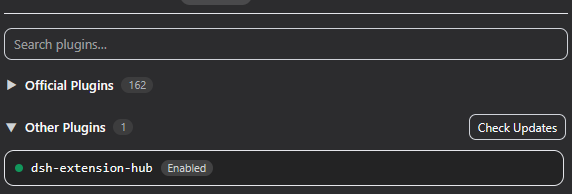
The Plugins tab lists every plugin row in your DSH composition, split into two collapsible groups:
- Official Plugins — DeepSeek's own
@deepseek-ai/*packages (collapsed by default). They can be disabled but not uninstalled; thecordis:includeentry is the composition loader itself and is marked Core — it cannot be disabled or removed. - Other Plugins — third-party and your own plugins (e.g. this one).
Click a plugin to see its details: description, source, repository link, entry id and module name. From the detail block you can:
- Enable / Disable — written to your profile
cordis.patch.yml; takes effect after adsh webrestart. Disabling warns you that an unknown plugin may cause serious problems. - Uninstall (non-official only) — removes the plugin row from the configuration, with a warning plus a second "Confirm uninstall?" step. If the plugin was installed via a GitHub clone, its local clone directory is deleted too.
The Other Plugins group header has Check Updates: it compares npm
packages against the registry and local git clones against their origin HEAD.
Updateable plugins get a green Update Available button next to their status
label — click it to pull the new version (npm tarball or git pull), or use
Update All to update every updateable plugin at once.
Discovering & installing new plugins
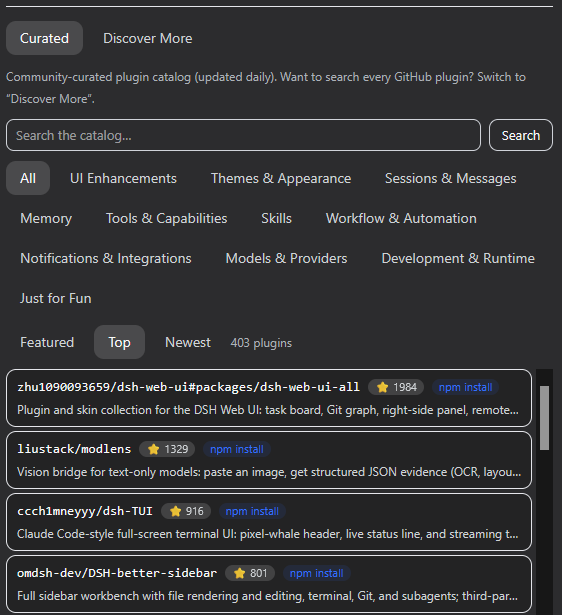
The Plugin Market tab has two sub-views:
- Curated (default) — a community-curated catalog (awesome-dsh-plugin, refreshed daily) with 11 categories, bilingual descriptions, star counts and ordering (Featured / Top / Newest). Entries with an npm mapping install from npm in seconds (registry tarball, with an anti-squatting check that the package points back at the listed repository); entries without one fall back to a GitHub clone. A 24h local cache keeps the view usable offline.
- Discover More — searches GitHub for repositories tagged
dsh-plugin(a free-text query narrows the search). Each result shows stars and an "Installed" badge when the repo is already present locally.
Click a curated/discovered entry to open its detail page — description, stars, category (curated), install method and a link to the repository — then hit Install. Extension Hub:
- Prefers the npm registry when the plugin publishes to npm: downloads the
tarball into the profile
node_moduleswithout pnpm (no symlink/permission requirements) and registers a bundle row. Packages installed this way are managed by Extension Hub itself — keep updating them with its Check Updates; the dependency is declared in the profile manifest, so a laterdsh plugin/ pnpm install keeps it. - Otherwise clones the repository (shallow) into
~/.dsh/extension-hub/plugins/and verifies it ships a usablepackage.jsonentry. Clone installs support zero-dependency plugins only: packages with npm runtime dependencies are rejected (there is no dependency-install step), and packages that rely on a bundle patch (dsh.bundle.patch) are flagged because a clone cannot apply it. Be aware that a monorepo root (e.g. the repo ofdsh-myrulesis this very repository) clones as the root package, not the target plugin — use the npm or Add-ons install path for those. - Registers the plugin in your profile
cordis.patch.yml(managed insert block) and self-checks the write.
After a dsh web restart the plugin appears in the Other Plugins group,
where you can disable or uninstall it (GitHub-clone installs also remove the
clone directory) and keep it updated with Check Updates (npm packages
check the registry; local git clones update via git pull).
Installing runs third-party code. Only install repositories you trust, and check the repository's own README for install instructions — a repo tagged
dsh-pluginmay still be a skill, an MCP server, or need a custom setup.
Recent Updates
Recent updates (click to expand)
- 2026-08 — v0.2.12: review fixes — MCP discovery now follows Claude/Codex precedence (project
.mcp.json> project.claude.json> user configs; Codex project > global) instead of the reversed order; the MCP list shows home-level rows ($DSH_HOME/cordis.patch.yml, read-only, badge-marked); composition and state writes are atomic (temp+rename, lock retries) so a crash cannot corruptcordis.patch.yml; clone-install rejection messages distinguish a missing package.json from a missing build output (git installs fetch sources, not artifacts); README notes that npm-installed plugins stay managed by Extension Hub across laterdsh plugin/pnpm runs. - 2026-08 — v0.2.11: docs — quick-start install command pinned to the current release (the published tarball had carried the v0.2.8 command).
- 2026-08 — v0.2.10: complete Windows fix for GitHub-clone installs — clone rows now register a
file://URL pointing at the clone's entry file (v0.2.9 pointed at the clone directory, which Node ESM still rejects withERR_UNSUPPORTED_DIR_IMPORTand crasheddsh web); clone installs also refuse packages with npm runtime dependencies (there is no dependency-install step) and warn when a package relies on a bundle patch that a clone cannot apply. To repair a broken row by hand, editcordis.patch.ymland pointnameat the entry file, e.g.name: file:///C:/Users/you/.dsh/extension-hub/plugins/foo/lib/index.js. - 2026-08 — v0.2.9: Windows GitHub-clone install fix (first pass) — clone rows switched from raw drive-letter paths to
file://module names; superseded by v0.2.10 (entry-file URLs). - 2026-08 — v0.2.8: one-command install — the package now ships a bundle patch (
cordis.patch.yml), sodsh plugin --profile web add dsh-extension-hubwires the plugin row into your profile automatically; the quick start no longer requires manualcordis.patch.ymledits. - 2026-08 — v0.2.7: new add-on dsh-recall — conversation history recall for DSH (three-layer literal/fuzzy/semantic retrieval over every past session, fully local & offline); install / disable / uninstall from the Add-ons block, updates together with the main plugin.
- 2026-08 — v0.2.6: new Add-ons block in the Plugin Management tab — install / disable / enable / uninstall companion features (dsh-myrules) without leaving the page; the header Check Updates now checks the main plugin AND installed add-ons together and updates everything at once; collapsible block; feature i18n keys aligned with their ids; "Integrate with Extension Hub" invitation section added to both READMEs.
- 2026-08 — v0.2.5: new companion plugin dsh-myrules (
packages/dsh-myrules) — a Customize (个性化) page in Settings that edits the host-wide global instructions ($DSH_HOME/AGENTS.md, injected into every session, new sessions apply immediately); theme-inverted primary buttons across the plugin manager, slim save button, percentage budget meter; rolling.bakbackup removed. - 2026-08 — v0.2.4: Plugin Market with a Curated store + npm install path — the Plugin Market tab now leads with a Curated view of the community catalog (awesome-dsh-plugin, 11 categories, bilingual descriptions, Featured/Top/Newest ordering, 24h offline cache) beside Discover More (GitHub search); plugins with an npm mapping now install from the npm registry via tarball (no pnpm, anti-squatting repo check) with GitHub clone as fallback; settings tab renamed to Plugin Market; curated view no longer hangs on load (client-side method registration); quoted (
@scope) row ids match in installed detection and uninstall; README overhaul with new screenshots. - 2026-08 — v0.2.3: fix: patch persistence semantics — 0.2.2's flat-row writer was wrong for patch files (a bare top-level
- id:row means "override" and silently no-ops; rows must be wrapped in- insert:). Reverted all patch writes to the managed insert-block region; the profile patch was rebuilt to the correct format. This restores plugin loading after restart. - 2026-08 — v0.2.2: unified flat-row patch persistence (CLI and UI write the same loader-compatible format); MCP list reads merged rows (region and flat formats); scalar quoting fix for
@-prefixed names; uninstall removes discover-installed clone directories. - 2026-08 — v0.2.1: Discover tab pagination ("Load more", 30 per page), plugin detail as a modal popup, truthful "Installed" badges (verified against the config row, not just the clone dir), install write-back verification, horizontal-overflow fixes.
- 2026-08 — v0.2.0: full plugin manager — official vs third-party grouping (vendor-scope based), core protection for the composition loader, enable / disable / uninstall with confirmations, per-plugin check & update (npm registry + local git clones, Update All), and a GitHub-powered Discover tab that clones and installs
dsh-pluginrepositories in one click. - 2026-08 — v0.1.4: package the v0.1.3 changelog into the published artifact (registry-sync release).
- 2026-08 — v0.1.3: strict Typert descriptors (
./typert) fix/api/extensionHub/*404 in layouts where the protocol package loads twice; one-click update downloads the npm tarball directly (no pnpm). - 2026-08 — "Check Updates" button in the header: compares the local package version against the npm registry.
- 2026-08 — Section renamed to Extension Management with a header ("Manage plugins, skills and MCP"); import moved from its own tab into the Skills and MCP Servers pages.
- 2026-08 — Full zh/en i18n (83 keys), project folder picker, built-in skill read-only layer.
- Initial release — CLI + durable settings UI + zero-dependency persistence core.
How it works
- The host half (
lib/host.js) is aTypertRemoteServicegateway exposed under theextensionHubwire namespace; the browser half mounts its Remote contribution and calls the mounted namespace service. - The browser bundle is declared via
dsh.client.platform: "web"inpackage.json; DSH's client-modules system scans it at boot, injects the boot manifest, and serves the bundle over/plugins/dsh-extension-hub/client.js— no web bundle rebuild required. - All real reads/writes run inside the host process (outside the session file
sandbox) and share the same
lib/code as the CLI.
Data sources (discovery scope)
| Source | Skills | MCP |
|---|---|---|
| Claude | /.claude/skills/*/SKILL.md, ~/.claude/skills/*/SKILL.md | /.mcp.json, ~/.claude.json, ~/.claude/.claude.json |
| Codex | /.codex/skills/*/SKILL.md, ~/.codex/skills/*/SKILL.md | ~/.codex/config.toml, /.codex/config.toml |
Conversion: Claude/Codex stdio servers → DSH transport: stdio
(command/args/env); http/sse → transport: streamable-http
(url/headers). Skill name/description/whenToUse are preserved,
license/allowed-tools fold into metadata.
Persistence locations
Skills
- Project scope
--scope project→/.dsh/skills//SKILL.md - Global scope
--scope global→~/.dsh/skills//SKILL.md
Enable/disable rewrites the disable-model-invocation / user-invocable
frontmatter flags; removal deletes the file.
MCP
- Global → rows are appended/updated inside the managed region
(
# >>> dsh-extension-hub…# /.dsh/mcp-servers.yamland generates a dedicated preset~/.dsh/.agent-presets/-mcp/agent.cordis.yml(based on the shippedstandardpreset). Select that preset in the session roster to activate the servers.
Supported platforms
DSH itself runs on Windows, macOS and Linux; this plugin has no platform specifics — the