@wu5/dsh-your-turn
Turn-handoff reminder for DeepSeek Harness: an interactive centred popup plus a synthesized chime when the agent hands the turn back to you. · DSH 回合交接提醒:轮到你了——可交互居中弹窗 + 免素材提示音。 用于在Agent完成回复时提醒用户。适合需要实时交互反馈、避免挂机等待的用户。
インストール
npx -p @deepseek-ai/dsh dsh plugin --profile web add github:WenOwen/dsh-your-turnドキュメント
README 全文を読む ↗@wu5/dsh-your-turn
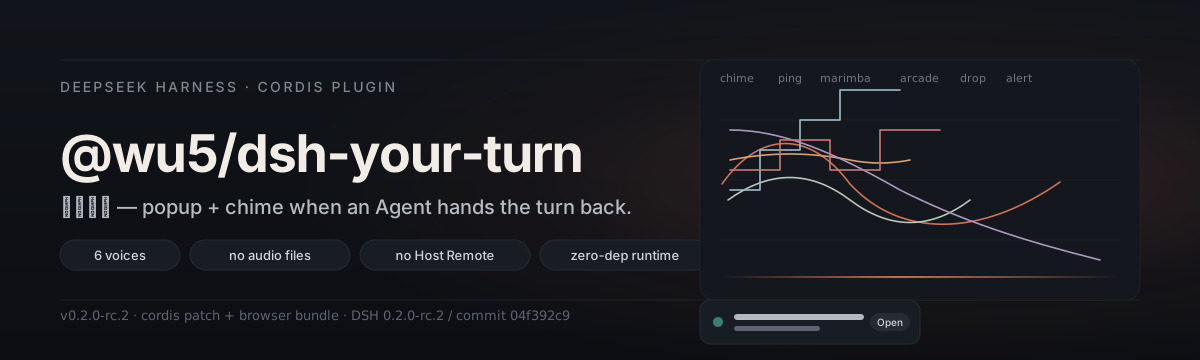
Turn-handoff reminder for DeepSeek Harness.
A real popup you can act on, plus a chime the moment an Agent hands the turn back to you.
简体中文 · Report a bug · Source
What it does
A DeepSeek Harness session is rarely watched the whole time — the user is in another tab, in another app, or just thinking. The moment the Agent stops and hands the turn back, this plugin raises a focused reminder so the handoff is never silent:
- A centred modal with focus management, Escape, and a backdrop close. The turn's outcome, the session title, its directory, and the turn duration are all on one card. Three actions: Open session, Snooze 5 min, Got it.
- A top banner alternative for when a modal feels heavy.
- A synthesized chime — six voices, every one generated at runtime by the Web Audio API. No audio files are shipped, so the bundle stays small and the sound is yours to tune.
- A speaker icon in the sidebar's foot that mirrors the sound switch, with a small unread badge. Hover it to see every session still waiting on you; click one to jump to it.
Why it's different
Most "reminder" plugins for AI agents either need a separate server, a Host-side patch with a poll loop, or a file watcher. @wu5/dsh-your-turn doesn't. The Web client already knows when every session's Agent stops — it has to, to render the running dot. This plugin reads that same state in-process:
- Zero audio assets. The plugin ships no
.mp3or.wav. Every voice isOscillatorNode + GainNodewith an exponential attack-and-decay envelope; aDynamicsCompressorat the end of the graph lets the master gain sit above full scale without clipping. - Zero Host Remote. No API gateway contribution, no schema to declare, no extra surface. The browser side is a single Cordis plugin that registers a slot and a settings section.
- No file watching. No session log polling. The handoff is observed the moment the Host publishes it to the Web client.
- Cross-tab aware. Open three tabs on the same origin and only one reminder raises. Closing it in one closes it in all.
How it works
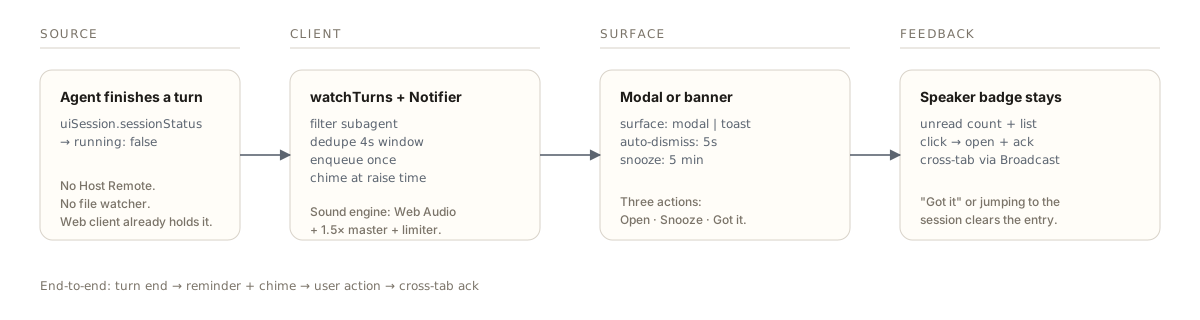
The plugin lives in two halves that share one Cordis context. The Host half declares a small settings schema (surface, autoDismissSeconds, volume, soundEnabled, soundPreset, errorSoundPreset) and tells the settings service not to auto-generate its own page. The browser half installs the stylesheet, registers the Slot contributions, watches the Session list the Web client already publishes, and on every turn end:
- filters subagent sessions and recently-dismissed ones,
- enqueues a
Remindercarrying the session id, title, directory, and outcome, - plays the configured success or failure voice through the speaker graph,
- renders the modal (or banner) according to
surface, - keeps the entry in the queue after auto-dismiss so the speaker badge stays useful, and clears it the moment you click Open session, Got it, or any other session in the workspace.
Install
# From GitHub
npx @deepseek-ai/dsh plugin --profile  add github:WenOwen/dsh-your-turn

# From npm (after publish)
npx @deepseek-ai/dsh plugin --profile  add @wu5/dsh-your-turn
The plugin comes with a cordis.patch.yml and a prebuilt lib/; no build step is required on the user's machine. Restart Harness, reload the browser, and the reminder section is live. The settings page lives under Settings → Turn-handoff reminder.
Settings
| Display name | Field | Default | Meaning |
|---|---|---|---|
| Reminder surface | surface | modal | modal or top banner toast; a retired both resolves to modal. |
| Auto-dismiss | autoDismissSeconds | 5 | The reminder closes itself after this long; 0 keeps it until you close it. Choose Never / 5s / 10s / 30s / 1 min / 2 min / 5 min, or pick Custom… and enter any value 0–600. |
| Play a chime | soundEnabled | true | Play a chime at all; the sidebar-foot speaker icon toggles this same field. |
| Success response | soundPreset | chime | Voice for a clean handoff. |
| Error response | errorSoundPreset | alert | Voice for a failed, aborted, or truncated turn. |
| Volume | volume | 70 | 0–100, applied to a 1.5× master gain with a brick-wall limiter. |
Six voices: chime (two-partial bell), ping (short tap), marimba (wooden attack), arcade (rising steps), drop (falling tone), alert (tri-tone). Silence is the sound switch, not a seventh voice.
Compatibility
- DeepSeek Harness
0.2.0-rc.2/ commit04f392c9, runtime0.1.7-rc.2for the Cordis and Client packages. - A Web-enabled profile is required, such as
webor the app'sdesktopprofile. - A browser with the Web Audio API (every browser shipped in the last decade).
- The Client must stay connected to the Host to observe turn ends; closing the page disables reminders.
Acknowledgements
- The Web client provides everything this plugin reads. No Host API was extended, no DSH core was modified.
- The plugin design follows the build-deepseek-harness-plugin convention: one Cordis Loader entry, one Client Slot contribution, one Settings section, theme tokens reused.
License
MIT.