cuijiajun/dsh-session-top-new ↗★ 0
dsh-session-top-new
Session overview dock for the DeepSeek Harness Web GUI: N-day session list, cross-session unread and running status, one-click jump, and a completion chime. 适合会话列表较长、需要快速切换和监控会话状态的用户。
インストール
npx -p @deepseek-ai/dsh dsh plugin --profile web add github:cuijiajun/dsh-session-top-newドキュメント
README 全文を読む ↗dsh-session-top-new
Session list too long to search through? The newest session always buried?
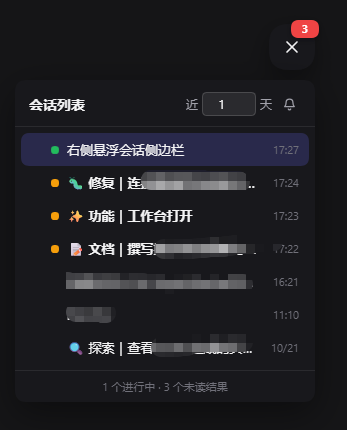
A session overview dock for the DeepSeek Harness Web GUI: every session's unread and running state in one floating panel, one click to jump to any of them, and a chime when one finishes — so the newest and the unread never get lost in a long list again.
会话列表越长越难找?最新会话总被淹没?
一个 DSH Web GUI 的会话总览悬浮栏:所有会话的未读与运行状态集中在一个小面板里, 点一下就能跳过去,会话跑完会响一声——最新和未读的再也不会被长列表埋掉。
Features
- Overview, not per-session — the dock is a global aggregate: you see the state of all sessions while you are inside one of them.
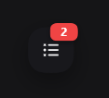
- Live status — a running session shows a pulsing green dot; a session whose result you have not looked at shows an amber dot and a bold title; the round button carries a red badge counting unread results.
- N-day history — shows sessions updated within the last N days (default: today only). N is editable in the panel header, 1–365.
- Click to jump — clicking a session switches the main view straight to it. The panel stays open.
- Parent / child grouping — subagent sessions nest under their parent and stay collapsed until you expand them, instead of flattening into one list.
- Completion chime — a synthesized two-tone chime (Web Audio, no asset files) plays when a session finishes, with a mute toggle.
- Draggable and resize-aware — drag the button anywhere; the position is stored as a fraction of the window, so it keeps its relative spot when the window is resized. The panel flips up or sideways near a screen edge.
- Dismiss a row — the ✕ that appears on hover hides that row; it comes back by itself once the session produces something newer. Dismissing a parent also hides its currently visible subagent rows.
- Collapsible — expands by default; click the button to collapse it back to a single round button.
中文说明
功能一览:
- 圆形按钮可拖拽到任意位置,窗口缩放时按比例跟随
- 「近 N 天」可自定义(默认当天)
- 运行中显示绿色脉冲点,未查看结果显示琥珀点,按钮红色角标显示未读数
- 子任务折叠在主任务下,不平铺
- 点击会话直接跳转,面板不自动收起
- 鼠标悬停行尾出现 ×:忽略该记录,等这个会话有新记录时自动重新出现 (忽略主任务会同时忽略它当前显示的子任务)
- 结束提示音使用 Web Audio 合成,无需音频文件,可静音
Install
dsh plugin --profile web add github:cuijiajun/dsh-session-top-new
Install from source builds the package once, so the first install asks for the usual build approval.
Then restart the Web GUI — the client-modules scan caches package verdicts per boot, so a newly installed plugin only appears after a restart.
Layout
dsh.plugin.json     plugin manifest (id / version / main / engines)
cordis.patch.yml    bundle patch: mounts the host plugin row
lib/index.js        host entry (no-op; exists so the bundle mounts)
lib/client.js       the dock: __ModuleLoader__ bundle (apply + widget)
assets/             screenshots
screenshots.json    storefront screenshot list
How it works
The widget registers a root-scope shell.overlay entry, so it floats above the
whole app regardless of panel or session. It reads two client services and
keeps only the leaf fields it renders:
| Purpose | Source |
|---|---|
| Session list and metadata | sessions.list — ids, byId[id] with displayTitle, running, updatedAt, parentId, origin, retainedBy.mainView |
| Running / unread state | uiSession.sessionStatus — { running, pendingInteraction, completionUnread } |
| Jump to a session | uiWorkspace.openSession(id) |
The dock observable subscribes to both sources, extracts a flat snapshot of
scalars, and hands the widget a referentially stable object. A running → finished transition (or a new completionUnread flag) triggers the chime,
respecting the mute toggle.
Compatibility
This plugin talks to the DSH client runtime services named above. They are
the interfaces the official UI itself uses, but they are not a frozen public
API, so a Harness upgrade may rename or restructure them. When that happens the
dock can lose its click-to-jump or status markers until the plugin is updated —
if a control stops responding, check the browser console for a
[dsh-session-top-new] warning, which is emitted instead of failing silently.
Tested against DSH builds current as of October 2026.
License
MIT