dyguests/dsh-compact-panel-nav ↗★ 0
dsh-compact-panel-nav
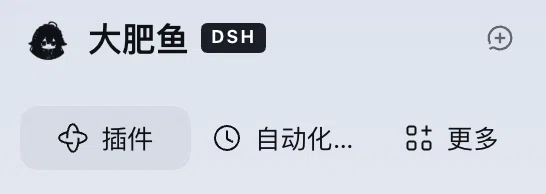
Puts the sidebar's Plugins / Automations / More entries on one compact row, and New Session in the brand row as an icon. 适合屏幕较小、需要展示更多工作区或会话列表的用户。
インストール
npx -p @deepseek-ai/dsh dsh plugin --profile web add github:dyguests/dsh-compact-panel-navドキュメント
README 全文を読む ↗dsh-compact-panel-nav


A DeepSeek Harness Web UI plugin that compacts the top of the sidebar: Plugins / Automations / More collapse from three stacked rows into one, and New Session leaves its own full-width row to become an icon at the right end of the brand row. Together that returns about 130px to the workspace list.
压缩侧边栏顶部的 DeepSeek Harness 客户端插件:「插件 / 自动化任务 / 更多」三行合并成一行,「新会话」从整行按钮收成图标放到品牌行最右侧 —— 一共给下面的工作区列表腾出约 130px 高度。
What it does / 它做了什么
-
Expanded sidebar: the three panel rows become a single 32px row of three equal cells, icon + label centered.
-
New Session leaves the flow and becomes a 28×28 icon-only control at the right end of the brand row, same size as the sidebar toggle. Its tooltip keeps the accessible name and the
⌘Nhint. -
Collapsed 56px rail: untouched — the navigation keeps its vertical icon stack, and New Session returns to its shipped place in the rail.
-
Everything else stays as shipped: the brand identity, row order, hover/active states, focus rings, keyboard access, and the More menu.
-
展开态:三行合成一行,32px 高、三等分、图标与文字居中。
-
新会话:离开文档流,变成品牌行最右端的 28×28 纯图标控件(与右上角收起按钮同规格),tooltip 里仍然有「新建会话 ⌘N」。
-
收起态(56px 图标栏):完全不动 —— 导航保持竖排图标,新会话回到它在窄栏里的原位。
-
其余一律不动:品牌标识、顺序、hover/选中态、焦点样式、键盘可达性、More 菜单。
How it works / 实现方式
Navigation — CSS only. The rules target the navigation landmark by its accessible name, which the sidebar derives from its own panels.label dictionary (全局面板 in the shipped Chinese locale, Global panels in English). A :has() guard requires an icon + title pair inside a row, which only the expanded sidebar renders, so the collapsed rail keeps its original layout.
New Session — no reparenting. The button stays where React put it; the script only switches that one element to position: absolute, measures the brand strip once against the button's own parent, and writes the geometry (28×28, vertically centered, right-aligned) inline. Nothing is written onto the brand row or any other node, so a measurement can never squeeze the brand identity.
Every precondition is checked before anything is touched: expanded sidebar, the button is the sibling immediately before the nav, the strip above it is a div that holds no button of its own (that rejects the macOS window-control strip), and the button contains an icon. If any check fails, the button is left exactly as shipped. Collapsing the sidebar or disabling the plugin restores the saved inline style text.
The icon-only look — hiding the label and the inline ⌘N hint, plus the hover background in theme tokens — is scoped to a data attribute the script sets, so it can never style an unrelated element.
导航行 —— 纯 CSS。 选择器只认导航容器的无障碍名称(侧边栏自己的 panels.label:中文「全局面板」、英文「Global panels」),再用 :has() 判断行内是否出现「图标 + 标题」——只有展开态成立,因此收起态保持原样。
新会话 —— 不搬家。 按钮仍在 React 放的位置,脚本只把这一个元素改成 position: absolute,以它自己的父元素为基准量一次品牌行,把几何值(28×28、垂直居中、右对齐)写成内联样式。品牌行与其它任何节点的内联样式一个都不碰,所以「量错就把品牌挤没」那种事故在结构上不可能发生。
动手前逐条校验:必须展开态、按钮必须是导航前一个兄弟、它上面那条必须是「自身不含 button」的 div(用来排除 macOS 窗口控制条)、按钮里必须有图标。任一条不成立就原样保留。收起侧边栏或停用插件时,恢复此前保存的 cssText。
「只留图标」这件事(隐藏文字与 inline ⌘N、hover 底色、主题变量配色)都挂在脚本自己写的 data 属性上,不会误伤别的元素。
Install / 安装
This is a profile bundle: a package whose package.json declares dsh.bundle.patch, with a ./client module for the browser half. It is published on npm as dsh-compact-panel-nav, so there are two routes.
From npm (no clone). Install the published package into the profile, then make sure it is enabled in Settings → Plugins:
dsh plugin --profile web add dsh-compact-panel-nav
The same step through the Harness agent does install and bundle selection in one call:
plugin_manager action=install_bundle target=dsh-compact-panel-nav
From this repository (the route verified here).
-
Clone it somewhere stable (the profile links the directory — moving or deleting it breaks the plugin).
git clone https://github.com/dyguests/dsh-compact-panel-nav.git -
Install the bundle into the current Harness profile. Ask the Harness agent to install this directory as a bundle — the plugin manager call is
install_bundlewith the cloned directory as its target:plugin_manager action=install_bundle target=/absolute/path/to/dsh-compact-panel-navIt installs the package, selects the bundle in the profile and activates it; the profile then references the directory by link.
-
Check Settings → Plugins for the bundle — title Compact Sidebar Nav / 侧边栏导航压缩. It applies immediately; if the sidebar does not change, reload the page once (
Cmd+R).
这是一个 profile bundle(package.json 里声明 dsh.bundle.patch,浏览器侧由 ./client 模块提供),已发布到 npm:dsh-compact-panel-nav。
- 走 npm(不用 clone):
dsh plugin --profile web add dsh-compact-panel-nav,装完在「设置 → 插件」里确认启用;或者让 agent 调install_bundle,target 直接写包名,一步完成安装 + 启用。 - 走本仓库(这里验证过的方式):clone 到固定位置后,
install_bundle的 target 写该目录的绝对路径;profile 是通过 link 引用它的,别删目录。
装完即时生效,不生效就刷新一次页面。
Compatibility and known limits / 兼容性与已知限制
- Verified on DeepSeek Harness 0.2.1-rc.3 (Desktop, macOS), Chinese UI.
package.jsondeclaresengines.dshas>=0.2.1-rc.3 =0.2.1-rc.3 =0.2.1-rc.3 =0.2.1-rc.3 <0.3.0),宿主会在装载前校验运行时版本。仅清单改动,client.js不变。 - 1.3.2 — 仅文档:npm 徽章、
dsh plugin … add安装命令,以及给 DSH Plugin Hub 用的docs/hub-submission.md。运行时无改动。 - 1.3.1 — 「新会话」收成品牌行里的纯图标控件。1.3.0 已经放到位,但没隐藏 inline
⌘N提示:它和图标一起挤 28px,两者都被裁掉;1.3.1 隐藏该提示(tooltip 仍列快捷键),并让图标容器铺满按钮。 - 1.2.0 — 撤回「按测量给品牌行加 padding」的那版实验(那次把品牌标识挤成 0 宽)。导航回到纯 CSS,并附带一次性清理残留。
- 1.0.0 — 首个版本:三行合并为一行。
License
MIT — see LICENSE.