@idoall/dsh-notify
DSH web plugin: in-page task notifications for DeepSeek Harness — enhanced or soft status toasts, a collapsible top-right stack, answer buttons, background-tab attention, and a WebAudio cue that also plays while the page is hidden. Live delivery only: no history, no service worker, no web push, no OS notification matrix.
インストール
npx -p @deepseek-ai/dsh dsh plugin --profile web add @idoall/dsh-notify@latestドキュメント
README 全文を読む ↗DSH Notify
In-page task notifications for DeepSeek Harness: clear status toasts, a collapsible stack, sound, and background-tab attention. Live delivery only — notification records are never stored.



English | 中文
What it does · Quick start · Settings · Compatibility · Uninstall · Changelog
DSH Notify is a DeepSeek Harness community plugin. It registers only a settings section and an in-page overlay; it does not modify DSH source.
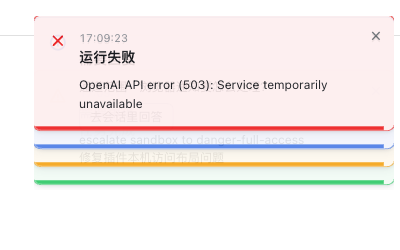
When a session really stops, fails, asks a question, or needs approval, a card appears in the top-right corner of the current page. A green Task completed card follows DSH's native agent/status: idle transition — the same state that stops the session-tree spinner — rather than the earlier moment when text first looks complete. Intermediate goal rounds and queued follow-up turns stay quiet. Everything happens in the page you already have open: there is no service worker, web push, host OS notification, or notification history.
What it does
- Enhanced or soft toast styling. The default Enhanced style gives each notification a clear status colour and a short four-second attention bar; the bar is attention only, not a dismissal timer. Soft is a lower-key alternative. A card remains until you close it, open its session, or complete an in-card answer.
- A collapsible page-local stack. With Collapse multiple notifications enabled (the default), the second card and onward form a pile: the newest card is fully readable on top, while earlier cards remain complete underneath and expose equal
18pxlower edges. Pointer entry or keyboard focus expands the pile. From two cards on, a Clear all action sits above the pile and retires every card on this page at once; clearing stays page-local, so a pending question or approval is untouched and still waits in its session. The page keeps up to 50 live cards; pending actions are prioritised before ordinary cards, then newer cards come first. - Direct, traceable navigation. Clicking a card opens its session and the exact originating turn. After the host selects that session, the selected row is smoothly revealed in the left session tree, even when it lives in a different off-screen workspace. A card stays put with an explanation if navigation cannot succeed.
- Answer in the toast. A pending question or approval renders the same compatible options as the composer. Execution approvals and plan reviews share DSH's amber decision colour; ordinary questions remain blue. In-card and composer answers share the same host interaction.
- Sound and background attention. Built-in WebAudio cues and validated custom uploads play only after a card is admitted to an enabled visual Toast queue, including while the page is hidden. One polling batch produces one cue. A background tab with unseen notifications receives a temporary bell prefix and favicon attention marker.
- Completion means native idle, once per task. A green card waits until DSH reports the owning Agent as
idle, matching the session-tree spinner instead of guessing from a rendered answer or an elapsed timer. A plan review and an execution approval are control gates, so their temporary idle pause does not create an extra completion card; the later work turn supplies the one card. An ordinary question is different: if its answer directly finishes the task, that same turn still produces one green card. If work resumes, the prior candidate is cancelled and only the final native-idle transition is announced. - Task-noise control. Subtask, background-job, and workflow completion notifications are off by default.
- Online version detection. The settings page shows the running version against the newest one published on npm, with Check for updates, GitHub, Changelog and Issues links. The check is read-only: the host asks the registry, reports, and shows a copyable upgrade command — it never installs anything and never restarts DSH. An unreachable registry renders as a failed check instead of presenting the running version as the newest.
- No history by design. Notification records are held only in the open page's in-memory queue. Settled history is never replayed after a refresh or overlay remount; an interaction that is still open when the host can report it is restored silently.
Quick start
Requirements:
- DeepSeek Harness with a Web profile
- Node.js 24.9.0 or newer for current DSH (the plugin itself declares Node.js 20+)
- Verified DeepSeek Harness version:
0.2.2-rc.3
Install from npm into your Web profile:
dsh plugin --profile web add @idoall/dsh-notify@latest
Install from GitHub:
dsh plugin --profile web add "github:idoall/dsh-notify"
From a local clone:
git clone https://github.com/idoall/dsh-notify.git
cd dsh-notify
npm install
dsh plugin --profile web add "link:$(pwd)"
Reload the profile or restart DSH only when its plugin host has not hot-reloaded the client. The client registers settings.section and shell.overlay; the host mounts through cordis.patch.yml.
Name note: the unscoped npm name
dsh-notifybelongs to another author. Install this plugin as@idoall/dsh-notify. Its internal Cordis name, mount id, and/plugins/dsh-notify/*routes remaindsh-notify.
Settings
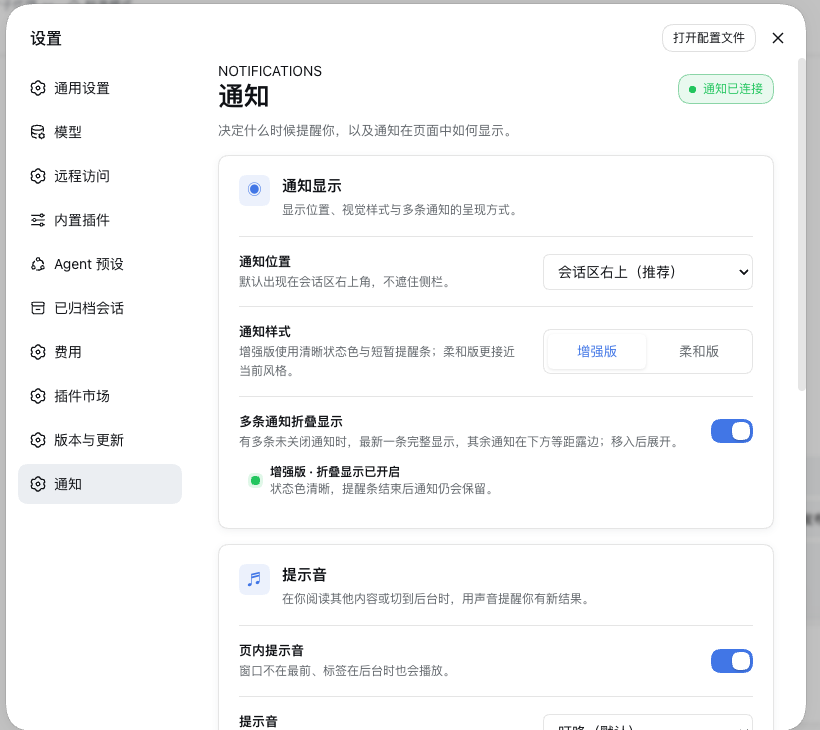
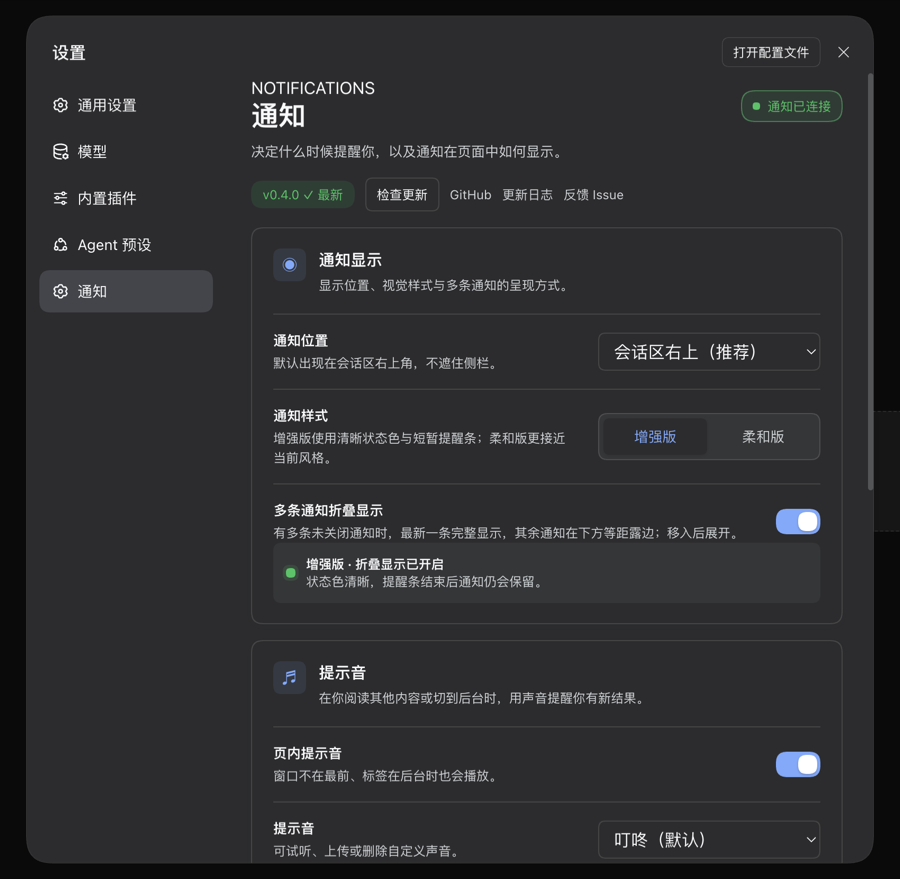
Settings → Notifications provides a compact preview-first control surface:
| Setting | Default | What it does |
|---|---|---|
| Toast position | conversation top-right | Anchors the overlay to the chat column and follows sidebar layout changes. |
| Notification style | Enhanced | Enhanced uses clear status colours and a short attention bar; Soft uses a quieter presentation. |
| Collapse multiple notifications | on | From two cards onward, show the newest card fully and stack older cards below it; hover or focus expands them. |
| In-page sound | on | Plays one cue when a polling batch admits one or more new visible Toasts, including while DSH is in a background tab. Built-ins: chime, ping, alert, silent; custom uploads are supported. |
| Subtask / background completion | off | Enables notifications for subagents, background jobs, and workflows, which can otherwise be noisy. |
| Preview and self-test | — | Sends page-local examples only: Completed, Confirm, Failed, Info, replay all four styles, fold the active examples, or clear them. No test sends a system notification or changes a real task. |
Custom sounds are stored in /sounds/ in the profile data directory, not the plugin installation. Uploads are limited to 1 MB and mp3 / m4a / aac / wav / ogg / flac; names must be a single path segment.
Above the cards, the page shows the running version against the newest one on npm: v0.4.14 ✓ 最新, v0.4.13 ➔ v0.4.14, or v0.4.14 · 检查失败. 检查更新 forces a fresh lookup (GET /plugins/dsh-notify/update?force=1, authenticated); a page load reuses the host's six-hour cache. When a newer version exists the row reveals dsh plugin --profile web add @idoall/dsh-notify@ with a copy button — installing it, and restarting DSH afterwards, stays your decision.
Compatibility
Current release: plugin 0.4.14 is verified against DeepSeek Harness 0.2.2-rc.3.
| Plugin | Verified DeepSeek Harness | What that version is |
|---|---|---|
0.4.14 | 0.2.2-rc.3 | Declares DSH 0.2.2-rc.3 compatible and reviews every break between it and rc.1. Of the 15 packages it binds, nothing on its call path moved: dsh-host-webserver's register(route) half and dsh-client-connection's host half are byte-identical, and the hoc slot kind, JobError and one web/providers-changed declaration are all additive. No notification source changes. |
0.4.13 | 0.2.2-rc.1 | Declares the new DSH RC compatible, preserves existing support, and updates bilingual release information and the current DSH Node.js requirement. No notification source changes. |
0.4.12 | 0.2.2-alpha.3 | Fixes Client entry lifecycle handling (constructor detection and cleanup return), declares the current DSH alpha compatible, synchronizes lockfile DSH peer ranges, updates locked Zod, and adds bilingual release checks. Notification logic is unchanged; see the release notes for verification limits. |
0.4.11 | 0.2.2-alpha.2 | Declares DSH 0.2.2-alpha.2 compatible — one dshReleases line, since >=0.1.7-rc.1 =0.1.7-rc.1 =0.1.7-rc.1 =0.1.7-rc.1 =0.1.7-rc.1 =0.1.7-rc.1 =0.1.7-rc.1 =0.1.7-rc.1 =0.1.7-rc.1 <0.3.0 as of 0.4.1. DSH refuses an incompatible bundle at profile load, so a range that excluded the running release would silently drop the plugin — which is exactly what the old <0.2.0 ceiling would have done on the 0.2.0 release. |
- An interactive gate only withholds a completion while it is unanswered. DSH resolves an execution approval and a plan review inside the turn that asked them (`approval.request