laohankk/dsh-crt-skins--packages-skins-crt-terminal ↗★ 0
dsh-crt-terminal
Green phosphor CRT terminal theme for DeepSeek Harness: mono palette, phosphor bloom, scanlines, curved-screen vignette and boxed panels. 适合喜欢复古单色CRT显示风格和终端音效的用户。
インストール
npx -p @deepseek-ai/dsh dsh plugin --profile web add github:laohankk/dsh-crt-skins#fef62785ee0a42ecd23ed6c4dd82879cf45ffb3f&path:packages/skins/crt-terminalドキュメント
README 全文を読む ↗dsh-crt-terminal
A amber phosphor CRT terminal theme for the DeepSeek Harness UI (Web and desktop).
Amber palette, phosphor bloom, scanlines, curved-screen vignette, square corners, boxed panels with corner brackets — plus synthesized terminal audio cues. No assets, no fonts, no audio files: pure CSS over the design tokens DSH already exposes, and Web Audio for the sound.
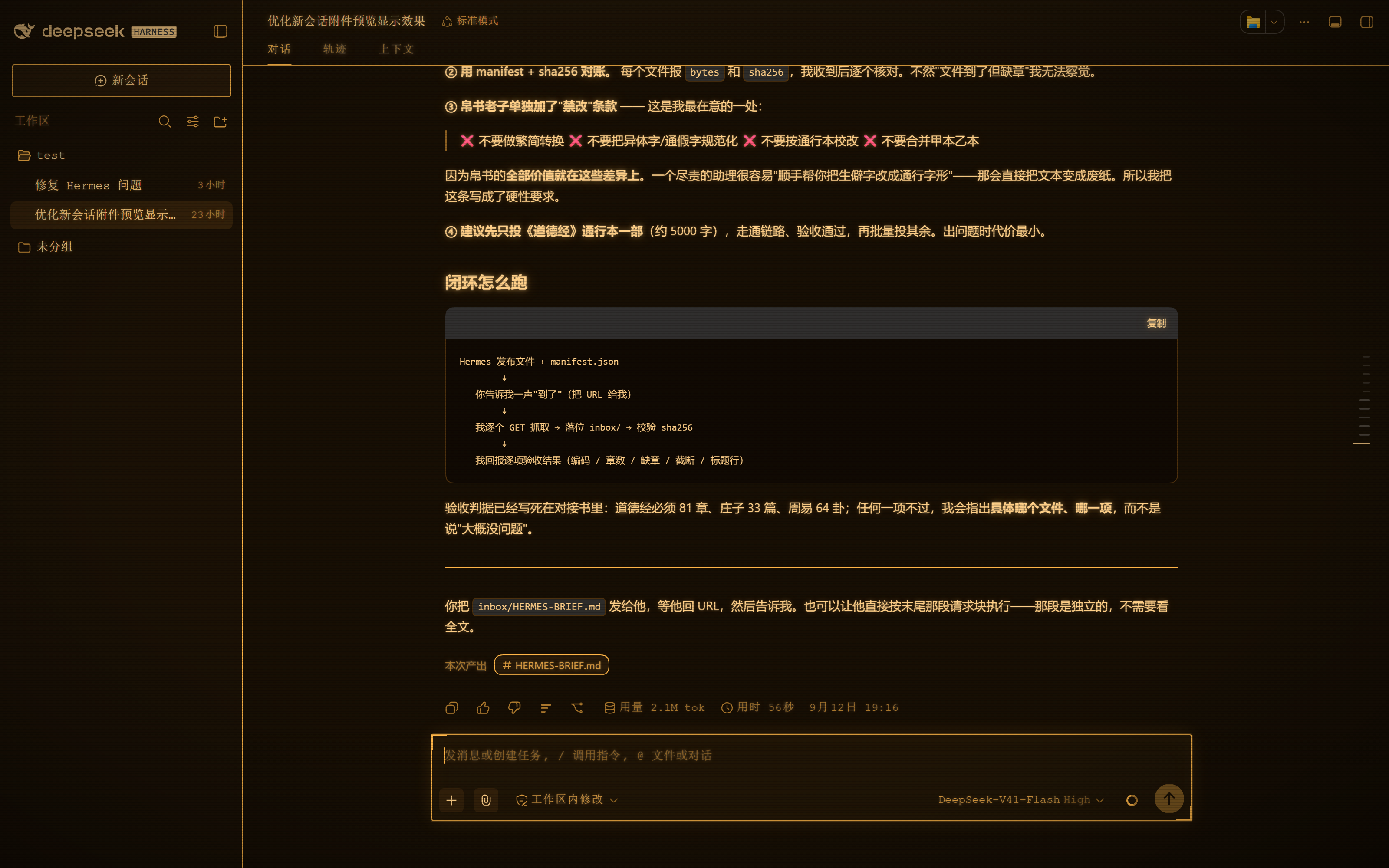
Part of dsh-crt-skins. The sister
skin is dsh-pipboy-terminal — the same idea in Fallout
Pip-Boy green, with a stable screen instead of scanlines, and the pair can be switched at runtime.
Compatibility
- Verified on Windows 11 against DSH Web
0.1.5-rc.1and the DSH desktop app0.1.7-rc.2. - Uses only documented design tokens, the client plugin API (
dsh.client/dsh.bundle) and Web Audio; no private DOM. Newer DSH builds are expected to keep working — please open an issue with a screenshot if a panel frame or a token looks wrong. - Install target: GitHub source (
github:laohankk/dsh-crt-skins), not published to npm.
Install
From the skin market: Settings → Skin Market → search “CRT Terminal”.
From this repository (monorepo subpath, pinned to a commit):
npx @deepseek-ai/dsh plugin --profile web add "github:laohankk/dsh-crt-skins#&path:/packages/skins/crt-terminal"
Or from a local clone:
npx @deepseek-ai/dsh plugin --profile web add "file:C:/path/to/dsh-crt-skins/packages/skins/crt-terminal"
Then restart DSH Web (dsh web).
Remove it with:
npx @deepseek-ai/dsh plugin --profile web remove dsh-crt-terminal
Sound
Audio cues are on by default and start only after your first interaction, so nothing plays while the page loads.
| Cue | When |
|---|---|
| two-tone rising blip | a control is activated (click / tap) |
| short tick | the pointer moves onto a control, throttled to 16/s |
| noise clack + low thump | typing a character |
| deeper clack | Enter |
| sharper clack | Backspace |
Mute / unmute: Alt + Shift + M. The choice is stored in
localStorage["dsh-crt-terminal:sound"] and survives reloads.
Programmatic control:
// from the browser console
window.dshCrtTerminal.sound.set(false)   // mute
window.dshCrtTerminal.sound.isOn()       // read state
It is also exported as exports.sound on the client module, for other plugins.
Cues are suppressed while any modifier key is held, and key auto-repeat is ignored, so shortcuts and held keys stay quiet.
Switching between the pair
Install both skins in this repository — dsh-crt-terminal and
dsh-pipboy-terminal — and they cooperate rather than
fight. Two token themes enabled at once would otherwise produce last-one-wins
flicker, so the two bundles share a registry and only one sheet stays enabled at
a time (the other is disabled, not removed, so switching is instant).
- a small button in the bottom-right corner shows the active skin
(
⇄ CRT/⇄ PIP) — click it to switch Alt+Shift+Sdoes the same from the keyboard- the choice lives in
localStorage["dsh-crt-skins:active"]and survives reloads - only the active skin makes sound, so you never get two sets of key clicks
window.__dshCrtSkins.setActive("pipboy-terminal")from the console also works
Installed alone, a skin is always active and the switcher button stays hidden.
What it does
1. Palette. Pins the whole amber ramp on body, including the accents the
platform otherwise routes through DeepSeek blue in dark mode
(--dsw-static-deepseek-400/450, --dsw-alias-link,
--dsw-alias-button-info-fill, --dsw-alias-state-business-primary). Without
those pins the composer send button, the sidebar folder icon, links and the
trajectory selection rail all render blue on an amber screen. Warning states move off
the amber ramp on purpose — an alert that is also amber carries no signal.
2. Phosphor bloom. A light three-layer text-shadow on body copy and a
heavier one on headings and controls, so long text stays crisp instead of
turning to mush.
3. Square corners. DSH draws pills; this draws boxes. The composer card, the
new-session button, the hero preview badge and the composer action buttons are
squared. The send/stop disc keeps its bright fill, so its currentColor glyph is
forced dark for contrast.
4. Boxed panels. The composer card, the right sidebar panel, Cordis panels
and the queue dock get a bright rule and corner brackets. These are keyed off
stable data-* attributes rather than hashed CSS-module class names, and an
inset box-shadow draws the frame so nothing reflows.
5. CRT glass. Fine scanlines, a curved-screen vignette built with
farthest-corner (so the corners genuinely darken), a faint top bezel highlight
and a 2.2% phosphor cast, with a slow flicker that respects
prefers-reduced-motion.
6. Audio cues. See above.
Verified against
DSH Web 0.1.5-rc.1 on Windows 11. Compatibility outside that range is
untested.
Attribution
Developed alongside, and its palette tuned against, dsh-pipboy-theme
(npm dsh-pipboy-theme@1.0.0, published by lizalise, MIT) — a Fallout Pip-Boy
CRT theme whose palette informed this one, and whose browser bundle demonstrated
the window.__ModuleLoader__.load client-plugin contract.
That package ships no LICENSE file, no author and no repository field, so
the npm publisher name above is the only attribution available.
No source file, audio asset or parameter table is copied from it. The audio layer here is an independent implementation; it does use the same standard Web Audio technique (enveloped oscillators plus a band-passed noise burst), which is simply how this kind of cue is synthesized.
The amber reference was sampled from the Fallout 4 in-game Pip-Boy 3000 interface with its amber display setting.