pocketagents
PocketAgents — Self-hosted mobile remote control for Claude Code, OpenAI Codex, Antigravity IDE, DeepSeek Harness (DSH) & WorkBuddy. Swipe approvals, voice input, multi-host hub & terminal QR.
インストール
npx -p @deepseek-ai/dsh dsh plugin --profile web add github:oscarka/pocketagentsドキュメント
README 全文を読む ↗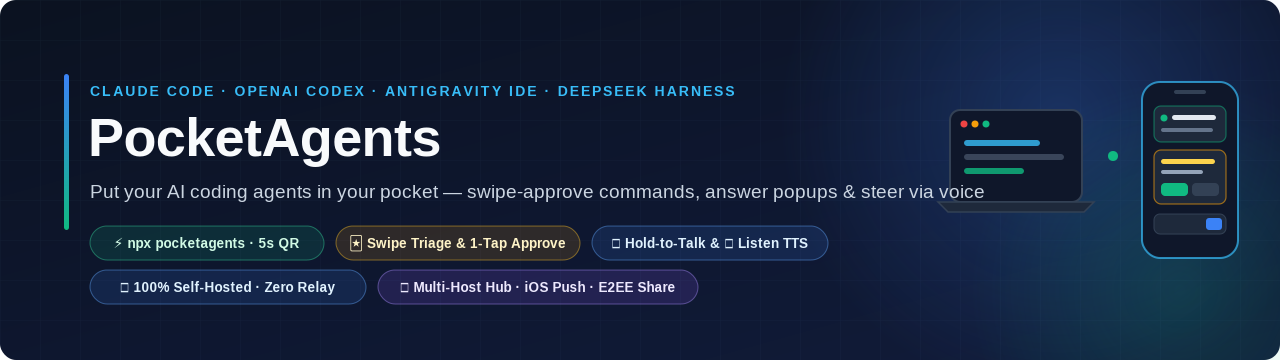
PocketAgents — Control [Claude Code, OpenAI Codex, Antigravity IDE, DeepSeek Harness (DSH) & WorkBuddy](#supported-ai-coding-tools) from your phone — 100% self-hosted, zero vendor relay.
Swipe-approve shell commands, answer multiple-choice popups, steer running tasks with Hold-to-Talk voice, or listen to replies with 🔊 Listen.
[](https://pocketagents.agentrun.vip/?demo=1&lang=en)
[](https://railway.com/deploy/dsh-remote-control-hub?referralCode=44kg1p&utm_medium=integration&utm_source=template&utm_campaign=generic)
⚡ Try on your own Mac / Linux in 5 seconds (same Wi-Fi · terminal QR code · zero config):
npx pocketagents
Opens a local Hub, auto-discovers your Claude Code / Codex / Antigravity / DSH sessions, and prints a scannable QR code right in your terminal.

[](https://www.npmjs.com/package/pocketagents)


= 20" />

🇺🇸 English · [🇨🇳 简体中文](https://github.com/oscarka/pocketagents/blob/a4c4f483743e2ed5ab433a10b25eb6d48c748175/README.zh-CN.md) · [✨ Live Demo](https://pocketagents.agentrun.vip/?demo=1&lang=en) · [24/7 Cloud Setup](#get-started-in-3-steps) · [Supported Tools](#supported-ai-coding-tools) · [What's New](#whats-new) · [FAQ](#faq)
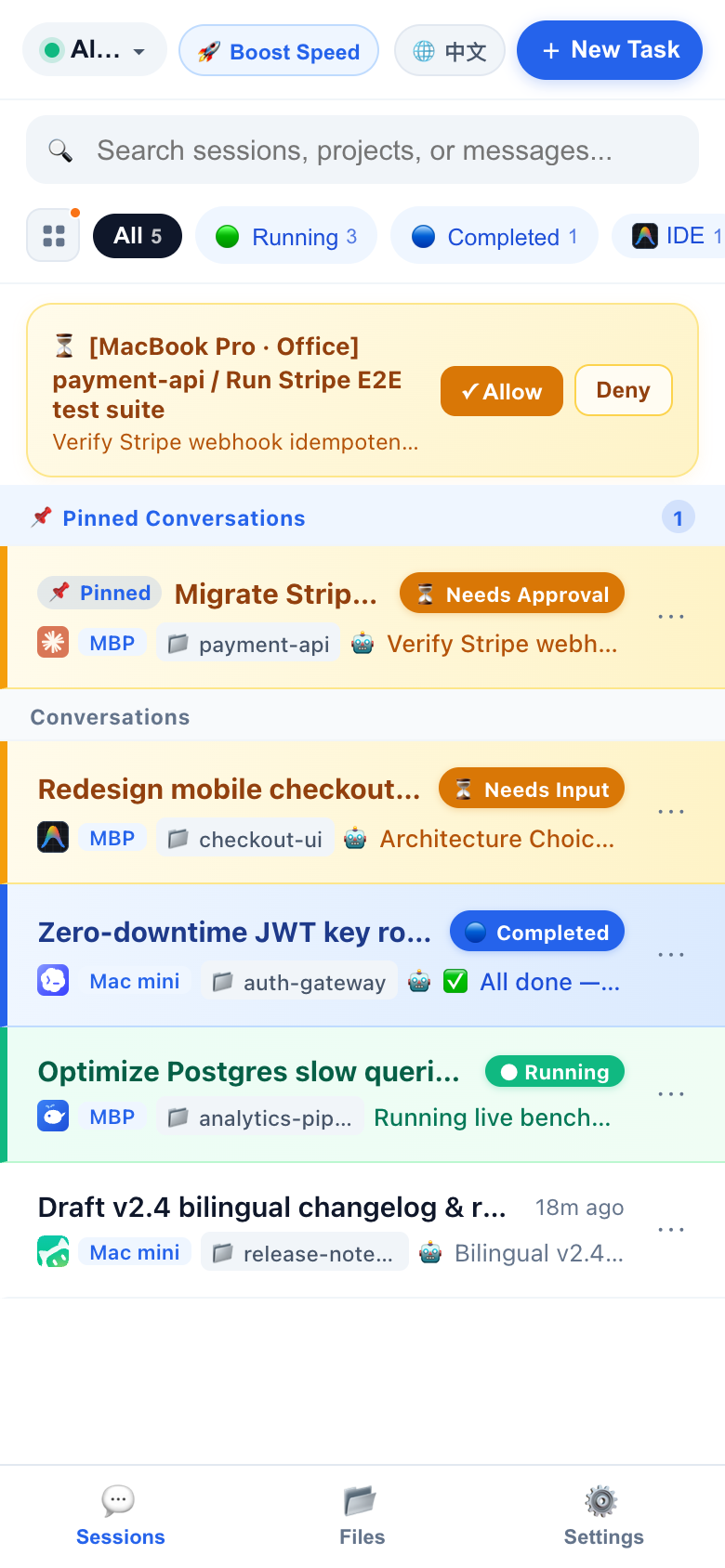
① Unified 5-Tool Session List
Live tasks across Claude Code, Antigravity IDE, Codex, DSH & WorkBuddy with Pinned Conversations & unread dots
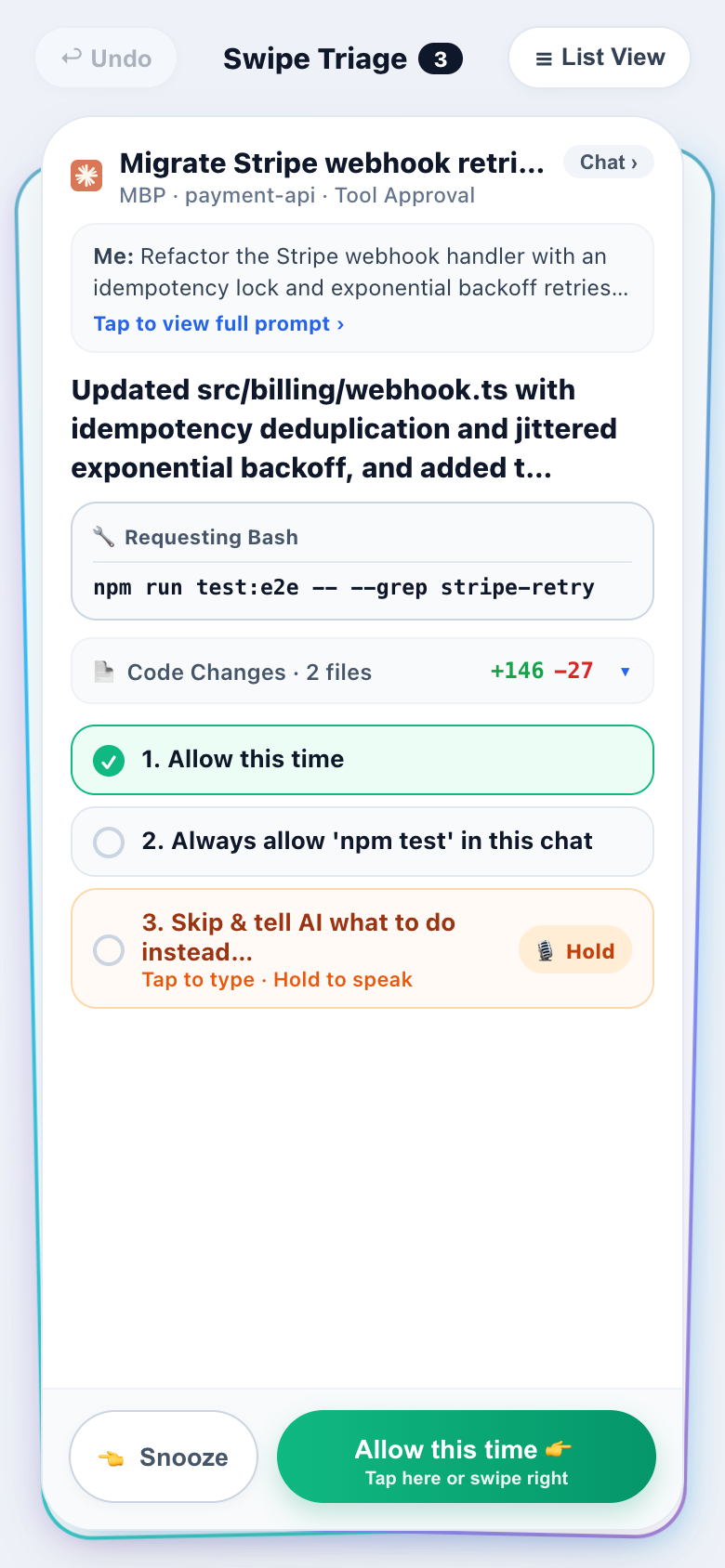
② Swipe Triage Deck
Swipe right to approve shell commands, answer multiple-choice popups, or hold-to-talk an alternative instruction
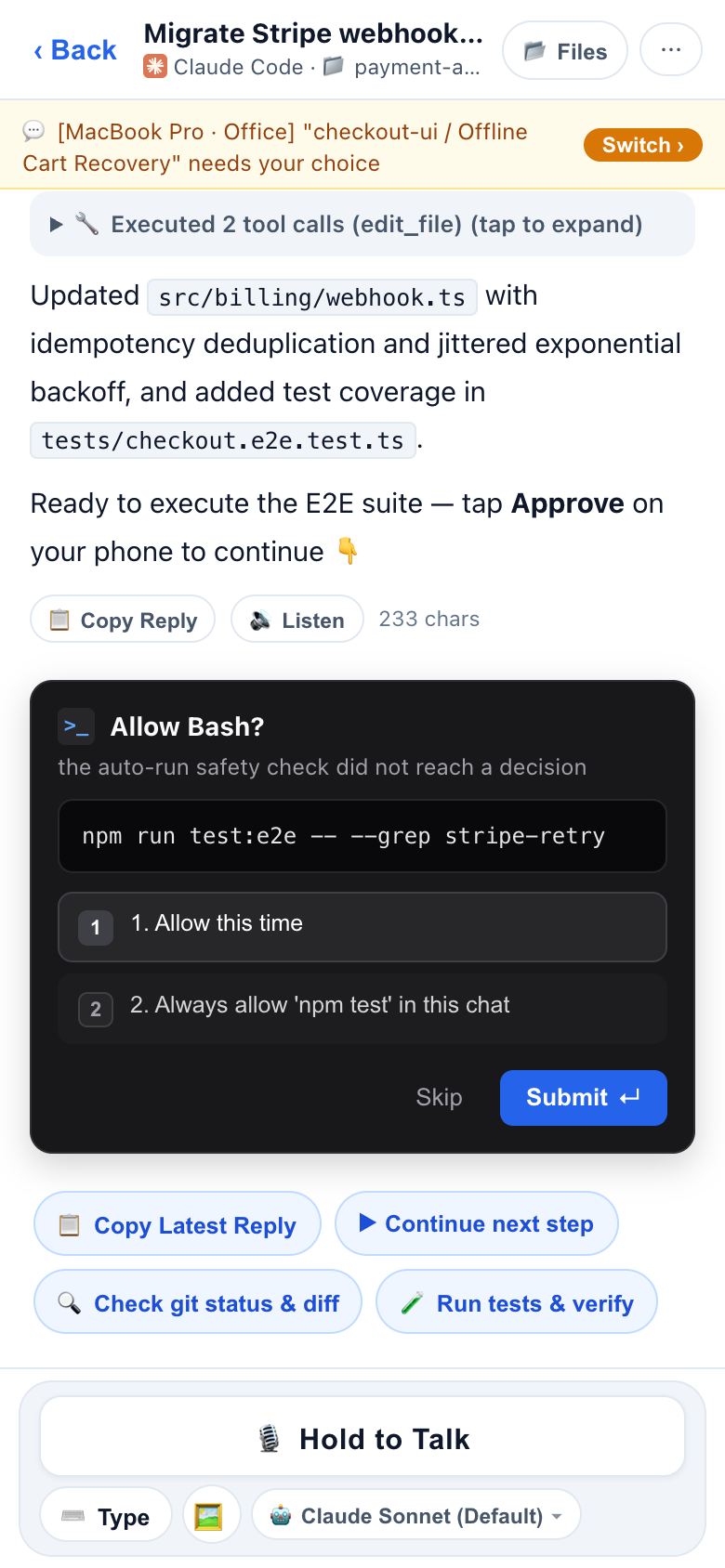
③ Approve, Voice & Listen
1-tap approvals, WeChat-style Hold-to-Talk voice, 🔊 Listen TTS & live HTML deliverable previews
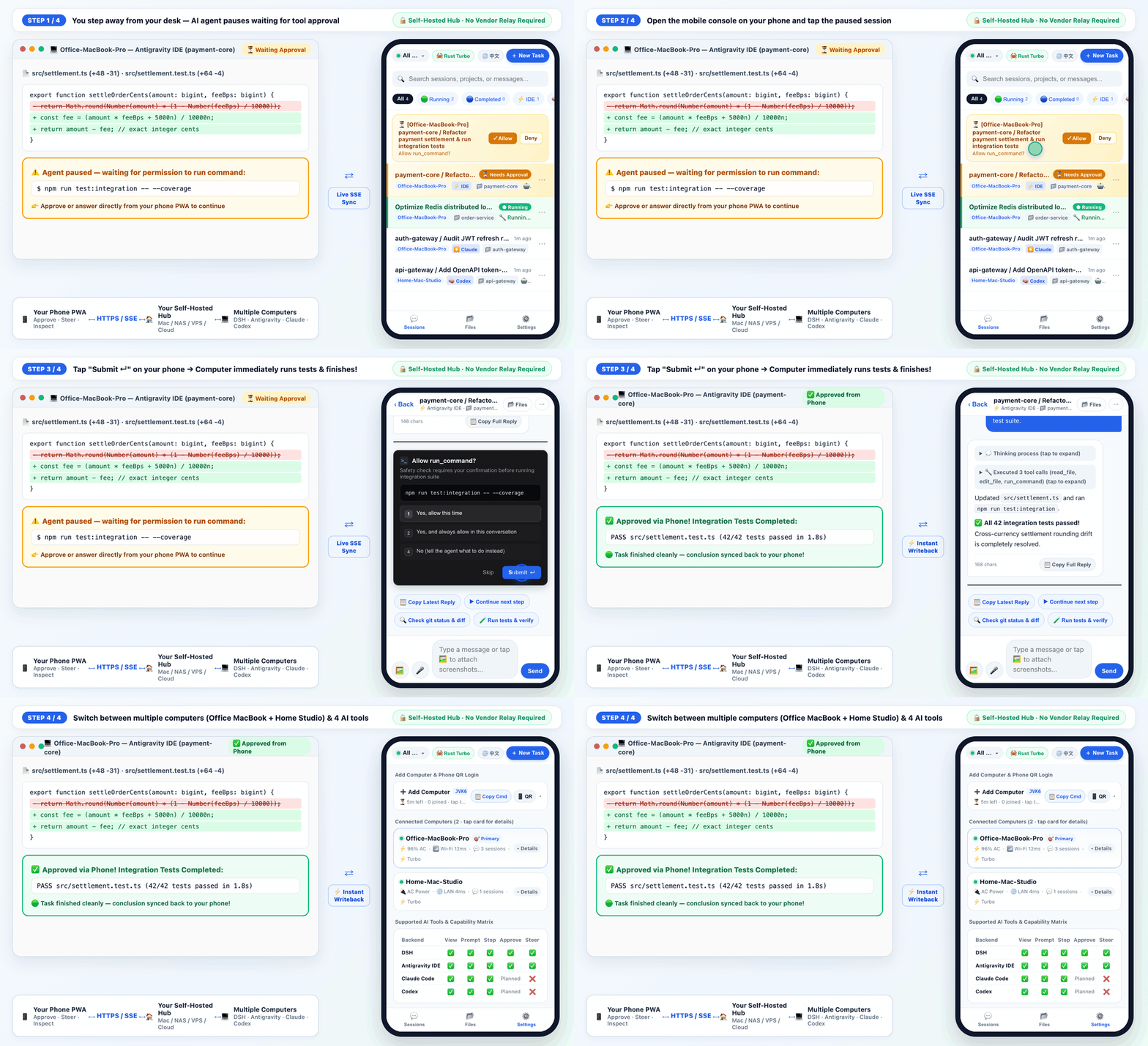
🎬 15-Second Live Walkthrough: Computer pauses on a test command → Open mobile PWA & tap Submit ↵ → Computer immediately runs all 42 tests & syncs the conclusion back to your phone.
Why Mobile Remote Control for AI Coding Agents?
When you kick off a long refactoring, test suite, or deployment in Claude Code, OpenAI Codex, Antigravity IDE, DeepSeek Harness (DSH), or Tencent WorkBuddy, stepping away from your desk usually means flying blind:
- Stuck on a popup: The agent asks "Allow
npm run test:integration?" or pops up an architecture multiple-choice question — and waits for hours until you return to your keyboard. - No visibility on the go: You want to check whether the task finished, hold-to-talk a quick voice instruction, attach a phone screenshot, or hit emergency stop while away from your desk.
- Multiple computers: You have both an office Mac and home workstations running tasks and want one unified mobile view.
PocketAgents puts all of your computers' AI coding sessions into a clean mobile web app (with WeChat-style Hold-to-Talk voice input + smart punctuation, 1-tap 🔊 Listen algorithmic reply playback (⚡ Summary / 📖 Full + seamless mid-stream speed control), iOS 16.4+ Home Screen lock-screen push notifications, and automatic English/Chinese UI detection).
How It Works: Self-Hosted Architecture (No Vendor Relay Required)
Before starting, it helps to understand the two lightweight pieces and how data flows between them:
┌──────────────────────────┐         HTTPS / Live SSE          ┌─────────────────────────────────┐
│     📱 Your Phone PWA    │  ◄─────────────────────────────►  │   🏠 Your Self-Hosted Hub       │
│  Approve · Steer · Files │                                   │  (Your Mac / NAS / VPS / Cloud) │
└──────────────────────────┘                                   └────────────────┬────────────────┘
                                                                                │ Outbound HTTPS
                                                       ┌────────────────────────┴────────────────────────┐
                                                       ▼                                                 ▼
                                      ┌─────────────────────────────────┐               ┌─────────────────────────────────┐
                                      │ 💻 Computer A (Office MacBook)  │               │ 💻 Computer B (Home Workstation)│
                                      │ DSH · Antigravity · Codex       │               │ DSH · Codex · WorkBuddy         │
                                      └─────────────────────────────────┘               └─────────────────────────────────┘
- Control Hub (
控制台): A tiny, zero-dependency Node.js web server that you deploy yourself (on Railway, your own VPS/Cloudflare CDN, NAS, computer, or Cloud Run). You never have to route your sessions through a third-party vendor's central SaaS relay. - Computer Daemon (
connect-host.sh): A background agent installed on each of your Mac/Linux computers via a 1-line command. It watches your local AI coding sessions and connects outbound to your Control Hub (so your computer does not need a public IP or port forwarding).
Transparent Data Boundary: Your self-hosted Control Hub holds recent session metadata and active conversation snapshots in memory so your phone can open chats instantly. Full project source files, screenshots, and videos stay on your computers and stream directly on demand over a dedicated reverse HTTP tunnel (
HTTP 206 Rangevideo scrubbing, smart thumbnails, and short-lived read-onlymediaTicketURLs that never exposeHUB_TOKEN). Share links (/share/:id#k=...) use client-side AES-256-GCM end-to-end encryption. SeeSECURITY.mdfor full details.
Get Started in 3 Steps
⚡ 5-Second Local Tryout via
npx(Works with Claude Code, Codex, Antigravity IDE, DSH & WorkBuddy — Zero Config):npx pocketagentsStarts a local Control Hub + session watcher in 3 seconds, auto-enables Claude Code mobile approvals, and prints a scannable QR code right in your terminal (same Wi-Fi, 1-tap passwordless phone login — no
git clone, no Railway, no config files).🔌 Install as a Native Agent Plugin (GitHub direct — no store signup required):
- Antigravity:
git clone --depth 1 https://github.com/oscarka/pocketagents ~/.gemini/config/plugins/pocketagents- Claude Code (includes zero-hang
PermissionRequesthook +pocketagentsskill):/plugin marketplace add oscarka/pocketagents /plugin install pocketagents@pocketagents- OpenAI Codex (ships
.agents/plugins/marketplace.json+.codex-plugin/plugin.json): Addoscarka/pocketagentsvia Codex/plugins(auto-discoversplugins/pocketagents).- DeepSeek Harness (DSH >= 0.2.0) (also available in DSH Market):
dsh plugin --profile desktop add github:oscarka/pocketagents
# Or use --profile web if you run `dsh web`
Ready for 24/7 cellular (4G/5G) access across multiple computers? Follow the 3 steps below:
Step 1: Start Your Control Hub (Pick 1 of 4 Ways)
Choose the deployment method that best fits how you use your phone:
🌟 Option A: 1-Click Cloud Deploy on Railway (Recommended · Fastest 24/7 4G/5G Access, No CLI Required)
If you want to control your home/office computers from anywhere on cellular 4G/5G without installing cloud CLIs or managing servers, click the Deploy on Railway button at the top of this README (or open the official template directly):
- Automatically generates a strong
HUB_TOKENpassword (or customize it to your own strong password before clicking Deploy). - Provisions a ready-to-use
https://...URL in1 minute with native SSE streaming and predictable low monthly cost ($5/mo Hobby plan for 24/7 connected hosts).
🏠 Option B: Run Locally on Your Computer (Fastest 30s Tryout · Same Wi-Fi, $0 Cost)
No cloud account or Docker needed. Clone the repo and start the Control Hub directly on your computer (requires Node.js >= 20):
git clone https://github.com/oscarka/pocketagents.git
cd pocketagents

# Replace choose-a-password with your own password
HUB_TOKEN="choose-a-password" PORT=8080 npm start
The terminal will print both http://localhost:8080 and your LAN URL (e.g. http://192.168.1.x:8080).
🐳 Option C: VPS / NAS / Raspberry Pi (Docker or Cloudflare CDN / Tunnel)
If you have a lightweight VPS (e.g. paired with Nginx + Cloudflare HTTP/2 & HTTP/3 CDN), home server, NAS, or Raspberry Pi, run the prebuilt Docker image (or npm start + cloudflared tunnel --url http://localhost:8080):
docker run -d --name pocketagents-hub \
  --restart unless-stopped \
  -p 8080:8080 \
  -v dsh-hub-data:/data \
  -e HUB_TOKEN="choose-a-password" \
  ghcr.io/oscarka/pocketagents:latest
☁️ Option D: Google Cloud Run (CLI Script Deploy)
If you prefer deploying on GCP via gcloud, use the bundled helper script (note: because connected computer daemons keep persistent 24/7 SSE/heartbeat streams open, Cloud Run remains resident while hosts are online rather than scaling to zero — for always-on multi-computer setups, Railway or a lightweight VPS is usually much more cost-effective):
git clone https://github.com/oscarka/pocketagents.git
cd pocketagents

# Replace with your GCP project ID and your chosen password
GCP_PROJECT_ID="your-gcp-project-id" \
HUB_TOKEN="choose-a-strong-password" \
./deploy-cloudrun.sh
Once deployed, the script prints your https://dsh-remotecontrol-hub-xxx.run.app URL.
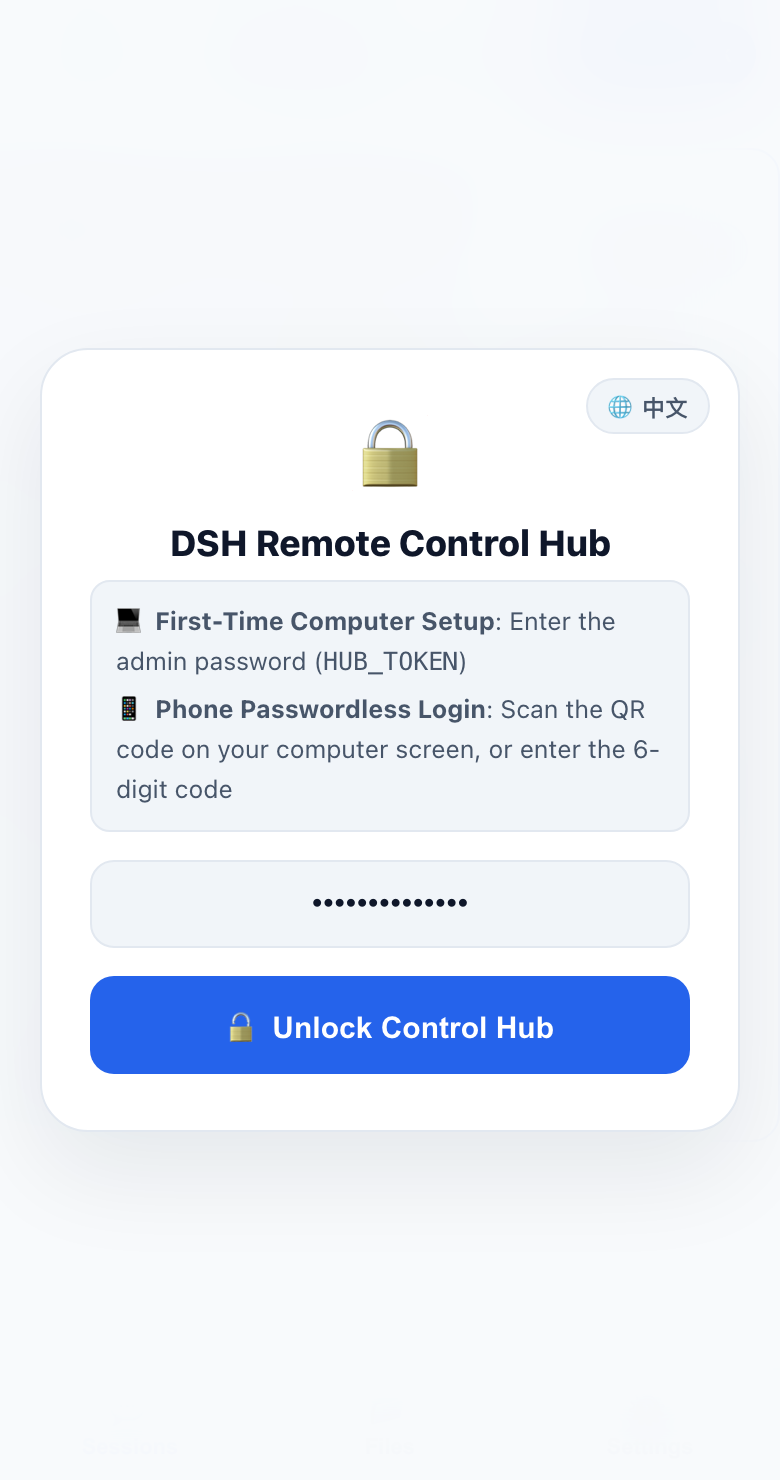
Step 1 Result: Open your Control Hub URL in your computer browser and enter your HUB_TOKEN password (tap 🌐 EN / 中文 top-right to switch language).
Step 2: Connect Your Computer (1-Line Command)
After unlocking the Control Hub on your computer browser, you will see the Connect Your Computer in 3 Steps card with a 15-minute enrollment code:
- Click
📋 Copy 1-Line Install Command(or📋 Copy Local Repo Commandif you already cloned the repo). - Paste and run it in your computer's terminal:
curl -fsSL https://your-hub-url/install.sh | bash -s -- --code ABCD-1234 - The script automatically registers your computer with a dedicated revocable credential, installs the background LaunchAgent/systemd service, and connects live within 2 seconds.
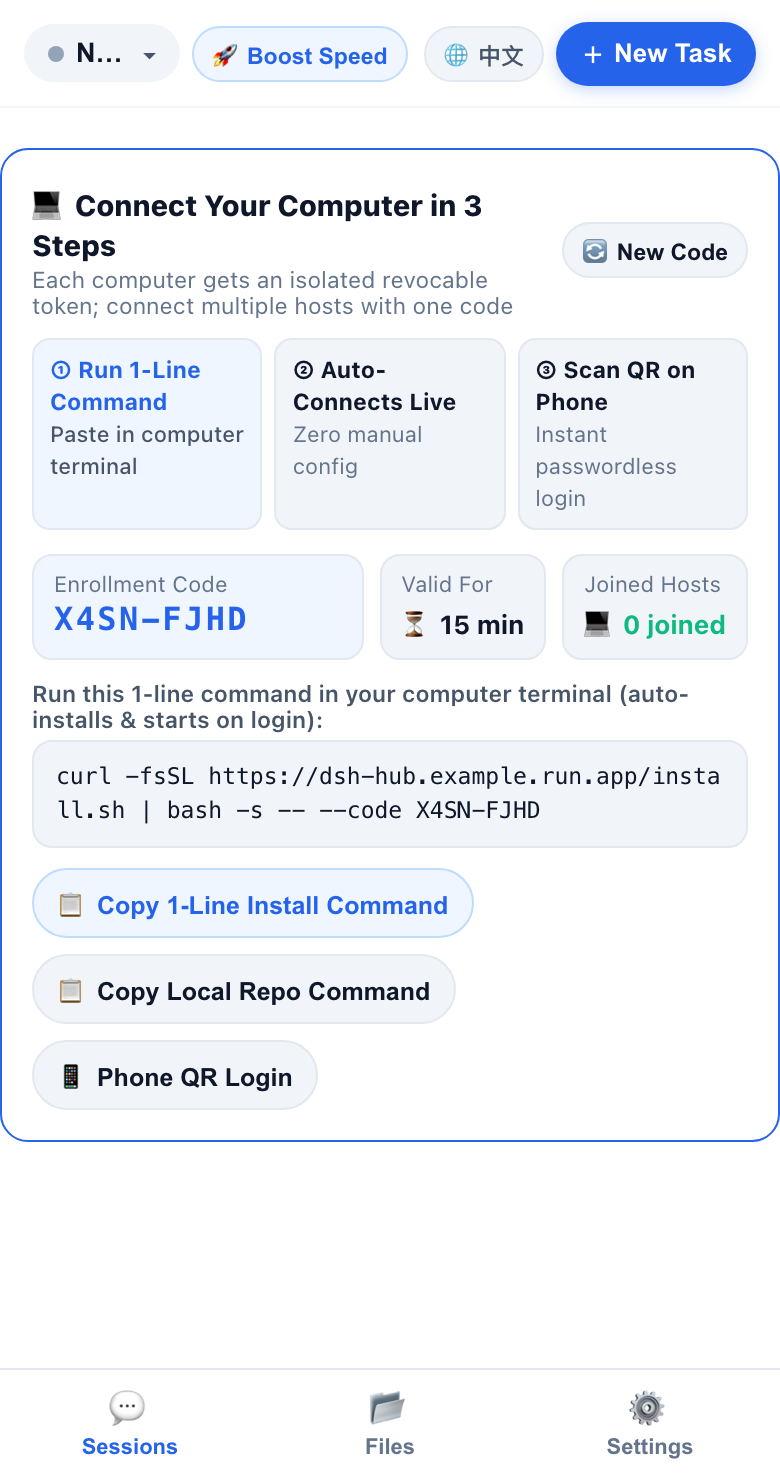
Step 2 Screen: Copy the 1-line command from the onboarding card and run it in your computer terminal.
Step 3: Scan QR Code on Your Phone (Passwordless Login)
- In your computer browser, click
📱 Phone QR Login. - Point your phone's camera at the QR code on screen — your phone logs in immediately without typing the password!
- Smart LAN Detection: If you opened
http://localhost:8080on your computer, the QR sheet automatically switches the QR code URL to your computer's LAN IP (http://192.168.x.x:8080) so your phone on the same Wi-Fi connects on the first try.
- Smart LAN Detection: If you opened
- Optional (Recommended on iPhone): In Safari, tap Share → Add to Home Screen, open the app from your Home Screen, and enable Lock-Screen Push in Settings to receive instant alerts when a task finishes or needs approval.
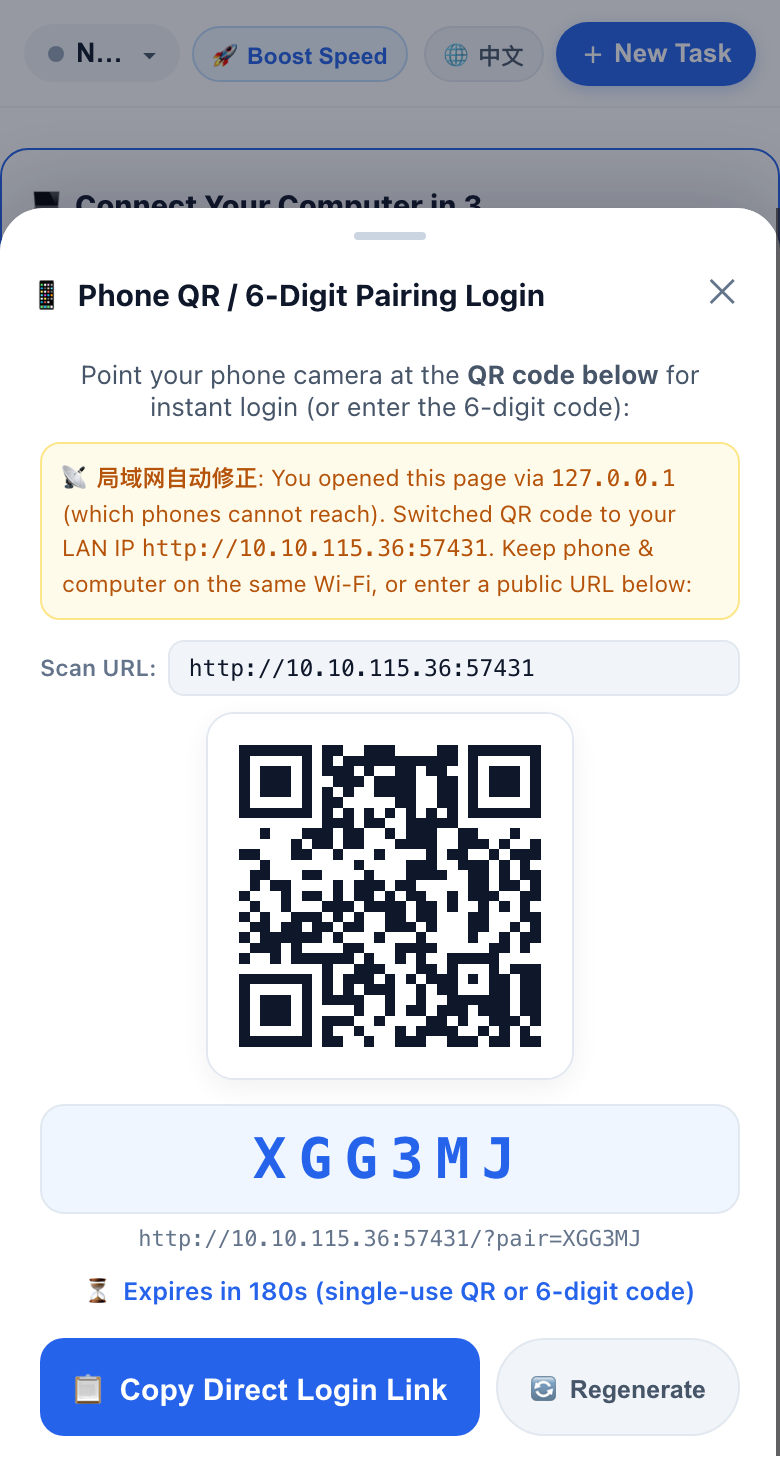
Step 3 Screen: Scan the QR code with your phone camera for instant passwordless login.
Supported AI Coding Tools
The background daemon automatically discovers local sessions across all 6 supported coding tools on your machine:
| AI Coding Tool | View Live Sessions | New / Resume Prompt | Emergency Stop | Mobile Approval & Question Popups | Live Mid-Run Steer |
|---|---|---|---|---|---|
| DeepSeek Harness (DSH) | ✅ | ✅ | ✅ | ✅ (Shell approvals + ask_user_question / exit_plan_mode cards) | ✅ |
| Antigravity IDE | ✅ | ✅ | ✅ | ✅ (Connect-RPC + native keystroke injection) | ✅ |
| OpenAI Codex | ✅ | ✅ (codex app-server + codex exec fallback) | ✅ | ✅ (JSON-RPC approvals & question cards via app-server) | ✅ |
| Tencent WorkBuddy | ✅ | ✅ (ACP HTTP+SSE) | ✅ | ✅ (ACP permission popups) | ✅ |
| Claude Code | ✅ | ✅ (via claude --resume) | ✅ | ✅ (Native PermissionRequest Hook: Bash, Edit, Write, MCP & AskUserQuestion) | — |
Doubao Desktop (豆包电脑版) | ✅ (Observe-only) | — | — | — | — |
📅 What's New (Recent Releases)
💡 Grouped one drawer per day with every exact version tag preserved inside; see
CHANGELOG.mdfor granular per-release notes.
2026-11-20 · v0.9.1–v0.9.4 — Swipe Triage TTS, Bidirectional Multi-Host Rename Sync & Native Antigravity / Claude Code / Codex Plugins
- Swipe Triage
🔊 ListenTTS & Automatic Multi-Computer Legacy Rename Migration (v0.9.4): Added 1-tap🔊 Listen/⏹ Stop/⚡ Summary | 📖 Full/1x–1.5xplayback directly on Swipe Triage conclusion cards and expanded full-reply modals (with silent cold-hydration upgrade and auto-mute on swipe/mic); addedHubAgent.migrateLegacyCustomTitles()on daemon boot so every enrolled computer automatically migrates its own legacy~/.dsh/session-titles.jsontitles into A