polox_ai
An open-source, agent-native platform for multimodal AI generation, built on DeepSeek Harness. Every interaction lives in agent conversations and an infinite canvas, unifying creation, generation, and editing. 适合需要通过对话在无限画布上进行多模态内容创作与编辑的用户。
インストール
検証済み bundle がないか、互換性チェックに失敗しています。先にリポジトリの説明を読んでください。 README 全文を読む ↗
ドキュメント
README 全文を読む ↗
PoloX AI — Agent-Powered Multimodal Creation Workbench
Generate, edit, and refine without operating generators by hand — chat through everything, and see the results on an infinite canvas.
English | 简体中文
🌐 Website: polox.ai
💬 WeChat: SaihholdZhao
📪 Email: saihhold.chiu@gmail.com
𝕏 X: @saihholdzhao
If you run into a problem you cannot resolve, contact me on Discord.
Introduction
This is the open-source edition of PoloX AI, a creative platform in the same space as Lovart and Crepal. PoloX takes an agent-native approach: agent conversations and an infinite canvas bring creation, generation, and editing into one continuous workflow. Describe what you want, work with the agent, and refine the results on the canvas.
PoloX runs locally with Nuxt, Vue, and SQLite. Bring your own WaveSpeed API key; no PoloX account or subscription is required. Projects, asset libraries, conversations, generation history, and media are stored on your machine. AI inference uses external providers, so relevant inputs are sent to those services and their API charges apply. WaveSpeed supports checkout with credit cards, WeChat Pay, and Alipay.
Updates
September 26, 2026 — v2.1.0
-
LLM image budget — each request accepts up to 8 images and 18 MB; older images are sent as links, local images are shrunk to 1536px WebP before upload, and a 413 response gets one retry.
-
More robust video generation — added reference checks, frame-extraction and duration tools, and a last-frame fallback.
-
Document upload and reading — upload PDF, Word, and Excel files; PoloX asks before reading them and provides Office previews. Video frame extraction and document features require
ffmpegandffprobe(see the setup notes below). -
Voice recorder and Talking Avatar — added a voice recorder and rewrote the Talking Avatar skill.
-
Skill categories — Utility and Fun categories now have homepage tabs, and Skill Creator asks for a category.
-
Skill covers — set a skill cover directly from test results.
-
Smoother agent flows — fixed IME Enter sending, made auto-retry smarter, improved homepage-to-agent handoff, and made Create Skill open the editor.
-
Lighter UI and prompts — skill prompts use fewer tokens, and the Skills header stays on one row on mobile.
September 21, 2026 — v2.0.0
-
Major: Skill Creator (first public test)
Build your own L1 skills with Skill Creator. On the homepage agent composer, type/skill-creatorto start (or open Skills → Create Skill).
L1 skills orchestrate PoloX’s existing tools and UI cards — they cannot define custom tools or custom UI. A later L2 tier (custom tools + UI) may open up.Please note (test build):
- This is the first test release of Skill Creator. Many bugs were found and fixed in development, but more will remain.
- Because this is still an L1 preview, some built-in tools are incomplete, so not every skill idea can be built perfectly yet.
- If you hit either case, please open an issue or email saihhold.chiu@gmail.com.
-
Harness LLM — agent driver model switched to
deepseek/deepseek-v4.1-flash. In our testing it is stable and priced lower than the previous Kimi K3 lock.
September 20, 2026 — v1.6.0
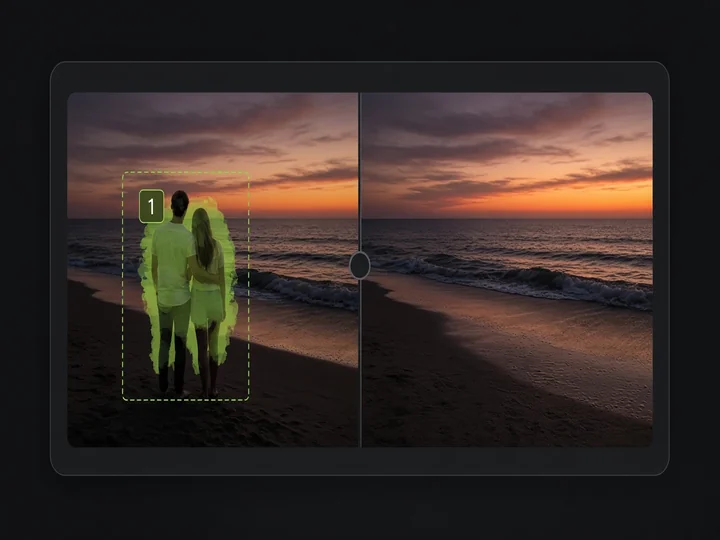
- Image Object Removal — mark objects with boxes or green masks and remove them while keeping the rest of the image.
-
Canvas image toolbar — added Remove object to the right of Remove BG; it attaches the selected image, mentions
image-object-removal, and sends. -
Smart resolution for Image to Image — models with 1K / 2K / 4K tiers (including Image Text Editor and Object Removal) pick a tier from the source image size.
September 19, 2026 — v1.5.0
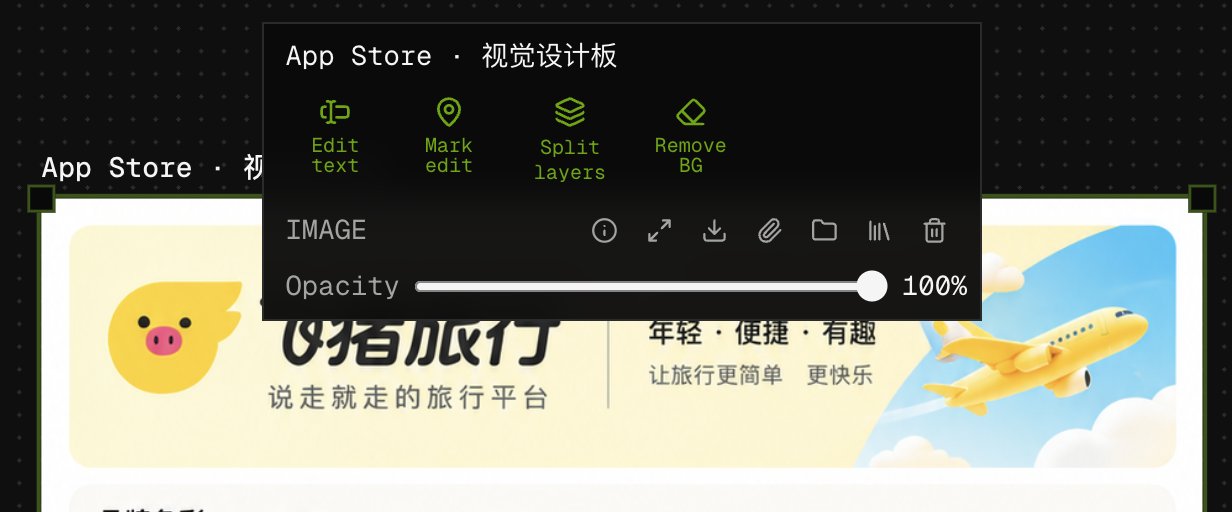
- Added skills to the image asset toolbar on the canvas (Edit text, Mark edit, Split layers, Remove BG).
September 19, 2026 — v1.4.0
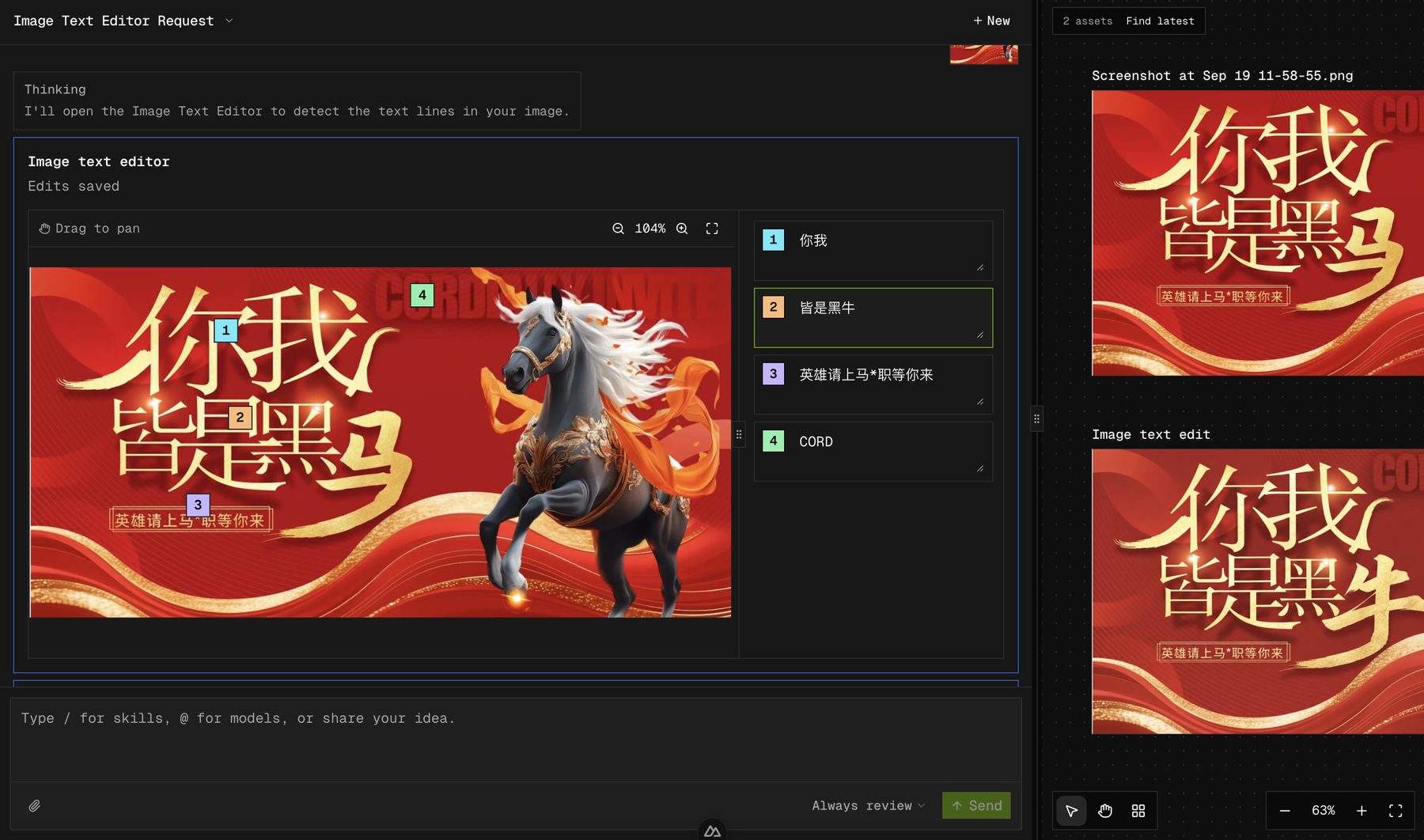
- Image Text Editor improvements
Detects text coordinates with the LLM and shows matching serial numbers on the canvas next to each text field.
-
Image Layer Splitter bug fix
- Choosing Need to correct or add more now reopens the layer-selection method instead of looping on the Confirm card
-
Agent Skills structure
- New dedicated skills:
image-layer-splitter.md,image-text-editor.md single-generator.mdkeeps only shared rules plusfollowpointers; specialized flows live in their own files
- New dedicated skills:
-
Other small changes
- WaveSpeed media fields now include
image_urls; tool schemas JSON expanded - Canvas asset ids:
canvasAssetIdSchemaallows/, fixing “Could not load canvas layout” forref:…paths - Draw-boxes canvas: hover scroll-wheel zoom (anchored to the cursor)
- Studio split: chat pane max width ratio
0.48→0.8 - Thinking: Collapse after expand
- Confirm card: hide Image Layer Splitter prompt details
- Removed unused leftover files
- Other minor polish and bug fixes
- WaveSpeed media fields now include
September 17, 2026 — v1.3.1
- Image Layer Splitter draw-boxes now recognizes intent by comparing the original image with a boxed annotation preview instead of raw coordinates; the confirm card shows that same preview
September 16, 2026 — v1.3.0
- Added Asset Libraries: keep shared images, video, and audio on your machine and reuse them across projects
- Import library assets into chat with
@(searchable third column next to project assets) - Save canvas results into a library from the project page
- Improved Image Layer Splitter: the agent inspects the image, then asks you to Confirm / Adjust before splitting, with one target per line
- Wider canvas zoom range (about 2%–800%)
- Clearer delete copy: removing an asset takes it out of the project, not a library
- Miscellaneous small fixes and polish
September 16, 2026 — v1.2.0
- Added Annotated Image Edit and App Store Graphics skills
- Chat supports drag-and-drop attachments; clicking an attachment opens the media lightbox
- Default image-to-image path uses GPT Image 2.5 Sunburst
- Long Thinking / choice / confirmation text can collapse and expand
- Result evaluation asks before regenerating on a suspected mismatch (no silent auto-retry)
- Long-form video can use reference audio for more consistent character voices
- README Skills section aligned with the
/skill picker - Fix: Agent chat history no longer drops confirmation cards, ask-user prompts, or media while the agent is thinking or waiting for confirmation.
- Miscellaneous small fixes
September 13, 2026 — v1.1.0
- Added GPT Image 2.5 Flare and Sunburst models
- Added Product Hunt and Sketch to Image skills
- Switched the API provider to WaveSpeed.ai for easier checkout with credit cards, WeChat Pay, and Alipay
- Improved agent prompts and skill structure; removed redundant content
- Fixed other known bugs
How to update
Tell GrokBot or Codex:
Pull the latest code from https://github.com/saihhold-zhao/polox_ai and install dependencies.
⚠️ If you have already modified the local code, you may hit merge conflicts. Ask GrokBot or Codex to help resolve them.
Install with GrokBot or Codex
Create a new task in GrokBot or Codex and send this prompt:
Help me install PoloX AI locally:
1. Check that Node.js 22.20 or newer and pnpm are installed. Install any missing prerequisites.
2. Install FFmpeg, including ffprobe, for video concatenation, video frame extraction, and document features; verify that both commands are available.
3. Clone https://github.com/saihhold-zhao/polox_ai and open the project directory.
4. Run pnpm i to install dependencies.
Run locally with GrokBot or Codex
Whenever you want to use PoloX, open the project in GrokBot or Codex and send:
Run pnpm dev in this project and open the local page in the browser. Keep the server running while I use the app.
The default address is http://localhost:3001. You do not need to run pnpm build for everyday local use.
Run manually
You need Node.js 22.20 or newer and pnpm. For the first run:
git clone https://github.com/saihhold-zhao/polox_ai.git
cd polox_ai
pnpm i
pnpm browser:install
pnpm dev
For subsequent runs, open a terminal in the project directory and run:
pnpm dev
Open http://localhost:3001 and keep the terminal running. Press Ctrl+C to stop the server.
Use Asset Libraries in the sidebar to import shared media, then @-mention those assets in any project. The home page Skills catalog currently includes Product Hunt gallery, App Store Graphics, Sketch to Image, Image Text Editor, Annotated Image Edit, Image Layer Splitter, and Long-form video. Select a card or type / in the agent composer to pick a skill. Starting a sketch from home creates a new agent in your project. Product Hunt website inspection uses Playwright Chromium; on Linux, install its system dependencies with pnpm browser:install:linux.
FFmpeg for video concatenation
Install FFmpeg and ffprobe to stitch generated clips, extract video frames, and support document features. Uploads and AI generation do not require them, and pnpm i does not install them.
macOS with Homebrew:
brew install ffmpeg
Ubuntu / Debian:
sudo apt update
sudo apt install ffmpeg
On Windows, install an FFmpeg build that includes both tools and add its bin directory to your PATH. Verify the installation in the terminal used to run PoloX:
ffmpeg -version
ffprobe -version
Restart the development server after installing these tools.
Connect WaveSpeed
- Start PoloX and click the red API key not configured indicator in the top-right corner.
- In the Service connection dialog, use the Get API key link to obtain your WaveSpeed key.
- Paste the key and click Test connection.
- Once the test passes, the indicator turns green and reads Services connected. You are ready to create.
The agent LLM is locked to deepseek/deepseek-v4.1-flash; you do not need to choose a model in the dialog. Connection testing sends a short model request and may incur a small API charge.
This project needs a vision-capable model for image understanding. Among the options tested so far, Kimi has been the most stable fit. If you know a stronger or more cost-effective alternative, please open an Issue with your suggestion.
Available AI models
The Frontier AI models section on the homepage lists the integrated models. To ask the agent to use a particular model, select it with @ in your message.
Skills
Pick a skill from the home page, or type / in the agent composer. Skills are guided workflows the agent runs for you.
| Skill | What you can do |
|---|---|
| Product Hunt gallery | Build a consistent Product Hunt launch gallery from a website or product brief. |
| App Store Graphics | Turn app screenshots into a matched set of App Store–style frames with shared visual direction. |
| Sketch to Image | Draw lines and text in chat (/sketch-to-image), save the sketch, optionally add references, then generate with GPT Image 2.5 Flare. Supports move/rotate, text sizing, and undo/redo. |
| Image Text Editor | Edit text inside images while preserving fonts and layout. Supports batch uploads. |
| Annotated Image Edit | Mark points on an image and describe each change for precise edits. |
| Image Layer Splitter | Draw boxes around objects and extract them as separate transparent PNG layers. |
| Long-form video | Plan a storyboard, generate multi-shot clips, and stitch them with FFmpeg. |
Outside these skills, you can still ask the agent for open-ended image or video edits (including background removal) in plain language.
Long-form video generation
Ask the agent to create a five-minute, ten-minute, or longer video. The workflow generates individual shots with AI video models, then stitches them into a continuous video using FFmpeg. The maintainer has tested ten five-minute videos, with results meeting expectations; this is an early workflow, and results depend on the models and creative brief.
A typical workflow looks like this:
- Plan the storyboard. The agent works from your brief to plan scenes and shots.
- Establish the characters. The agent creates character reference sheets, such as three-view references. You can also upload your own character images and ask the agent to use them.
- Create first frames. The agent uses the character references to generate a first-frame image for each shot, helping maintain visual consistency.
- Generate the clips. Video models turn the planned shots and reference images into video segments.
- Assemble the video. Once the clips are ready, the agent stitches them together in storyboard order.
After assembly, continue the conversation to revise shots or add scenes. You can guide the whole process through the agent.
You can attach reference audio so clips keep a more consistent character voice or sound direction across shots (supported on the Seedance reference-to-video path via reference_audios).
The long-form video skill defines this workflow. It is still early; suggestions and contributions are welcome through Issues.
Troubleshooting and feedback
If installation or usage goes wrong, ask GrokBot or Codex to inspect the error and help you resolve it. Share the relevant error message and what you were trying to do.
If you find a bug or an improvement that would help other users, please open an issue. GrokBot or Codex can help you draft and submit it. Include steps to reproduce, your operating system, and relevant logs; remove API keys and other private information before sharing.
Local data
PoloX stores its SQLite database at .data/polox.sqlite and media under .data/media. Back up the entire .data directory with the server stopped to preserve your projects, asset libraries, and files. API keys are stored in the local database, so keep backups private.
This edition is intended for local use. Its workspace routes do not require authentication; keep the app on your machine or a private network.
Open-source foundations
Thanks to the projects that make PoloX possible:
| Role | Project |
|---|---|
| Application framework | Nuxt |
| UI foundation | shadcn/ui and its Vue ecosystem |
| UI templat |