dsh-media-gen
Image and video generation for DeepSeek Harness, reusing the providers configured in DSH 适合需要直接在对话中调用多媒体生成模型进行创作的用户。
同名パッケージの別リポジトリ
インストール
npx -p @deepseek-ai/dsh dsh plugin --profile web add github:so16tm/dsh-media-genドキュメント
README 全文を読む ↗Usage
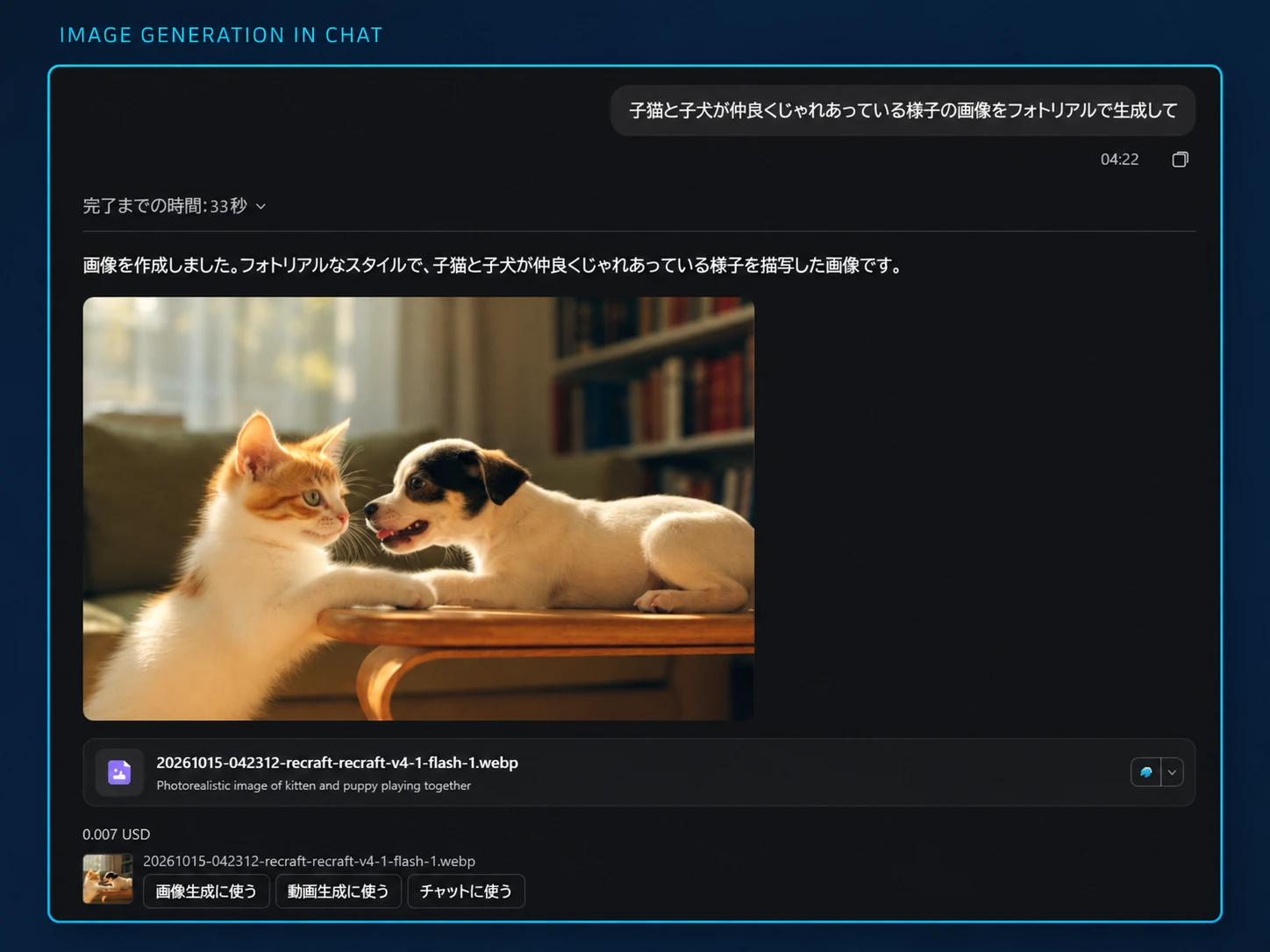
From a chat request to a generated image, ready to reuse in another image or video. Presentation edited from a user-provided screenshot; the displayed cost is specific to this example.
Generation cards and chat
Open Generate… beside the chat input and choose image/video, model, prompt, and available generation options.
- Ask the agent lets the agent write or translate your prompt and ask about missing details.
- Generate as written sends your text unchanged and starts a billable request. Check the displayed estimate first.
You can also ask directly in chat. For different image variants, ask for one prompt per image; /image --count instead repeats the same prompt.
Generated images open in DSH's file preview. Use for image and Use for video open a card using the image as input (the first frame for video). Use in chat inserts its path and replaces the current draft.
Ask the agent to save model-specific prompt notes if needed. Notes persist across restarts and apply to all conversations; saving or clearing them always requires approval.
Commands
Place options before the prompt and quote paths containing spaces with ".
| Command | Purpose |
|---|---|
| `/image [--model id] [--aspect 1:1] [--resolution 1K] [--count n] [--seed n] [--image path]... [--yes] | |
| ` | Generate images; repeat --image for multiple inputs |
| `/video [--model id] [--duration seconds] [--aspect 16:9] [--resolution 720p] [--audio on|off] [--seed n] [--first path] [--last path] [--ref path]... [--yes] | |
| ` | Submit a video job with optional first/last frames and reference images |
/media-jobs [job-id] | List this session's video jobs or check one immediately |
/media-model | Show selected models and defaults |
/media-model image | List image model IDs |
/media-model image [provider] | Select a model for this conversation |
/media-model image default | Clear the conversation selection |
/media-approval on | Allow generation in this conversation without normal per-request confirmation |
/media-approval off | Restore normal per-request confirmation |
Use video instead of image for video model selection. Chat-input selectors do the same thing; selections persist across restarts. The agent prioritizes the conversation selection over its own model argument, then uses configured defaults when no model is specified. Choosing a different card model through Ask the agent updates an existing conversation selection.
Approval and costs
Generation costs money. With requireApproval enabled and no conversation permission, agent requests ask for approval with the actual prompt and estimated cost; direct commands show only an estimate unless you add --yes. The chat input's Media → Ask before generating menu also controls conversation permission; only the user can change it.
Agent tools always ask before sending images outside the working directory or making a second generation call in the same turn, even if normal confirmation is disabled. Direct commands follow requireApproval, --yes, and conversation permission instead; these extra agent checks do not apply to them.
Estimates may be unknown or lower than the actual bill, especially for input-image or token charges. Required agent approvals still ask when an estimate cannot be obtained. After a timeout or unusable response, the provider may already have charged: check before retrying. If part of a multi-image request fails, already saved images are returned with the failure.
Video jobs
Jobs resume tracking after a DSH restart when storage is available. Completed files are downloaded automatically; completion, failure, or expiry is reported to the session when it is open. Jobs started with /video do not wake the agent on completion; use /media-jobs or wait for the next agent turn.
After videoMaxWatchMs (3 hours by default), tracking stops. This does not cancel the provider job or guarantee a refund. Ask the agent to check the job with media_video_status and its job_id to resume tracking.
Configuration
Open Plugins → Media Generation → Components → Media Generation > for model defaults, chat-menu models, limits, approval, and notifications. All models… can select a model outside your chat-menu filter; the agent can still list all models.
| Setting | Default | Purpose |
|---|---|---|
defaultImageProvider / defaultImageModel | unset | Default image provider/model IDs |
defaultVideoProvider / defaultVideoModel | unset | Default video provider/model IDs |
chatImageModels / chatVideoModels | [] | Chat-menu model IDs; empty shows all |
maxImagesPerCall | 4 | Images per call |
maxVideoSeconds | 10 | Video duration limit; see Limitations |
requireApproval | true | Normal per-generation confirmation |
outputDir | generated-media | Relative output path within the working directory |
notifyOnVideoCompletion | true | Notify the session when a video job ends |
For polling, tracking, timeout, cache, and download-size settings, see the configuration schema.