dsh-a2ui
A strict, replayable A2UI protocol bridge for DeepSeek Harness.
同名パッケージの別リポジトリ
インストール
npx -p @deepseek-ai/dsh dsh plugin --profile web add https://github.com/sunxiuguo/dsh-a2ui/releases/download/v0.1.0-alpha.13/dsh-a2ui-0.1.0-alpha.13.tgzドキュメント
README 全文を読む ↗DSH A2UI
A2UI for DeepSeek Harness conversations
DSH A2UI is an independent plugin for rendering standard, agent-generated interfaces inside DeepSeek Harness conversations. An agent presents an interface, the user interacts, and that action becomes the next agent turn.
It uses the official A2UI schemas and renderer, with explicit validation, streamed previews, session-scoped actions, and replay that does not execute past interactions.
See it in DSH · Try it locally · Compatibility · Roadmap · Report an issue
Development preview: 0.1.0-alpha.13. Alpha.13 makes clearing either half of a combined DateTimeInput clear the whole bound value, so explicit required checks on the submitting Button block empty submission rather than accepting malformed date/time fragments. Alpha.12 surfaces runtime expression failures as per-surface, dismissible notices without exposing evaluator payloads or changing action semantics. Alpha.11 preserves literal model/event metadata through submit and replay while enforcing disabled navigation at the actual function boundary. Alpha.10 adds native Slider naming and keyboard-to-action/replay coverage alongside the accessible TextField view through standard catalog extension APIs. The current alpha.13 bounded synthetic workflow passed in the official DSH Web host, including native plugin installation, HTTP RPC/WebSocket transport, two-session interaction, cancellation and restart restoration of authored history. The provider is scripted; live models and complete A2UI conformance are not certified. This is an additional project, not a replacement for DSH GenUI.
See it in DeepSeek Harness
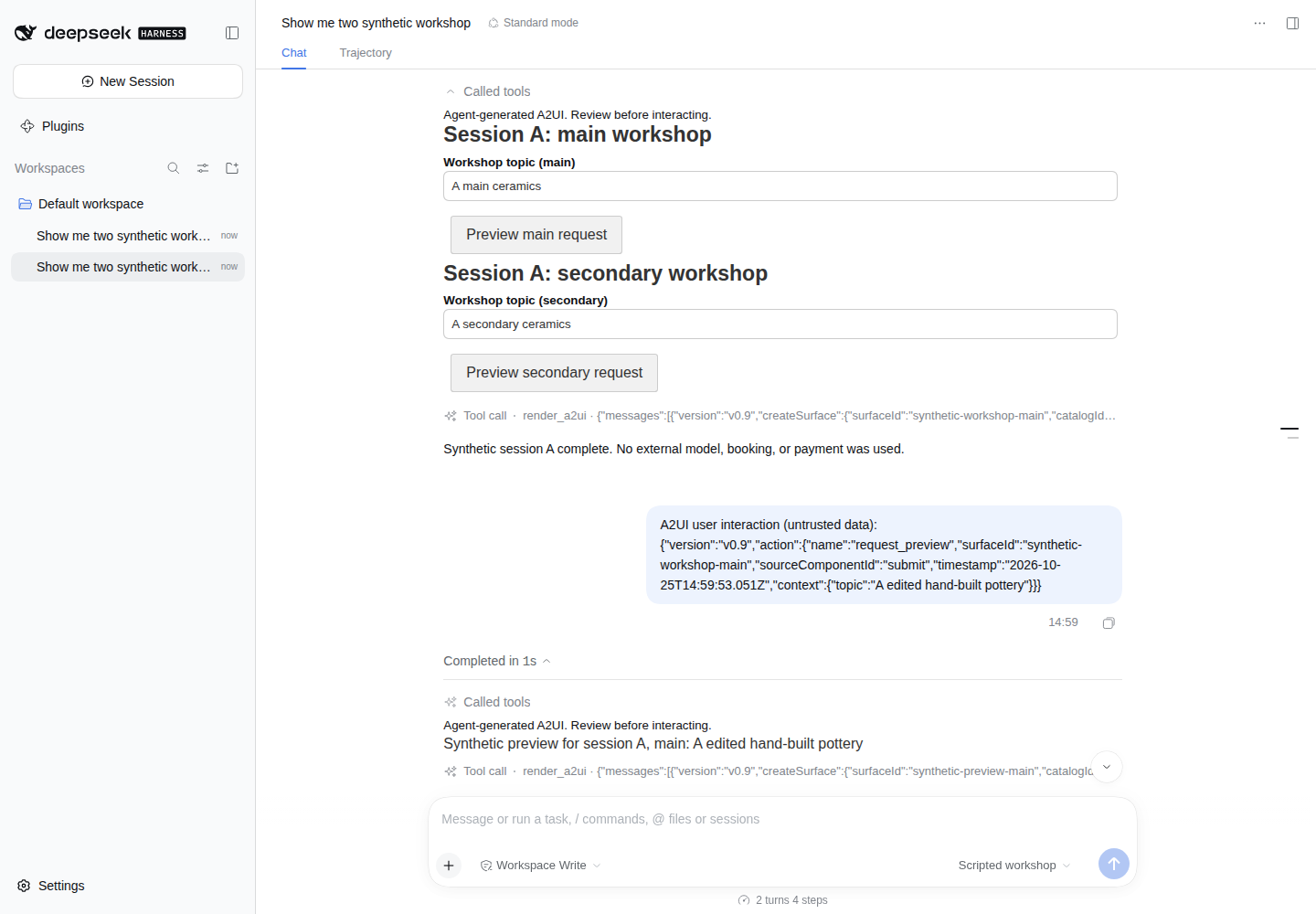
The actual DSH Web conversation, not a standalone renderer page: two A2UI surfaces, a user action and the next agent turn's preview. The model provider and workshop data are synthetic. No live model, real account, booking, payment or customer data was used.
Full-host acceptance run 40204726938 passed on 2026-10-25 at current alpha.13 source a8744445. It exercised the official CLI and Web shell over actual HTTP RPC and WebSocket transport: two isolated sessions, a controlled pre-admission action failure and deliberate retry, native Stop and recovery, then graceful process restart and reopening without resending history.
The restored Session B screenshot and full acceptance boundary and retained alpha.8 evidence document that run. Both screenshots were reviewed for privacy and legibility. Authored messages and submitted-action previews persist; unsent field drafts do not. This evidence covers the exact source and scenario, not all models, components or failure modes.
Standalone validation and replay demo
The earlier 23-second recording isolates the renderer: invalid input is blocked, a valid action is logged locally, and an explicitly exported recording restores an edited value after reload without resending its historical action. It also shows rejection of an unsupported runtime property.
This video is a standalone synthetic page, not the DSH host shown above. It comes from a8d1170 and its passing capture run. See the community showcase or reproduce the capture.
What this project is building
- Interfaces that participate in the conversation. A
render_a2uitool call creates a dedicated conversation node. Form actions return to the owning DSH session as explicitly labelled data, so the next agent turn can respond. - Standard payloads, official rendering. The bridge uses A2UI message envelopes and the official basic catalog with
@a2ui/reactand@a2ui/web_core. It does not rename a proprietary component vocabulary as A2UI. - Visible compatibility boundaries. Invalid schemas, unsupported catalogs, broken surface lifecycles and invalid final component references fail visibly. Unsupported features are not silently removed or rewritten.
- Replay without accidental resubmission. Portable recordings retain edited field values separately from model-authored messages. Historical actions remain evidence; importing a recording never sends them again.
The current examples are a workshop request form and a validation form. They are small, inspectable acceptance fixtures for the larger conversational experience.
Quick start
Use Node 24.19.0, the verification baseline. No model key or account is needed for either local example.
git clone https://github.com/sunxiuguo/dsh-a2ui.git
cd dsh-a2ui
npm ci --ignore-scripts
Top-level dependencies are exact and transitive dependencies are locked. The install command disables lifecycle scripts.
1. Try rendering, validation and replay in a browser
npm run dev
Open the loopback URL printed by Vite.
- Click Stream synthetic example, edit Workshop topic, then click Preview request. Its standard action envelope appears in the page's local log.
- Click Stream validation example. Enter
badto see a field error and disabled button; enterCD34and click Preview valid code to log a valid action. - Click Export recording and copy the JSON from the recording editor. Reload the page, paste the saved JSON into the editor, then click Restore recording. The edited value returns, but the historical action is not sent again.
The page does not automatically save the form or recording editor across reloads. Its action sink is a local log, not a DSH session. See the validation walkthrough for explicit checks and Button gating.
2. Follow an action into the next DSH agent turn
From the same source checkout:
npm run build:plugin
npm run demo:loop -- "Wheel-thrown pottery"
This executable walkthrough uses the real DSH AgentLoop, ToolRuntime, conversation assembler, official renderer and send controller. A scripted local model produces a form, the example edits and clicks it in jsdom, and the next real agent turn receives the action and renders a preview.
Expected result:
PASS: 2 completed agent turns, 4 provider calls, 2 real tool results, 1 UI action.
The model and in-process transport are synthetic. This is a terminal walkthrough, not an interactive browser, live model or full DSH shell. It requires the source checkout and development dependencies; the plugin tarball does not include it. Read the complete walkthrough and boundary.
How it fits into DSH
Agent tool call: render_a2ui({ messages })
  → schema, compatibility and document validation
  → DSH tool-result presentation metadata
  → A2UI conversation node
  → official A2UI runtime + focused accessible TextField and Slider views
  → user interaction
  → validated action, sent as labelled data to the owning conversation
  → next agent turn
While a tool call is streaming, partial arguments can produce a preview. Its controls cannot send actions until final tool validation succeeds. SDK fixtures cover failed/cancelled-result withdrawal; the native-host run additionally verifies that Stop retires an in-progress preview before successful tool completion and that a later action still works.
The server and client are separate plugin entries. Without the browser plugin, the tool's text receipt confirms validation only, not that an interface appeared. The client submits action data through DSH's conversation send controller; client-side checks are not authorization or a substitute for server validation.
Start with demo/fixture.ts or demo/validation-fixture.json for the messages argument. The implementation lives in src/dsh, with shared validation, rendering and recording modules.
Compatibility and support
This matrix describes the alpha's bounded implementation and evidence, not complete protocol or production certification.
| Area | Current implementation and evidence | Remaining boundary |
|---|---|---|
| A2UI protocol | v0.9 and v0.9.1 envelopes; unchanged official schemas pinned from v0.9.1 | A2UI v1.0 is not supported. |
| Official runtime | @a2ui/react and @a2ui/web_core 0.14.0 | Other renderer versions and cross-renderer parity are not certified. |
| Basic catalog | Contract fixtures for 15 permitted components and 13 permitted functions; separate function-result tests | Full variants, interactions, locales, accessibility and semantic conformance remain open. See coverage. |
| TextField accessibility | Alpha.9 plugin-owned view using official schema/binder; associated native labels across four variants, dynamic names and explicit validation descriptions | Other component accessibility and screen-reader certification remain open. See scope and evidence. |
| Slider accessibility | Plugin-owned native range view with associated labels, reactive descriptions and unchanged numeric binder | v0.9/v0.9.1 default step 1 only; inherited authored-value sanitization remains. See scope and evidence. |
| Literal metadata and execution policy | Model/resolved-event data preserve literal component/call fields; the renderer denies openUrl at execution as well as authored syntax | Inline authored definitions remain conservative; runtime errors produce a fixed per-surface notice, not atomic action failures. Dismissal acknowledges an observation, not recovery. See boundary and workflow and runtime notice lifecycle. |
| DateTimeInput clearing | Either cleared half of a combined selection becomes an empty bound value; explicit checks, action and portable replay preserve that state | Atomic clear, not partial draft storage or comprehensive date/time parsing. See workflow and limits. |
| Validation | Explicit checks with regex, including independently gated Buttons | TextField.validationRegexp is valid A2UI but ignored by the pinned runtime, so alpha.8 rejects it with COMPATIBILITY, even when empty or combined with checks. No automatic rewrite occurs. |
| Streaming | Incremental JSONL and DSH tool-argument previews; native Web-host streaming over HTTP RPC/WebSocket with inert previews and Stop cancellation | The provider is scripted. Cancellation during/after tool execution and broader network-recovery behavior are not certified. |
| Actions | Two native sessions with overlapping surface IDs; actions reach the owning next turn. Controlled pre-admission HTTP rejection retains edits; deliberate retry is admitted once in the tested scenario. | No automatic retry was observed in the bounded test. This is not an exactly-once guarantee; unconfirmed delivery can still be ambiguous. |
| Replay and state | Export/import preserves field snapshots without sending history; identical document resync retains state in the same mounted node | A changed document, node, preview/error state or teardown resets that in-memory state. Unsent edits do not survive a DSH reload. |
| Durable history | Both native sessions reopen after graceful host restart and a fresh browser context, with exact authored metadata and submitted-action previews; no new model call or action is sent by restoration. | Unsent drafts are not durable. Crash recovery, host-managed export/import and restoration of every interaction state remain open. |
| DSH integration | Official 0.2.0-rc.2 CLI and Web shell, Cordis 4.0.5; packed alpha.13 installation and the bounded native-host scenario passed. | Other versions, live-model workflows, Code Mode and production deployment are not certified. See full-host evidence. |
Upstream identifies A2UI v0.9.1 as current and v1.0 as a candidate. This bridge's support is narrower than the standard. See the packed acceptance ledger for the exact test boundaries and alpha regression history.
DSH package installation
Build and inspect a local plugin artifact:
npm run build:plugin
npm run test:packed
npm pack --ignore-scripts
The package contains server and client entries plus its cordis.patch.yml bundle contribution. It is not published to npm.
For a prebuilt package, download the alpha.13 release tarball and use the local-tarball command below. The plugin directory may also display a generic github:sunxiuguo/dsh-a2ui shortcut; that source-install shortcut is not a supported installation route for this alpha. This repository does not commit lib/ or define an automatic install-time build. Allowing lifecycle scripts alone does not replace the explicit build-and-pack steps above.
If you already have the compatible DSH 0.2.0-rc.2 installation and a complete Web profile, replace YOUR_EXISTING_WEB_PROFILE with that profile's name and install the local tarball using the native CLI syntax exercised by the acceptance run:
dsh plugin --profile YOUR_EXISTING_WEB_PROFILE add ./dsh-a2ui-0.1.0-alpha.13.tgz --ignore-scripts
This command targets that existing profile; it does not create a complete DSH installation. Configure any real model and its credentials yourself through DSH's normal settings. Real-model behavior remains outside this acceptance result.
Update, roll back or remove from that profile
Stop the DSH process using this profile before replacing or removing the package. Keep the previously working tarball and its source commit before updating. The pinned DSH 0.2.0-rc.2 plugin manager requires a process restart to load a replacement JavaScript module generation; a successful package command does not prove that an already-running host or browser is using the new code.
For an update, build and test the chosen source revision as above, then use add again with its exact local tarball and the same profile. For rollback, use the same command with the retained prior tarball. Do not use an npm registry update for this unpublished package. Replace CHOSEN_TARBALL.tgz with the actual filename:
dsh plugin --profile YOUR_EXISTING_WEB_PROFILE add ./CHOSEN_TARBALL.tgz --ignore-scripts
dsh plugin --profile YOUR_EXISTING_WEB_PROFILE list dsh-a2ui
Restart that profile using your existing DSH launch command, then reload its Web page. Check both the installed version and a fresh synthetic render_a2ui interaction; a text validation receipt alone does not establish client rendering. A bundle you deliberately disabled remains disabled when replaced—check the profile's plugin selection rather than assuming an update re-enables it.
To remove only this plugin from the stopped profile:
dsh plugin --profile YOUR_EXISTING_WEB_PROFILE remove dsh-a2ui --config.ignore-scripts=true
dsh plugin --profile YOUR_EXISTING_WEB_PROFILE list dsh-a2ui
Restart the same profile and reload its Web page. Do not delete the profile, conversation files or