tianyuec11-design/dsh-apple-liquid-glass ↗★ 1
dsh-apple-liquid-glass
Apple-style liquid glass for the DSH web client: composer, sidebar controls, model picker and send button, with a live 0–100% intensity control. The page background stays untouched.
インストール
npx -p @deepseek-ai/dsh dsh plugin --profile web add https://github.com/tianyuec11-design/dsh-apple-liquid-glass/releases/download/v0.1.0/dsh-apple-liquid-glass-0.1.0.tgzドキュメント
README 全文を読む ↗Liquid Glass — DSH Apple Liquid Glass
An Apple-style liquid-glass material for the DeepSeek Harness web client, applied to the composer, the clickable controls in the left sidebar, the model picker, and the send button. Intensity is adjustable from 0 to 100% live. At 0% the client is visually identical to the native renderer. The page background is deliberately left untouched.
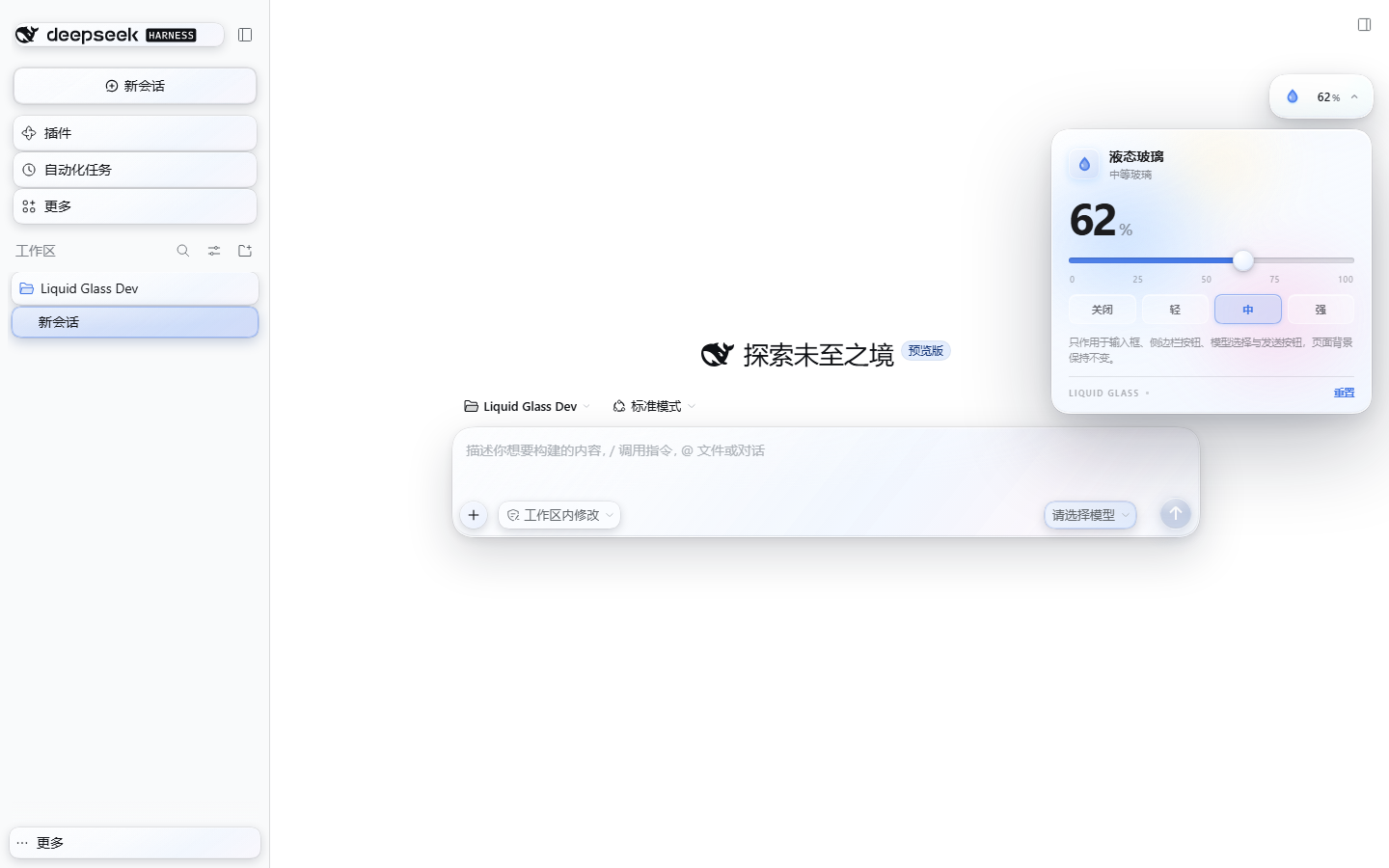
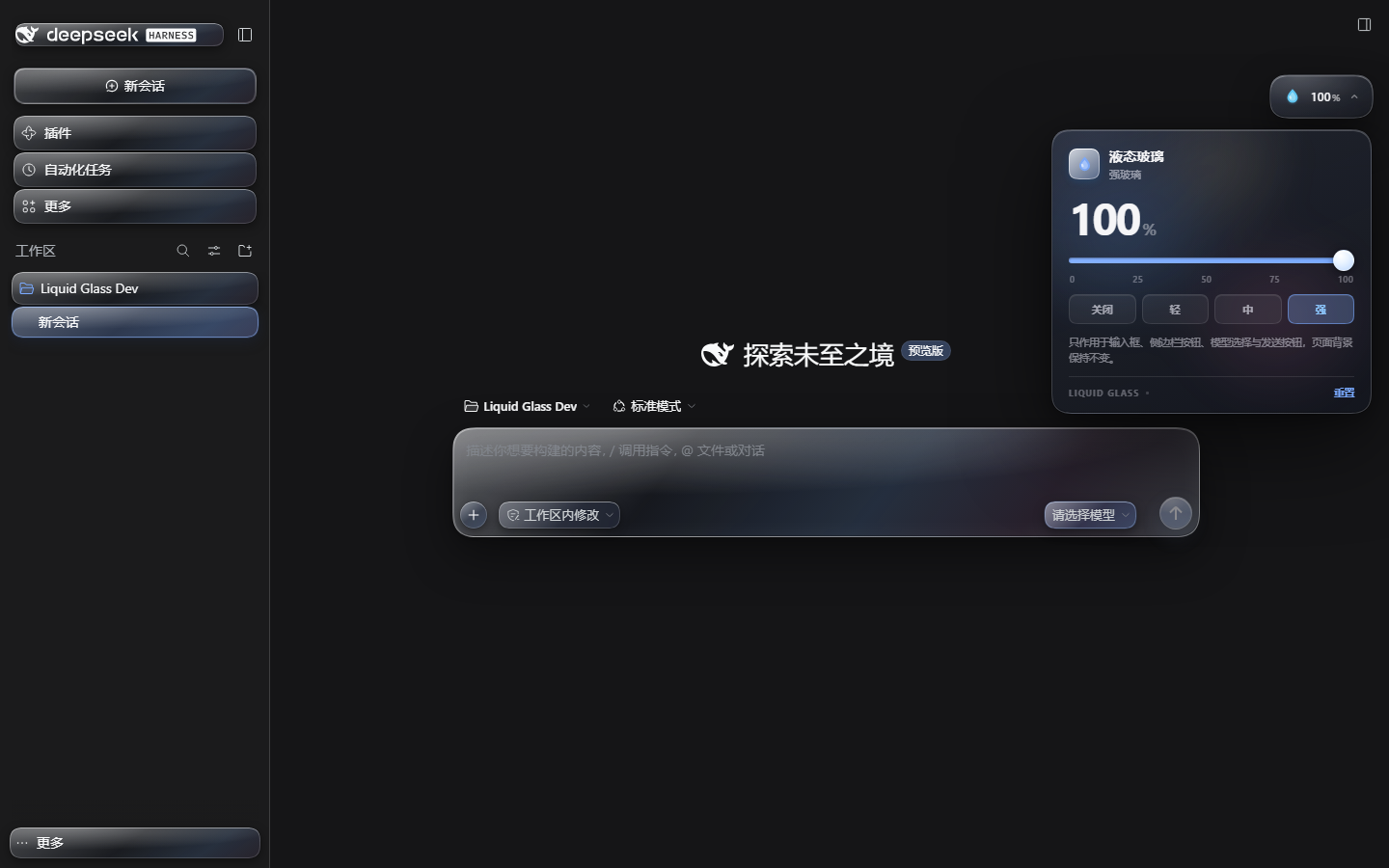
Captured in a real DSH 0.2.1-rc.5 web profile.
Install
Repository:
From GitHub (recommended)
DSH Desktop
-
Open Plugins in the sidebar.
-
Click Add plugin / + and choose Install a third-party plugin.
-
Paste the repository URL:
https://github.com/tianyuec11-design/dsh-apple-liquid-glass -
Install, then Enable it. Refresh the page (or restart if the host asks).
-
A droplet button appears at the top right; open it to adjust the intensity.
dsh web
dsh plugin --profile web add 'github:tianyuec11-design/dsh-apple-liquid-glass'
Restart dsh web afterwards. dsh plugin needs pnpm on PATH; the Desktop app ships its own package manager.
GitHub Release tarball
When a release is published, the pinned package is also available as:
https://github.com/tianyuec11-design/dsh-apple-liquid-glass/releases/download/v0.1.0/dsh-apple-liquid-glass-0.1.0.tgz
dshmarket's Themes tab only lists themes in its catalog. A GitHub-installed theme appears under Installed plugins; it is still a complete bundle theme and can be enabled or disabled normally.
From a local folder (development)
-
Plugins → Add plugin / + → Install a third-party plugin.
-
Paste the absolute path to this folder:
C:\Users\CTY\Desktop\learning project\deepseekharnesslearning\dsh-apple-liquid-glass -
Install → Enable → refresh.
Local dsh web install:
dsh plugin --profile web add "C:\Users\CTY\Desktop\learning project\deepseekharnesslearning\dsh-apple-liquid-glass"
From a self-built tarball
node scripts/build.mjs
npm pack
Then install dsh-apple-liquid-glass-0.1.0.tgz through the plugin manager.
Use
- The top-right droplet shows the current percentage. Click it to open the panel.
- Drag the slider, or use the mouse wheel over it (
Shift= 5% per step). - Presets: Off / Light / Mid / Strong = 0 / 35 / 65 / 100.
- Reset returns to the default 62%.
Escor an outside click closes the panel and returns focus to the button.- The choice persists per browser in
localStorage(keydsh-apple-liquid-glass.settings.v1). - 0% removes every surface override; only the controller remains.
Material scope
| Area | Elements |
|---|---|
| Composer | Input card, + add button, access-mode pill |
| Left sidebar | Brand/new-session, panel nav rows, workspace rows, session rows, settings/account row; small icon buttons on hover/focus |
| Model picker | The model trigger inside the composer |
| Send | Send/stop button |
The page background, message bubbles, header, and the model dropdown menu itself are out of scope for this first version.
How it works
- Pure CSS material plus a small DOM controller. The browser half has no React or third-party dependency.
- The composer's
backdrop-filterlives on a::beforepseudo-element so the card never becomes the backdrop root of its fixed-position popups;isolation: isolatekeeps the stacking local. - Sidebar styling targets clickable elements, never the whole column, so the background stays native.
- Pointer movement updates
--dslg-mx/--dslg-myfor a moving specular highlight. Press feedback uses the individualscaleproperty so the host's owntransformsurvives. - At 0% the controller removes
body[data-dslg-glass="on"]and every--dslg-*variable; all surface selectors stop matching. prefers-reduced-motionandprefers-reduced-transparencyare respected.- Light/dark follows the host through
body[data-ds-dark-theme].
Files
dsh-apple-liquid-glass/
├─ package.json
├─ cordis.patch.yml          # bundle registration
├─ lib/
│  ├─ index.js               # host half: intentional no-op
│  └─ client.js              # built browser bundle
├─ src/
│  ├─ client.js              # controller source
│  └─ style.css              # material source
├─ scripts/build.mjs         # wraps src into the DSH ModuleLoader bundle
├─ preview/harness.html      # static development preview
├─ docs/                     # README screenshots
└─ assets/icon.svg
Development
node scripts/build.mjs
start .\preview\harness.html
The preview accepts ?theme=light|dark&level=0..100&panel=1&hover=1&lang=en. It uses a mock host DOM; validate in DSH for real.
After installing from a local folder, DSH HMR may reload the bundle automatically. If not, refresh the page or restart the host. The Desktop plugin manager installs a copy, so reinstall after source changes, or use a link install during development.
Compatibility
- DSH >= 0.2.1-0.
- Verified on DSH 0.2.1-rc.5 (web profile, light/dark, 0%/62%/100%).
- Desktop uses the same web client; the controller accounts for
--dsh-windows-titlebar-height, but a real desktop pass is still recommended. - Chromium/Electron only; Safari/Firefox are not tested.
Known limitations
- The model dropdown menu, message bubbles, and header are not themed yet.
- Small sidebar icon buttons get the material on hover/focus only, to avoid a wall of blur.
- No SVG edge refraction yet; the current material is blur + saturation + translucent tint + specular highlight + bevel + shadow.
- The controller is fixed at the top right; another top-right overlay plugin could overlap it.
- No wallpaper and no page-background changes.
Uninstall
-
Desktop: Plugins page → this plugin → Remove; restart if prompted.
-
Web:
dsh plugin --profile web remove dsh-apple-liquid-glass
License
MIT. See LICENSE.
"Liquid Glass" describes the visual material. This project is not affiliated with or endorsed by Apple Inc.