ubik-dsh/deepseek-mods--packages-system-prompt-mod ↗★ 0
@local/dsh-system-prompt-mod
Dual-face DSH plugin: a chat-header button that shows the live system prompt, edits it, and applies an override without a restart 适合需要免重启实时调试和覆盖系统提示词的开发者。
インストール
検証済み bundle がないか、互換性チェックに失敗しています。先にリポジトリの説明を読んでください。 README 全文を読む ↗
ドキュメント
README 全文を読む ↗@local/dsh-system-prompt-mod
A DSH plugin that puts a Prompt control in the chat header: it shows the system prompt the model is actually receiving, lets you edit it, and applies the result on the next model request — no restart.
Русская версия: README.ru.md.
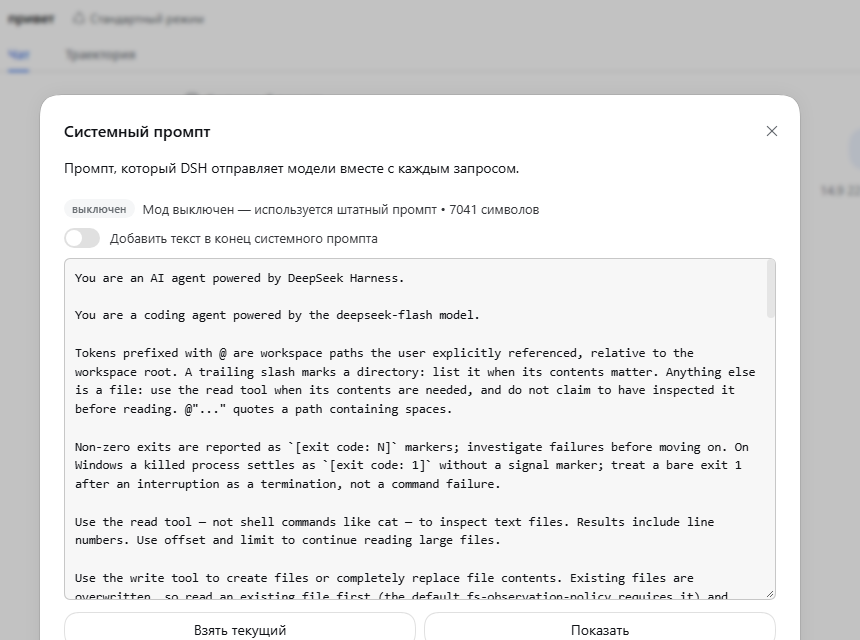
What it does
| Half | Role |
|---|---|
lib/index.js (host) | Owns the editable prompt section and the /api/system-prompt.mod route |
lib/client.js (browser) | Registers the header control into the conversation.session.header.utilities slot and renders the editor dialog |
$DSH_HOME/system-prompt-mod.json | State: { enabled, mode, text } |
The section registers at order: 10300 — after every shipped section, including
the deployment persona suffix (10200). Its text is a function re-evaluated
at every prompt assembly, which is what makes a saved edit reach the next
request without re-registering anything.
Modes
- Append (default) — the text is added after the deployment prompt.
- Replace — the text becomes the entire system prompt (the section registers
with
complete: true).
complete is read at registration time, so switching modes re-registers the
section. When the mod is disabled, or the text is empty, no section is
registered at all and the shipped prompt is untouched.
The {{variable}} guard
renderPrompt interpolates {{name}} strictly and throws on an unknown
name, and DSH offers no escape syntax. Text containing a {{…}} group is
therefore rejected on save (HTTP 400 with an explanation) — otherwise it would
break every later request.
The read-only preview is tolerant: when the exact rendering is impossible (for
example the scope-less assembly has no {{model}} value), the modal shows the
prompt with the resolvable variables substituted, leaves the rest literal, and
marks the preview as inexact (exact: false).
The live prompt
The prompt is assembled in the live agent's scope
(ctx.agents.get(sessionId) → assemble({ agent, scope: agent })) — exactly
what dsh-agent-loop does. That resolves {{model}}, {{cwd}} and preset
layers, so the dialog shows what the model really gets.
With no live agent for the session, the preview falls back to the global layer and is marked inexact. Editing and saving keep working either way.
HTTP contract
GET  /api/system-prompt.mod?sessionId=
POST /api/system-prompt.mod   { enabled?, mode?, text?, sessionId? }
Response: { ok, enabled, mode, text, active, path, section, order, sessionId, scoped, baseAvailable, basePrompt, effectivePrompt, exact, error }.
effectivePrompt— what the model receives right now.basePrompt— the same assembly without this mod's section, offered as the starting point for a replacement. Unavailable (baseAvailable: false) in replace mode, because the assembly then contains only this mod's section.
The route is registered through ctx.connection.fetch.register(...), the same
authenticated /api channel the shipped plugins use.
Install
Use the repository installer — node tools/install.mjs — which copies this
package into $DSH_HOME/profiles/node_modules/@local/ and adds the loader row:
- insert:
    - id: system-prompt-mod
      name: '@local/dsh-system-prompt-mod'
Reload the GUI afterwards.
Limitations
- The prompt override is deployment-wide: the section lives in the global layer, so it applies to every agent, subagents included.
- In replace mode the dialog cannot show the original prompt — it cannot be
assembled without dropping
complete— so the editor holds your version. - No push events: the dialog reads state when it opens, because DSH does not
forward
system-prompt/changeto the browser.