DDDMUC/dsh-delete-session ↗★ 1
dsh-delete-session
Delete sessions from the DSH Web sidebar: adds a Delete action to the session row menu with a risk-consent dialog, then removes the session log, workspace accounting and live session state. 适合需要直接在侧边栏快速清理、彻底删除历史会话的用户。
같은 패키지 이름의 다른 저장소
설치
$
npx -p @deepseek-ai/dsh dsh plugin --profile web add github:DDDMUC/dsh-delete-session使用
- 把鼠标移到侧边栏的会话行,点
...(会话操作) - 选择底部的「删除会话」
- 首次:勾选「我已了解,永久删除」(想省事可同时勾选「不再询问,以后直接删除」)→ 点「删除」
- 之后:直接删除,左下角出现 toast 提示
- 批量删除:会话菜单 →「多选」→ 勾选多个会话 → 底部「删除」;Esc 或「取消」退出选择模式
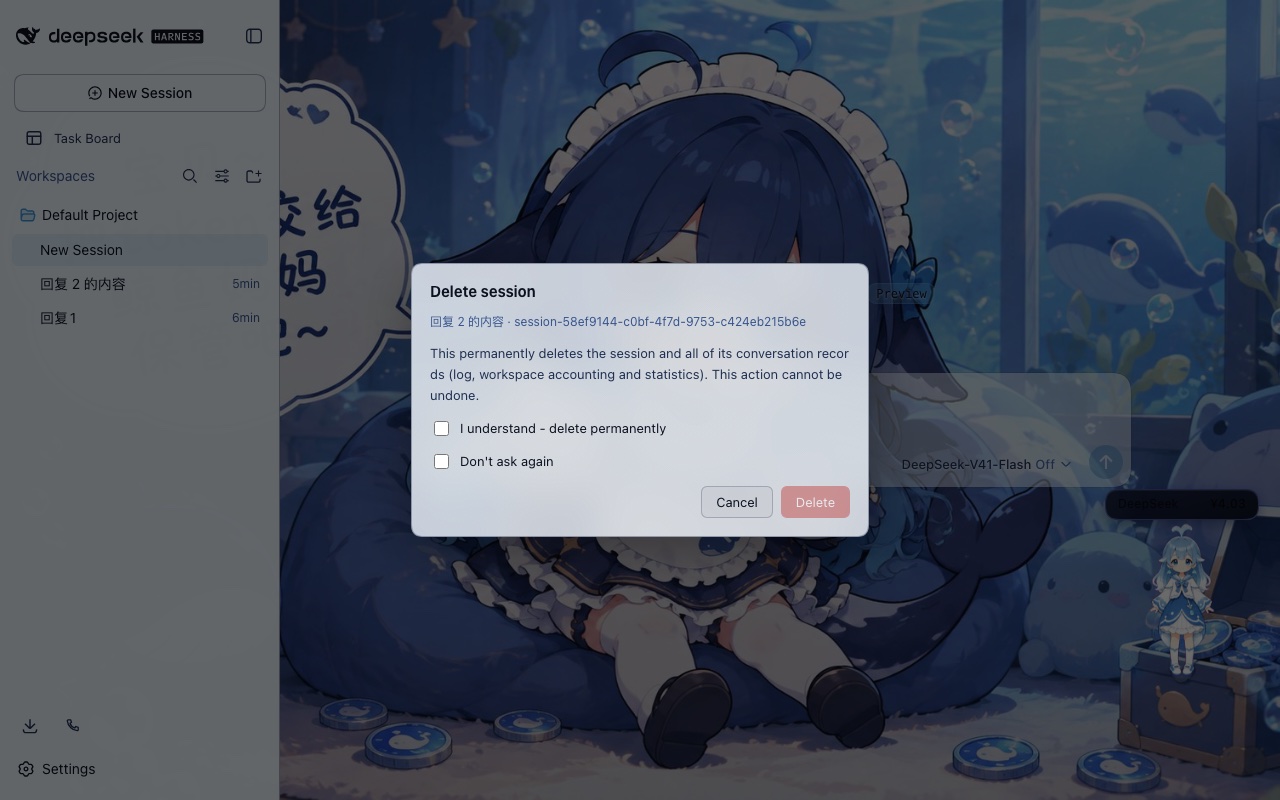
▲ 删除确认对话框(首次删除)
Usage
- Hover a session row in the sidebar and click
...(session actions) - Pick "Delete session" at the bottom
- First time: tick "I understand - delete permanently" (tick "Don't ask again" too if you like) and confirm
- Afterwards: the session is deleted directly, with a toast
- Batch delete: session menu -> "Select multiple" -> tick rows -> "Delete" in the bottom bar; Esc or Cancel exits
▲ The confirmation dialog (first delete)