dsh-pixel-studio
Native in-chat pixel art and animation studio for DeepSeek Harness, with an oy-pixel-style procedural shader plus PNG/GIF, spritesheet and OYPX export. 适合需要让AI生成像素画、并在DSH内直接编辑和导出的用户。
설치
npx -p @deepseek-ai/dsh dsh plugin --profile web add github:Fantety/dsh-pixel-studiodsh-pixel-studio



A native, in-chat pixel art and pixel animation studio for DeepSeek Harness. The agent writes a procedural shader, palette-indexed grids, or a template/motion recipe, and the result is rendered as an interactive canvas directly in the conversation — not as a deliverable card or a separate viewer page.
The same result is also exported as real production files: transparent PNG,
GIF89a animation, spritesheet + JSON atlas, an optional standalone HTML viewer,
and an oy-pixel-compatible .oypx
project.


Why another pixel tool?
- Native canvas first. Playback, frame stepping, zoom, pixel grid, onion skin, palette, and craft score live in the chat tool view.
- Shader-like procedural generation.
pixel_shaderis an adaptation of oy-pixel'spixel_run_shaderdesign: a bounded Lua-subset canvas API withpal,mix,hsv,alpha,rand,noise,phase/time, shapes, flood-fill, outline and stamp. The language is not Lua itself, but the generation contract follows the same design. - Designed for agents. One-character-per-pixel grids are compact, deterministic, easy to diff, and validated before any file is written.
- Actual game assets. PNG, GIF, spritesheet, atlas JSON, OYPX and a manifest are written together.
- Craft-aware generation. A DSH system-prompt section adapted from oy-pixel's pixel-art guidance is injected while the plugin is mounted, and every result includes a deterministic craft report.
- Zero runtime dependencies. Host code uses Node built-ins only; the client half uses the React runtime already supplied by DSH.
- Safe by design. Shader scripts run in a bounded tree-walking interpreter with no host access; inline canvas data is capped and decoded locally; the plugin performs no network requests.
Features
Native chat canvas
- Auto-play for animations, play/pause, previous/next frame
- Nearest-neighbour zoom (1–24×), pixel grid, onion skin
- Checker/dark/light background
- Palette chips, frame count, FPS and craft score
- Open PNG, GIF, spritesheet, OYPX, or optional HTML directly from the card
- Compact fallback panel when the artwork exceeds the inline budget
Pixel tools
pixel_shader— procedural generation with a Lua-subset canvas API, deterministicrand/noise, palette helpers, shapes,stamp, andphase/timeanimation samplingpixel_art— stills, icons, sprites, scenes, portraitspixel_animation— explicit frames or a base sprite plus a motion recipe- 7 built-in palettes: PICO-8, Game Boy, Sweetie 16, DawnBringer 16/32, Studio Warm, Ink & Paper
- Custom palettes and single-character
legendmaps - Layered drawing with source-over alpha
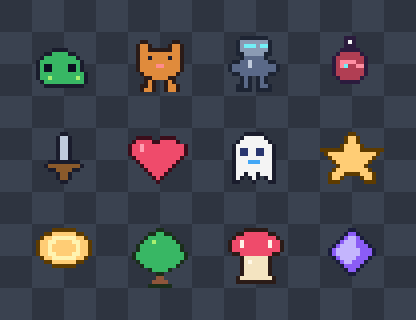
- 12 built-in 16×16 templates: slime, cat, robot, potion, sword, heart, ghost, star, coin, tree, mushroom, crystal
- Motion presets:
bob,float,breathe,sway,shake,pulse,spin,orbit - Outline, shadow, background, GIF loop count and per-frame duration
- OYPX v2 with direct
#RRGGBBAArow RLE, current oy-pixel parser compatible
Requirements
- DeepSeek Harness 0.2.1-rc.2 or newer within 0.2.x
- Node.js 20 or newer for development and tests
- A DSH Web GUI (the client half is
platform: "web")
Install
The package is a DSH bundle as well as a plugin: host entry lib/index.js,
client entry lib/client.js, dsh.bundle.patch pointing at
cordis.patch.yml, and a dsh.client declaration. The bundle patch inserts
the pixel-studio loader row; do not copy that row into your profile patch
manually when installing through the Plugin Manager.
Plugin Manager (recommended, including Desktop)
Paste either address into Settings → Plugins → Install:
https://github.com/Fantety/dsh-pixel-studio
or, when SSH access to GitHub is configured:
git+ssh://git@github.com/Fantety/dsh-pixel-studio.git
The manager installs the package, adds dsh-pixel-studio to the profile's
dsh.profile.bundles, and applies the bundled patch. No hand-edited
cordis.patch.yml row is needed.
CLI-managed profile
Replace my-profile with its name (for example web, headless, or a custom
profile):
dsh plugin --profile my-profile add \
  "git+ssh://git@github.com/Fantety/dsh-pixel-studio.git"
This forwards the package operation to pnpm and reconciles the profile's bundle
list. Confirm that dsh-pixel-studio appears in dsh.profile.bundles in
~/.dsh/profiles/my-profile/package.json; the bundled cordis.patch.yml then
adds the plugin row.
The desktop profile is owned by the Electron app. Install it through the
Plugin Manager rather than editing that profile by hand.
Reload the profile, then refresh the Web GUI once so the client bundle is loaded. If the tool card is still generic after a refresh, restart DSH.
Local development link
cd ~/.dsh/profiles/my-profile
pnpm add "link:/absolute/path/to/dsh-pixel-studio"
Then add "dsh-pixel-studio" to dsh.profile.bundles in that profile's
package.json and reload. Do not also keep an old manual pixel-studio
insert row: the bundle patch now owns that row. Remove it if it exists.
Quick start
Ask the agent in natural language:
Draw a 32×32 moss slime with top-left lighting and make an 8-frame floating animation. Export it as PNG, GIF and OYPX.
Or call the tool directly:
{
  "name": "moss-slime",
  "template": "slime",
  "palette": "sweetie16",
  "effects": { "outline": true, "shadow": true },
  "outputDir": "pixel-art"
}
Hand-drawn grid with a legend:
{
  "name": "tiny-heart",
  "legend": { "O": "#3B0D1A", "R": "#EF4B6B", "L": "#FF9FB2" },
  "grid": [
    ".OO..OO.",
    "ORROORRO",
    "ORLRRRRO",
    "ORRRRRRO",
    ".ORRRRO.",
    "..ORRO..",
    "...OO...",
    "........"
  ],
  "scale": 12
}
Without legend, characters 0-9a-z are palette indices (up to 36 colours).
. is always transparent. The default palette is sweetie16.
Animation
{
  "name": "native-ghost",
  "template": "ghost",
  "palette": "sweetie16",
  "effects": { "shadow": true, "shadowColor": "#00000055" },
  "motion": { "preset": "float", "frames": 8, "amplitude": 1 },
  "fps": 12,
  "loop": 0,
  "scale": 10
}
Explicit frames are also supported:
{
  "name": "coin-spin",
  "palette": "dawnbringer16",
  "fps": 10,
  "loop": 0,
  "frames": [
    { "grid": ["..00..", ".0110.", "011110", "011110", ".0110.", "..00.."] },
    { "grid": ["...00.", "..0110", ".01110", ".01110", "..0110", "...00."], "durationMs": 80 },
    { "grid": ["....00", "...011", "..0111", "..0111", "...011", "....00"], "durationMs": 60 }
  ]
}
Procedural shader
Use the shader path when a formula is shorter than rows: gradients, glows, textures, symmetry, geometry and formula-driven animation.
{
  "name": "shader-horizon",
  "width": 32,
  "height": 32,
  "palette": "studio",
  "seed": 12,
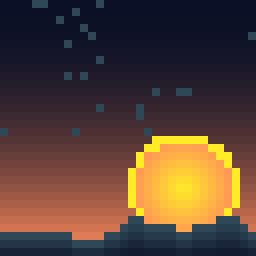
  "code": "local top = hex('#0B1026')\nlocal low = hex('#FF8A5C')\nfor y = 0, height - 1 do\n  local t = y / (height - 1)\n  for x = 0, width - 1 do canvas.pset(x, y, mix(top, low, t * t)) end\nend\ncanvas.circfill(width * 0.7, height * 0.72, 7, hex('#FFEC27'))\nfor x = 0, width - 1 do\n  local ridge = math.floor(height * 0.72 + noise(x, 0, 0.18) * 8)\n  for y = ridge, height - 1 do canvas.pset(x, y, hex('#2F4858')) end\nend"
}
The language is a safe Lua subset, not a Lua runtime: local, assignment,
calls, if/elseif/else, numeric for, while, break, table constructors,
and [key] indexing. Canvas API:
canvas.pset(x, y, c)            canvas.pget(x, y)
canvas.line(x0, y0, x1, y1, c)  canvas.rect / rectfill
canvas.circle / circfill        canvas.ellipse / ellipsefill
canvas.flood(x, y, c)           canvas.replace(old, new)
canvas.outline(c)               canvas.clear(c)
canvas.stamp(rows, legend, x, y)
Globals: width, height, time, phase, frame_index, frame_count.
Helpers: pal(i) (1-based), hex, mix, hsv, alpha, rand, noise,
clamp, step, smoothstep, math.*, string.format/len/lower/upper/sub/rep.
Set frameCount > 1 to render an animation sampled with time/phase.
The shader tool mirrors oy-pixel's design (canvas operations, palette indexing, time/phase uniforms, seeded randomness) but runs in a bounded JS interpreter instead of embedding Lua. No host globals, filesystem or network access is available to shader code. See docs/SHADER.md for the full API, design mapping and examples.
Output files
Files are written under the session workspace, by default pixel-art/:
pixel-art/
  moss-slime.png                 transparent 1× PNG
  moss-slime-preview.png         nearest-neighbour preview on checkerboard
  moss-slime.gif                 animated GIF (when 2+ frames)
  moss-slime-sheet.png           spritesheet
  moss-slime-sheet.json          frame x/y/width/height/duration atlas
  moss-slime.oypx                oy-pixel v2 project
  moss-slime.json                asset manifest + craft report
  moss-slime-viewer.html         optional: includeViewer: true
Craft report
Every generation includes a deterministic craft object in the tool result and
manifest:
{
  "score": 100,
  "checks": [],
  "metrics": {
    "colours": 9,
    "contrast": 61.2,
    "isolatedPixels": 0,
    "loopDelta": 19.4,
    "averageFrameMs": 83
  }
}
Checks cover contrast, isolated pixels, loop seams, frame timing, palette size and silhouette coverage. Warnings are actionable; the agent is instructed to iterate on them before finishing.
Craft guidance
While mounted, the plugin registers a DSH system-prompt section named
pixel-studio:craft (order 2500). It is adapted from oy-pixel's
PIXEL_AGENT_INSTRUCTIONS workflow and its PIXEL ART CRAFT /
PIXEL ANIMATION CRAFT guidance, and covers:
- compose once, verify once; prefer a small procedural shader over long grids
- silhouette first, 2×2+ detail clusters, clean stair-stepped diagonals
- one top-left light source, hue-shifted 3–5 step ramps, cast shadows
- ordered dithering, one outline strategy, sparing anti-aliasing
- lean animation counts, key poses, easing, anticipation/overshoot, squash, smears, subpixel motion, secondary motion and loop seams
The same guidance is referenced from all three tool descriptions.
Architecture
pixel_shader ──► Lua-subset AST ──► bounded interpreter ──┐
pixel_art / pixel_animation ──► grids / layers / motion ──┤
                                                          ▼
                                      frames + palette + craft report
                                                          │
                                      write PNG / GIF / sheet / OYPX / manifest
                                                          │
                                      compact presentationMeta.canvas
                                                          │
                                                          ▼
                                  lib/client.js → tool.call.toolview →
- Host half (
lib/, Node ESM) has no runtime dependencies and usesnode:zlibfor PNG. - Shader half (
lib/pixel/shader.js+lib/pixel/lua/) is a bounded tree-walking interpreter for a Lua subset. It exposes an oy-pixel-style canvas API, palette helpers, seededrand/noise, andtime/phaseanimation uniforms. No host globals,require, or filesystem access. - Client half (
lib/client.js) is a hand-writtenwindow.__ModuleLoader__.loadfactory, registered for all three tools. - Inline data is palette-indexed, one or two characters per pixel, capped at 131,072 pixels and 4,096 colours. Shader gradients therefore stay visible in the native canvas instead of falling back immediately.
- No network: the plugin reads only the current session working directory
and writes only under
outputDir.
More detail: docs/ARCHITECTURE.md.
Development
git clone git@github.com:Fantety/dsh-pixel-studio.git
cd dsh-pixel-studio
npm test
npm run check
npm run demo
npm run demo:showcase
npm run demo:shader
The demo scripts regenerate the checked-in examples. No install step is needed because the plugin has zero runtime dependencies.
Limits
- Canvas side ≤ 256 px; animation ≤ 120 frames and 8,000,000 total pixels.
- Grid-character palettes ≤ 36 colours; use
legendfor up to 64 symbols. - Shader scripts are capped at 64 KiB, 20M instructions and 5s per frame, with
a 10s total generation budget;
width/height/frameCountare upper-bounded. - GIF timing granularity is 10 ms; frames below 20 ms are stored at 20 ms.
- GIF transparency is 1-bit; translucent edges are quantised.
- OYPX export supports at most 256 unique colours.
- The plugin does not call an image generation model; the agent writes grids or shader code, which the plugin renders deterministically.
Contributing
Issues and pull requests are welcome. See CONTRIBUTING.md, CODE_OF_CONDUCT.md, and SECURITY.md.
License and attribution
This project is released under the MIT License, the same license used by DeepSeek Harness.
The craft guidance is adapted from oy-pixel, Copyright © 2026 Fantety. See THIRD_PARTY_NOTICES.md for attribution details.
中文说明:README.zh.md