dsh-token-stats
Floating draggable token usage statistics panel for DeepSeek Harness: totals, cache & hit rate, per-provider and per-model usage, current-month heatmap with per-day view, per-session detail and per-request records. 适合需要实时直观查看输入、输出、缓存命中率及每日热力图的用户。
같은 패키지 이름의 다른 저장소
설치
검증된 bundle이 없거나 호환성 검사에 실패했습니다. 먼저 저장소 설명을 읽어 주세요. 전체 README 읽기 ↗
简体中文 | English
dsh-token-stats
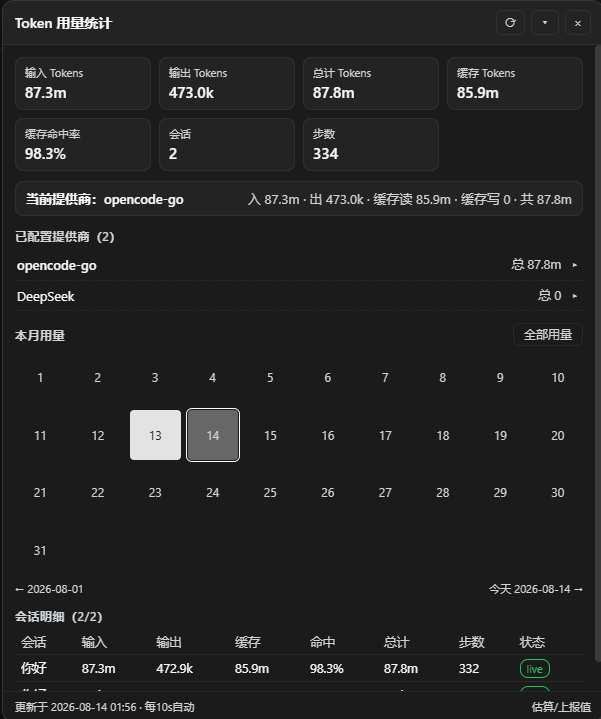
为 DeepSeek Harness Web 界面提供浮动的 Token 用量统计面板。安装后页面右下角出现可拖动的浮层,实时展示输入 / 输出 / 缓存 / 命中率 / 按提供商与模型维度的用量明细,以及当月每日热力图和会话级逐请求记录。


功能
- 总用量概览:输入、输出、总计、缓存读取 / 写入、缓存命中率、会话数、步数
- 当前会话提供商:自动高亮当前会话使用的提供商及其累计用量
- 提供商明细:只显示你实际配置的提供商(来自
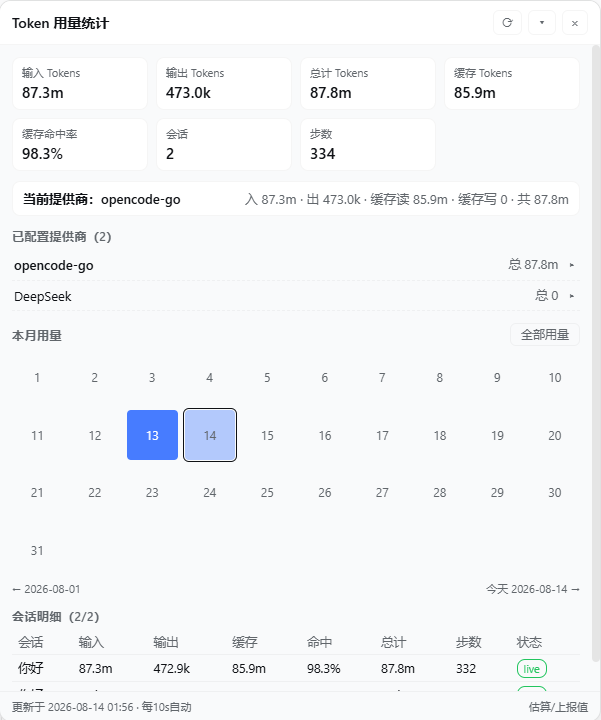
llm-pi-ai/llm-deepseek设置节)及产生过用量的路由;点击展开可查看每个模型的独立用量 - 本月热力图:当月 1 号至月末的每日用量方格(深色模式用量越多越亮,浅色模式越多越蓝);点击任意日期,整个面板切换为该日数据,点「全部用量」返回全量视图
- 会话明细:每个会话的输入 / 输出 / 缓存 / 命中率 / 总计 / 步数,展开可查看分桶统计、上下文占用与最近逐请求记录(时间、提供商 / 模型、输入、输出、缓存读、缓存写)
- 面板交互:可拖动、可折叠为摘要长条、关闭后从悬浮球重新打开
- 自动刷新:数据每 10 秒自动刷新;配色自动跟随 Harness 深浅主题
安装
npx dsh-token-stats install
安装器会自动完成以下操作(幂等,可重复运行):
- 将包安装到
$DSH_HOME/profiles/node_modules/dsh-token-stats(dsh 插件解析根,真实目录) - 将组合行写入
$DSH_HOME/profiles/ /cordis.patch.yml
完成后重启 dsh 并刷新浏览器页面即可看到面板。重启是唯一需要手动完成的步骤——宿主模块与组合在进程内缓存,插件无法安全地重启自己的宿主进程。
可选参数
| 参数 | 说明 |
|---|---|
--profile | 指定目标 profile(默认 web) |
--force | 重新覆盖已安装的包 |
从源码本地安装
git clone https://github.com/H1a3x/dsh-token-stats.git
cd dsh-token-stats
node scripts/install.js --from . --force
卸载
删除 $DSH_HOME/profiles/node_modules/dsh-token-stats 目录,从 cordis.patch.yml 移除以下行,然后重启 dsh:
- insert:
    - id: token-stats
      name: dsh-token-stats
也可以保留组合行,在 Harness 设置页的插件清单里禁用本插件。
工作原理
lib/index.js     宿主半:增量折叠会话日志,聚合统计数据,通过 HTTP 路由 /token-stats 提供查询
lib/client.js    浏览器半:面板 UI(shell module-table 格式,无需构建步骤)
scripts/install.js   一键安装器:拷贝包 + 写入组合行
数据来源:Harness 的 tokenUsage / sessionStats 投影(provider 上报值)叠加插件对会话日志的增量折叠(request/header + assistant/message usage)。历史会话读取一次后缓存,增量更新仅读取上次水位线之后的新事件。
插件装载契约:
package.json声明dsh.client.platform = "web"及inject依赖,宿主扫描器据此生成window.__DSH_BOOT__图行并挂载/plugins//client.js路由- 浏览器半以模块表格式打包,工厂返回
{ apply, inject },服务依赖以导出的inject为准 - UI 入口通过
ctx.slots.inject('shell.overlay', …)注入为 root 作用域浮层 - 热更新边界:
lib/client.js内容变化刷新页面即生效;dsh.client声明变化需要重启 dsh
开发
# 语法检查
npm run check

# 本地安装验证
npm run install:local
来源与版权
本项目 dsh-token-stats 由作者 H1a3x 个人开发,采用 MIT 许可证。
迁入第三方代码必须保留原 LICENSE 与署名;活跃且有上游的第三方依赖优先通过 npm 依赖引用,不搬代码。