dsh-triage-desk
GitHub triage inbox: reviews waiting on you, merge-ready pull requests, failing CI, new or assigned issues, and editable terminal launch scenarios for Claude Code, Codex, and other coding agents.
설치
npx -p @deepseek-ai/dsh dsh plugin --profile web add github:LHCWN/dsh-triage-deskTriage Desk




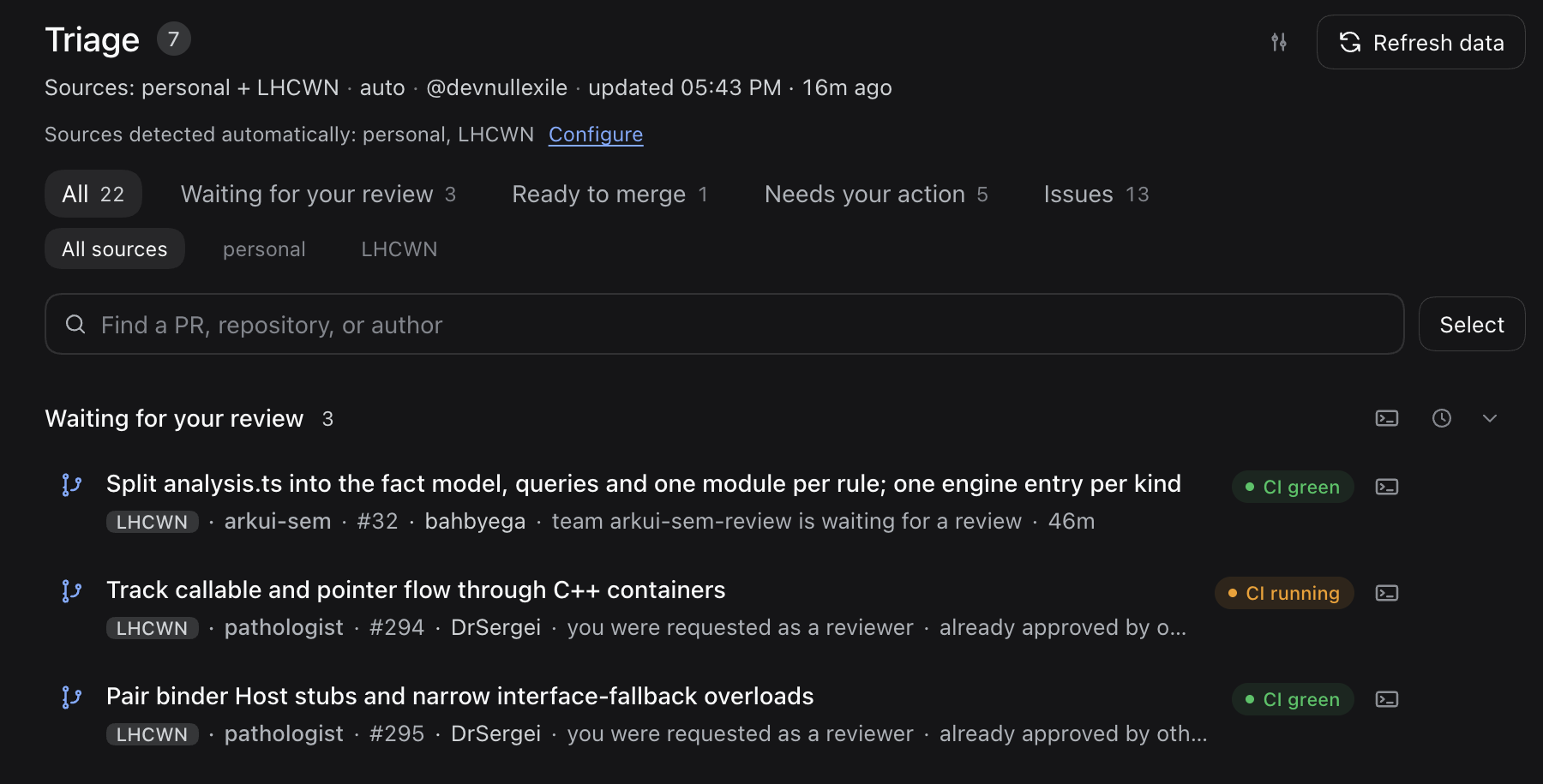
A DeepSeek Harness (DSH) plugin that answers one question every morning: what needs me right now? It turns GitHub activity into a single inbox panel: reviews waiting on you, your merge-ready PRs, threads that need an answer, failing CI, and new or assigned issues. One click opens a coding agent on any item with a prepared prompt that you review before sending. Everything runs locally through the GitHub CLI; the plugin never stores or forwards a token.
简体中文 · Reference · Architecture · Changelog
What it shows
- Waiting for your review: PRs that request your review (directly or through a team) at a head you have not reviewed.
- Re-review needed: PRs with new commits since your review, a re-request, or an author reply to you.
- Ready to merge: your approved, mergeable PRs; by default only with green checks.
- Needs your action: requested changes, conflicts, reviewer comments, assigned issues, and unanswered mentions.
- CI is failing: red checks on your PRs, on default branches you maintain, and on branches whose latest commit you authored in the last week.
- New in your repositories: unassigned issues from the last 30 days, kept out of the attention counter.
- Snooze: per row, per section, or a selection, until new activity, tomorrow, or next week.
- Launch scenarios: named, editable prompts that open a coding agent in the local clone or a new DSH chat.
- Agent tool:
triage_deskgives a DSH agent the same snapshot and can open a terminal on request. - Sources and languages: personal repositories plus up to 10 organizations; the panel follows the DSH language (English or Chinese).
- Large organizations: organizations as big as
llvmload in a lighter mode instead of failing (details).
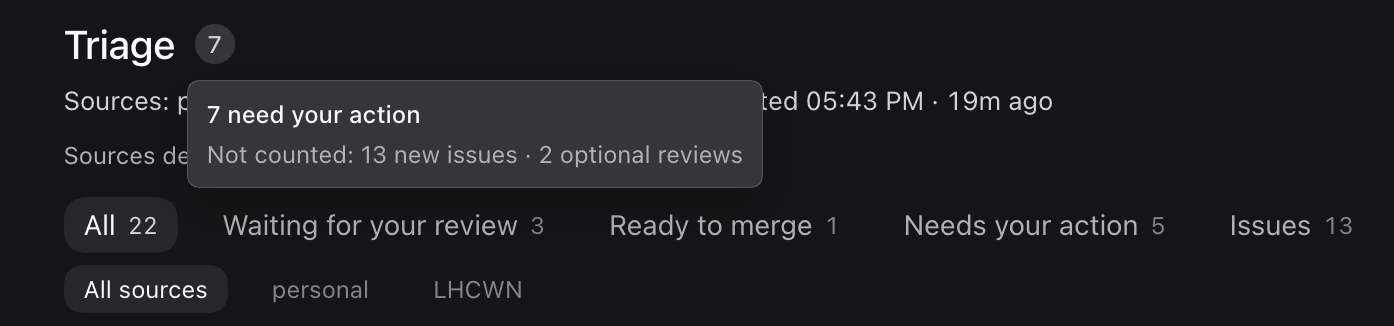
The count next to Triage is what needs you; hover or focus it to see what it leaves out.
Each feature is described in full in the reference.
Requirements
- DeepSeek Harness
0.2.2-rc.2or newer. - GitHub only: GitLab, Bitbucket, Gitea, and other code hosts are not supported.
- The GitHub CLI installed and signed in (
gh auth login). Private repositories need thereposcope thatgh auth loginnormally grants. Settings shows the connection and has a Sign in to GitHub button. - Optional, for typing prompts into agents other than Claude Code: Python 3 on macOS and Linux, Windows 10 version 1809 or later on Windows (see prompt delivery).
Install
Triage Desk is a DSH bundle: DSH installs it into a profile and loads it as a plugin. There is no build step.
From npm
dsh plugin --profile
 add dsh-triage-desk
is the profile you run: web for dsh web, desktop for the
Desktop app. Restart DSH, refresh the page, and open the Triage entry in the
sidebar. The first run auto-detects your organizations; the gear in the header
changes them. Plugin Manager can also install the package by name.
To update later, run the following and restart DSH:
dsh plugin --profile
 add dsh-triage-desk@latest
Removing the plugin (dsh plugin --profile remove dsh-triage-desk,
or Remove in Plugin Manager) keeps your saved settings in the profile, and
a reinstall picks them up again. To start from the defaults, see
uninstall and saved settings.
From a local checkout (development)
- Clone the repository.
- In DSH open Plugins → Add plugin and pick the repository directory, or run
dsh plugin --profile add ./dsh-triage-deskfrom its parent folder. - Open the Triage entry in the sidebar.
After editing the host half, quit and reopen DSH, then refresh the page; see local development for the reload rules.
Launching agents
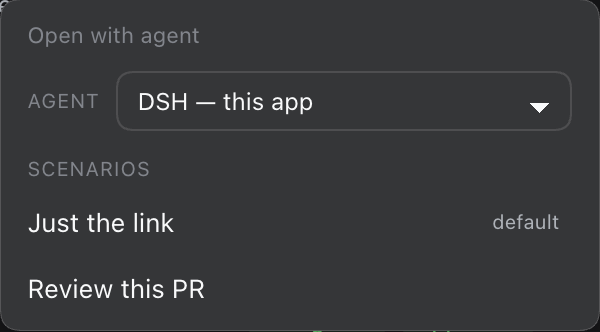
The terminal button on a row (or a section header) opens the launch menu: pick a target (DSH — this app or an installed agent), then a scenario. A row scenario opens the agent in the repository's local clone; a section scenario launches one agent with the list of every visible row. The prompt is always prepared but not sent. A line under the agent picker says where it opens and how the prompt arrives, for example Opens in Ghostty · prompt typed into the input box, unsent.
Once you send it, the review scenarios post one GitHub review of inline comments
tagged [P1]–[P3], and never approve. The fix and reply scenarios wait for your
OK before pushing or posting; triage only reports back. None of them add AI
attribution.
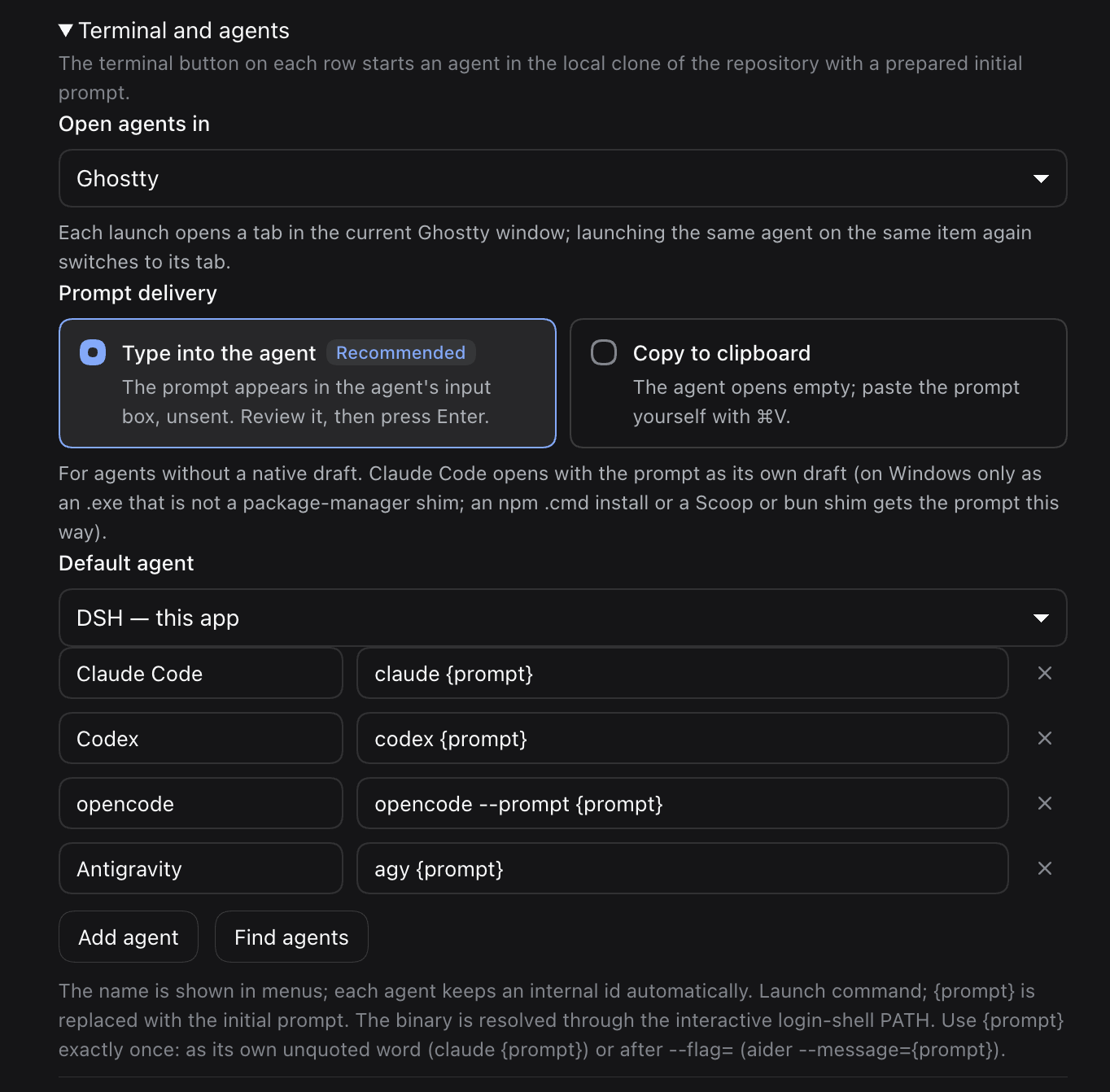
Terminals. Settings → Terminal and agents → Open agents in offers Automatic or one of this platform's terminals; terminals that are not installed are shown disabled.
| Platform | Terminals | Automatic |
|---|---|---|
| macOS | Terminal, iTerm2, Ghostty | iTerm2 when installed, otherwise Terminal |
| Linux | GNOME Terminal, Konsole, Xfce Terminal, Ghostty, kitty, Alacritty, xterm | $TERMINAL, then the first installed emulator |
| Windows | Windows Terminal, PowerShell window | Windows Terminal when installed |
iTerm2, Ghostty (macOS), GNOME Terminal, Konsole, Xfce Terminal, and Windows Terminal open a tab; the others open a window per launch. A saved terminal that is not installed falls back to Automatic, and the launch toast says so.
Prompt delivery. Claude Code opens with the prompt as its native
--prefill draft. On Windows that needs Claude Code as an .exe: an npm
install (a .cmd shim) is handled like the other agents, because cmd.exe
would not pass the prompt intact. So is an .exe shim from Scoop, bun,
Chocolatey, Volta, mise or proto, which can start a .cmd
(prompt delivery). For every other agent,
Settings → Prompt delivery offers:
- Type into the agent (default, recommended): a small paste wrapper waits
until the agent's input box is ready, then pastes the prompt into it without
pressing Enter. Needs Python 3 on macOS (
xcode-select --install) and Linux, or Windows 10 1809 or later; without it, launches use the clipboard and Settings and the toast say how to fix it. - Copy to clipboard: the agent opens empty and you paste the prompt (⌘V on macOS, Ctrl+Shift+V in Linux terminals, Ctrl+V on Windows).
The toast names the agent and the terminal, for example Codex opened in Ghostty (/path): the prompt will appear in its input box, not sent — review it and press Enter.
Agents. By default a launch opens a new DSH chat with the prompt, and the
menu lists the coding agents installed on this machine: Claude Code, Codex,
opencode, Gemini CLI, Cursor Agent, Antigravity (agy), pi, Aider, Amp, Droid,
Goose, and Crush. Pick another default in Settings, or add your own command. A
command must contain {prompt} exactly once, unquoted, as its own argument or
right after a --flag=.
Agents start in full access, as Orca's default does: each built-in command
carries the agent's own flag for skipping permission prompts, such as
codex --dangerously-bypass-approvals-and-sandbox or
agy --dangerously-skip-permissions. A step a scenario asks the agent to
confirm first, such as pushing, then rests on the agent following its prompt. To
get the permission prompts back, remove the flag from the agent's command in
Settings (flags per agent).
Details: terminal launcher reference.
Settings
The gear in the panel header opens Settings. A save usually applies to the
running plugin without restarting it, so the triage_desk tool stays
available while you save. The most used fields:
| Field | Default | Meaning |
|---|---|---|
orgs | [] | Organizations to scan (at most 10); empty auto-detects them |
includePersonal | true | Include your personal repositories |
refreshSeconds | 1200 | Auto-refresh interval, 15–3600 s |
requireGreenChecks | true | Ready to merge only with green or no checks |
defaultAgent | dsh | Target selected in the launch menu: dsh (a new DSH chat) or an agent id |
terminal | auto | Terminal for launches: auto or a terminal id |
promptDelivery | paste | paste (type into the agent) or clipboard |
All fields, including agents, scenarios, and clone search, are in the configuration reference.
Development
npm install     # dev dependencies and the pre-commit hook
npm run check   # lint, docs links, and all offline smokes
npm run smoke:host is a live check against GitHub that spends quota, so it is
not part of npm run check. Smokes, layout, and releasing:
reference; module map:
architecture.