NOirBRight/dsh-llm-ollama ↗★ 3
dsh-llm-ollama
Ollama Cloud models, OpenAI-compatible chat, and Web Search/Fetch for DeepSeek Harness
AI 분석
适合需要接入Ollama本地或云端模型,并使用网页搜索与获取功能的用户。
설치
npx -p @deepseek-ai/dsh dsh plugin --profile web add github:NOirBRight/dsh-llm-ollamaWeb configuration
Open Settings → LLM Providers → Ollama Cloud. The card manages settings and credentials through the authenticated Connection RPC. The Host never returns the stored literal, and settings revision fencing does not pretend that credential storage and settings save are one atomic transaction.
Fetch available models opens the picker immediately and calls the authenticated Connection RPC with the unsaved endpoint and one-shot key. The Host reads /api/tags, deduplicates native ids, and enriches up to six models concurrently through /api/show. The native metadata supplies context windows plus vision, thinking, and tools flags that /v1/models does not expose. The picker starts from the current draft selection, preserves current-only models, and replaces the draft catalog when applied.
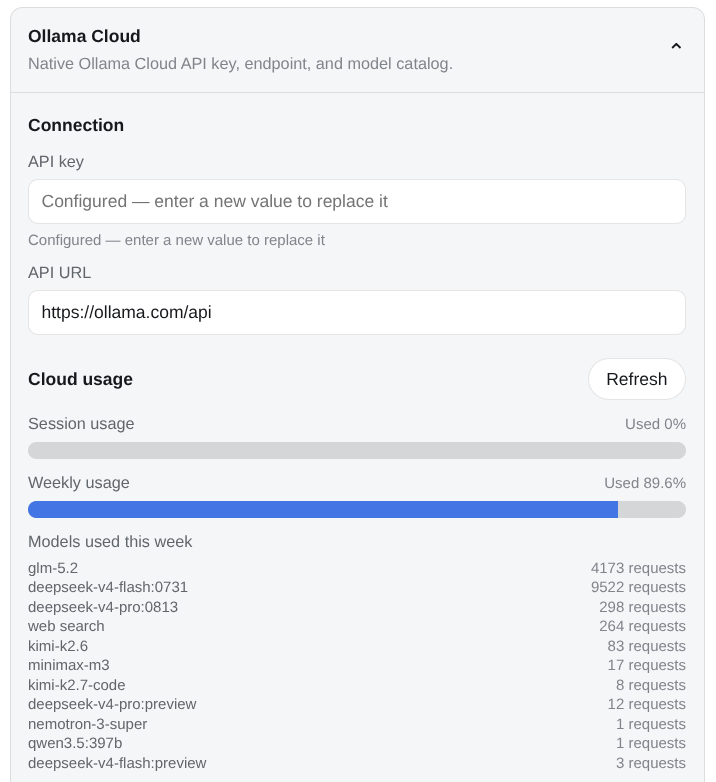
The card's Cloud usage section mirrors ollama.com/settings: the Host reads GET /usage with the stored (or one-shot) key and renders each window the endpoint reports (monthly, session, weekly) as consumed-percentage meters plus that window's per-model request counts. The credential never crosses to the browser. A self-hosted endpoint without the usage surface shows an unsupported note instead of an error.
The collapsed header falls back to the last successful quota from the shared browser cache while its credential is configured; storing a new credential purges the cache in every bundle copy, even without providerDirectory.
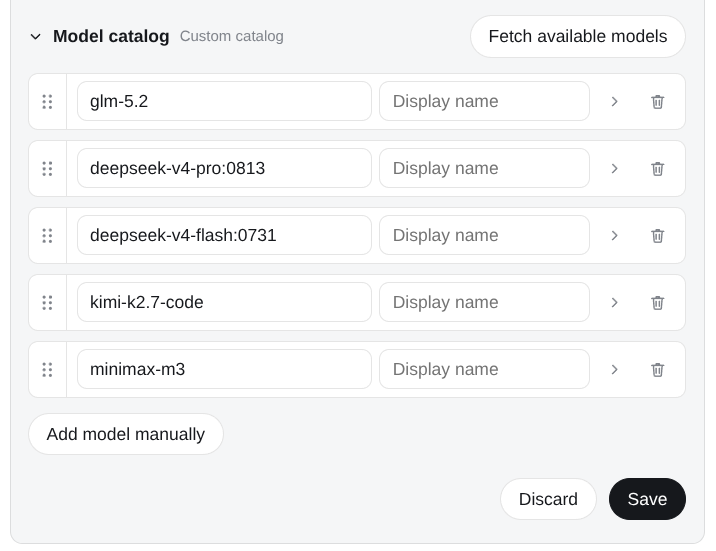
The model catalog starts collapsed and lists one row per model: a drag handle reorders rows (the order persists with the catalog), the chevron opens that row's context window, Default thinking, and capability flags, and the trash button removes it.
Plugin configuration screenshots
Cloud usage for every window the endpoint reports, with that window's model activity list:
Sortable model catalog:
The Models page lists saved ollama-cloud models and can select them. Current Harness releases do not expose a third-party editor slot inside that page, so this package owns its editor under Plugin configuration.
Plugin configuration screenshots
Cloud usage for every window the endpoint reports, with that window's model activity list:
Sortable model catalog:
The Models page lists saved ollama-cloud models and can select them. Current Harness releases do not expose a third-party editor slot inside that page, so this package owns its editor under Plugin configuration.