dsh-combo
PowerMode-style thinking and tool-call combo feedback for DeepSeek Harness Web and Desktop, with count-driven colors and soft percussive audio. 适合想要在DSH Web或Desktop中获得类似PowerMode的趣味交互反馈的用户。
설치
npx -p @deepseek-ai/dsh dsh plugin --profile web add github:QuentinCrane/dsh-combodsh-combo
English | 简体中文
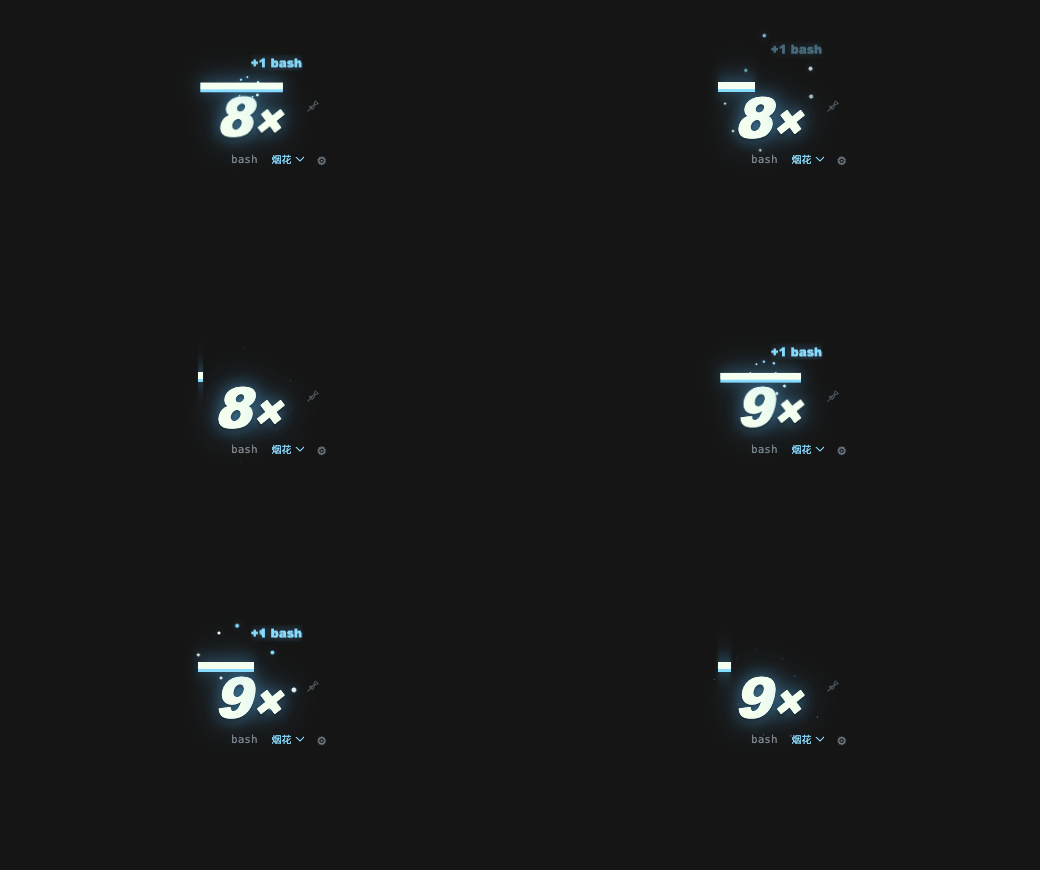
A lightweight DeepSeek Harness (DSH) plugin that displays per-turn thinking and tool-call combos in DSH Web and DSH Desktop. Each completed model round (assistant/message) and committed tool/call adds one; the counter resets at a turn boundary.
Features
- Reads the Host's
dshComboSession Projection. Tool results and unrelated events do not increment the count. - Keeps the counter turn-based by default. Set
expireMsto opt into an idle timeout. - Shows the latest thinking/tool activity, tiered visual feedback, optional sound, and a per-session pin that can carry a streak across turns.
- Carries its own configuration page on the Plugins page, where every setting — sound included — is saved into the profile and applied live.
- Runs in the DSH Web Client, including the Web UI embedded in DSH Desktop. It does not add content to model requests or contact a third-party service. Pin state is stored in the client page's
localStorage.
Install with the official CLI
This is an independent community plugin installed through the official dsh plugin CLI. It is not produced by DeepSeek. It ships runnable JavaScript with no install-time build scripts.
Install into the profile you use. Web and Desktop have separate profiles:
# DSH Web UI
dsh plugin --profile web add github:QuentinCrane/dsh-combo

# DSH Desktop
dsh plugin --profile desktop add github:QuentinCrane/dsh-combo
For DSH Desktop, launch the app once to initialize its profile, fully quit it, and run Desktop's bundled dsh command. If that command is not on your PATH, enable it through Manage dsh Command in the app first. Reopen Desktop after installation. See the official Desktop guide.
To install a local checkout instead, use the path to the directory containing package.json:
dsh plugin --profile
 add link:/absolute/path/to/dsh-combo
Check that the bundle layer appears in the profile before launching:
dsh --profile web --dump-config
dsh --profile web
The plugin contributes a Host projection and a DSH Client module. DSH Desktop embeds the same Web application, so the module also runs there when installed into the desktop profile. DSH requires Client modules to declare platform: web; this describes the Client runtime contract and does not mean the plugin is limited to the standalone Web profile. After installing or changing package files, restart the profile unless its HMR setup has applied the change.
Configure
In the app
Open Plugins in the sidebar, select the dsh-combo bundle, and use the configuration section on its page. Every setting lives there — including the sound switch, volume and starting combo — and a save is written into the profile's row config and applied immediately, with no restart and no page reload.
The HUD's own gear panel stays a per-browser quick tune on top of that: it previews changes for this browser only and keeps them in local storage. Saving the same key from the Plugins page clears that local override, so the profile value is what you see. The panel's 恢复默认设置 drops every local override and goes back to the configured values.
In the profile patch
The bundle provides working defaults in cordis.patch.yml. To override them by hand, add a later row for dsh-combo in the profile's cordis.patch.yml:
- id: dsh-combo
  config:
    enabled: true
    showToolName: true
    animation: normal
    particles: true
    preset: particles
    timerMs: 10000
    powerThreshold: 0
    effectFrequency: 1
    shake: true
    shakeIntensity: 3
    scale: 1
    offsetX: 18
    offsetY: 10
    barHeight: 7
    particleCount: 0
    particleSize: 4
    particleSpread: 1
    effectDurationMs: 820
    glow: 1
    accentColor: ''
    numberColor: ''
    showGain: true
    showTimer: true
    position: top-right
    excludeTools: []
    expireMs: 0
    sound: false
    soundVolume: 0.35
    soundFrom: 10
    pinPromptMs: 5000
DSH patch layers replace a row's complete config object. Include every setting you want to keep when overriding the row.
| Setting | Default | Meaning |
|---|---|---|
enabled | true | Show the HUD. |
showToolName | true | Show the most recent tool below the counter. |
animation | normal | off, normal, or strong; strong uses a larger pop. Reduced-motion preferences disable CSS animation. |
particles | true | Emit the selected effect on each combo gain while animation is enabled; particle density grows with the combo tier. |
preset | particles | Default effect: particles, flames, fireworks, or rift. |
position | top-right | top-right, top-left, bottom-right, or bottom-left. |
excludeTools | [] | Tool names to ignore, matched without case sensitivity. |
expireMs | 0 | Optional idle reset in milliseconds; 0 disables it. Maximum: 600000. |
sound | false | Play a soft synthesized percussive hit; rapid calls within 60 ms coalesce. |
soundVolume | 0.35 | Hit volume from 0 to 1. |
soundFrom | 10 | First count that plays a hit. Range: 0 to 1000. |
pinPromptMs | 5000 | How long a finished run of at least two calls remains available to pin. Maximum: 60000; 0 disables the prompt. |
Invalid enum values use their defaults; numeric settings are clamped to their documented ranges. The Host half declares every setting as a volatile field of its Schemastery Config, which is what puts them on the Plugins page and lets a write apply without restarting the row.
Display behavior
A completed model round counts once even when the provider does not expose reasoning text; its label is 思考. Streaming chunks, failed attempts, interrupted prefixes, history replacements and repeated settlement of the same turn/step do not add combos. Thinking and tools both refill the countdown.
| Count | Display |
|---|---|
| 1–9 | Green multiplier, bar and glow and square particles |
| 10–19 | Larger multiplier, yellow-green glow and more particles |
| 20–49 | Yellow glow, slight shake and denser particles |
| 50+ | Orange glow, largest multiplier and densest particles |
The unboxed PowerMode-style meter displays a bold multiplier beneath a bright bar. Use the selector below it to switch between particles, flames, fireworks and rift; switching previews the effect without changing the count. Your choice is saved locally and overrides the configured default preset. All presets share count-driven colors: green at 1–9, yellow-green at 10–19, yellow at 20–49 and orange at 50+. Presets change the motion, while explicit custom colors override this palette.
The 📌 button keeps the current run as a streak for that Session. When an unpinned turn ends, a run of at least two calls stays dimmed for pinPromptMs; pin it during that window to continue counting across turns. Pin state survives a page reload in local storage.
Appearance and rhythm
Use the gear beside the meter to edit appearance, timing and effects immediately. Preferences are saved locally; Reset clears local overrides and restores the configured defaults.
The countdown alone does not reset the per-turn count. For PowerMode-style idle resets, set expireMs in the profile configuration. Unpinned runs then use the same duration for the countdown. Pinned streaks remain preserved across turns.
| Option | Default | Range | Description |
|---|---|---|---|
timerMs | 10000 | 1000–60000 ms | Countdown duration; refills on each thought or tool call. Unpinned idle-reset runs use expireMs instead. |
powerThreshold | 0 | 0–1000 | Combo needed to activate feedback and effects. |
effectFrequency | 1 | 1–20 | Combo gains per burst; batches crossing a trigger boundary also emit. |
shake | true | boolean | Independent combo-shake switch. |
shakeIntensity | 3 | 0–12 px | Shake amplitude. |
scale | 1 | 0.5–2 | Scale the meter and its particles. |
offsetX | 18 | 0–240 px | Horizontal edge offset. |
offsetY | 10 | 0–240 px | Vertical edge offset, clearing window chrome at the top. |
barHeight | 7 | 2–16 px | Countdown bar height. |
particleCount | 0 | 0–80 | Particles per burst; 0 automatically scales with combo tiers. |
particleSize | 4 | 1–12 px | Particle size. |
particleSpread | 1 | 0.25–2 | Spread multiplier. |
effectDurationMs | 820 | 200–2500 ms | Burst animation duration. |
glow | 1 | 0–2 | Glow strength; 0 turns it off. |
accentColor | '' | #RRGGBB or empty | Override glow and particle color; empty uses combo tier colors. |
numberColor | '' | #RRGGBB or empty | Override the number and bar color; empty follows combo tier colors. |
showGain | true | boolean | Display the floating +N gain. |
showTimer | true | boolean | Display the countdown bar. |
Inspired by VS Code PowerMode: remaining time expresses rhythm, threshold and frequency control feedback, and presets combine with independent customization. This implementation uses CSS animations and DSH session projections, with completed model rounds and tool calls driving feedback.
Repository layout
dsh-combo/
├── index.js              # Host Session Projection and config route
├── client.js             # DSH Client module and overlay HUD
├── cordis.patch.yml      # Installable DSH bundle layer
├── package.json          # Bundle and Client module manifests
├── test/                 # Host and Client unit tests with local runtime shims
├── docs/                 # Development, publishing, and troubleshooting notes
├── README.md
├── README.zh-CN.md
├── CONTRIBUTING.md
├── CHANGELOG.md
└── LICENSE
Development
Run the local unit suite with:
npm test
The Client reads the active binding from uiSession.adapter.current and subscribes to sessions.binding(id).session.projections.faceOf('dshCombo'). The Host owns the fold over committed Session events. dsh.client.inject lists package relationships; the Client plugin's exported Cordis inject list declares the runtime services it waits for.
Release and npm distribution notes live in docs/publishing.md: the release workflow tests, publishes the version to npm once NPM_TOKEN is configured, and always creates the GitHub release with the packed tarball.
For the public bundle and Client contracts, see the DSH plugin publishing guide, Client Modules reference, Session Projections reference, official Client package rules, and Desktop guide. DSH is in developer preview and may introduce breaking API changes.
For GitHub discoverability, add the dsh-plugin topic to the repository.