Saknutella/dsh-thinking-quips ↗★ 2
dsh-thinking-quips
Lightweight personalisation for the DeepSeek Harness running-turn status line: rotating bilingual quips, six configurable loading icons, one-click theme-colour matching and an optional elapsed-time readout. A drop-in DSH web client plugin (bundle) with no dependencies and no build step. 适合想要自定义加载图标、双语俏皮话和计时器的Web端用户。
설치
npx -p @deepseek-ai/dsh dsh plugin --profile web add github:Saknutella/dsh-thinking-quipsdsh-thinking-quips
v0.8.0 · a DSH bundle (install-and-go) · web client plugin
Lightweight personalisation for the DeepSeek Harness status line — the line the
conversation shows while the agent is working (DSH's default Deep diving...).
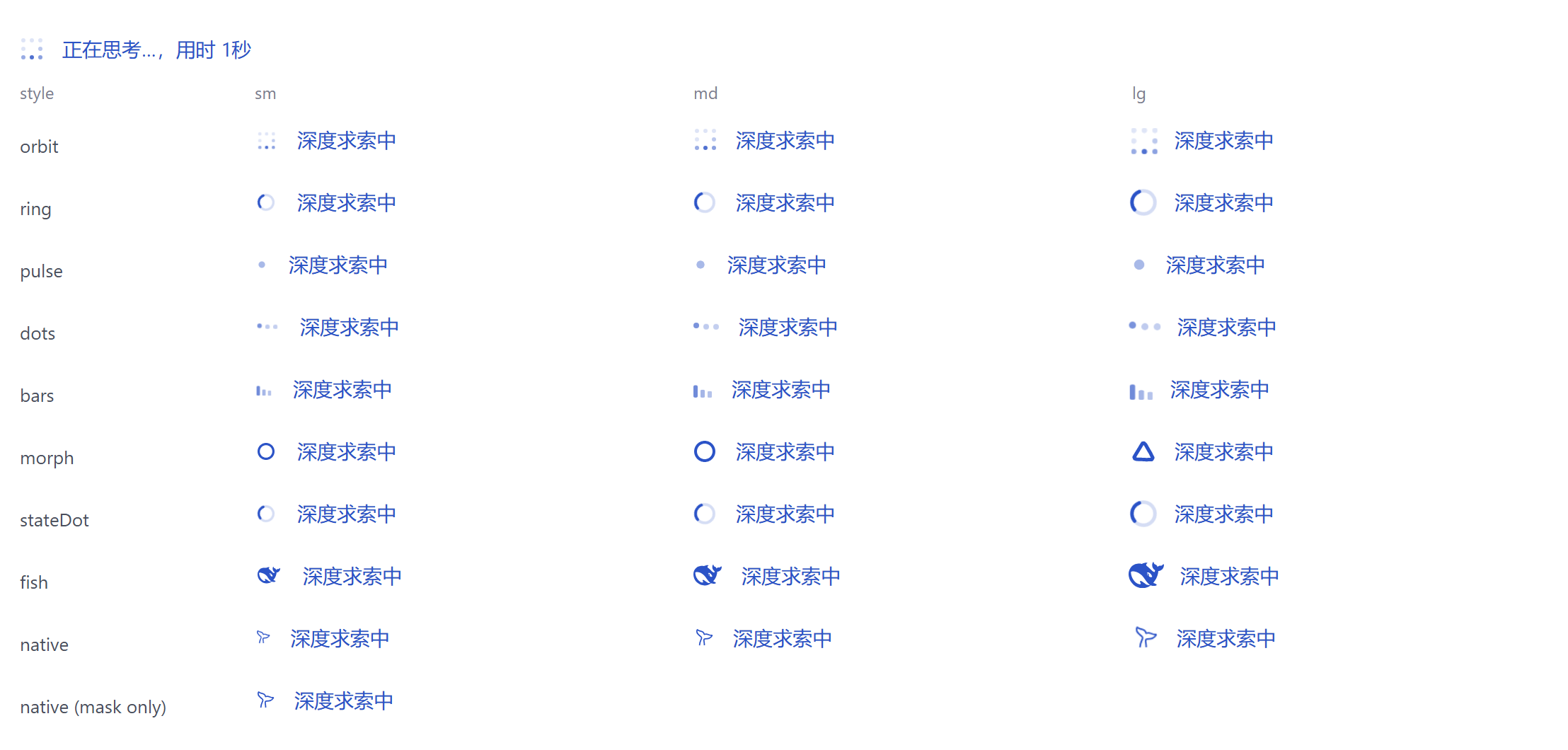
Rotating bilingual quips, nine loading icons in three sizes, one-click theme-colour
matching and an optional elapsed-time readout, all in
Settings → Playful quips (its own page in the settings nav, not a row under General).
Incremental by design: no dependencies, no build step, no config file, no network
requests. One hand-written client file, settings in localStorage, and stock DSH
packages are not modified.
Features
- Nine loading icons — dot orbit (default), spinner ring, shape morph, pulse,
bouncing dots, equalizer bars, plus three that reuse what DSH already ships: its
StateDotspinner, its logo mark, and DSH's own running whale (cloned out of the live line, animation included) — each in S / M / L. DSH's whale is one of the choices rather than a permanent neighbour, so the line always shows exactly one indicator; pick Official whale to have it back. - Rotating quips — your own list, one per line, split into
# Chinese/# Englishsections and edited in a small modal; the Language control picks which section shows (Follow UI, English only, Chinese only, or Mixed). - Font colour — preview swatch, hex, RGB, or the native colour wheel.
- Sweep brightness — 0–100%, how much brighter the official sweep's moving highlight is
than the text (0% makes it the text colour, i.e. an invisible sweep; 100% is white). It
writes the token the official
TextShimmerpaints that highlight with. - Match theme — one click fits the active theme's accent colour to a readable contrast, and keeps following theme switches until you stop it.
- Text effect — Shimmer (default: DSH's own sweep, because the plugin renders the
official
TextShimmercomponent) or Wave (each character/word lifts in turn). Two choices, not four: the hand-painted "glow" copy of the official sweep was indistinguishable from it side by side, so it was retired. - Elapsed time — Inline folds the duration into the quip so it animates with
the text (the DSH 0.2 shape), Beside shows it as a separate grey note outside the
animation (the 0.1 shape), or turn it off. The time comes from DSH's own turn
start (
turn.start.time) and formats exactly like the officialformatRunDuration. - Animation speed — Slow / Normal / Fast in one click. Normal is the shipped pace and overrides nothing; the others scale the plugin's own animations. DSH's own whale carries its animation inside the image (a 60-frame APNG), so for that one the plugin adds its own swim cue at the chosen pace instead.
- Time per quip and glow strength.
- Indicator only — inject just the icon and leave the status text alone, so it can sit alongside another status-text plugin.
Install
- Add the package to the profile:
dsh plugin --profile web add github:Saknutella/dsh-thinking-quips - Add it to
dsh.profile.bundlesin$DSH_HOME/profiles/web/package.json:"dsh": { "profile": { "bundles": ["@deepseek-ai/dsh-base", "@deepseek-ai/dsh-web-app", "dsh-thinking-quips"] } } - Restart
dsh web.
Requirements: DSH ≥ 0.2.0-rc.2 (the web surface). On 0.2 the running line is
[data-chat-running] and its label lives inside DSH's TextShimmer; the plugin detects
both that shape and the older [class*="turnStatus"] one, so 0.1.x shells keep working.
Uninstall: remove it from dsh.profile.bundles, run
dsh plugin --profile web remove dsh-thinking-quips, and restart dsh web.