@stmol/dsh-rub-cost
Current session cost in rubles in the DeepSeek Harness conversation dock 适合需要以卢布实时监控当前会话API消耗的用户。
설치
npx -p @deepseek-ai/dsh dsh plugin --profile web add github:Stmol/dsh-rub-costdsh-rub-cost
A DeepSeek Harness plugin: it shows the cost of the current session in rubles in
the conversation dock, next to the built-in token counters
(conversation.composer.dock).
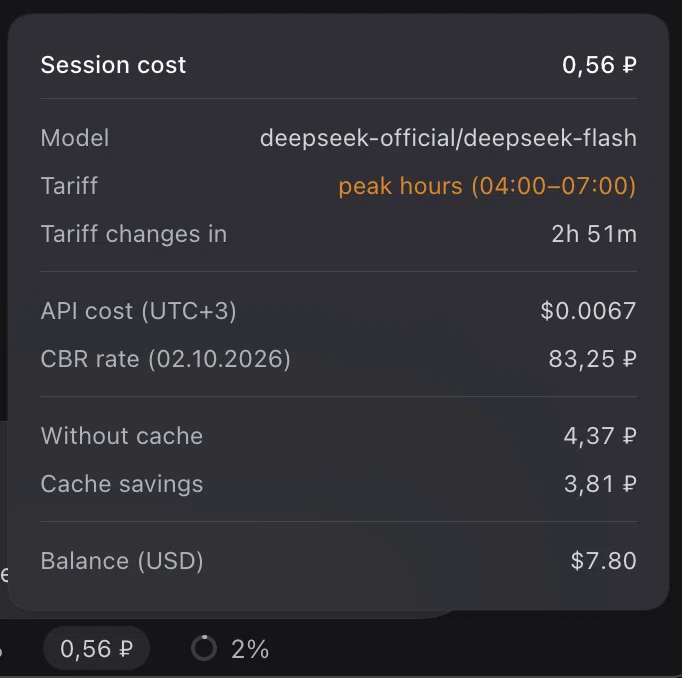
The pill is a button. Clicking it opens a card styled after the built-in "Token usage" popover; a second click, a click outside the card, or Escape closes it.
Installation
Published on npm as @stmol/dsh-rub-cost.
Any DSH bundle source works: an npm package, a Git repository, a tarball, or a
local folder.
- GUI: Settings → Plugins → Add plugin, then
@stmol/dsh-rub-cost, or the repository address. - CLI:
dsh plugin add @stmol/dsh-rub-cost.
The install name is the name field in package.json; the name in
cordis.patch.yml and the factory id in client.js have to match it, or the
bundle will not build. There are no automatic updates: remove the plugin and add
it again. The plugin runs with your own privileges.
What the card shows
Model, the current tariff and the countdown to its switch, the API cost in dollars at the tariff in effect (UTC+3), the CBR rate with its publication date, the cost of the session including subagents, the same session without a cache and the savings, and the DeepSeek Platform wallet balances.
Every amount except the API cost is shown with two decimals; the API cost keeps four. The token breakdown stays out of the card, because the neighbouring "Token usage" cell already prints it.
Peak hours cost twice the off-peak rate. The tariff row names only the window in
effect, for example peak hours (04:00-07:00) highlighted in amber, or
off-peak. Peak hours are weekdays 09:00-12:00 and 14:00-18:00 Beijing time,
which is 04:00-07:00 and 09:00-13:00 MSK.
How it is computed
cost = (uncachedInput + cacheWrite) × cacheMiss + cacheRead × cacheHit + output × output
Tokens are priced with DeepSeek's official dollar list per 1M tokens, then converted at the CBR USD/RUB rate. The account is billed in dollars, so the dollar list is the basis; the yuan list on the Chinese documentation page is the same list at the fixed 20/3 ¥/$ rate. A usage report can show amounts in CNY while a granted yuan balance is being spent, which is that same list again.
Tokens come from the host tokenUsage projection and the model from
modelSelection.lastUsed; the plugin never folds the session journal itself. The
rate comes from a mirror of the CBR rates and is cached in localStorage: with
no network the last known rate is used, and with no cache the cell shows a dash
and the reason in the tooltip.
The amount is the cost of the current session, not of the account. Subagents are priced from their own route and summed into a separate "Total with subagents" row; while the card is open their spend is polled every 15 seconds. If even one child cannot be read, that row is hidden rather than shown incomplete.
Known limitations
- Chinese holidays are ignored, so a holiday weekday is priced as a peak day.
tokenUsageholds a whole-session total with no per-route split, so after a mid-session model change everything is estimated with the last used model.- Cache writes are billed at the cache miss rate: DeepSeek publishes no separate price, and on DeepSeek routes that counter is zero anyway.
- Subagents use their own last used model at the current tariff, and a child that has not chosen a route yet falls back to the parent's.
- The balance request pins
x-client-version. The version is hardcoded inclient.jsand has to be updated by hand after a DSH upgrade.
Editing prices and the rate
MODEL_PRICES, BILLING_CURRENCY and RATE_URL sit at the top of client.js.
After an edit the bundle has to be reinstalled: remove and add the plugin in the
UI, or dsh plugin add .
License
MIT, see LICENSE.