Tkingxiao/dsh-memu-memory ↗★ 1
dsh-memu-memory
面向长篇 RP 与陪伴对话的 DeepSeek Harness 记忆插件:三层记忆、逐轮召回、来源标注、关系图、图片附件与独立 WebUI。
설치
npx -p @deepseek-ai/dsh dsh plugin --profile web add dsh-memu-memory
dsh-memu-memory
A local-first memory plugin for DeepSeek Harness — shared by folder, bound to a chat, written by the agent, curated in the background, and honest about what it does not know.


English | 中文
dsh-memu-memory is built for long-form RP and companion chats. It gives a DSH conversation a memory that behaves like memory instead of a log: three retention layers that fade, a first-turn anchor plus at most one per-turn recall, provenance that cannot be quietly upgraded from "I inferred it" to "they said it", contradictions that wait for a decision instead of both being read as true, and an optional relationship graph with evidence. Speakers, characters, worlds and story branches form hard boundaries, and what a character is allowed to know stays separate from what actually happened.
It is local-first by default. The default agent backend stores full text in JSON indexes and recalls lexically — no Python, no embedding service, no API key. The api backend switches recall to the optional, pinned MemU engine (vector search). MemU is a plugin for people who want it, not a requirement for the plugin to start.
[!WARNING] Early-stage software. This plugin is still early and may contain unforeseen errors, bugs or breaking changes. Back up your data, and please report an issue or send a pull request — feedback helps the project improve.
Status: 1.1.2. The first public release was 1.0.0. The manual now lives in
docs/, withAGENTS.mdas a short index. Back up~/.dsh/dsh-memu-memorybefore upgrades, and read Compatibility & limits before storing data you cannot re-create.
Screenshots
All screenshots are the real WebUI on isolated example data, not anyone's memories.
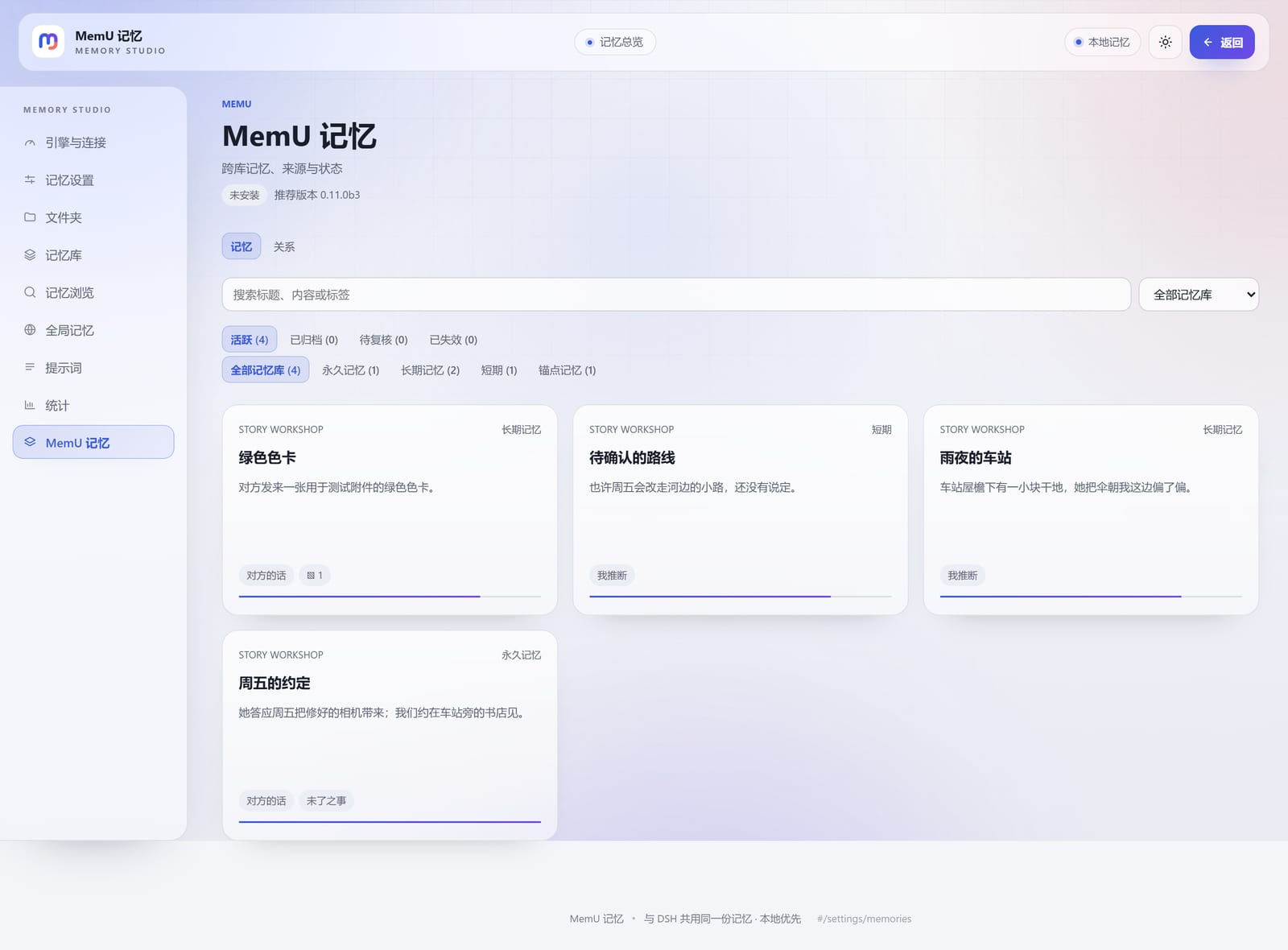
MemU WebUI · cross-library memory wall
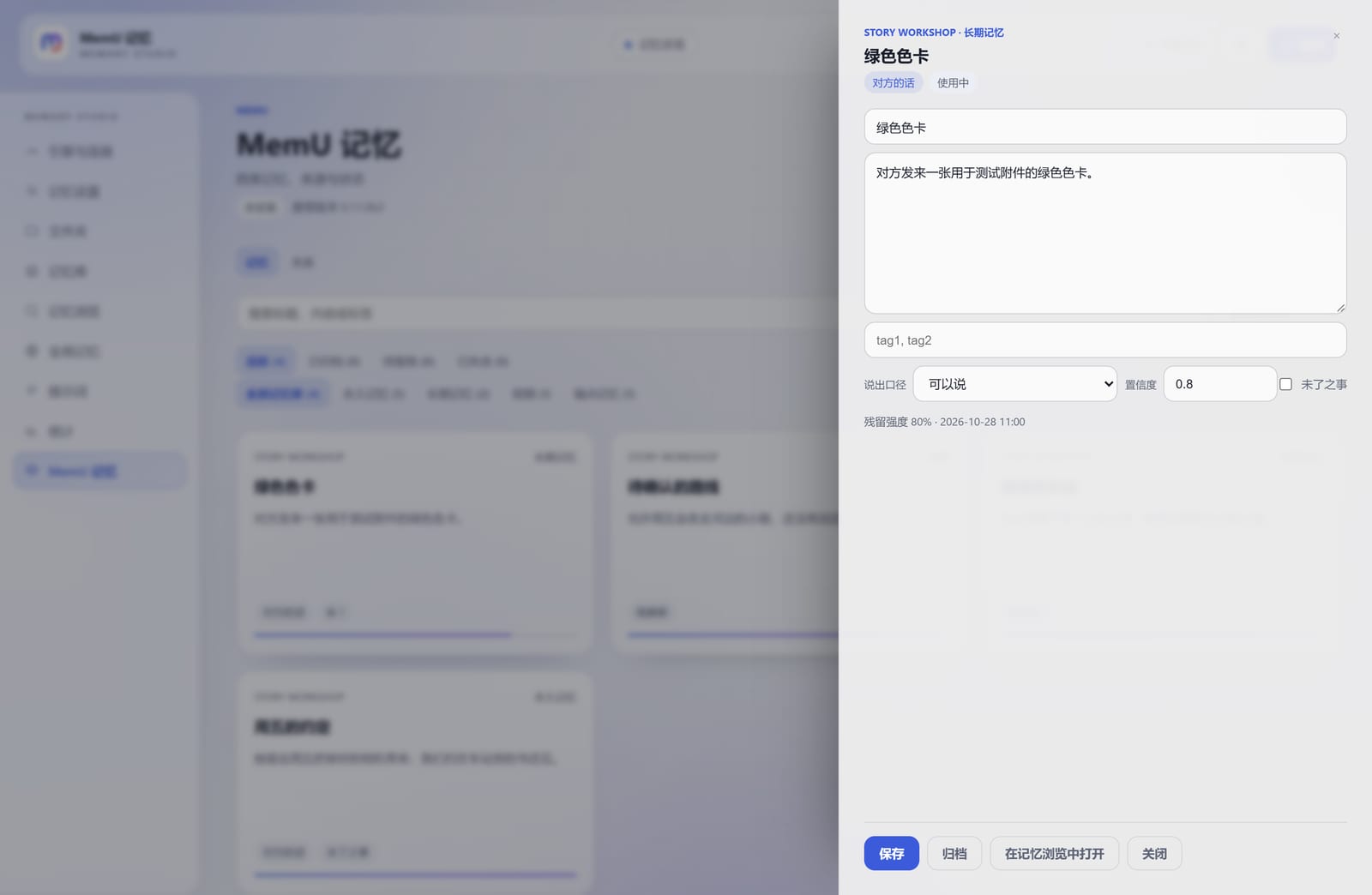
Edit, archive or restore without leaving the wall
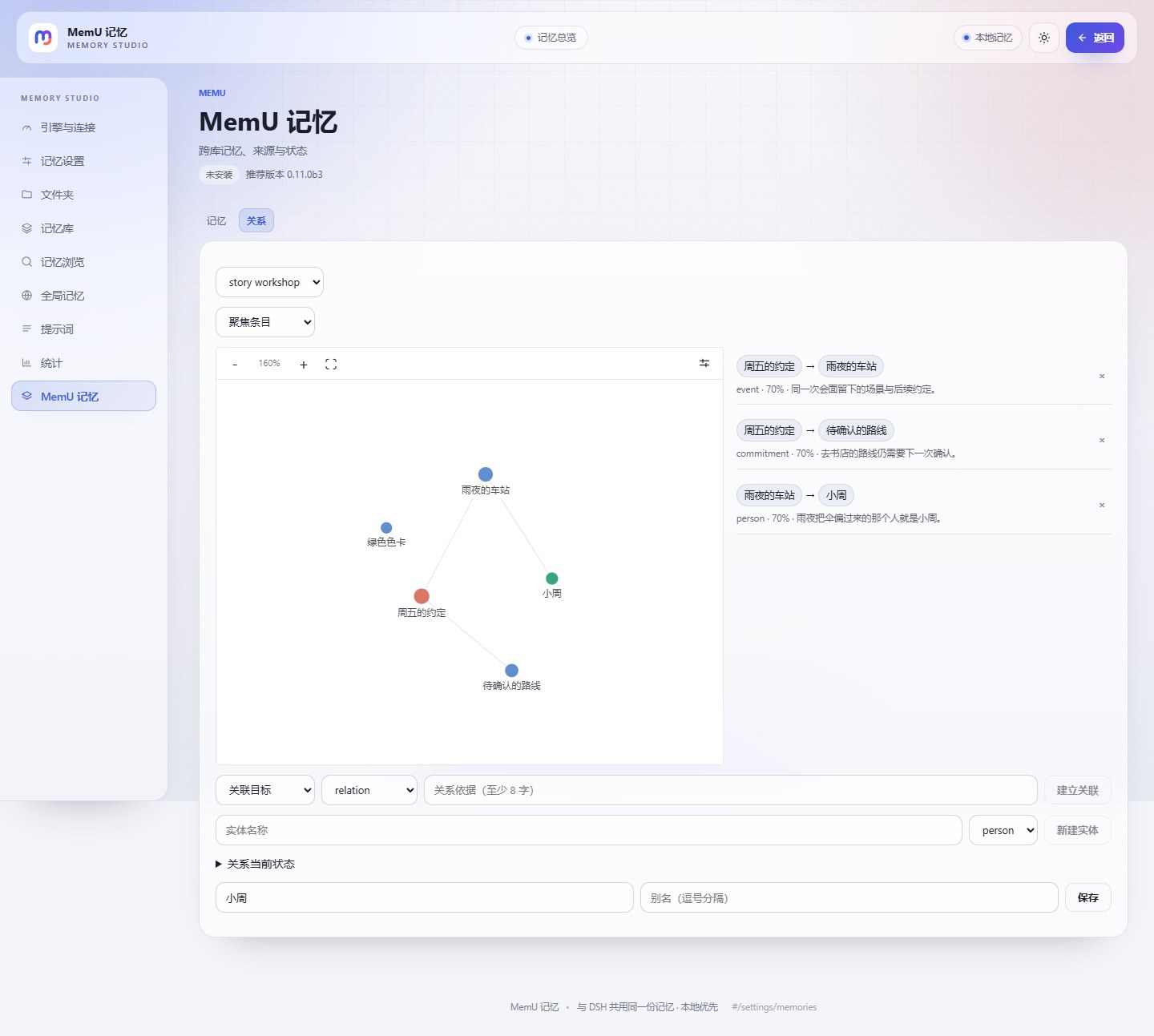
Relationship graph and adjacency list in one view
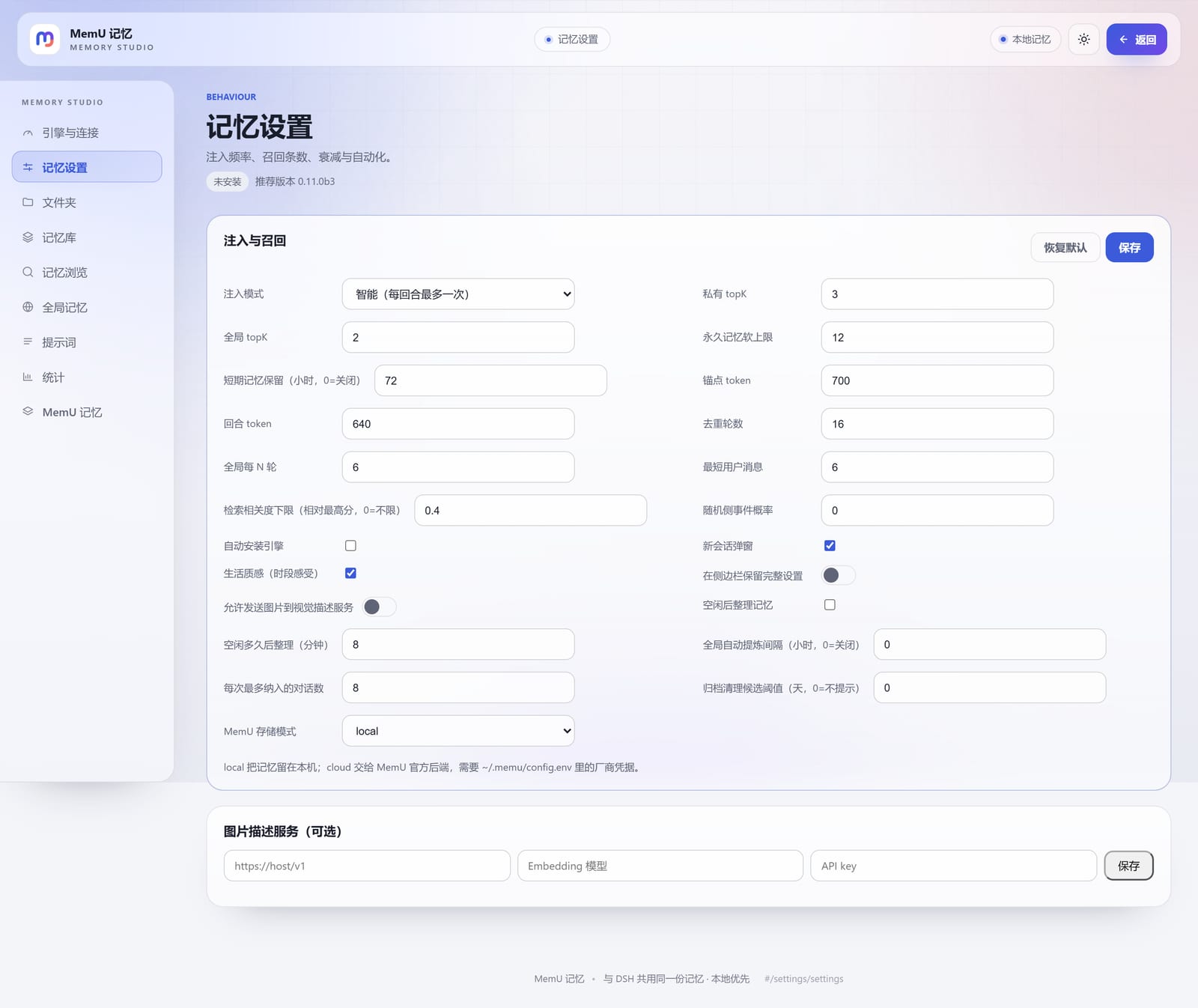
Injection, budgets, retention and automation
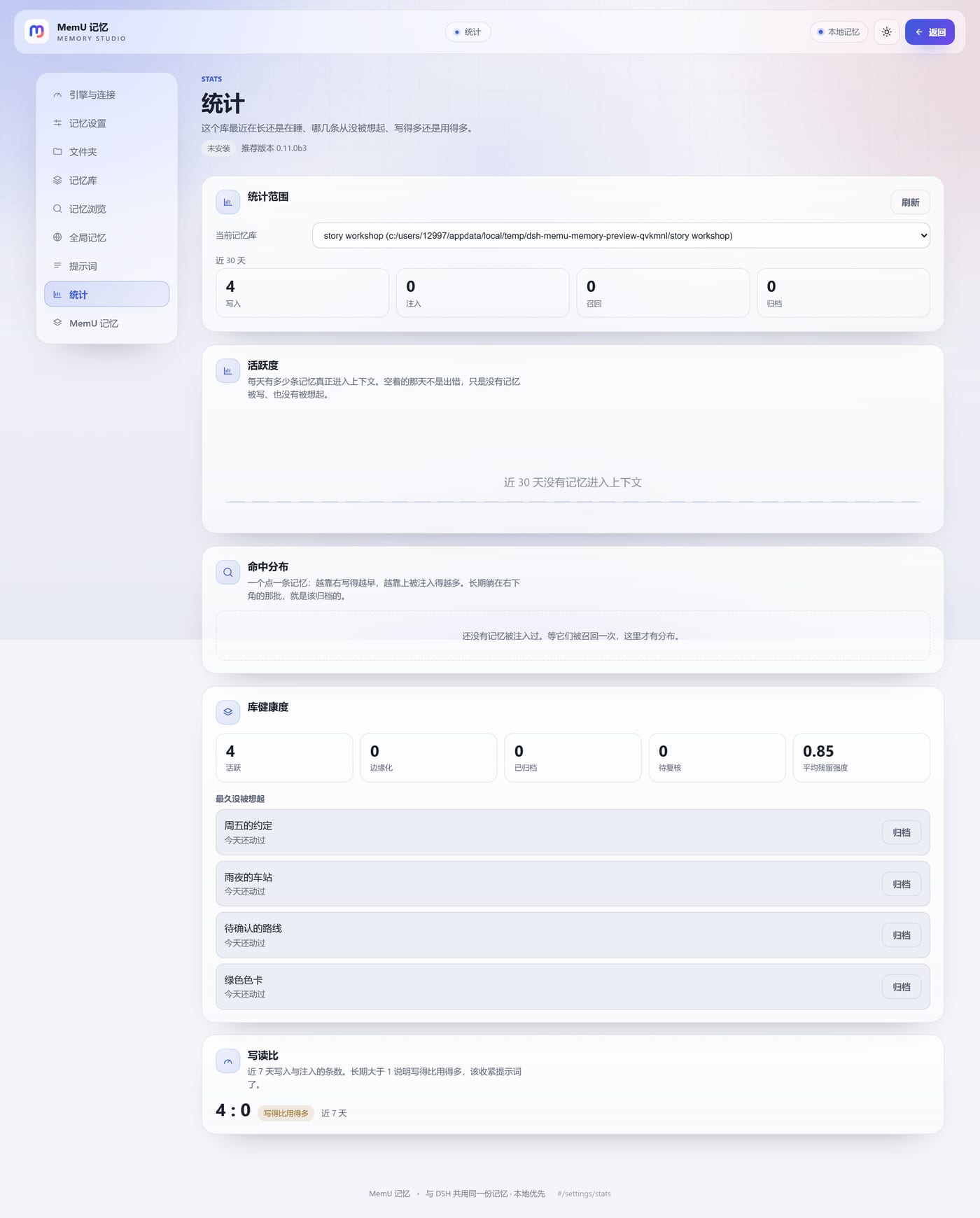
Daily activity, hit distribution and archive candidates
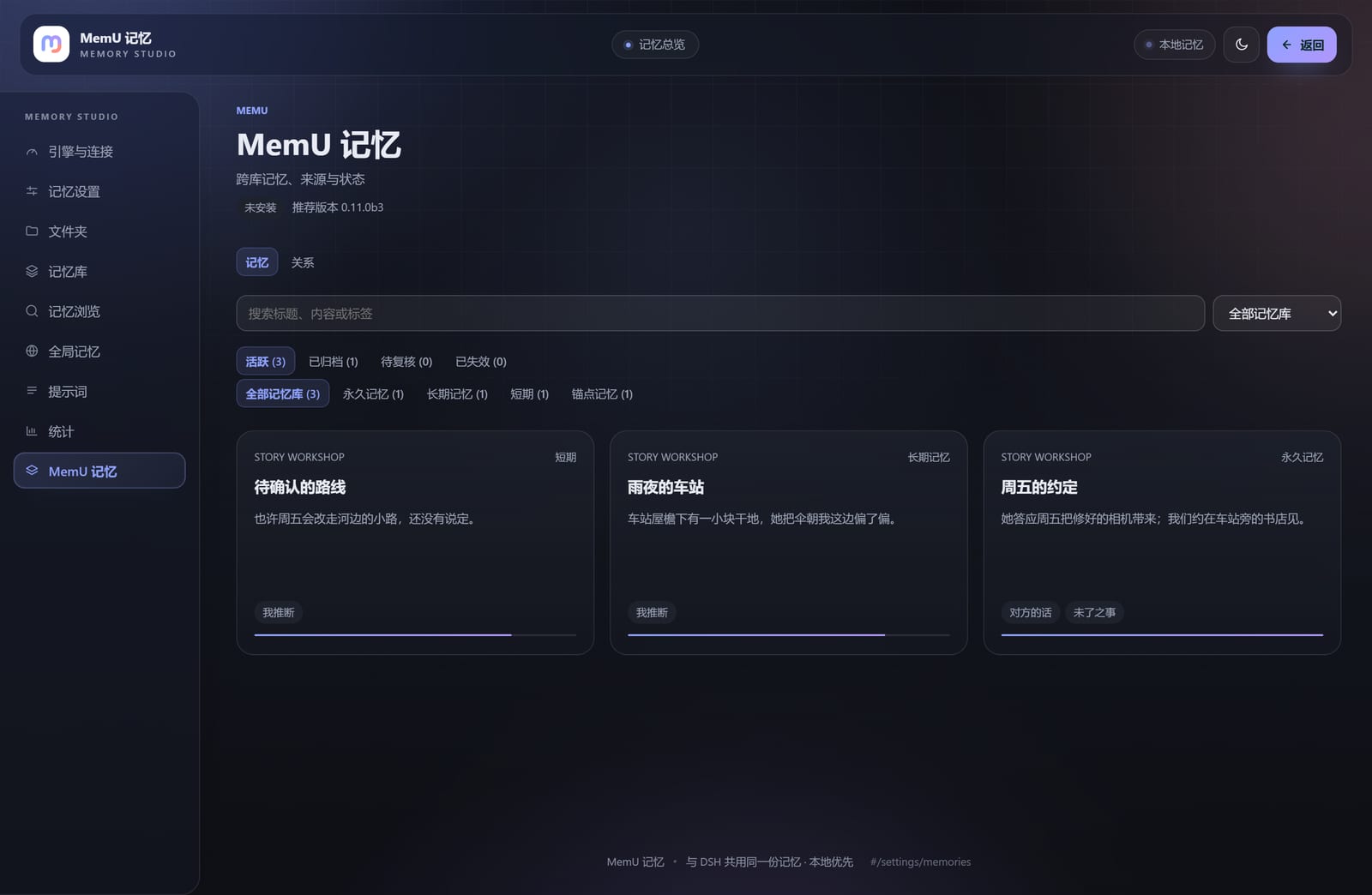
Dark theme · the same surfaces and motion
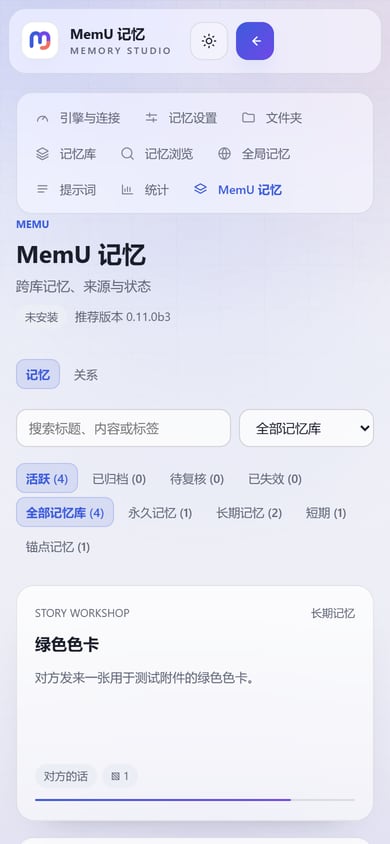
Narrow layout · the rail folds into a horizontal strip
What it remembers
- Three layers, one timeline.
short_termdrafts expire after 72 hours by default;long_termis the body of ordinary memory;must_rememberneeds a reason and a source, decays over 365 days with a 0.35 strength floor, and can be marginalized but never auto-deleted to make room. - Recall is a moment, not a dump. The first turn after a session starts (or after compaction) gets an anchor block with budgets for pinned, core and global memory. After that, each user turn gets at most one recall. Deduplication and a token budget are enforced in code, not left to the prompt.
- A date is either an anniversary or one day.
MM-DDrecurs every year (a birthday);YYYY-MM-DDfires the day before and the day itself, then is spent. A memory that says "tomorrow" is stored as the dated form, so an appointment does not come back every year. - Memory fades unevenly. Recency, access count, arousal, mood congruence, peak and end effects, primacy, habituation and flashbulb accuracy all feed one strength score. A vivid memory can be more confident than it is accurate, and the UI says so.
- Provenance is a fact, not a style. Every entry carries
source(user_said/inferred/imagined/told),confidence,accuracy, and disclosure rules. A vague recollection cannot impersonate a quote. - Contradictions wait. A write that rewrites or contradicts an existing entry lands as
pending_review: it is not injected, not recalled, and appears in a review queue until someone accepts or rejects it. - Secrets stay excluded.
secretvisibility, group-chat channels, characters, worlds, branches andknownByall constrain reads and edits. Automatic recall never injects asecretmemory, and asecretis still readable by an explicit recall from the same folder — it hides a memory from the prompt, it is not a lock. What actually separates two conversations in one folder is thecontextscope (channelId/characterId/worldId/branchId); a blank scope on both sides means one shared scope, which is the point of a folder. The oldvisibility: 'session'level is gone — reading turns it intosharedwith itscontextuntouched, andnode scripts/migrate-visibility.mjsrewrites libraries that still store it (--apply, backs up first). - People and stories are structured. Group chat uses stable
speakerId/channelId, not display names. RP usescharacterId/worldId/branchId. Relationships are edges with a note and confidence, entities can be renamed without rewriting memory bodies, and the current relationship state (familiarity, trust, warmth, boundaries, promises) is a snapshot that keeps its history and evidence. - Images are pointers and captions, not pretend vision. Attachments are deduplicated by SHA-256, quota-limited and tiered; an image without a description is remembered as "received an image", never as a scene the model did not see.
- Housekeeping happens in the background. Consolidation runs in a seeded fork sub-session, never as an editable turn in your chat. Failed runs back off instead of reporting success.
One WebUI
The sidebar has exactly one entry: MemU WebUI. The memory wall and all settings live in the same navigation, with deep links such as #/settings/memories, #/settings/folders and #/settings/stats. The interface follows the browser locale (Chinese or English).
In-place work. Clicking a memory card opens a right-side drawer with the full text and the fields that decide how it behaves — title, content, tags, disclosure, confidence, open loop — plus save, archive, restore and "open in the browser" for heavier work. Archived memories can be deleted in the same drawer; the first click only arms it and the second confirms. Global memories are read-only in the drawer and link to their own page. Filters and scroll position stay where they were. Cards that carry images use the first usable attachment as a cover, and the drawer opens the full gallery; secret and never_say entries never receive a pixel URL, so they show a label instead.
Graph and list together. The Relations tab renders the graph canvas and the adjacency list side by side (stacked on narrow screens), with the focus selector above them and link/entity/relationship tools below. There is no mode switch to forget.
The locally bundled D3 force layout preserves positions and the camera across background data refreshes. Drag nodes, pan the background, zoom with the wheel or pinch, fit the graph, and highlight neighbors. Labels avoid collisions; graph settings adjust repulsion, link distance, labels and live layout. Layout only visualizes recorded links: it never infers or writes relationships.
| Page | What it is for |
|---|---|
| Memories | Cross-library wall, source/status/library/preview, in-place drawer, Relations tab |
| Engine & connection | Optional MemU engine install/switch, embedding endpoint, backups and restore |
| Memory settings | Injection mode, token budgets, topK, relevance threshold, retention, automation |
| Folders | Folder-level private/global ceiling, expandable conversations and their own switches |
| Libraries | Create, rename, archive, restore, explicitly delete libraries |
| Memory browser | Full-text editing, attachments, review queue, graph and bounded canvas, JSON/ZIP import/export |
| Global memory | Domain-scoped global memories, evidence, review queue and the separate curator |
| Prompts | General / RP / Coding / Mixed variants, overrides and per-key reset; new conversations start on RP |
| Stats | Daily activity, hit distribution, health, never-recalled shortlist, 7-day write/read ratio |
Settings save as you change them (250 ms debounce), with about 2.5 s cross-window sync and a heartbeat for writes made by tools or another window. The WebUI opens in a new tab; when a popup is blocked it falls back to an in-app overlay without unloading the host SPA. Light, dark, reduced-motion and narrow layouts are supported.
Domain Prompts
Resident guidance, writing policies and consolidation prompts follow the current session domain. Local tools and remote JSON consolidation share the domain body, with separate supported output contracts. New conversations default to RP; Coding, Mixed and custom pages stay enabled and can be selected per conversation.
| Domain | Memory focus |
|---|---|
| Coding | Requirements, acceptance criteria, interfaces, call chains, invariants, root causes, tradeoffs, verification and handoff points. Neutral engineering notes, not character psychology. Preserve necessary minimal code and exact semantics without copying whole files or truncating critical conditions. |
| RP | Evidenced moments, character reactions, names and habits, commitments, boundaries and repair. Let memory shape present choices without repetitive callbacks, invented facts or automatic intimacy. |
| Mixed | The prompt separates technical, character and OOC material per item; it does not automatically change the session domain. Tags aid retrieval, not access control or character knowledge. |
| General | Neutral facts, preferences, decisions with reasons, promises and constraints; no default roleplay. |
Updated defaults never overwrite custom text. The default-update notice remains until that prompt is saved or reset. Compare, merge or restore individual prompts in Prompts; there is no need to clear memories. Regression tests cover routing and output contracts, not a guarantee of naturalness or long-term memory quality, which still requires real-conversation evaluation.
Installation
Requirements
| DSH | >=0.2.0-rc.1 (web profile) |
| Node.js | >=20.9 |
| OS | Windows, macOS or Linux, wherever DSH's web host runs |
| Optional engine | Python 3.11+ only if you choose the vector backend. The default backend needs no Python, no embedding service and no API key. |
Method 1 — npm (recommended)
dsh plugin --profile web add dsh-memu-memory
dsh web
Restart the host after installing or updating. The plugin appears as Settings → MemU, and the right sidebar gets the MemU WebUI button.
Replace
webwith your profile name if you use another one. Older DSH CLIs accept the shorter formdsh plugin add dsh-memu-memorywithout the profile flag.
Method 2 — npx (no global install)
npx @deepseek-ai/dsh plugin --profile web add dsh-memu-memory
npx @deepseek-ai/dsh web
Method 3 — from a local checkout (development)
The repository has no build step: lib/ is the runtime. Clone it, link the checkout into your DSH profile, and add the bundle.
git clone  dsh-memu-memory
cd dsh-memu-memory
npm ci --legacy-peer-deps
In the profile's package.json:
{
  "dependencies": {
    "dsh-memu-memory": "link:/absolute/path/to/dsh-memu-memory"
  },
  "dsh": {
    "profile": {
      "bundles": ["dsh-memu-memory"]
    }
  }
}
Then restart DSH. A symlinked checkout is picked up on restart; there is no bundle cache.
Optional — vector engine (MemU)
The default agent backend is fully usable without this step. Install the engine from Settings → MemU → Engine & connection, or from a terminal:
npx --package dsh-memu-memory dsh-memu-memory-setup
What it does:
- installs the pinned
memu-cli==0.11.0b3into~/.dsh/dsh-memu-memory/engine//venv; - never installs into the system Python or user site-packages, and leaves no
pipinside the venv; - tries PyPI mirrors in order (user-configured → Tsinghua → Aliyun → pypi.org);
- if no usable Python/pip exists, uses a pinned uv runtime inside the plugin directory and leaves the system
PATHuntouched; - downloads roughly 150 MB, runs a real smoke test, and keeps the previous version for rollback.
To use the api backend, point it at an OpenAI-compatible embedding endpoint (for example a local Ollama at http://localhost:11434). DSH itself has no embedding API, so "local embeddings" means a local service you run; a key is not required for a local server. Cloud MemU is not part of the supported scope.
First run
- Install, then restart DSH.
- Open MemU WebUI from the sidebar (or Settings → MemU).
- New conversations ask once whether this chat should use memory: private only, global only, both, or none. Remember my choice skips the question later. The card you pick sets both switches at once, so the sidebar shows the card you chose; the advanced "existing / new library" pick only changes which library the private layer reads, never the two switches.
- If you want a folder-wide ceiling, set it under 文件夹 — a folder can forbid private or global memory, and the chat switches will respect that ceiling.
- Talk. The agent writes private memories itself. The MemU 记忆 wall is where you review, edit, archive, link and export them.
Folder policy is a ceiling, not an initial value: turning a folder switch off immediately clamps every conversation in it, and turning it back on restores each conversation's own choice. A folder with both switches off does not prompt, does not create a library and does not inject anything.
Model tools
| Tool | Purpose |
|---|---|
memu_private_remember | Write a private memory, with source, layer, disclosure, visibility, tags, open loop and attachment references |
memu_private_recall | Natural-language or exact-id recall; results may carry up to two relationship pointers |
memu_private_list | List the memories usable in the current scope |
memu_private_update | Edit, without bypassing pin admission, review or visibility rules |
memu_private_archive | Archive; never delete |
memu_private_unpin | Marginalize a permanent memory with a first-person reason, quota and cooldown |
memu_private_link | Link memories/entities with evidence, or update a relationship snapshot; cannot delete edges |
memu_global_recall / `memu_global_ |