Yokira404/dsh-thinking-highlight ↗★ 0
@Yokira404/dsh-thinking-highlight
Chain-of-thought keyword counting and highlighting: per-word count chips with a click-to-suppress switch, per-word colour and text style, whole-word matching, and a dedicated settings section 适合需要分析和追踪思维链中特定关键词出现频率的用户。
설치
npx -p @deepseek-ai/dsh dsh plugin --profile web add github:Yokira404/dsh-thinking-highlightThinking Highlighter · 标红插件
A DSH plugin that counts and highlights keywords inside chain-of-thought rows ("thinking" rows), with its own section in Settings.
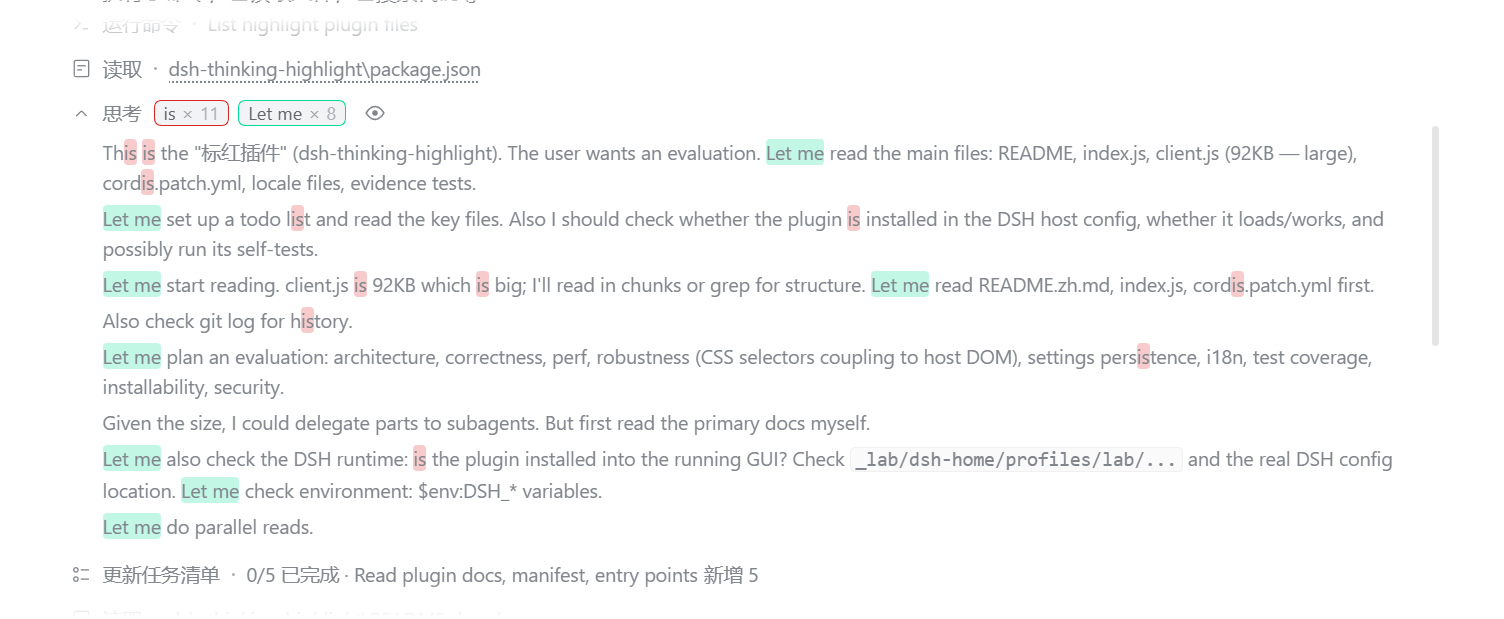
- Count chips — every thinking row shows
keyword × nright after its title, one chip per keyword, so you can see at a glance which word keeps coming back and how often. - Click a chip to switch that keyword off — the word stops being highlighted everywhere, the chip stays in place in a muted state and the same click turns it back on. The choice is remembered.
- Highlighting — expand a row and every occurrence of a keyword is tinted with that keyword's own colour. The text itself is never recoloured, so nothing becomes unreadable.
- Per-keyword colour and text style — colour, typeface (default / monospace / serif), bold, italic, underline. What you set is what both the highlight and the chip show.
- Whole-word matching — per keyword:
iseither matches everywhere or only where it stands alone (never insidethisorThisIs). - Folded rows count the whole chain of thought — the numbers do not change when you expand a row.
- Per-row eye — one row's highlighting can be hidden without touching the others.
- One row per keyword — typing a word that already exists is refused, with a note saying why.
Install
Requires the DSH desktop app (built and tested against @deepseek-ai/dsh-desktop 0.2.0-rc.2).
git clone https://github.com/Yokira404/dsh-thinking-highlight.git
cd dsh-thinking-highlight
node evidence/install.mjs desktop        # or another profile name
The installer records a link: dependency pointing at the checkout, adds the package to
dsh.profile.bundles, and creates a junction under /node_modules. Then restart the app: the card
appears in Plugins → 已安装, where the switch enables or disables it.
You can also add the folder through the Plugins page's own "add plugin" action, which does the same thing through pnpm.
The dependency entry is not optional: the Plugins page only lists a package the profile records as a dependency (or as a shipped-optional bundle). A package that is merely selected in
dsh.profile.bundlesloads fine but gets no card — and therefore no switch.
Settings
Ctrl + , → 标红插件 / Thinking Highlighter in the left navigation.
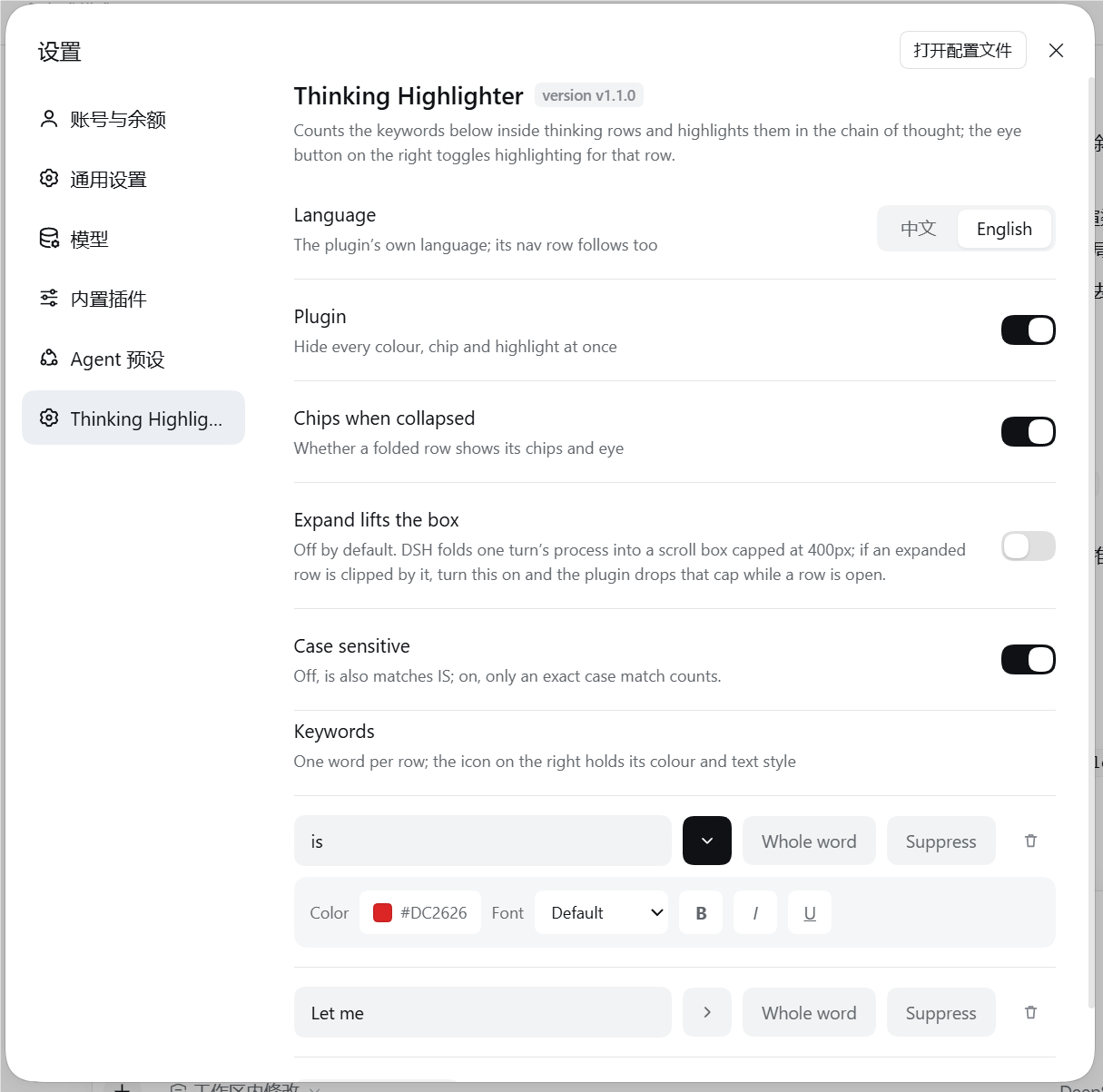
| Row | What it does |
|---|---|
| Language | 中文 / English for the plugin's own UI; the nav row follows it too |
| Plugin | Hides every colour, chip and highlight at once |
| Chips when collapsed | Whether a folded row shows its chips and eye |
| Expand lifts the box (off by default) | DSH folds a turn's process into a scroll box capped at 400px; with this on, an expanded row temporarily drops that cap so a long chain of thought can be read without scrolling inside the box |
| Case sensitive | Off (default): is also matches IS |
| Keywords | One row per word: text field, ▸ style, 完整词 / whole word, suppress, delete |
| ▸ style panel | Colour, font, Bold, Italic, Underline for that keyword |
Settings live in the browser's localStorage and apply immediately.
How it works
The thinking row is a sealed built-in component with no slot to render into, so the plugin decorates the rendered DOM instead — by splitting text nodes, never by replacing them:
- Highlighting empties the text node React owns and inserts the plugin's own spans before it. React keeps updating the same node, so streaming never breaks or loses text. The one visible seam: between React writing a new chunk into that node and the plugin's next pass (at most one 90 ms coalescing window) the previous split and the new text are both in the DOM; the pass drops the stale copy and re-marks the new text.
- Work is coalesced on a 90 ms timer, and a row whose text and settings are unchanged is skipped entirely.
- The chip set is inserted inside the header's own text line, after the title and its separator: while a row
is folded that header is a fixed-height box, so anything appended to the block itself would land below it.
The header block is found by its
[data-disclosure-row]line, not by being the row's first element: while the model is still streaming the host renders a visually-hidden "running" status span before it, and a chip set parked in that 1 px box is a chip set nobody can see. - The expanded chain of thought is looked for inside the disclosure block, right after the header line,
because that is where
DisclosureRowrenders it ([div[data-disclosure-row], open && children]). A settled row that was never seen streaming has to be found this way too, or expanding it can never highlight anything. - Nothing in the chip set may shrink (the collapsed preview beside it is
flex: auto), which is why the chip group has a fixed width cap and clips only itself. - Counting is text-accurate: the chip set is excluded, the highlight spans are not — otherwise the numbers would climb by one on every pass, or collapse to zero after the first highlight.
- A folded row has no body to read: the host only mounts the chain of thought while expanded, and the whole
text lives in the host component's
textprop. The plugin reaches it through the fiber React attaches to every element it created (__reactFiber$…); anything unexpected reads as "unavailable" and the DOM text is used instead.
Compatibility and caveats
- The plugin decorates
[data-variant="think"]rows as DSH renders them today. A DSH release that changes those internals can require an update here; when a lookup fails the plugin degrades to doing less, never to breaking the transcript.evidence/host-shape.mjsmodels the installed markup and also asserts the markers it depends on are still present in the app's own bundle, so a DSH rename fails a test instead of going quiet. - Per-keyword suppression applies to all rows (the chip is the same keyword everywhere). The per-row eye is the per-row control.
- Expand lifts the box is the one setting that reaches into host layout, which is why it ships off.
- Settings live in this browser's
localStorage. A change made in another window arrives through the browser'sstorageevent; the plugin re-reads the store and rebuilds every row.
Development
node evidence/selftest.mjs         #  27 checks: splitting, undoing, counting, case, colour, whole-word edges
node evidence/client-harness.mjs   # 102 checks: the browser half really runs, against a stubbed host
node evidence/css-check.mjs        #  19 checks: the stylesheet literal (braces, chip/row/panel rules)
node evidence/locale-check.mjs     #   8 checks: package meta, both locale files and the version tag agree
node evidence/host-shape.mjs       #  25 checks: the installed row markup, plus its markers in the app bundle
node evidence/e2e-bundle.mjs
 @Yokira404/dsh-thinking-highlight
The self-tests extract the shipped functions out of client.js by brace matching and run them against a DOM
stub — never a copy — and the harness executes the factory, apply, the settings page and a full row
decoration with React stubbed out. They exist because the failure modes here are quiet ones: a template
literal that loses its tail, counts that count themselves, a cache that keeps a highlight from coming back.
host-shape.mjs is the one suite that models the DOM the host actually renders — the hidden status span, the
body nested inside the disclosure block — because a fixture built from the plugin's own assumptions cannot
catch a wrong assumption. It skips its bundle check with a printed SKIP when the app is not installed here.
e2e-bundle.mjs checks a running scratch profile end to end: the host row activates, the boot graph carries
the browser half, and the served bundle is byte-identical (sha256) to client.js.
| File | Role |
|---|---|
package.json | bundle manifest: dsh.bundle.patch + dsh.client (platform: web) |
cordis.patch.yml | inserts the thinking-highlight row into a profile |
index.js | host half; makes the package loadable and publishes dsh.client |
client.js | browser half: the settings section and the reasoning-row decoration |
locale/*.json | card title and description, in the {"meta": {...}} shape DSH reads |
icon.svg | plugin icon |
docs/ | the screenshots used above |
At runtime, window.__DSH_TH__ exposes settings(), rows() ({ highlighted, count, hasBadges, marked, folded }), refresh(), clear(), pass() and passes() for poking at the decoration from the console.
Uninstall
Use the card's 卸载 / Remove in the Plugins page, or delete the link: dependency, the
node_modules/@Yokira404/dsh-thinking-highlight junction and the dsh.profile.bundles entry by hand. Unloading
removes every chip, puts the split text nodes back, drops the plugin's stylesheet and takes its dsh-th-body
marker class off the host's elements.
License
MIT © 2026 Yokira404