best0127/dsh-session-workbench ↗★ 0
dsh-session-workbench
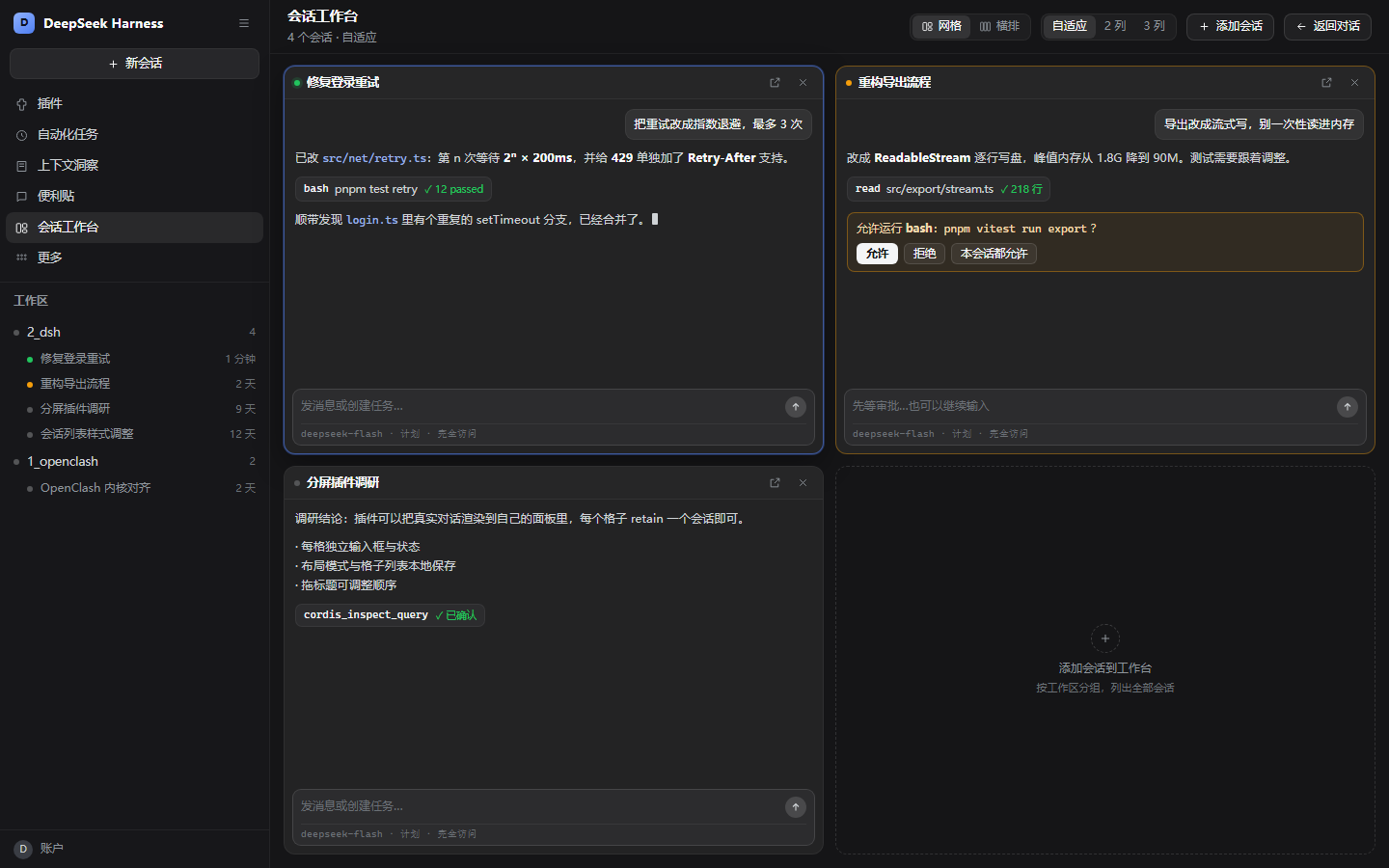
DSH 会话工作台:在一个面板里并排处理多个会话,每一格都是可交互的原版对话。
같은 패키지 이름의 다른 저장소
설치
npx -p @deepseek-ai/dsh dsh plugin --profile web add github:best0127/dsh-session-workbenchdsh-session-workbench
A DSH (DeepSeek Harness) client plugin that turns one panel into a workbench for several sessions at once. Every pane is a real, interactive conversation — the stock transcript, tool cards, streaming output, approval cards and the stock composer — not a read-only mirror.
一个 DSH(DeepSeek Harness)客户端插件:把面板变成多会话工作台,每一格都是可以真正对话的原版会话(聊天记录、工具卡、流式输出、审批卡、原生输入框),不是只读预览。
English
Features
- One entry, one panel — a
会话工作台row in the sidebar panel list (next to Plugins / Automations / Sticky Note). It opens a full main panel, so the board is not bound to any workspace or session: it shows every session. - Real conversations — each pane renders the shipped
conversation.contentfactory under its ownSessionProvider, so typing, streaming, stopping, approvals, queued messages and the model selector all work inside the pane. - Grid or columns — a grid (fit-to-width, or fixed 2/3 columns) and horizontal columns for long conversations. The grid keeps every pane at least 360 px wide and drops columns on narrow windows.
- Add / remove / reorder —
Add sessionlists every session grouped by workspace; drag a pane title to reorder;×removes a pane,↗opens that session as the normal conversation. - Status at a glance — idle / running / needs-approval dots, with approval panes tinted amber.
- Persisted — layout mode, column choice and the pane list live in
localStorage; the board reseeds with your four most recent sessions on first use.
Requirements
- DSH
>= 0.2.0-rc.2(verified on0.2.2-rc.2, Windows desktop and web). - No build step:
client.jsis the shipped browser bundle (window.__ModuleLoader__.load).
Install
Pin a release with a Git tag, or follow the default branch:
# a specific release
dsh plugin --profile desktop add github:best0127/dsh-session-workbench#v1.0.0

# or the latest default branch
dsh plugin --profile desktop add github:best0127/dsh-session-workbench
Then restart the app (or the dsh web process). In Desktop you can also open Plugins → Add plugin and point it at the repository.
Publish this plugin through a plugin index
docs/market/index.json is a ready plugin market index (format 1) listing this plugin with categories, labels and keywords. Serve it from any static host — for example GitHub Pages — then add that URL under Plugins → Discover → Add index source.
How it works
- Host half: an empty loader row. All behaviour is in the browser.
- The panel registers one child slot (
single, scopesession) and renders one occurrence per retained session.ctx.sessions.retain(id)keeps a pane's session open for the pane's lifetime; the pane body callsrenderFactorySlot('conversation.content', …), so panes are the host's own Conversation, mounted outside the Conversation factory tree. - A conversation view tab cannot host other conversations: a factory cannot render itself (
recursive render of factory), which is why the board is a separate main panel.
Versioning
Semantic Versioning (MAJOR.MINOR.PATCH). Releases are Git tags vX.Y.Z; the plugin's engines.dsh declares the compatible DSH range and dsh.manifestVersion the manifest format. See CHANGELOG.md.
Limitations
- One session can decorate only one pane (draft and input state are shared), so duplicates are rejected.
- While the workbench panel is open the normal conversation is replaced;
Back to conversation(orEsc) returns. - Pane scroll positions reset when the panel is closed.
- The pane composer is the stock composer, about 90 px tall.
License
MIT — see LICENSE.
中文
功能
- 一个入口:左侧面板列表里的「会话工作台」一行(插件 / 自动化任务 / 上下文洞察 / 便利贴 之后)。打开后占据主面板,不绑定任何工作区或会话,列出所有会话。
- 真对话:每一格在独立的
SessionProvider下渲染宿主自带的conversation.content工厂——输入、流式输出、停止、审批、队列、模型选择全部可用。 - 网格 / 横排:网格支持自适应列数(每格不窄于 360px,窄窗自动降列)或固定 2/3 列;横排适合长对话,会话少时均分整宽,多时按可用宽度均分并横向滚动。
- 添加 / 移出 / 排序:
添加会话按工作区列出全部会话;拖标题可排序;×移出,↗把该会话作为普通对话打开。 - 状态一眼可见:空闲 / 运行中 / 待审批三个状态点,待审批的格子有琥珀色描边。
- 可持久化:布局、列数、格子列表都存在本地;首次打开自动放入最近 4 个会话。
安装
# 指定版本
dsh plugin --profile desktop add github:best0127/dsh-session-workbench#v1.0.0

# 或跟随默认分支
dsh plugin --profile desktop add github:best0127/dsh-session-workbench
装完重启应用(或 dsh web 进程)。桌面端也可以在 插件 → 添加插件 里填仓库地址。
打标签与分发
- 语义化版本(
MAJOR.MINOR.PATCH),发布用 Git 标签vX.Y.Z; package.json里engines.dsh声明兼容的 DSH 版本范围,dsh.manifestVersion声明清单格式;docs/market/index.json是可直接发布的插件市场索引(format 1),带分类、标签、关键词,静态托管后用 插件 → 发现 → 添加索引源 载入。
已知限制
- 同一个会话不能同时铺两格(草稿/输入状态共享)。
- 工作台打开时原对话被替换,用
返回对话或Esc回去。 - 关闭面板后每格滚动位置会重置。
- 格内输入框是原生输入框,约 90px 高。
许可证
MIT。