hirohana77/dsh-plugin-trajectory-tracker ↗★ 0
dsh-plugin-trajectory-tracker
让你更清楚地了解究竟是什么占据了你的等待耗时的 DSH 时序轨迹追踪插件 适合需要精确监控 DSH 模型首包等待和生成耗时的用户。
설치
npx -p @deepseek-ai/dsh dsh plugin --profile web add github:hirohana77/dsh-plugin-trajectory-trackerDSH Trajectory Tracker ⏱️
English
Know exactly what’s taking up your waiting time.
A lightweight, non-intrusive execution trajectory and real-time latency tracker plugin for DeepSeek Harness (DSH) WebUI. It provides instant, transparent visibility into the model's preparation, streaming, and tool execution stages as they happen.
🌟 Key Features
- Dual-Phase Reasoning Breakdown: Accurately splits each model invocation into two distinct stages: Time-to-First-Token (
首包等待, TTFT / inference readiness) and Streaming Generation (生成中, thought & content streaming). - Dual Reactive Timers: Real-time status indicator dynamically tracks both
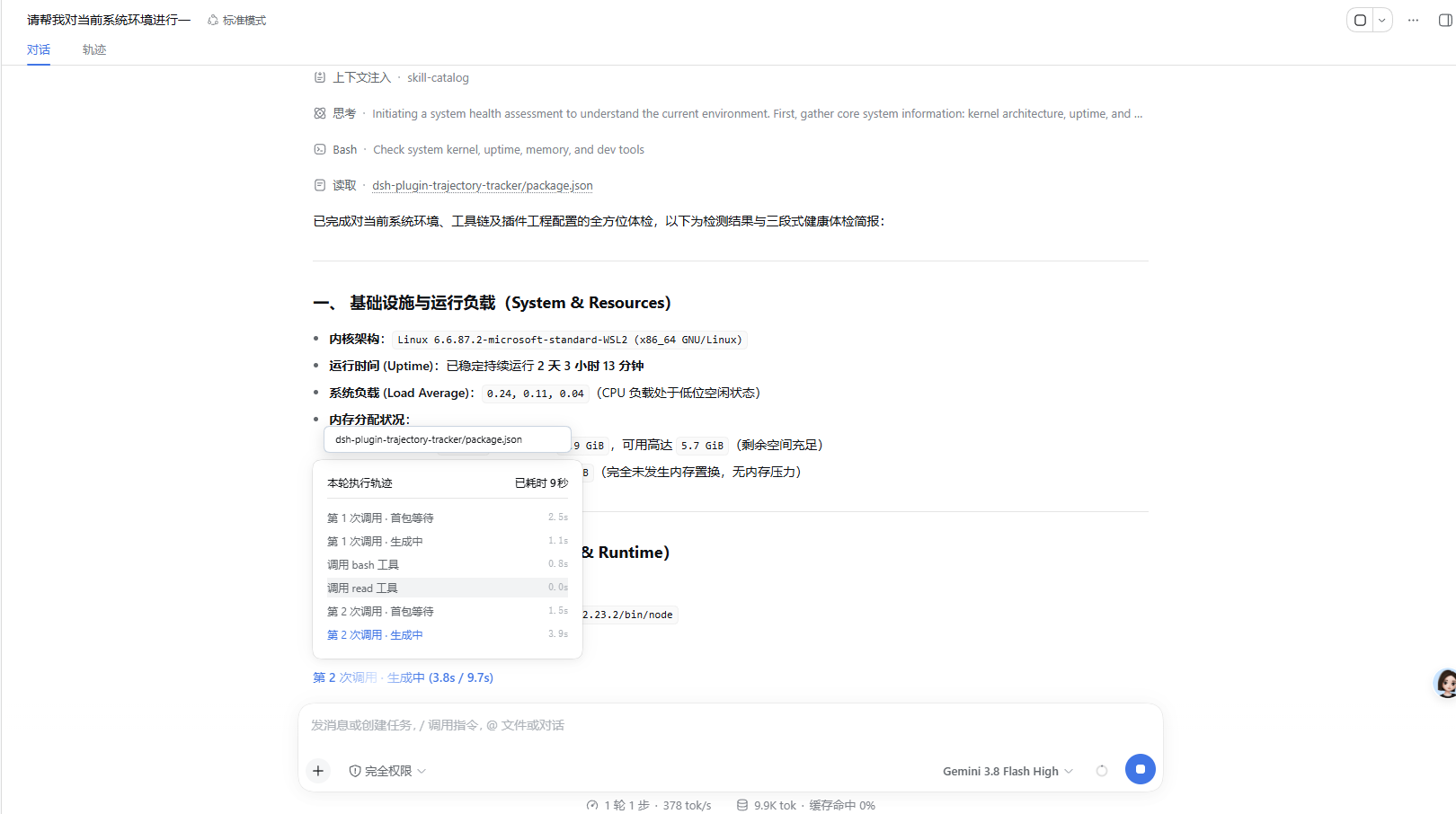
(current_step_elapsed / total_turn_elapsed)(e.g.第 2 次调用 · 生成中 (3.8s / 9.7s)), updating smoothly at 150ms intervals. - Zero-Space-Occupation Floating Panel: Built with React Portals directly anchored on
document.body—smoothly floats above the trigger without pushing or shifting any chat transcript content. - Top-Anchored Action Highlight Card: Hovering over any tool row triggers an elegant, top-anchored white card in just 120ms, showing key actions (target file or command) at a glance without cluttering parameters or causing horizontal scrollbars.
- Parallel Tools Auto-Grouping: Accurately groups concurrent tool calls initiated in the same decision step without inserting duplicate model calls.
- Natural Auto-Scroll to Latest: Smoothly auto-scrolls to the bottom of the list when steps exceed container height, keeping the active step in view.
- Crash-Proof Sandbox: Isolated with React Error Boundaries; zero modifications to official core packages, 100% immune to white-screen errors.
🖼️ Screenshots
1. Live Execution & Floating Trajectory Panel
Real-time dual reactive timers
(3.8s / 9.7s), live progress list, and top-anchored action highlight card on hover:
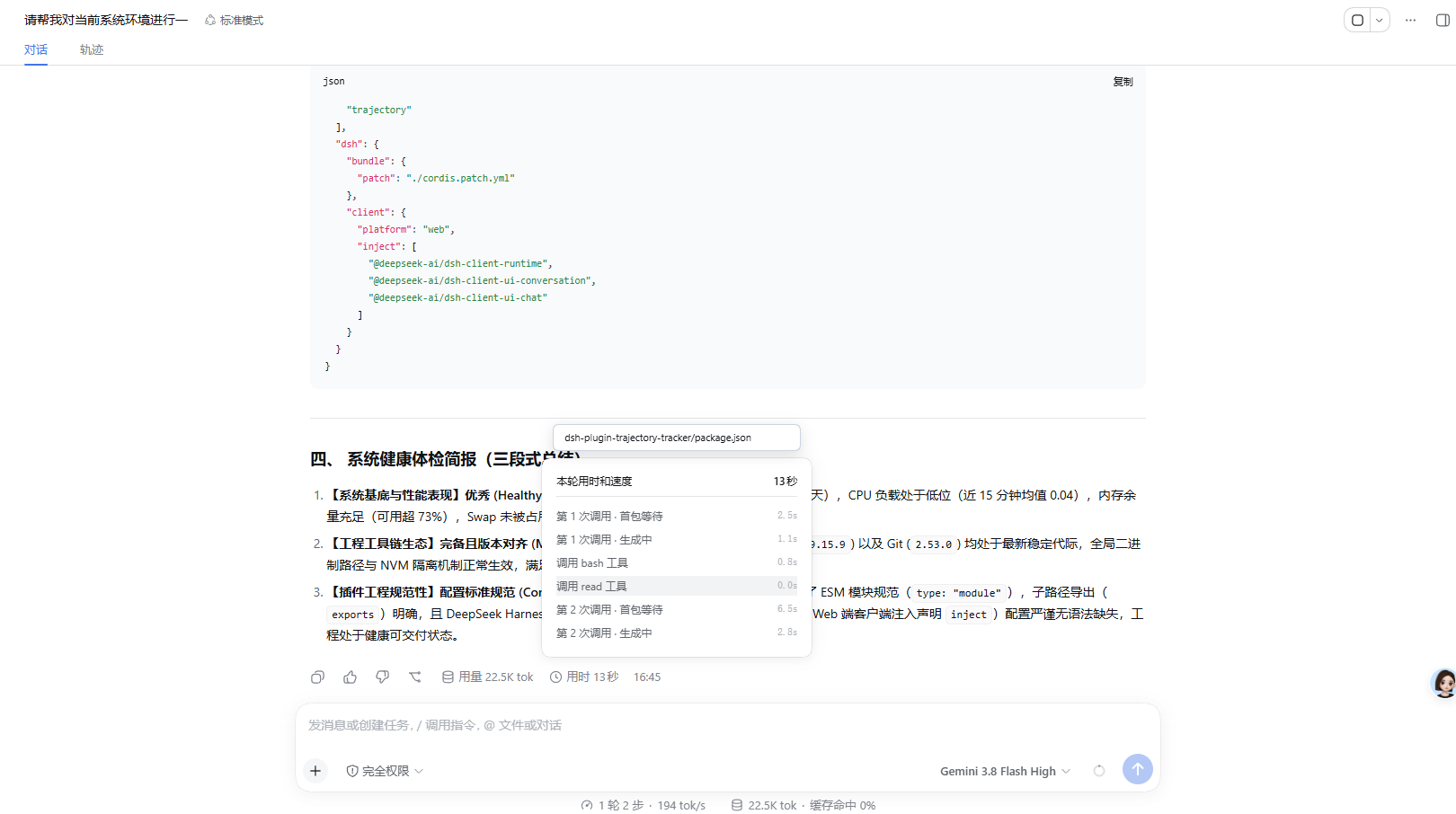
2. Post-Completion Turn Trajectory Recall
Click the completed turn's
用时 13秒pill to recall the full two-phase breakdown and exact step durations:
🚀 Quick Start
1. Install Plugin
Install into your DSH Web Profile directory:
cd ~/.dsh/profiles/web
npm install github:hirohana77/dsh-plugin-trajectory-tracker
2. Enable in Profile
Ensure ~/.dsh/profiles/web/package.json includes:
{
  "dependencies": {
    "dsh-plugin-trajectory-tracker": "^1.0.1"
  },
  "dsh": {
    "bundle": {
      "plugins": [
        "dsh-plugin-trajectory-tracker"
      ]
    }
  }
}
3. Start DSH
dsh web
Refresh the browser (http://127.0.0.1:3080) to activate!
简体中文
让你更清楚地了解,究竟是什么占据了你的等待耗时。
专为 DeepSeek Harness (DSH) WebUI 量身打造的轻量级、零侵入执行轨迹与实时时序追踪插件。帮助你在任务生成期间,实时透视大模型的思考准备(首包等待)、流式推理生成以及本地工具调用的每一个关键步骤与耗时细节。
🌟 核心特性
- 两段式调用细化拆解:精准拆解每次模型调用的 首包等待(
首包等待,TTFT / 思考准备就绪) 与 流式生成中(生成中,思维链推演与正文生成) 两个独立生命周期。 - 双响应式实时计时器:任务生成中状态栏实时呈现
(当前步耗时 / 总累计耗时)(如第 2 次调用 · 生成中 (3.8s / 9.7s)),双数字以 150ms 频率毫秒级平滑递增。 - 悬浮式不占空间弹窗(Zero Space Occupation):基于 React Portal 挂载在 body 顶层,展开和收起完全脱离消息文档流,绝不挤压、不推挤上方任何聊天消息空间。
- 置顶吸附操作重点提示卡:鼠标悬停在工具条目上 120ms 极速在卡片正上方弹出精致白底小方框,一眼看清调用的核心指令或目标文件,0 像素占用内部滚动容器,彻底杜绝横向滚动条。
- 并发工具智能归组:精准识别单次调用并发派发的多个并行工具(Parallel Tools),不误插多余的调用序号。
- 新步骤自动平滑跟滚:当过程条目超出容器高度时,列表自动自然滑向最底部,确保当前最新动态时刻处于第一视线内。
- 沙箱级防白屏隔离:内置 React ErrorBoundary 错误边界,完全不碰官方核心包一行源码,绝不引发界面崩溃白屏。
🖼️ 界面预览
1. 实时执行态与悬浮轨迹小窗
生成中的双响应式计时
(3.8s / 9.7s)、实时轨迹列表,以及鼠标悬停时顶部吸附展示的操作重点卡片:
2. 任务完成态全景轨迹回溯
回答完成后,点击右下角的
用时 13秒胶囊,随时回溯查看包含两段式细化与每步精确耗时的完整轨迹:
🚀 快速开始
1. 安装插件
在您的 DSH Web Profile 目录下执行安装:
cd ~/.dsh/profiles/web
npm install github:hirohana77/dsh-plugin-trajectory-tracker
2. 在配置中声明激活
确认 ~/.dsh/profiles/web/package.json 已声明插件:
{
  "dependencies": {
    "dsh-plugin-trajectory-tracker": "^1.0.1"
  },
  "dsh": {
    "bundle": {
      "plugins": [
        "dsh-plugin-trajectory-tracker"
      ]
    }
  }
}
3. 启动并体验
dsh web
浏览器访问 http://127.0.0.1:3080 刷新页面即可立即生效!
📄 开源许可 (License)
MIT License © 2026 hirohana77