dsh-theme-shelter
Immersive weather ambience for the DeepSeek Harness Web GUI: physical rain with splashes, snow crystals with habits, a hearth, procedural snow wind, recorded rain/fire, and twenty-five wallpapers behind glass. 沉浸式天气主题:物理化的雨与水花、带晶型的雪、炉火、真实录音、程序化风声与二十五张玻璃壁纸。
설치
npx -p @deepseek-ai/dsh dsh plugin --profile web add github:ifer47/dsh-theme-shelterUsage
Click the small button in the bottom-right corner:
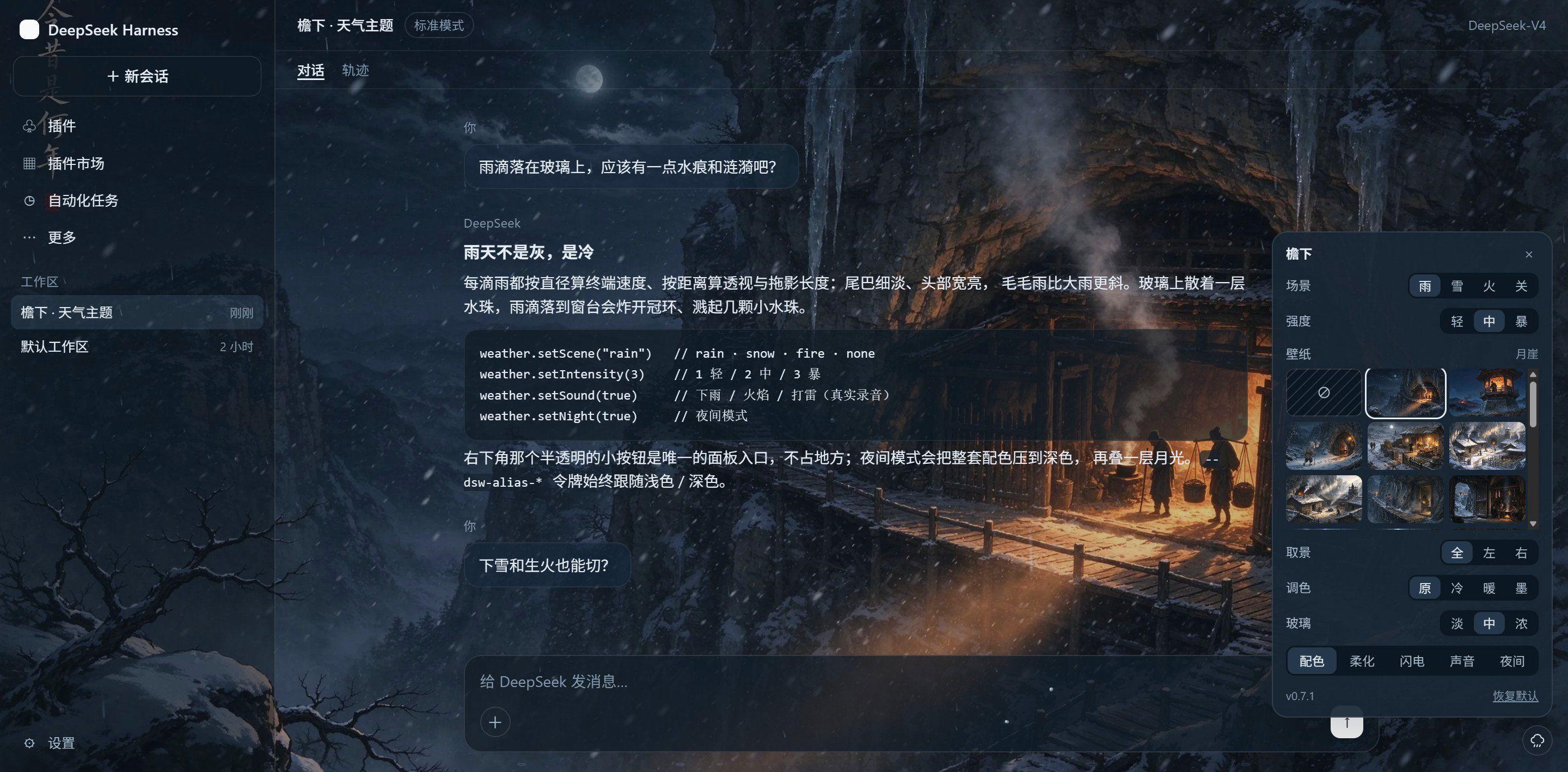
| Control | Effect |
|---|---|
| Scene | rain / snow / fire / off |
| Intensity | light / medium / heavy |
| Wallpaper | none · 25 wallpapers · your own image — plus any file in ~/.dsh/wallpapers |
| Framing | Full / Left / Right: crop and zoom the chosen wallpaper |
| Grade | Original / Cool / Warm / Ink: recolour it |
| Glass | Light / Medium / Heavy: how much the veil dims the picture |
| Frost | soften the image; the rest of the chrome keeps its own contrast |
| Palette | theme colors on or off — the animation runs either way |
| Lightning | rain only: bolt, flash, thunder |
| Sound | rain and fire recorded, snow wind generated |
| Night | dark palette plus a moonlight wash |
Lightning. A strike draws a branched bolt across the sky, flashes the pane, then bangs. The delay encodes distance — 0.3–0.9 s when close, 1.5–2.8 s when far — and a close strike leaves a cracked pane for 5–9 s. Strikes land every 2–9 s, denser at intensity 3.
Sound. Browsers refuse audio until the page has seen a click or a keypress, so the first sound arrives after your first interaction.
Settings live in localStorage["dsh-theme-shelter/v2"] and survive reloads; a picked wallpaper image is the one thing that lives in IndexedDB instead, because a photo does not fit in the 5 MB quota.
First run. On a fresh install a small bubble appears above that button with a one-line hint (“click here to switch the weather”, in the UI's own language). It never takes a click itself: any click or keypress anywhere dismisses it, and so does twelve seconds passing. If you miss it, the button is always in the bottom-right corner: 28 px, with a cloud, umbrella, snowflake or flame depending on the scene.
Console API:
__dshWeather.setScene("fire")     // rain · snow · fire · none
__dshWeather.setIntensity(2)      // 1 light / 2 medium / 3 heavy
__dshWeather.setPalette(false)    // animation only, default colors
__dshWeather.setWallpaper("tower") // an id from __dshWeather.wallpapers, or none / custom / "u:"
__dshWeather.setWallCrop("left")  // full · left · right
__dshWeather.setWallTone("warm")  // none · cool · warm · ink
__dshWeather.setWallDepth(3)      // 1 light / 2 medium / 3 heavy
__dshWeather.setWallBlur(true)    // frosted image
__dshWeather.setSound(true)
__dshWeather.setNight(false)
__dshWeather.reset()