dsh-slack
Slack-style threads for DeepSeek Harness with live session summaries and TODO progress
같은 패키지 이름의 다른 저장소
설치
npx -p @deepseek-ai/dsh dsh plugin --profile web add github:liush2yuxjtu/dsh-slackDSH Slack
Slack-style session threads for DeepSeek Harness. Each message in the Chats composer starts a new session. Reply in the selected Thread to keep its conversation context.
The compact list shows a title, the latest committed assistant summary and real TODO progress. The Thread uses DSH's native conversation renderer, Markdown, tool calls, TODO panel and composer.
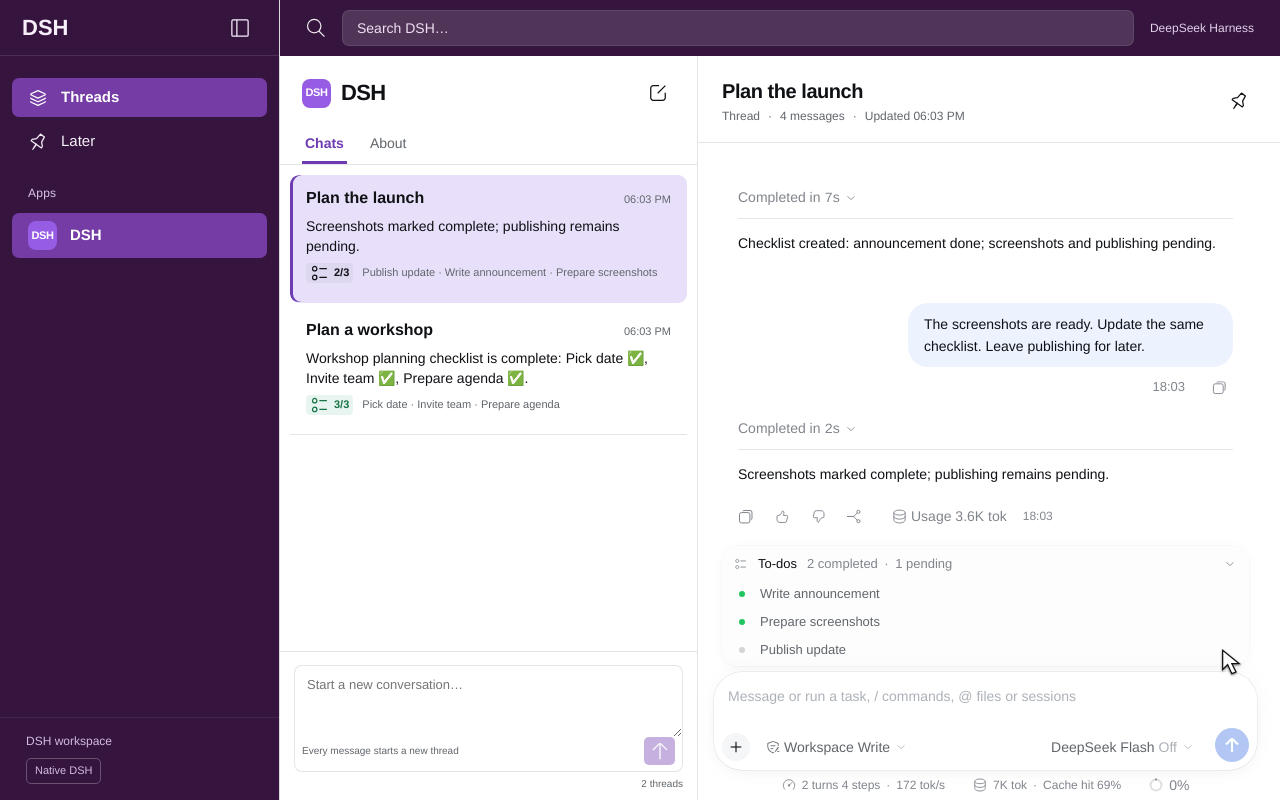
Watch the feature in 8 seconds
Select Plan the launch in the history list, then expand its native TODO list. The Thread keeps the earlier reply and the updated 2/3 progress. The workshop stays in its own session.
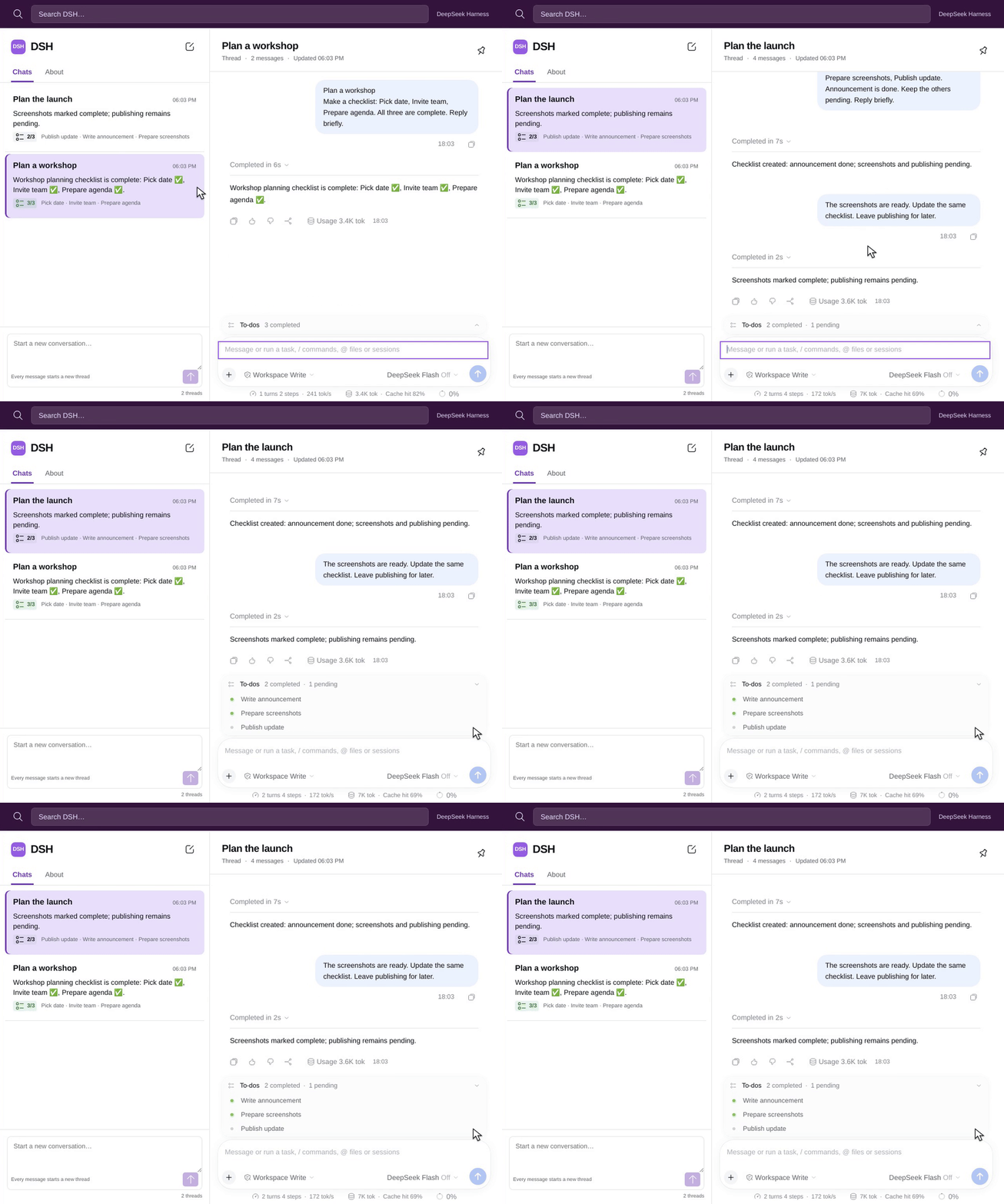
Play the 8-second MP4 · Watch the complete recording · Recording evidence
Recorded in real Chromium on the GPT Work machine with the official DeepSeek API. The short clip reopens an existing Thread. The complete recording shows both new conversations, a contextual reply and actual model waits. No speed changes or generated UI frames.
This is an independent DSH plugin. It is not a Slack integration and does not require a Slack account.
Install
Requires Node.js 24.9 or later and DSH 0.2.2-rc.1. The verified upstream revision is fcc0ad462172522aaf5c93a7b2e01f6b9f0b0159.
git clone https://github.com/liush2yuxjtu/dsh-slack.git
cd dsh-slack
npm pack --ignore-scripts
dsh plugin --profile web add "$PWD/dsh-slack-0.1.0.tgz"
dsh web
Use DSH's plugin manager to install the generated dsh-slack-0.1.0.tgz into your Web profile and enable the bundle. The bundle patch registers its host projection. Its browser module replaces the sidebar and main.conversation slots. It does not patch upstream files.
Configure your DeepSeek API credential in DSH's host settings. This plugin reads no API key in the browser and adds no analytics or remote telemetry.
Use
- Send a message in the Chats column to start a new conversation.
- Select a history entry to open its Thread.
- Send a reply in the Thread composer to continue that conversation.
- Use search to filter the session list.
- Use the native TODO panel for task details. The compact count comes from the same durable
todo/writeevents. - Select Native DSH to use the original navigation, Settings and Plugins. Select Open DSH Slack to return. Unsent root drafts survive this switch.
User and model-generated titles come from DSH session metadata. The first user line replaces DSH's automatic fallback title. Summaries come from committed assistant text. Reasoning and unfinished stream fragments do not appear as summaries. Empty sessions do not receive invented tasks. Session data stays in normal DSH persistence.
Verify
Fast checks use the projection reducer and the distributable package. Final acceptance requires the actual DeepSeek service and real local Chromium.
npm run verify
DSH_SOURCE_ROOT=/absolute/path/to/built/deepseek-harness \
DSH_API_KEY_FILE=/private/path/to/deepseek.key \
npm run verify:live
node scripts/install-hooks.mjs
The live test installs this external package into a real DSH profile. It creates four sessions through the browser, runs native read and todo_write, sends a contextual Thread reply, verifies persistence after reload and captures desktop, mobile and dark screenshots. Every model response is matched to an actual HTTPS response from api.deepseek.com, including response IDs, output-token usage and native tool-call IDs.
The Git hook exports the staged tree and runs a fresh real API E2E before every commit. Missing credentials or a failed check refuse the commit. There is no mock fallback. Credentials, authentication URLs and runtime files are excluded from Git.
See the verification report and design QA.
Compatibility
DSH's plugin API is pre-stable. This package targets the pinned version above. The host owns tools, model requests and persistence. Install this plugin only into profiles where you intend to use the threaded navigation.
MIT license.