oscarka/deepseekharness-remotecontrol ↗★ 2
deepseekharness-remotecontrol
Mobile Web & Feishu Remote Control Hub for DeepSeek Harness (DSH), Antigravity, Codex, Claude Code, WorkBuddy, and Doubao.
설치
npx -p @deepseek-ai/dsh dsh plugin --profile web add github:oscarka/deepseekharness-remotecontrol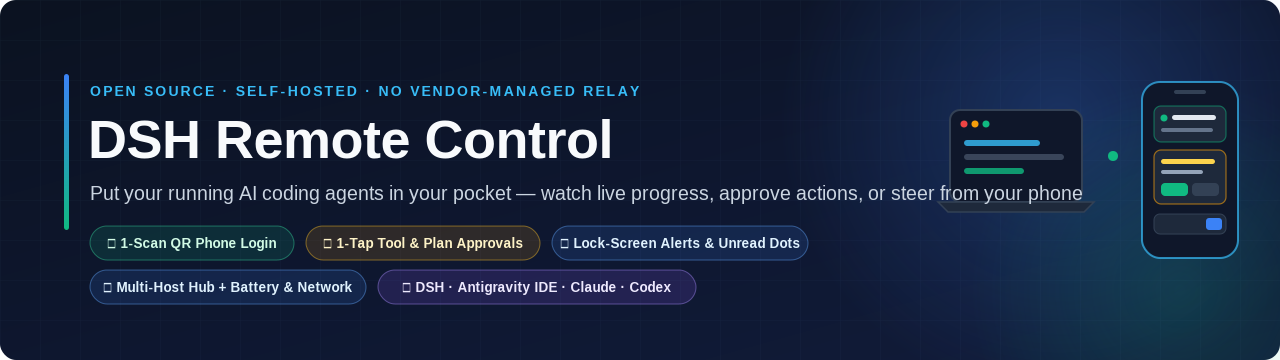
Your AI Coding Agents, Under Your Control — No Vendor-Managed Relay Required.
Monitor live progress, steer running tasks, stop runaway loops, or tap to approve commands & multiple-choice popups from your phone. Deploy your own self-hosted Control Hub on your computer, NAS, VPS, or Cloud Run.



= 20" />

[](https://railway.com/deploy/dsh-remote-control-hub?referralCode=44kg1p&utm_medium=integration&utm_source=template&utm_campaign=generic)
💡 Auto-generates a strong HUB_TOKEN password (or customize it to your own strong password before clicking Deploy).
🇺🇸 English · [🇨🇳 简体中文](https://github.com/oscarka/deepseekharness-remotecontrol/blob/8b119438347c60b4bcba3ececb7f362d0aae54b6/README.zh-CN.md) · [3-Step Setup](#get-started-in-3-steps) · [Supported Tools](#supported-ai-coding-tools) · [What's New](#whats-new) · [FAQ](#faq)
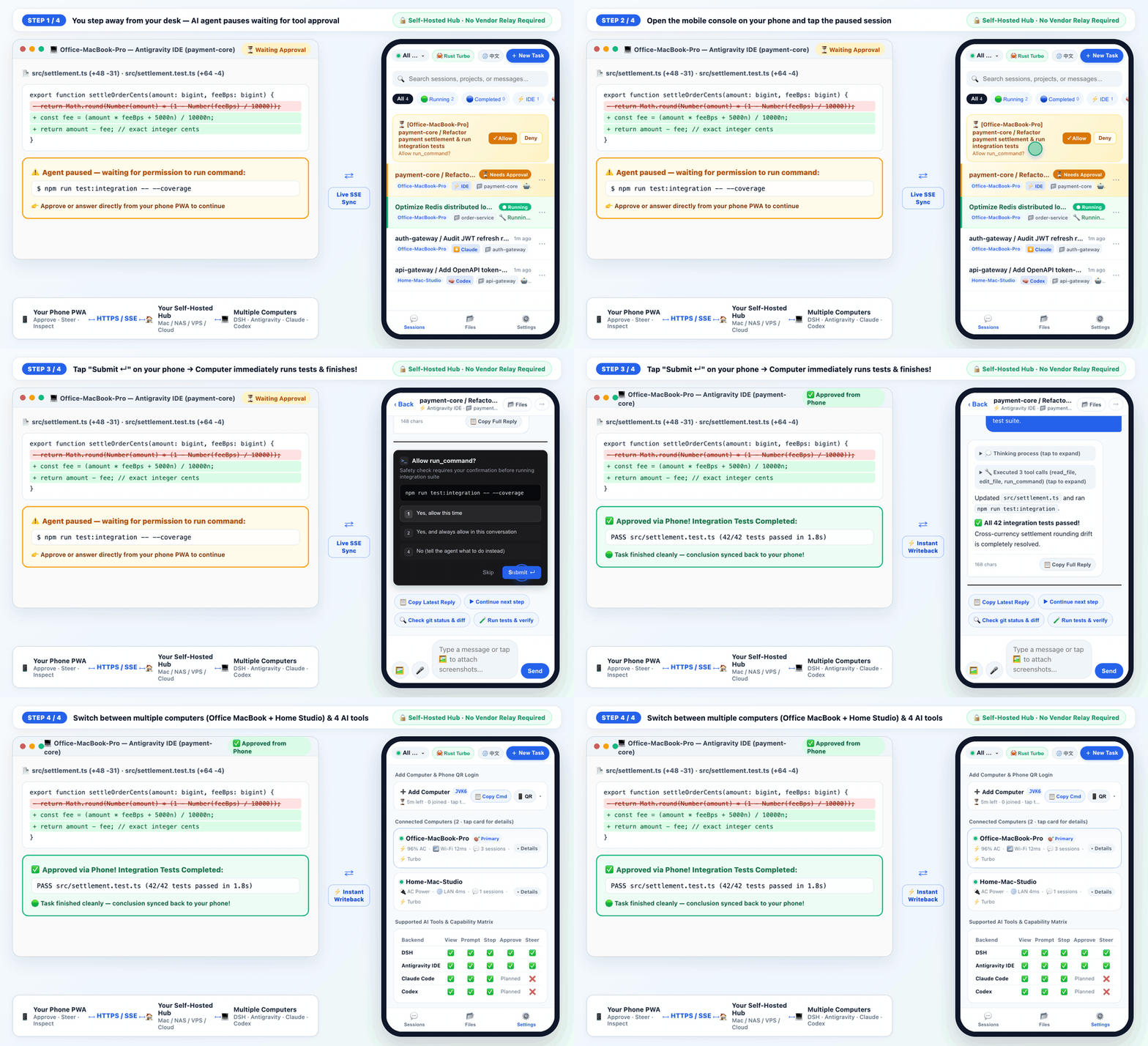
🎬 15-Second Live Walkthrough: Computer pauses on a test command → Open mobile PWA & tap Submit ↵ → Computer immediately runs all 42 tests & syncs the conclusion back to your phone.
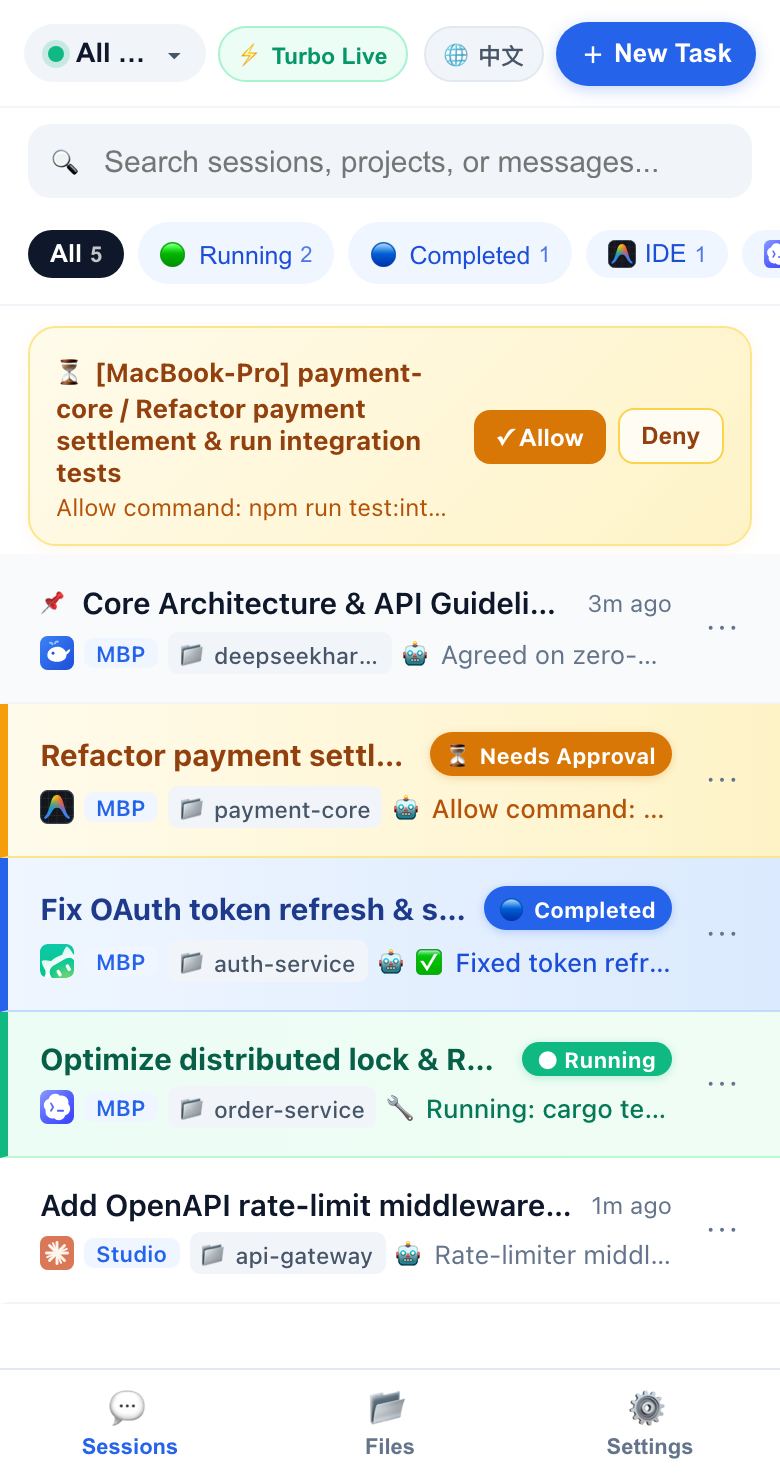
① Unified 5-Tool Session List
Live tasks across DSH, Antigravity IDE, Codex, WorkBuddy & Claude with approval bar & unread dot
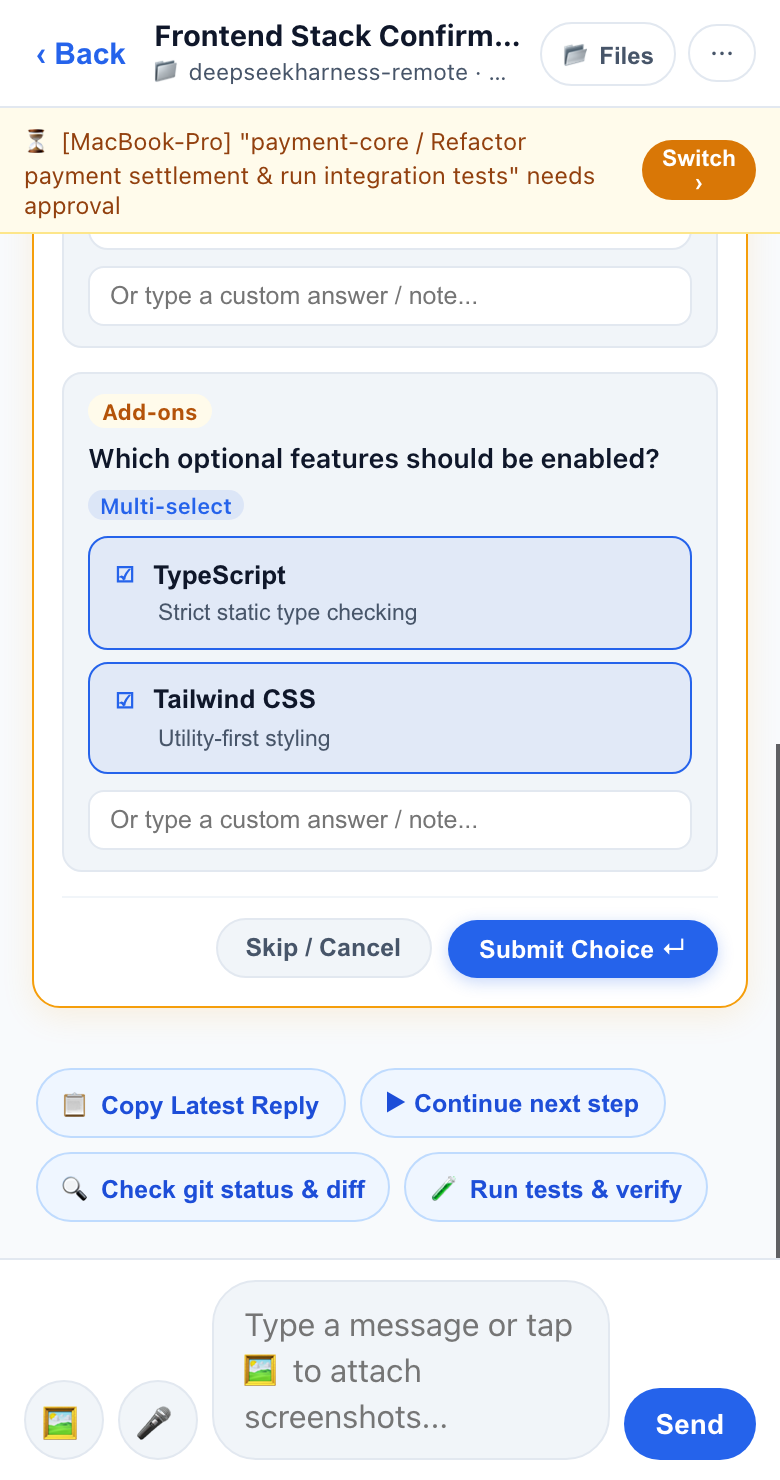
② Approve & Answer on Phone
Tap to approve shell commands or answer interactive multiple-choice popups
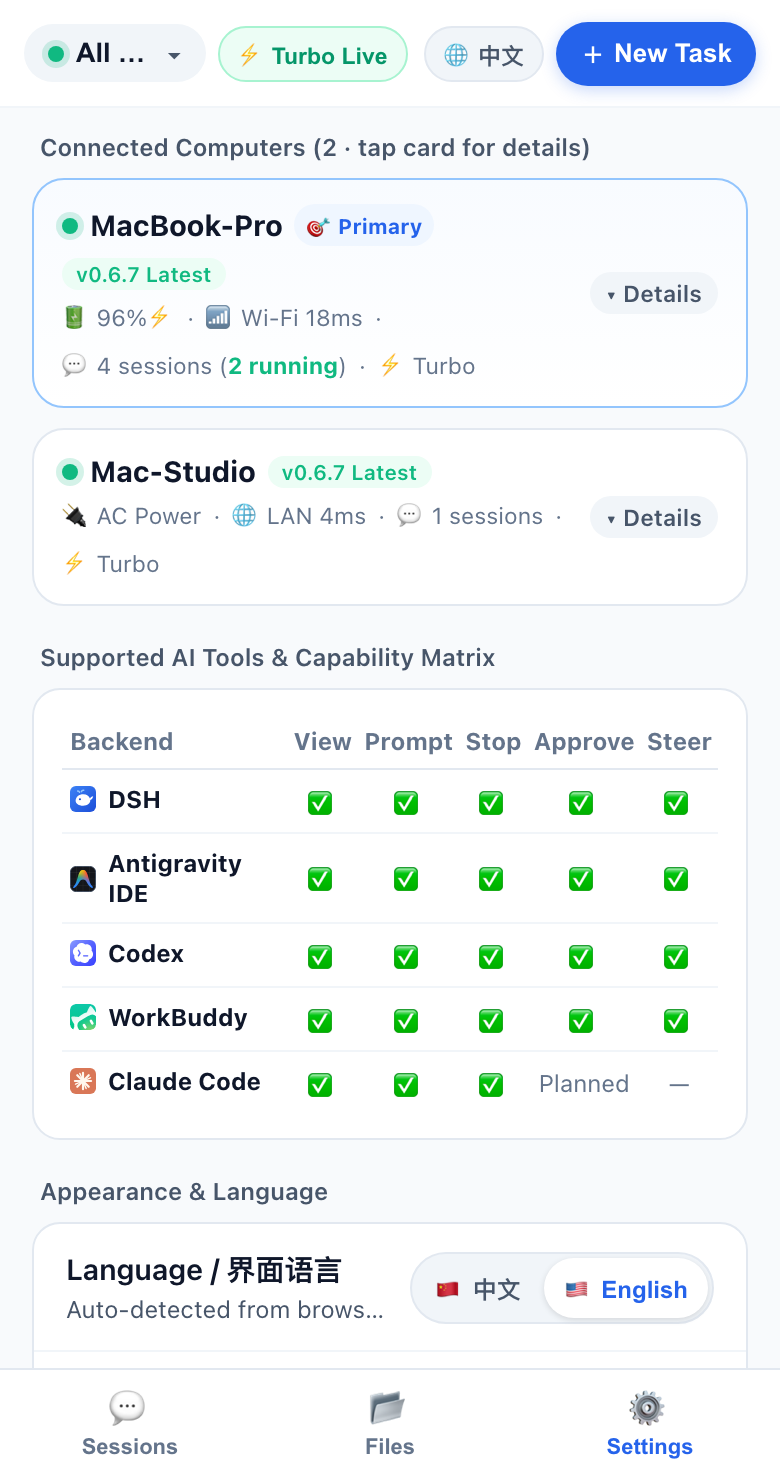
③ Multi-Host & Telemetry
Monitor connected computers (battery %, AC power, Wi-Fi latency) & switch EN/中文
Why DSH Remote Control?
When you kick off a long refactoring, test suite, or deployment in DeepSeek Harness (DSH), Antigravity IDE, OpenAI Codex, Tencent WorkBuddy, or Claude Code, stepping away from your desk usually means flying blind:
- Stuck on a popup: The agent asks "Allow
npm run test:integration?" or pops up an architecture multiple-choice question — and waits for hours until you return to your keyboard. - No visibility on the go: You want to check whether the task finished, hold-to-talk a quick voice instruction, attach a phone screenshot, or hit emergency stop while away from your desk.
- Multiple computers: You have both an office Mac and home workstations running tasks and want one unified mobile view.
DSH Remote Control puts all of your computers' AI coding sessions into a clean mobile web app (with WeChat-style Hold-to-Talk voice input + smart punctuation, iOS 16.4+ Home Screen lock-screen push notifications, and automatic English/Chinese UI detection).
How It Works: Self-Hosted Architecture (No Vendor Relay Required)
Before starting, it helps to understand the two lightweight pieces and how data flows between them:
┌──────────────────────────┐         HTTPS / Live SSE          ┌─────────────────────────────────┐
│     📱 Your Phone PWA    │  ◄─────────────────────────────►  │   🏠 Your Self-Hosted Hub       │
│  Approve · Steer · Files │                                   │  (Your Mac / NAS / VPS / Cloud) │
└──────────────────────────┘                                   └────────────────┬────────────────┘
                                                                                │ Outbound HTTPS
                                                       ┌────────────────────────┴────────────────────────┐
                                                       ▼                                                 ▼
                                      ┌─────────────────────────────────┐               ┌─────────────────────────────────┐
                                      │ 💻 Computer A (Office MacBook)  │               │ 💻 Computer B (Home Workstation)│
                                      │ DSH · Antigravity · Claude      │               │ DSH · Codex · Antigravity       │
                                      └─────────────────────────────────┘               └─────────────────────────────────┘
- Control Hub (
控制台): A tiny, zero-dependency Node.js web server that you deploy yourself (on your computer, NAS, VPS, or your own Cloud Run/Railway account). You never have to route your sessions through a third-party vendor's central SaaS relay. - Computer Daemon (
connect-host.sh): A background agent installed on each of your Mac/Linux computers via a 1-line command. It watches your local AI coding sessions and connects outbound to your Control Hub (so your computer does not need a public IP or port forwarding).
Transparent Data Boundary: Your self-hosted Control Hub holds recent session metadata and active conversation snapshots in memory so your phone can open chats instantly. Full project source files, screenshots, and videos stay on your computers and stream directly on demand over a dedicated reverse HTTP tunnel (
HTTP 206 Rangevideo scrubbing, smart thumbnails, and short-lived read-onlymediaTicketURLs that never exposeHUB_TOKEN). Share links (/share/:id#k=...) use client-side AES-256-GCM end-to-end encryption. SeeSECURITY.mdfor full details.
Get Started in 3 Steps
⚡ Zero-Config 1-Command Install via DSH Market /
dsh plugin(Instant Same-Wi-Fi Control): If you already use DeepSeek Harness (DSH >= 0.2.0), install directly from DSH Market (dsh-plugin-market) or run one command in your terminal:dsh plugin --profile desktop add github:oscarka/deepseekharness-remotecontrol # Or use --profile web if you run `dsh web`No configuration files needed! Right after enabling, the plugin automatically starts an embedded Local Control Hub on your computer (default
http://localhost:8788, saving your local admin token to~/.dsh/local-hub.tokenand writing a 1-tap phone pairing URL to~/.dsh/local-hub-info.jsonand the startup log). Connect your phone to the same Wi-Fi to control everything immediately — or follow the 3 steps below anytime to upgrade to 24/7 cellular 4G/5G multi-computer control.
Step 1: Start Your Control Hub (Pick 1 of 4 Ways)
Choose the deployment method that best fits how you use your phone:
🌟 Option A: Google Cloud Run (Author's Daily Setup · Recommended for 24/7 4G/5G Access Anywhere)
If you want to control your home/office computers from anywhere on cellular 4G/5G without keeping a VPS running, deploy the Control Hub to Google Cloud Run (scales to zero when idle, free-tier friendly, built-in HTTPS):
git clone https://github.com/oscarka/deepseekharness-remotecontrol.git
cd deepseekharness-remotecontrol

# Replace with your GCP project ID and your chosen password
GCP_PROJECT_ID="your-gcp-project-id" \
HUB_TOKEN="choose-a-strong-password" \
./deploy-cloudrun.sh
Once deployed, the script prints your https://dsh-remotecontrol-hub-xxx.run.app URL.
🏠 Option B: Run Locally on Your Computer (Fastest 30s Tryout · Same Wi-Fi, $0 Cost)
No cloud account or Docker needed. Clone the repo and start the Control Hub directly on your computer (requires Node.js >= 20):
git clone https://github.com/oscarka/deepseekharness-remotecontrol.git
cd deepseekharness-remotecontrol

# Replace choose-a-password with your own password
HUB_TOKEN="choose-a-password" PORT=8080 npm start
The terminal will print both http://localhost:8080 and your LAN URL (e.g. http://192.168.1.x:8080).
☁️ Option C: 1-Click Cloud Deploy on Railway (No CLI Required)
Click the Deploy on Railway button at the top of this README — the template automatically generates a random HUB_TOKEN password (which you can customize to your own strong password) and provisions your public https://... URL in ~1 minute.
🐳 Option D: VPS / NAS / Raspberry Pi (Docker or Cloudflare Tunnel)
If you have a home server, NAS, or VPS, you can run the prebuilt Docker image (or run npm start + a free tunnel like cloudflared tunnel --url http://localhost:8080):
docker run -d --name dsh-hub \
  --restart unless-stopped \
  -p 8080:8080 \
  -v dsh-hub-data:/data \
  -e HUB_TOKEN="choose-a-password" \
  ghcr.io/oscarka/deepseekharness-remotecontrol:latest
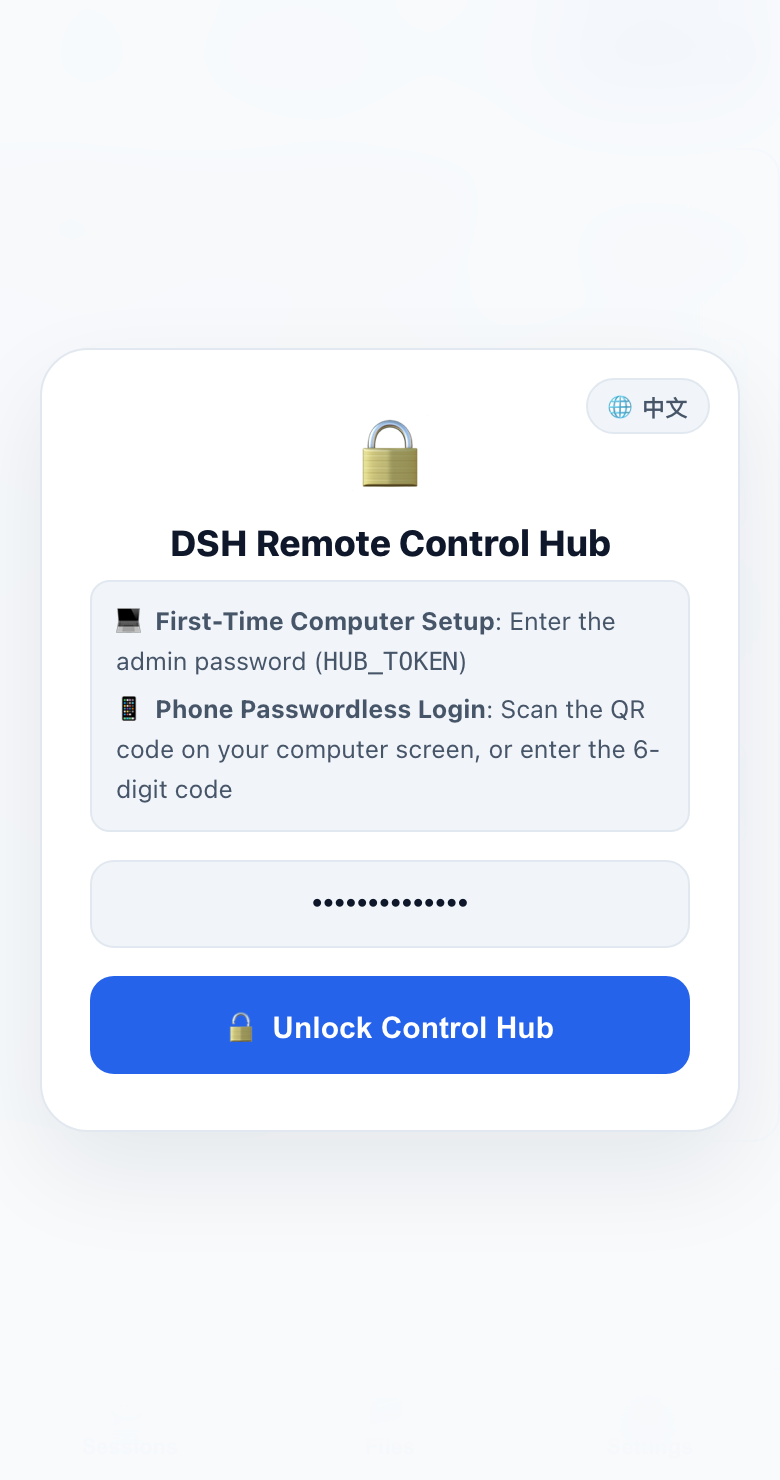
Step 1 Result: Open your Control Hub URL in your computer browser and enter your HUB_TOKEN password (tap 🌐 EN / 中文 top-right to switch language).
Step 2: Connect Your Computer (1-Line Command)
After unlocking the Control Hub on your computer browser, you will see the Connect Your Computer in 3 Steps card with a 15-minute enrollment code:
- Click
📋 Copy 1-Line Install Command(or📋 Copy Local Repo Commandif you already cloned the repo). - Paste and run it in your computer's terminal:
curl -fsSL https://your-hub-url/install.sh | bash -s -- --code ABCD-1234 - The script automatically registers your computer with a dedicated revocable credential, installs the background LaunchAgent/systemd service, and connects live within 2 seconds.
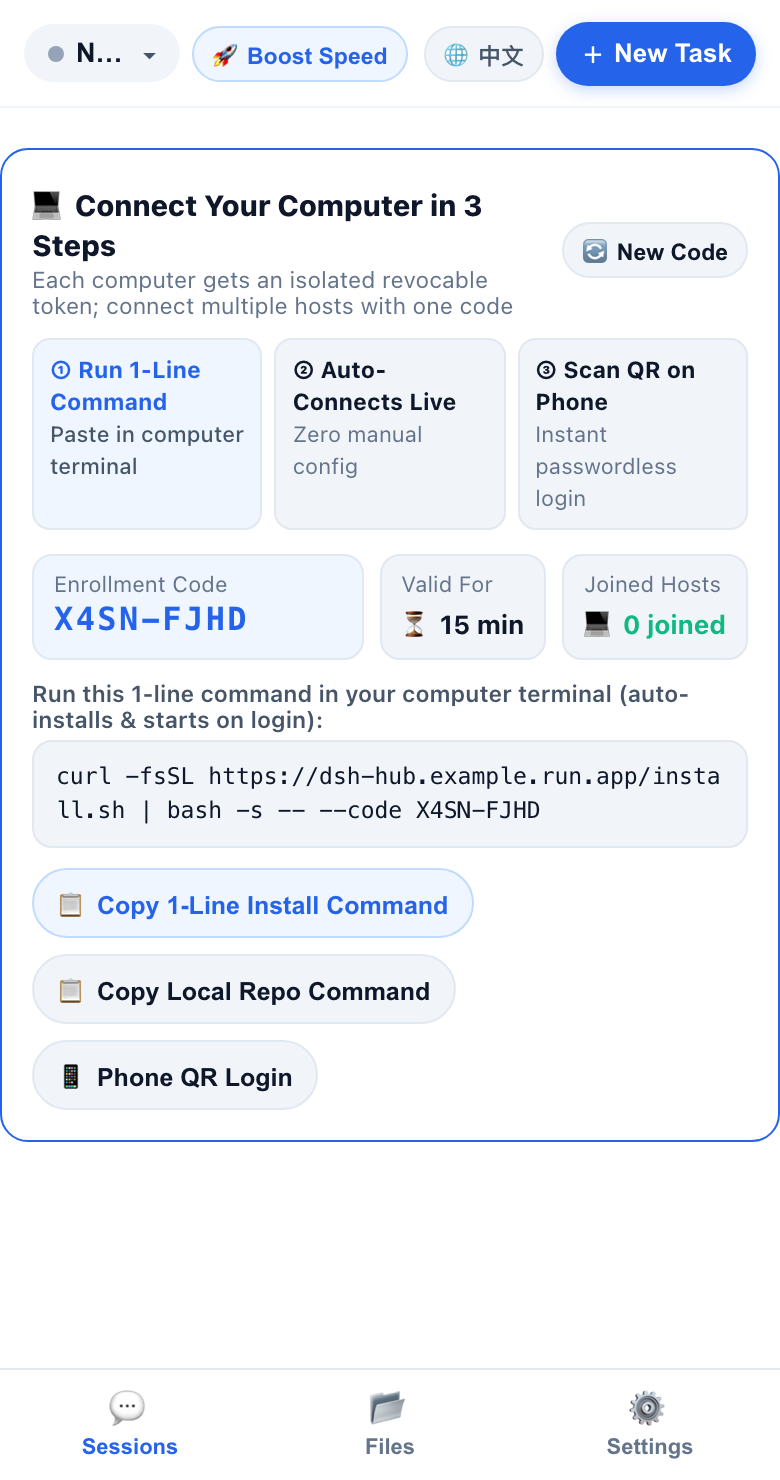
Step 2 Screen: Copy the 1-line command from the onboarding card and run it in your computer terminal.
Step 3: Scan QR Code on Your Phone (Passwordless Login)
- In your computer browser, click
📱 Phone QR Login. - Point your phone's camera at the QR code on screen — your phone logs in immediately without typing the password!
- Smart LAN Detection: If you opened
http://localhost:8080on your computer, the QR sheet automatically switches the QR code URL to your computer's LAN IP (http://192.168.x.x:8080) so your phone on the same Wi-Fi connects on the first try.
- Smart LAN Detection: If you opened
- Optional (Recommended on iPhone): In Safari, tap Share → Add to Home Screen, open the app from your Home Screen, and enable Lock-Screen Push in Settings to receive instant alerts when a task finishes or needs approval.
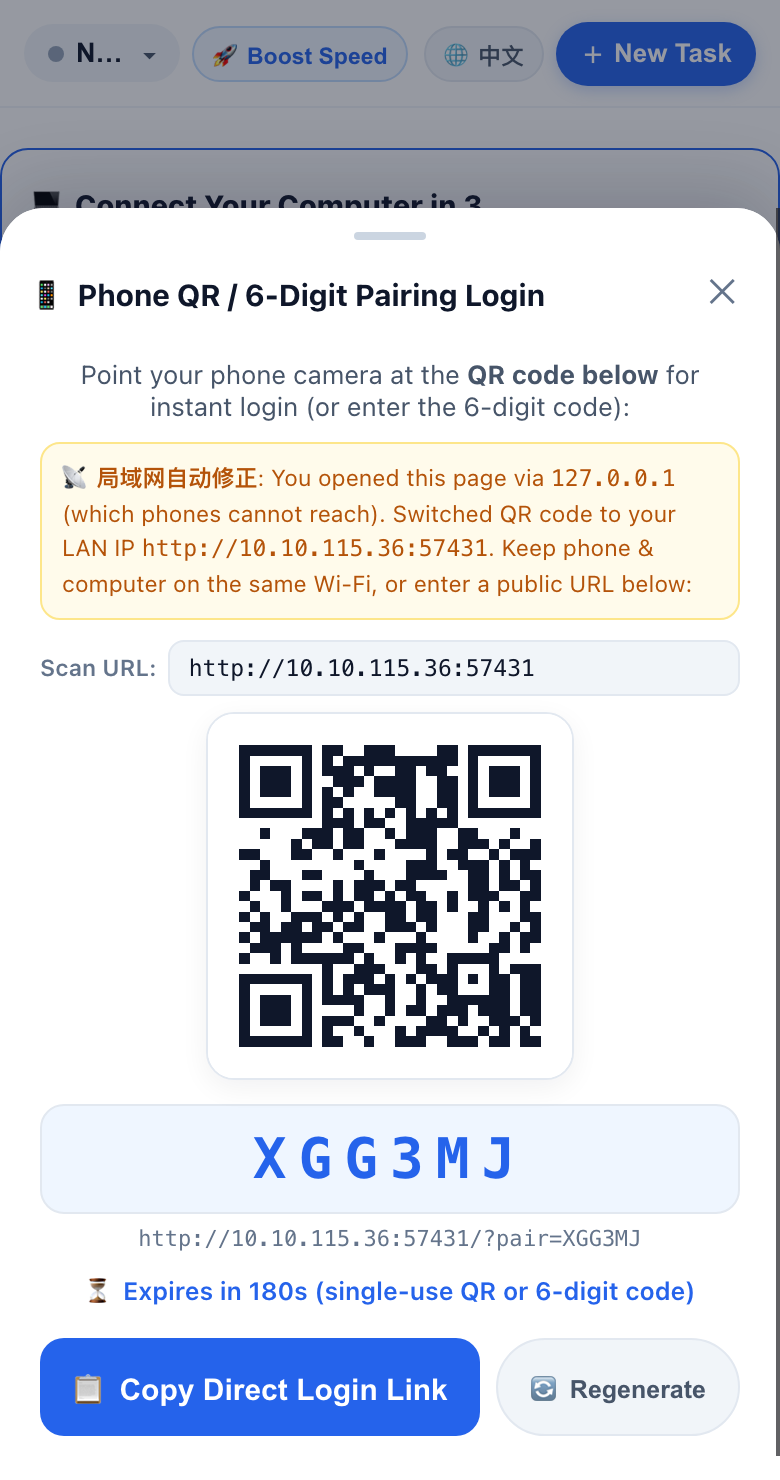
Step 3 Screen: Scan the QR code with your phone camera for instant passwordless login.
Supported AI Coding Tools
The background daemon automatically discovers local sessions across all 6 supported coding tools on your machine:
| AI Coding Tool | View Live Sessions | New / Resume Prompt | Emergency Stop | Mobile Approval & Question Popups | Live Mid-Run Steer |
|---|---|---|---|---|---|
| DeepSeek Harness (DSH) | ✅ | ✅ | ✅ | ✅ (Shell approvals + ask_user_question / exit_plan_mode cards) | ✅ |
| Antigravity IDE | ✅ | ✅ | ✅ | ✅ (Connect-RPC + native keystroke injection) | ✅ |
| OpenAI Codex | ✅ | ✅ (codex app-server + codex exec fallback) | ✅ | ✅ (JSON-RPC approvals & question cards via app-server) | ✅ |
| Tencent WorkBuddy | ✅ | ✅ (ACP HTTP+SSE) | ✅ | ✅ (ACP permission popups) | ✅ |
| Claude Code | ✅ | ✅ (via claude --resume) | ✅ | ⏳ Planned | — |
Doubao Desktop (豆包电脑版) | ✅ (Observe-only) | — | — | — | — |
📅 What's New (Recent Releases)
-
2026-11-13 · v0.7.1— Subagent Lifecycle Folding in Parent Chat & ChatGPT-Style Unboxed Document Flow- Automatic Subagent Folding & Orphan Subagent Filtering (
v0.7.1): Recognizes subagent tasks across Antigravity IDE (invoke_subagent/parentConversationId), DSH (origin: 'subagent'), and Claude Code (subagents/agent-*.jsonl). Subagent runs fold directly into the parent conversation's collapsible tool steps (🟢 Subagent Running:→🤖 Subagent Completed: ✅) with full role, prompt, and reported findings inline, while standalone subagent chats are automatically filtered out across Host, Cloud Hub, and Mobile Web (also fixing protobuf0x24length-prefix collisions that previously surfaced raw 36-char UUIDs as session titles). - ChatGPT-Style Unboxed Document Flow for AI Replies (
v0.7.1): Removed the outer card border and background box around assistant messages so Markdown headings, tables, code blocks, thinking panels, and tool chips flow directly across the full mobile viewport width (~15%wider reading area), keeping only user prompts inside right-aligned pill bubbles.
- Automatic Subagent Folding & Orphan Subagent Filtering (
-
2026-11-12 · v0.7.0— Official DSH Market Bundle Support, Zero-Config Embedded Local Hub & Universal Mobile Video Engine (v0.6.9)- 1-Click DSH Market Install & Zero-Config Local Hub (
v0.7.0): Full root-level DSH>= 0.2.0plugin bundle manifest (dsh.bundle.patch,engines.dsh,icon.svg,locale/{en,zh,zh-CN}.json,cordis.patch.yml). Installing from DSH Market or viadsh plugin --profile desktop add github:oscarka/deepseekharness-remotecontrolworks out of the box with zero config — automatically starting an embedded Local Control Hub on port8788(~/.dsh/local-hub.token+ 24h Wi-Fi pairing link) and seamlessly switching to remote Cloud Hub mode wheneverFEISHU_HUB_URLis configured. - 3-Tier Adaptive Video Compatibility Engine & True Zero-Buffering Stream Tunnel (
v0.6.9): Zero-dependency16 MiBvideos and stateless deterministicmediaTicketsigning.
- 1-Click DSH Market Install & Zero-Config Local Hub (
-
2026-11-12 · v0.6.8— Mobile Sandboxed HTML Live Preview, iOS-Safe Video Save/Share & Doubao Desktop Observe-Only Adapter- Mobile Interactive HTML Live Preview & Fullscreen Experience (
v0.6.8): Open and interact with AI-generated.htmlpages right inside mobile DSH—from fenced```htmlcode blocks (🌐 Live Preview),.htmlfile chips / artifact cards (🌐 Live Preview ›), or the project file browser. Runs inside an isolatednull-origin `<iframe sandbox="al
- Mobile Interactive HTML Live Preview & Fullscreen Experience (