wuxiangru915/dsh-session-manager ↗★ 0
@dshwp/dsh-session-manager
Session manager for the DeepSeek Harness web UI: browse all sessions, archive / unarchive (restore) / delete them, preview conversation content — from the Settings panel. · DSH 会话管理:设置页查看全部与已归档会话,归档 / 恢复 / 删除 / 内容预览。
AI 분석
核心用途是提供一个集中的会话管理后台,支持按工作区对所有会话进行分组,进行批量归档、彻底删除或内容预览。适合历史会话极多、需要高效整理和释放磁盘空间的用户。
설치
$
npx -p @deepseek-ai/dsh dsh plugin --profile web add github:wuxiangru915/dsh-session-managerUsage
Web UI
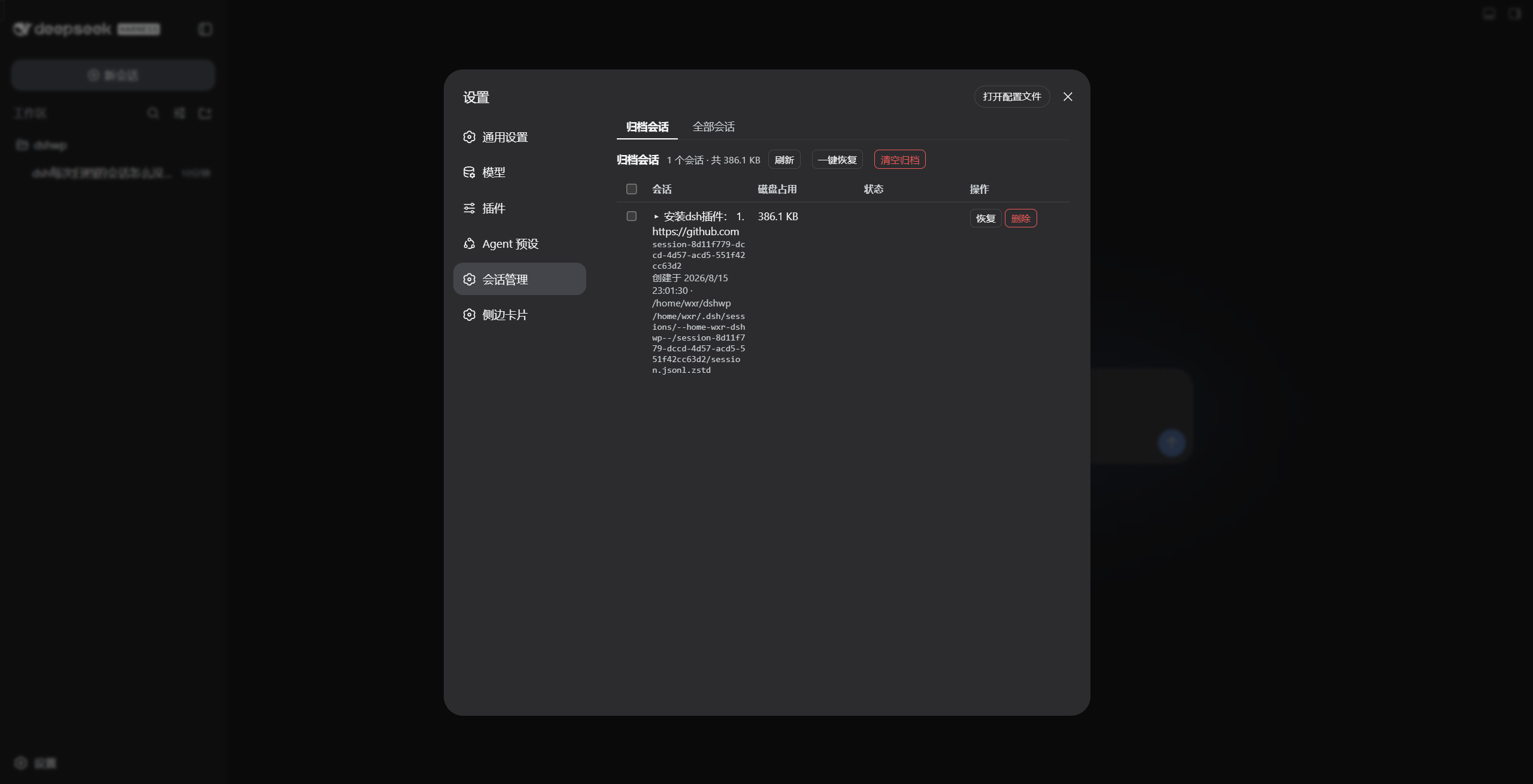
Open Settings → Session manager:
- Archived tab (default): every archived session with title, id, creation time, cwd, disk size and the full on-disk path; status badges for running and missing files. Buttons: Restore (single / batch / all), Clear archive (delete all archived, two-step), row-level Delete (two-step).
- All sessions tab: every persisted session grouped by workspace (ungrouped sessions show a
—), status badges for archived / live / running. Actions: Archive, Delete, and Delete all (two-step; skips running/open sessions). - Click any session title to preview its content inline (user / assistant / tool messages, first 100).