ydlly224/dsh-ui-taskpanel ↗★ 0
dsh-ui-taskpanel
DSH web UI right-sidebar native tab: todos, subagents, background jobs (pure client plugin) 适合需要集中监控和管理后台任务与子智能体运行状态的用户。
설치
npx -p @deepseek-ai/dsh dsh plugin --profile web add github:ydlly224/dsh-ui-taskpaneldsh-ui-taskpanel




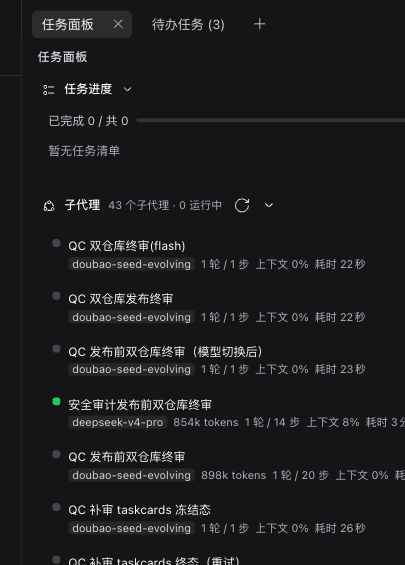
DSH(DeepSeek Harness)Web UI 的纯客户端插件:官方右侧栏原生标签页「任务面板」(sidebarRightTabs 注册类型 + sidebar.right.pane.tab 槽位,与「工作区文件/浏览器/终端」同一套 dock 体验:可拖拽分栏、全屏、宽度拖拽、会话级布局记忆),聚合当前会话的三类运行信息。
兼容性:DSH Web 0.1.x ~ 0.2.x(依赖官方
sidebarRightTabs服务与sidebar.right.pane.tab槽位;在 0.2.1-rc.2 上验证)。纯客户端 bundle,无 npm 依赖。
- 任务进度清单 — 当前会话的 todo 投影(
projectionValues.todos,兼容数组与{items}两种形态),in_progress → pending → completed排序;进度条 + "已完成 N / 共 M" + "进行中 X · 待办 Y" 计数;会话不具备该能力(键缺失)时面板隐藏。 - 子代理运行状态 — 当前会话的直接子代理(
origin === "subagent"且parentId === current);每行展示模型芯片、token 用量、轮次/步数、上下文占用%、耗时(读取 0.2.1 的tokenUsage/sessionStats/contextPressure/subagentTiming/modelSelection/subagent.label投影);运行中置顶、其余按更新时间倒序;超过 8 行分页"显示其余 N 个";点击经subagentAddress→uiWorkspace.openSession跳转(旧宿主回退sessions.openSubagent);面板可见时setSubagentCatalogOpen订阅目录推送 + 手动刷新。 - 后台运行任务 — 0.2.1
jobs服务快照(state.rows[sessionId]+watchRows),live(running/stopping)置顶并每秒刷新已运行时长,展示 progress 进度行(JobView.progress)或终止原因(detail);支持两段式终止(ctx.jobs.kill(sessionId, jobId),先点击待确认、3 秒内再点执行);settled 折叠进"历史"分区。
文件
| 文件 | 说明 |
|---|---|
package.json | 包清单;dsh.client.inject 声明运行库由 shell 静态表提供,无任何 npm 依赖 |
cordis.patch.yml | bundle patch:注册插件入口(host 半边 no-op) |
lib/index.js | host 加载器入口 stub(apply() 为空) |
lib/client.js | 浏览器 bundle:手写 CJS 工厂(window.__ModuleLoader__.load),导出 apply / inject |
安装
# 1) 安装包(本地目录或 Git 仓库;GitHub 简写亦可)
dsh plugin --profile web add file:
#   或:dsh plugin --profile web add git+https://github.com/ydlly224/dsh-ui-taskpanel.git
- 在
~/.dsh/profiles/web/package.json的dsh.profile.bundles数组里追加"dsh-ui-taskpanel"(pnpm 已把依赖写入dependencies,注册 bundle 需手动加一行); - 重启一次 dsh web,浏览器刷新后在右侧栏「+ 新标签页 → 任务面板」打开;此后仅改
lib/client.js会自动 HMR 热重载。
纯客户端插件:无 npm 依赖、不发起网络请求、不写除 localStorage["dsh.taskpanel.v4"] 之外的本机持久化。
行为细节
- 面板为填充式布局(
.dsh-tp-panel-rootheight:100% flex 列),宽度/分栏/全屏/标签页开关全部由官方 dockkit 提供;入口为右侧栏「+ 新标签页 → 任务面板」,标签页按会话记忆。 - 面板数据范围:待办清单、子代理运行状态、后台运行任务;标签页归属会话即数据来源会话(
props.sessionId)。 - 面板分区开关持久化到
localStorage["dsh.taskpanel.v4"]:{ panels: { todos, subagents, jobs } },读写均有 try/catch 兜底。 - 主题只使用经核实的
--dsw-alias-*CSS 变量(bg-layer-1/label-*/border-l2/state-*-primary/brand-primary等),暗色主题自动生效;面板底色随官方 dock 面板(bg-base),不再自带半透明/模糊容器。 - CSS 经 `` 注入,HMR 卸载标签后重载会重新注入。
- 所有快照选取器只返回原语或存量引用(数组/对象派生一律走
useMemo),避免useSyncExternalStoreWithSelector的引用不稳定循环。 - 所有文案走
t()(NS=taskpanel,zh 为键集真源),动态字符串一律以 React 文本节点渲染。
自检
node --check lib/index.js   # 通过
node --check lib/client.js  # 通过
English
A pure client-side plugin for DeepSeek Harness Web UI: registers a native right-sidebar tab (sidebarRightTabs) — a Task Panel tab that shows todo progress, subagent status (model, tokens, turns, context) and background jobs (progress + two-step terminate).
- Repo: https://github.com/ydlly224/dsh-ui-taskpanel
- Install:
dsh plugin --profile web add git+https://github.com/ydlly224/dsh-ui-taskpanel.git, then register the bundle name in~/.dsh/profiles/web/package.json→dsh.profile.bundles, restart dsh web and refresh. - Extends: DSH Web 0.1.x ~ 0.2.x (verified on 0.2.1-rc.2); pure client bundle, zero dependencies.