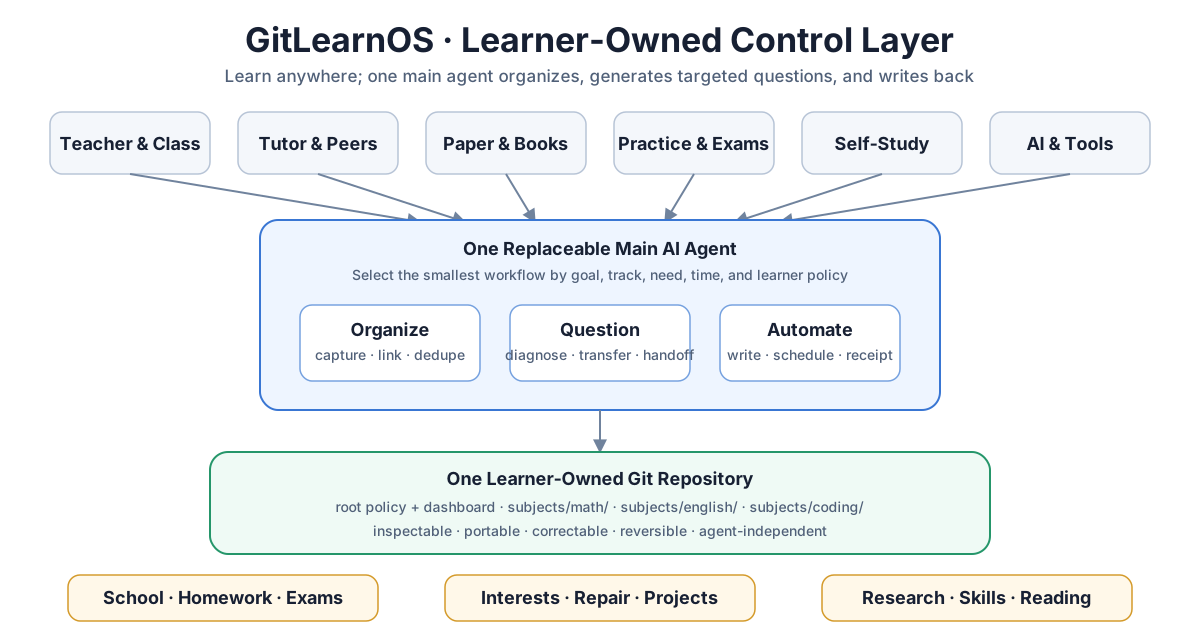
GitLearnOS gives an AI a learner-owned Git memory: notice real learning,
organize useful evidence, guide the next step, and write results back
automatically.
Learning may happen with teachers, class, paper, books, practice platforms,
projects, peers, or AI. GitLearnOS does not move all learning into one app. One
replaceable main agent connects the useful evidence and next actions inside the
learner's own Git repository.
Git stays in the background. The learner does not need to manage folders,
commits, branches, or a Git hosting service during normal learning.
It should notice learning without a command
Once configured, GitLearnOS should not wait for “use GitLearnOS,” “save this,”
or an explicit Skill invocation. A subject question, attempted answer,
photographed page, class note, teacher comment, practice result, or repeated
difficulty can be a learning event.
The agent answers the immediate need first. Under safe-auto, it then makes the
smallest useful writeback when value, target, and privacy are clear. If the
event is ambiguous it makes one brief suggestion or asks one necessary
question. Incidental conversation is not stored.
Cross-conversation continuity comes from:
flowchart TD
    A["Project rules"] --> C["Proactive agent"]
    B["Native memory"] --> C
    D["Project Sources"] --> C
    E["Current chat"] --> C
    C --> F["Learner Git state"]
Skills improve a workflow but are never the only activation mechanism.
The setup installs the compact
project/custom instructions and, when
permitted, a verifiable
, so the core loop
survives on a surface that does not expose Skills.
goal and real learning input
→ automatic organization with traceable evidence
→ targeted question from the current gap
→ learner answer or external feedback
→ later independent check
→ updated state and one reversible Git commit
The primary success condition is observable improvement through answering and
rechecking—not merely a tidy collection of notes.
Core capabilities
Capability
Result
Automatic organization
notes, mistakes, teacher feedback, and platform results become linked evidence and one next action
Targeted questions
questions use the goal, source, current gap, and recent performance instead of random worksheet volume
Automated writeback
safe changes, due checks, answers, and feedback are committed and reported without making the learner maintain files
Proactive guidance
the agent notices useful learning events, suggests or performs one next step, and does not wait for repository commands
Live AI tutoring is optional. A learner may work mainly with a human teacher
and use GitLearnOS for continuity, questions, and review.
Build for impact
The AceSAT working demo follows a fictional public-school
student with limited data, a shared phone, short study periods, and no paid
tutoring continuity. The agent uses an existing practice summary, chooses one
high-value SAT question, preserves the answer, updates the next check, and
prepares evidence that a teacher can inspect.
The demo is deliberately text-first and local-Git compatible. It does not
require a custom app, always-on server, database, large download, or background
scheduler. It still requires access to a capable AI runtime; GitLearnOS reduces
overhead but does not pretend that devices, connectivity, or AI access are
universally available.
One main AI agent that can read and write a Git repository.
OpenAI documents Git operations for local projects, and ChatGPT may hide the
technical Git details from the everyday interface. Actual capability still
depends on the current Chat, Work, Codex, or connector session, so the agent
must verify it.
Chat is the preferred daily surface for short questions, answers, note
photos, and feedback when repository access is present. It must work without
Skills by using project instructions, AGENTS.md, native memory, and event
recognition.
Work is the guided path for setup, large imports, multi-file organization,
maintenance, and substantial review.
Codex or another repository agent is useful for technical setup,
migrations, validation, and visible Git review.
Some accounts treat Chat and Work usage differently. Use the current plan and
workspace UI as the source of truth rather than promising that Chat is always
free or that a task never consumes credits.
The target may be:
a local Git repository;
a standard remote Git repository;
GitHub, GitLab, Gitea, or another Git host.
GitHub is a convenient path, not a core dependency. A database, vector store,
server, custom app, multi-agent runtime, and OpenSpace are also optional.
This project is published on GitHub because the challenge requires a GitHub
submission. That submission requirement is separate from how a learner uses
GitLearnOS. Add a remote only for chosen backup, cross-device sync,
collaboration, or publishing.
GitHub becomes especially useful for private off-device backup, cross-device
continuity, teacher or tutor review, shared course materials, and group project
work. Keep shared teaching content separate from each learner's private answers,
gaps, and history. See
Why Git, and when GitHub helps.
Large textbooks, PDFs, scans, media, and long-lived reference files should
usually live in ChatGPT Project Sources, another agent's project file area,
or an authorized local folder. Git stores compact state, provenance pointers,
selected excerpts, and history.
Recommended: a local RAG knowledge layer
For textbooks, long course packs, notes, and durable personal knowledge, we
recommend enabling a local RAG knowledge layer. The learner may decline and
GitLearnOS still works. RAG-Anything
is the first explicitly supported and recommended implementation, not the only
compatible choice:
                    one Main Agent
                 /        |        \
               Git   RAG-Anything   other tools
Git is the formal memory: goals, learning history, errors, methods,
durable knowledge, and a compact source register.
RAG-Anything is the searchable layer: authorized textbooks, foundational
materials, notes, and knowledge promoted for long-term reuse.
The main agent makes every decision. Do not add a separate RAG agent and
do not query RAG for ordinary general questions.
Temporary exercises do not enter RAG automatically. If the main agent already
understood a photo or screenshot, it inserts the faithful Markdown or
structured result instead of repeating OCR. Raw files go directly to
RAG-Anything mainly for complete books, long PDFs, large durable collections,
or documents whose images, tables, and equations must stay connected.
The current upstream package is a Python framework, so an agent must not assume
that an MCP service or one-click server already exists. It must ask about the
learning goal and material first, then choose the smallest supported parser and
model setup from the official RAG-Anything documentation. Deployment is not
complete until one authorized source is really ingested and a traceable test
query really retrieves it. See the
RAG-Anything deployment card.
Start with one subject
First tell the agent your target repository. By default the agent treats you as
the learner, asks for the learning goal, subject, and current material, and
recommends enabling a local RAG knowledge layer. It must wait for your answer
before it installs, initializes, ingests, commits, or deploys anything.
Maintaining, documenting, testing, or publishing the public GitLearnOS template
is not learner deployment and is not blocked by this gate.
Send this to a write-capable agent:
Use https://github.com/Guojiz/GitLearnOS as the GitLearnOS template.
My learning Git repository or local checkout is:
Before changing anything, read GITLEARNOS.md and START-HERE.md completely. Ask
me for my learning goal, subject, and current material. Recommend that I enable
a local RAG knowledge layer, with RAG-Anything as the first supported option.
Wait for my answer before any learner installation, initialization, ingestion,
commit, or deployment. Then use
the complete skills/gitlearnos/ folder when Skills are supported. Detect whether
the main agent is Codex, Claude Code, OpenCode, ChatGPT, or another runtime;
install the folder in that agent's documented native location and verify it
appears in the Skill list. Do not depend on explicit Skill invocation. Guide me
through setup, put large source files in the project/source workspace, and
configure durable instructions plus native memory when available. Future
questions, answers, photographed pages, notes, feedback, and results should be
considered automatically. Detect actual repository, Git, memory, source, and
scheduling capability. Use safe-auto: answer first, organize useful evidence,
guide the next step, and commit safe reversible writeback. Preserve original
answers, notes, and external feedback. Do not store the full conversation or
claim mastery without delayed independent evidence. During setup, assign an
explicit learner-local recurring time and IANA time zone to both `maintenance`
and `due-review`, create them in a real repository-capable scheduler, and test
both. Use 21:30 and 07:00 respectively when I accept the defaults. If either
job cannot be verified, mark deployment automation incomplete rather than
substituting a reminder. Finish with activation
surfaces, verified Skill status, changed files, actual automation, the next
action, and the undo boundary.
The agent should initialize only the current subject and the files needed now.
See the complete Quickstart.
Git does not preserve empty folders. The agent creates each optional folder on
first real use.
Truth before completeness
Original answers, notes, and external feedback are preserved.
Corrections become new linked records instead of silent rewrites.
AI summaries, models, gaps, and plans may be revised.
Important conclusions link evidence; missing evidence remains unknown.
Ordinary chat and hidden reasoning are not stored.
External resolution and independent mastery remain separate.
The dashboard is a current view, not a second source of truth.
Required recurring automation that acts
Every learner deployment must assign both recurring operations a learner-local
time and an IANA time zone:
maintenance: reconcile input, waiting feedback, stale views, and
contradictions; default daily at 21:30;
due-review: read due evidence and deliver concrete answerable questions;
default daily at 07:00.
The learner may change either time. Deployment automation is complete only
after a real repository-capable scheduler exposes both recurring tasks and each
passes one observed test run. Record policy in learning-policy.md and observed
runtime state in automation.md. A reminder, date, prompt, or on-handoff check
does not count. If no real scheduler is available, keep interactive learning
usable but report deployment automation as incomplete.
Daily recurrence is a check cadence, not permission to invent work. With no new
evidence to organize or no due review, the job silently records skipped in
runtime evidence: no filler questions, learner notification, timestamp-only
commit, or empty commit.
Install the complete GitLearnOS Skill folder, not only its
SKILL.md. One discoverable Router loads setup, organization, question,
review, source, model, optional tutoring, maintenance, and subject references
only when needed.
Codex and OpenCode default to .agents/skills/gitlearnos/; Claude Code uses
.claude/skills/gitlearnos/. A source file in this template is not an
installation—the active runtime must list gitlearnos. See the
cross-agent installation map.
OpenSpace may later evaluate this generic Skill through an
optional integration; it is not required.
GitLearnOS-exclusive DeepSeek Harness support
GitLearnOS now ships a native DeepSeek Harness learning surface. A
GitLearnOS ▸ bar sits beside the conversation input. The main agent can open
it when the queue is the helpful next move, or leave it folded when interruption
would not help; the learner can always toggle it manually. It shows the queue
that the main agent maintains in the learner's own Git repository, keeps the
agent's order, and offers plain actions such as review, practice, ask a teacher,
or read the learner's notes. After teaching, the agent can use one native
multiple-choice prompt to check the point without turning the session into a
quiz feed.
The bundle also provides honest status and routing plus one narrow,
policy-checked Git event transaction. The Host does not rank the queue: it
exposes evidence, while the main agent judges what comes next from the goal,
difficulty, importance, mastery, retention, and current constraints. See the
launch note and the
install, verification, limits, and native roadmap.
This remains a Developer Preview. It does not yet provide native RAG calls or
verified cold-session background work. DeepSeek's official provider is
text-only, and Harness's session-local Schedule is not a substitute for
recurring repository automation.
Evaluation
GitLearnOS uses documented end-to-end scenarios rather than exact AI text
matching. The v2 acceptance cases cover bootstrap, implicit learning-event
recognition, note organization, teacher feedback, due questions, answer
writeback, non-fabrication, idempotency, cross-agent Skill discovery, and a
complete local-Git workflow.