@zerohackz/dsh-openflowframes
DeepSeek Harness plugin exposing OpenFlowFrames video frame interpolation (RIFE) as agent tools
安装
$
npx -p @deepseek-ai/dsh dsh plugin --profile web add github:ZeroHackz/OpenFlowFrames说明文档
阅读完整 README ↗OpenFlowFrames - Video Frame Interpolation for Windows
This project is a fork of the original Flowframes by n00mkrad. Huge thanks to him for creating and maintaining the powerful core of this application!
This fork is a lean, fully free and open reimagining: a modern Python GUI around the latest RIFE models — no Patreon tiers, no paid builds, no legacy codebase.
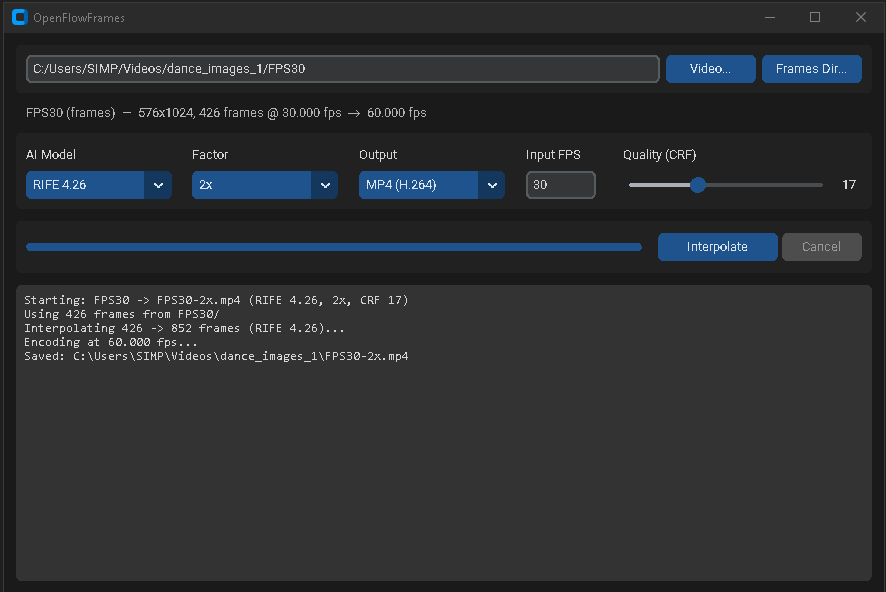
Screenshot
Main interface: pick a video or a folder of frames, choose a model and factor, interpolate.
✨ Features
- Latest RIFE Models: RIFE 4.9 through 4.26 bundled in the repo — no external model server, fully self-contained.
- Any GPU: Runs on AMD, Intel, and NVIDIA via
rife-ncnn-vulkan— no CUDA or PyTorch required. - Modern GUI: A clean CustomTkinter dark-mode interface — no install needed beyond Python.
- Video or Frame-Folder Input: Interpolate a video file, or a directory of PNG/JPG/WebP frames with a custom input framerate.
- MP4 or PNG Output: Encode to H.264 MP4 (audio preserved) or export the interpolated frames as a PNG sequence.
- Robust Frame Handling: Mixed resolutions and alpha/16-bit PNGs (common in AI-generated frames) are normalized automatically.
- Portable Windows Executable: Build a self-contained portable app with one script — no Python needed on the target machine.
- No Monetization: Fully free; no Patreon/PayPal integrations.
💻 How to Use (Easy Way)
Python GUI (recommended):
- Clone this repository:
git clone https://github.com/ZeroHackz/OpenFlowFrames.git - Double-click
launcher-gui.bat— it sets up a virtual environment on first run and launches the GUI.
Portable build:
Run build-portable.bat. The result in dist/ is fully self-contained:
dist/
  OpenFlowFramesPortable.exe
  packages/av/           (ffmpeg)
  packages/rife-ncnn/    (interpolator + bundled RIFE models)
Copy the dist folder anywhere and double-click the exe.