cxzrdxy/dsh-file-explorer ↗★ 1
@cxzrdxy/dsh-file-explorer
DeepSeek Harness plugin: an in-workspace file tree plus a peer view tab that previews text and image files.
安装
$
npx -p @deepseek-ai/dsh dsh plugin --profile web add github:cxzrdxy/dsh-file-explorer说明文档
阅读完整 README ↗📂 dsh-file-explorer
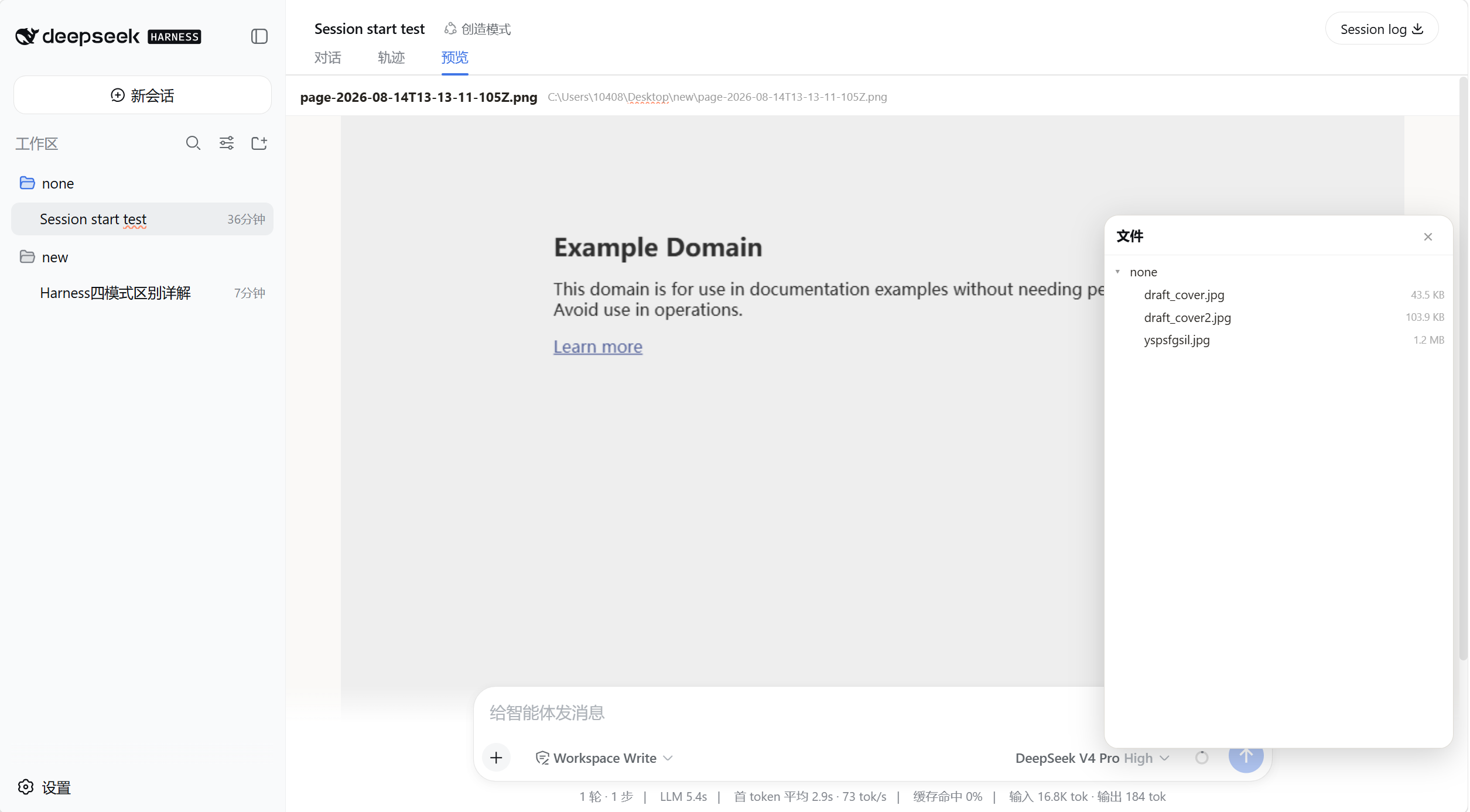
给 DeepSeek Harness 的纯文本 Agent 装上一个「文件浏览器」。 一个右下角的浮动文件树,加一个与「对话」「轨迹」平级的预览页签——浏览工作区目录、预览文本和图片,无需切出对话。
✨ 为什么用它
纯文本模型(如 DeepSeek)没法直接「看」文件。这个插件把文件浏览和预览收进 Harness 界面里:
- 📁 浮动文件树 — 右下角一个按钮,点开即浏览当前工作区的目录树,可逐层展开
- 🗂️ 平级预览页签 — 点文件后,切到对话区顶部的「预览」页签(与「对话」「轨迹」并排)查看内容,不打断对话流
- 🔄 实时跟随工作区 — 文件树根路径跟随当前会话的
cwd,切换工作区立即刷新 - 🔒 只读、安全 — 同源校验 + 路径规范化 + 条目/字节上限,不做写操作
🚀 快速开始
需要 DeepSeek Harness 的 Web profile 和 pnpm:
# 1. 克隆仓库
git clone https://github.com/cxzrdxy/dsh-file-explorer.git
cd dsh-file-explorer

# 2. 安装到 web profile(本地路径)
dsh plugin --profile web add file:.
重启 Web profile 即可。包内已提交编译好的 lib/,从 checkout 安装不需要消费端构建。
使用三步:
- 点右下角 📁 按钮 → 打开文件树
- 点某个文件 → 弹出提示「已打开「文件名」」
- 点对话区顶部页签栏的「预览」→ 查看内容
📦 可预览的文件类型
| 类型 | 扩展名 | 大小上限 |
|---|---|---|
| 📄 文本 | .txt .md .markdown .json .js .ts .tsx .jsx .css .html .htm .yml .yaml .xml .csv .log .py .c .cpp .h .cs .java .go .rs .sh .ps1 .sql .ini .cfg .toml .bat .cmd | 512 KB |
| 🖼️ 图片 | .png .jpg .jpeg .gif .webp .bmp |