Deploy projects to Sealos Cloud from your AI agent.
Sealos Skills is a plugin-first skill pack centered on Sealos Cloud development and deployment. It helps an AI agent inspect a project, prepare missing deployment artifacts, connect Sealos Cloud databases and object storage for development, build or reuse a container image, ship the app to Sealos Cloud, and view deployed resources in a local read-only canvas.
The recommended Codex path is native Codex plugin installation. Cross-host plugin installs, skills.sh, and context-only extension hosts such as Gemini CLI and Qwen Code use the same root skills/** source.
Quick Start
Recommended: install in Codex
Add this repository as a Codex marketplace, then install the Sealos plugin:
After installation in Codex, use the plugin from Codex:
Codex CLI: type $sealos
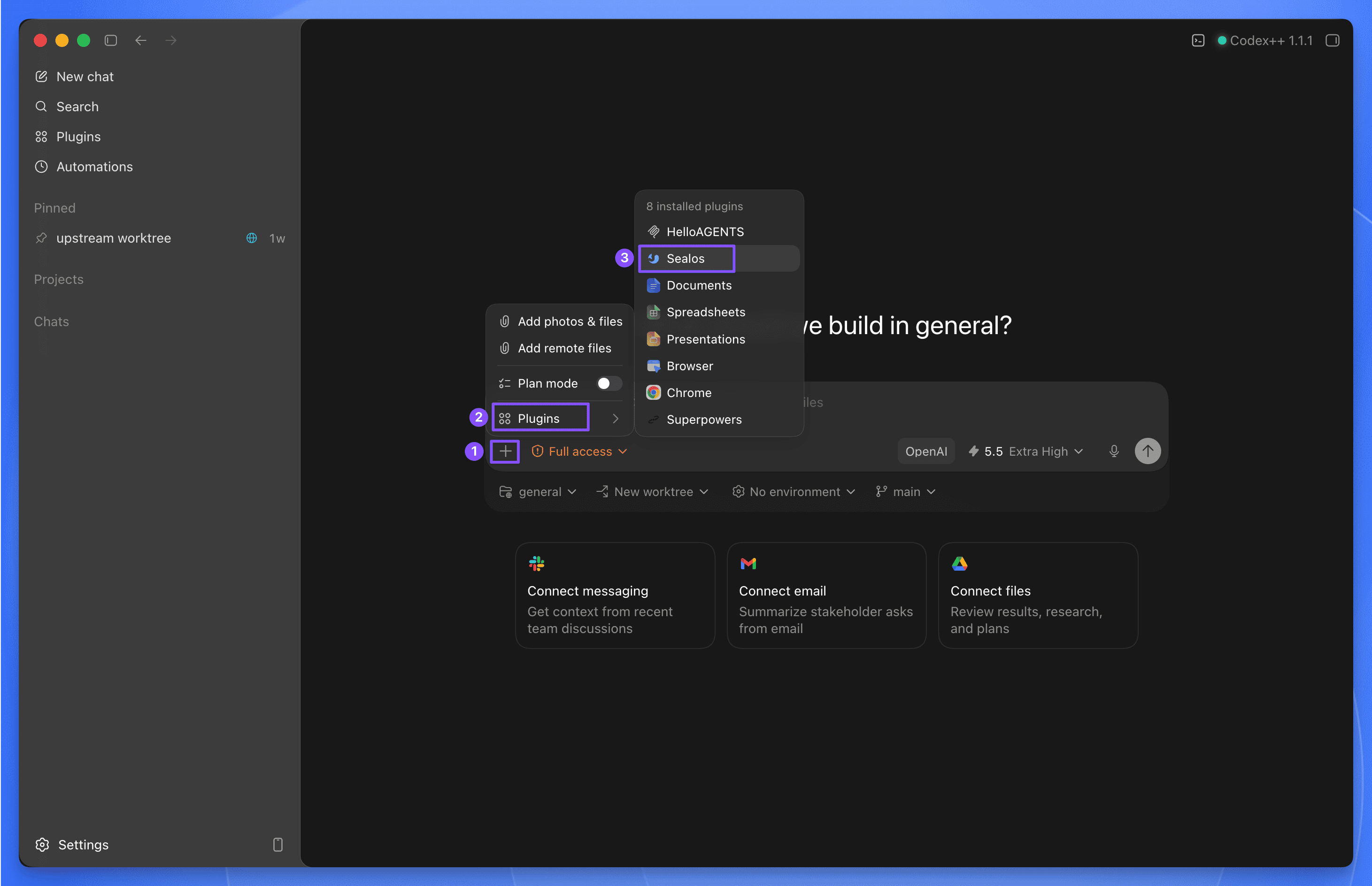
Codex App: click the + button in the lower-left corner of the chat input, choose Plugins, then choose Sealos
Codex examples:
$sealos deploy this repo to Sealos Cloud
$sealos deploy /path/to/project
$sealos deploy https://github.com/labring-sigs/kite
$sealos create a cloud Postgres database for this repo and wire DATABASE_URL
$sealos create private S3 object storage for uploads and wire env vars
Install in Claude Code
Add this repository as a Claude Code marketplace, then install the Sealos plugin:
claude plugin marketplace add labring/sealos-skills
claude plugin install sealos@sealos
For compatibility with cross-host plugin installers, install the same plugin with:
/sealos deploy this repo to Sealos Cloud
/sealos deploy /path/to/project
/sealos deploy https://github.com/labring-sigs/kite
/sealos create a cloud Postgres database for this repo and wire DATABASE_URL
/sealos create private S3 object storage for uploads and wire env vars
Test in Qoder
Build the Qoder plugin package from the repository root:
python3 scripts/package-qoder-plugin.py
Import dist/sealos-1.2.5.zip into Qoder. The package exposes the same eight root-level skills as the Codex plugin and provides /sealos as its command entry point.
Qoder examples:
/sealos deploy this repo to Sealos Cloud
/sealos create a cloud Postgres database for this repo and wire DATABASE_URL
/sealos create private S3 object storage for uploads and wire env vars
/sealos show the resources created by the last deployment
Install in DeepSeek Harness
This repository is a dsh profile bundle over the same root skills/** source. After npx @deepseek-ai/dsh web works, install it into the same web profile (pnpm must be on PATH):
npx @deepseek-ai/dsh plugin --profile web add github:labring/sealos-skills
npx @deepseek-ai/dsh web
A local checkout:
npx @deepseek-ai/dsh plugin --profile web add /path/to/sealos-skills
The eight root skills appear in the session skill catalog. Ask the agent to deploy to Sealos Cloud; it loads sealos-deploy (and sibling skills as needed) through the skill tool, then runs kubectl / sealos-cli through bash.
The default bash sandbox blocks writes outside the workspace. Login writes ~/.sealos/kubeconfig, so those commands need sandbox_permissions: danger-full-access.
Other supported AI tools
Tool
Install
Usage
Codex CLI / Codex App
codex plugin marketplace add labring/sealos-skills then codex plugin add sealos@sealos
$sealos in Codex CLI, or + → Plugins → Sealos in Codex App
Claude Code
claude plugin marketplace add labring/sealos-skills then claude plugin install sealos@sealos
Gemini CLI and Qwen Code manifests provide repository context through CLAUDE.md; they do not claim slash-command support.
Alternative: install as a skills.sh skill pack
If your agent uses skills.sh directly, install the same skills pack with:
npx skills add labring/sealos-skills
Then run the deploy skill directly:
/sealos-deploy
/sealos-deploy /path/to/project
/sealos-deploy https://github.com/labring-sigs/kite
/sealos-database create a cloud Postgres database for this repo and wire DATABASE_URL
/sealos-s3 create private object storage for uploads and wire env vars
After a project has been deployed and .sealos/state.json contains verified last_deploy runtime evidence, use the sealos-canvas skill through your installed plugin entry point for a local read-only view. Canvas stays plugin-pack mediated because it consumes verified deployment state.
/sealos-deploy, /sealos-database, and /sealos-s3 are direct skills.sh skill entries. Plugin usage should go through $sealos in Codex or /sealos in Claude Code.
Why Use the Plugin
Prefer the plugin install for Codex, Claude Code, and Qoder because it:
installs all Sealos skills as one managed package
exposes the same skills across supported agent tools
keeps the plugin metadata, logo, prompts, commands, and capabilities together
avoids maintaining a separate packaged copy of the skills
You only need a plugin-compatible or skills.sh compatible AI agent and a project to deploy.
During the deploy, database, and object-storage flows, Sealos Skills will:
check whether tools such as Docker and kubectl are available
guide the user through Sealos login when needed
use sealos-cli for Sealos Cloud database creation, connection details, and database operations
use sealos-cli s3 for Sealos object storage buckets, credentials, quota checks, object operations, and presigned URLs
use or help prepare a container registry path such as Docker Hub or GHCR
For an actual deployment, you will still need a Sealos Cloud account and access to a container registry, but these do not need to be fully set up before the skill starts. For database and object-storage work, you need a Sealos Cloud account and a workspace that can create the requested resources.
What Sealos Deploy Handles
On a typical deploy, the agent will:
assess the project structure and runtime needs
reuse an existing image or build one when needed
generate a Sealos template
deploy and verify rollout
verify the actual Sealos App URL, logs, login/setup flow for web apps, and resource footprint before reporting the app as usable
Later runs can switch to an in-place update flow when an existing deployment is detected.
What Sealos Database Handles
For a local project or Devbox that needs a cloud database, the agent will:
detect database signals such as DATABASE_URL, Prisma, Drizzle, MongoDB, MySQL, or Redis
use sealos-cli database to list, create, inspect, and connect Sealos Cloud databases
write only the required local env key without exposing secrets in chat
verify the app's real database path through migrations, introspection, or startup checks
manage public access only after confirmation
What Sealos S3 Handles
For a local project or Devbox that needs S3-compatible object storage, the agent will:
detect object-storage signals such as S3 env keys, AWS SDK usage, MinIO, upload paths, or presigned URL code
use sealos-cli s3 from zjy365/sealos-cli#28 to list, create, inspect, and update object storage buckets
initialize S3 credentials only when needed and keep access keys out of chat
wire the smallest required local env keys for bucket, endpoint, access key, secret key, region, and path-style settings
verify upload, list, download, delete, or presigned URL behavior with the project's real storage path
make buckets public or rotate credentials only after confirmation
What Sealos Canvas Handles
For a repository already deployed by Sealos Deploy, the agent will:
Read .sealos/state.json to locate the deployed app.
Query the Sealos namespace with read-only kubectl get commands.
Start a temporary 127.0.0.1 canvas UI.
Output and open the local UI address for inspection.
If the project has not been deployed yet, Sealos Canvas stops and directs the user to deploy the project first.
Included Skills
The plugin and skills.sh pack expose the same skill source:
sealos-deploy — deploy a local or GitHub project to Sealos Cloud
sealos-database — create, connect, and operate Sealos Cloud databases for development
docker-to-sealos — convert Docker Compose services into Sealos templates
Repository
skills/ is the single source of truth for Sealos deploy, Sealos canvas, and the supporting skills used during the deploy flow. The same root-level skills directory serves skills.sh installs and every plugin or extension manifest in this repository.