smanx/dsh-conversation-indicator ↗★ 0
dsh-conversation-indicator
Conversation indicator for the DeepSeek Harness web GUI: clickable markers along the transcript scrollbar that jump to the corresponding message or turn.
安装
npx -p @deepseek-ai/dsh dsh plugin --profile web add github:smanx/dsh-conversation-indicator说明文档
阅读完整 README ↗dsh-conversation-indicator
English | 中文
面向 DeepSeek Harness Web GUI 的对话指示器插件。一个紧凑的胶囊面板垂直居中显示在对话区的右侧、紧贴滚动条左侧;每条用户消息对应一条可点击的指示条(DOM kind 为 user)——助手回复默认不标记。点击指示条会让对话区平滑滚动到该对话附近,在长会话中跳转时无需拖动滚动条,也不必划过大量工具调用内容。
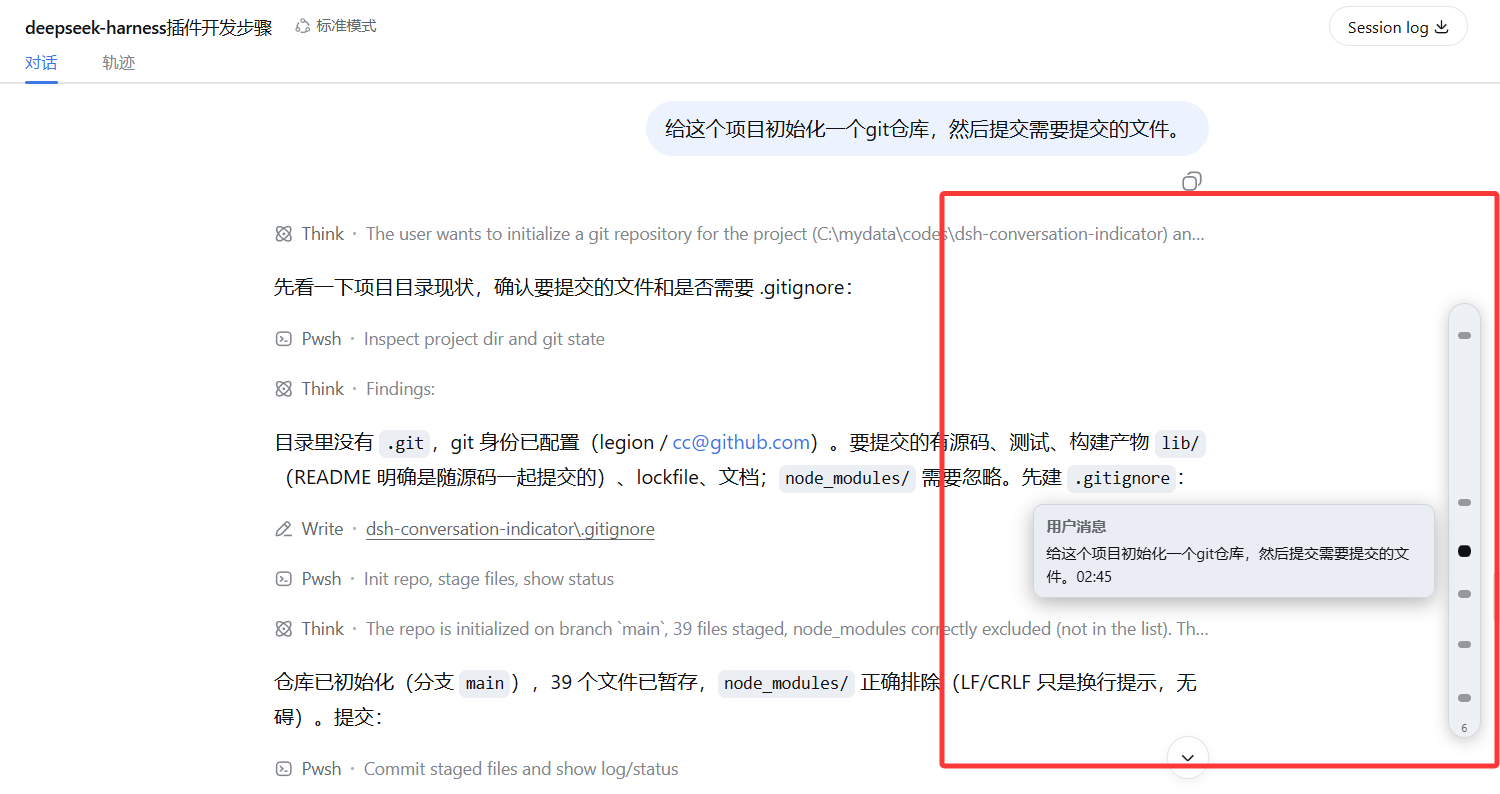
悬停标记可查看对话摘要,点击标记可跳转到对应对话。
浏览器端: 监听 [data-conversation-scroll](应用的对话滚动容器)
         -> 读取 [data-chat-anchor-key] 行,按 data-chat-flow-kind 过滤
         -> 固定定位的胶囊浮层,垂直居中于右侧边缘
         -> 每行一个指示条,按内容比例定位(contentTop / scrollHeight)
         -> 点击 -> scrollport.scrollTo({ top: contentTop - padding, behavior: 'smooth' })
无需改动 harness,也没有任何服务端逻辑:宿主入口是空操作,整个插件就是浏览器端 bundle,由 /plugins/dsh-conversation-indicator/client.js 提供。
安装
从 GitHub 仓库安装(pnpm 的 github: 形式是
git+ssh://git@github.com/smanx/dsh-conversation-indicator.git#main 的简写):
dsh plugin --profile web add github:smanx/dsh-conversation-indicator#main
首次安装后需要重启一次 Web 服务器,让启动清单把新的客户端 bundle 编进去,然后刷新页面。当前会话内容超过一屏时胶囊面板就会出现(对话区没有溢出时自动隐藏)。更新插件时重新执行同一条命令即可——pnpm 会按 git 依赖重新解析到最新提交。
开发时如果希望直接使用本地工作目录(改完代码刷新即可,无需重新安装),可以把 profile 指向本地路径:
dsh plugin --profile web add file:C:/mydata/codes/dsh-conversation-indicator
配置项
插件完全自包含,偏好设置保存在浏览器里(localStorage["dsh-conversation-indicator.options"],JSON,部分合并)。在 DevTools 中设置后刷新页面即可生效(下次插件挂载时应用)。
| 键 | 默认值 | 作用 |
|---|---|---|
enabled | true | 总开关。 |
markKinds | ["user"] | 要标记的行类型(data-chat-flow-kind);"*" 标记所有渲染出的行。助手回复的实际 kind 是 assistant-step,默认不标记——想标记的话加入 "assistant-step"(或 "*")即可。其他类型:steering、context、tool-call、command、compaction、manual-compaction、model-retry、turn-error、turn-max-tokens、turn-tail、。 |